パッケージ、リポジトリ、アプリカテゴリを検索

floating_logger のカバー
パッケージ詳細v2.1.3

floating_logger

floating_logger は、リアルタイムのAPIリクエストログ用のフローティングウィジェットを提供するFlutterライブラリです。

AndroidiOSmacOSWindowsLinux
30日間ダウンロード
1220
いいね数
38
Pub ポイント
150

パッケージをインストール

flutter pub add floating_logger

パッケージ概要

公開情報に基づく選定ガイドです。参考としてご利用ください。

floating_logger は、アプリ開発中にリアルタイムのAPIリクエストログを表示するためのフローティングウィジェットを提供するFlutterパッケージです。リクエストURL、メソッド、応答時間、ステータスコードなどの詳細情報を表示することで、開発者がネットワーク活動を簡単に監視できます。ウィジェットは画面に浮かんでおり、ユーザーの流れを妨げることなくアクセス可能です。デバッグおよびテスト専用に設計されており、複数のプラットフォームでFlutterアプリにシームレスに統合されます。外部ツールに頼らずにAPIの挙動を迅速に把握したいチームに最適です。

用途

  • 開発中のリアルタイムAPIモニタリング
  • Flutter アプリでのネットワークリクエストのデバッグ
  • HTTPコールの詳細の迅速な確認
  • APIの問題に関するチーム連携の向上
  • さまざまな条件下でのAPIパフォーマンスのテスト

主な機能

  • 継続的なログ可視性のためのフローティング UI
  • APIリクエスト/レスポンスデータのリアルタイム表示
  • すべての主要なデスクトップおよびモバイルプラットフォームをサポートしています
  • 1つのコマンドで最小限のセットアップ
  • カスタマイズ可能なログフィルタリングとスタイル

適している対象

  • アクティブな開発中のFlutter開発者
  • APIデバッグに注力するチーム
  • 頻繁なネットワークテストを必要とするアプリ
  • REST API を使用するフロントエンドエンジニア
  • ネットワーク呼び出しに対する迅速なフィードバックが重要なプロジェクト

注意事項

  • 本番環境での使用を想定していません
  • 大量のデータをログに記録するとパフォーマンスに影響する可能性があります
  • アプリのリリース前に手動で削除が必要
  • デバッグビルドに限定
  • 小さなデバイスでは、UI が画面のコンテンツを隠してしまう可能性があります

元の README

関連するソースリポジトリの README 原文のスナップショットです。最新の内容はリポジトリをご覧ください。

floating_logger 🚀

floating_logger is a Flutter library designed to help developers debug and test API calls with ease. It provides a floating widget that allows you to monitor API requests in real-time and even copy the curl command for quick testing. Perfect for anyone who wants to streamline the development and debugging process! ⚡

📌 Features

  • ✅ Advanced Search & Deep Debugging - Search log path, headers, body, response, and deep JSON content with highlighting and auto-expansion
  • ✅ Dynamic Search Navigation - Easily navigate through multiple search matches with up/down arrows
  • ✅ Beautify JSON Response Item - Collapsible and formatted JSON viewer
  • ✅ Network Simulator - Test Slow, Offline, and Normal network conditions
  • ✅ Copy cURL (Long Tap) - Easily copy API requests
  • ✅ Floating Button (Flexible Logger) - Moveable debugging widget
  • ✅ Preferences for Global Hide/Show - Toggle visibility globally
  • ✅ Custom Item List - Customize how log items are displayed

Installation 🔧

To get started, add floating_logger to your pubspec.yaml:

dependencies:
  floating_logger: ^latest_version

package import :

import 'package:floating_logger/floating_logger.dart';

Demo 🎥

logo

Check out the live demo of Floating Logger:

Live Demo

Preview Debug

Here is the preview of the debug console log for the HTTP request:

logo
Above: Example of the HTTP request.

logo
Middle: HTTP response log.

logo
Below: HTTP error log.

📖 Usage

🚀 Step 1: Logging Your API Calls

There are two ways to ensure your API calls are captured by the floating logger. Choose the one that best fits your project:

Option A: Use FloatingLoggerInterceptor (For existing custom Dio)

If you already have your own Dio instance and don't want to change it, simply add the interceptor:

final dio = Dio();
dio.interceptors.add(FloatingLoggerInterceptor());
Option B: Use DioLogger (Easiest / No-config)

If you don't want the hassle of configuring a custom Dio instance, use the built-in DioLogger directly:

Future<void> fetchData() async {
  try {
    final response = await DioLogger.instance.get(
      'https://api.genderize.io',
      queryParameters: { "name": "james" },
    );
    // ... handle response
  } catch (e) {
    // ... handle error
  }
}

🏗 Step 2: Displaying the Logger with FloatingLoggerControl

Once you've set up the logging (Step 1), you need to wrap your app (or a specific page) with FloatingLoggerControl to show the floating debug button.

return FloatingLoggerControl(
  child: Scaffold(
    appBar: AppBar(
      title: const Text("Floating Logger Test"),
    ),
    body: Center(child: Text("Logger is active!")),
  ),
);

🎚 Toggle Floating Logger Visibility Using Preferences

Use ValueNotifier to toggle the logger visibility dynamically. This allows you to enable or disable the logger and persist the setting across app sessions.

📌 Define the Visibility Notifier
final ValueNotifier<bool> isLoggerVisible = ValueNotifier<bool>(true);

@override
void initState() {
  loadLoggerSettings();
  super.initState();
}

Future<void> loadLoggerSettings() async {
  try {
    bool pref = await getStoredPreference();
    setState(() {
      isLoggerVisible.value = pref;
    });
  } catch (e) {
    print(e);
  }
}

Future<bool> getStoredPreference() async {
  return await CustomSharedPreferences.getDebugger();
}
📌 Apply Preferences in FloatingLoggerControl
return FloatingLoggerControl(
  getPreference: getStoredPreference,
  isShow: isLoggerVisible,
  child: Scaffold(
    appBar: AppBar(title: Text("Logger Toggle Test")),
    body: Switch(
      activeTrackColor: Colors.blue,
      value: isLoggerVisible.value,
      onChanged: (value) {
        setState(() {
          isLoggerVisible.value = value;
          CustomSharedPreferences.saveDebugger(value);
        });
      },
    ),
  ),
);

🎨 Customizing Floating Logger UI

You can modify the floating logger’s UI using widgetItemBuilder to create a custom log display format.

return FloatingLoggerControl(
  widgetItemBuilder: (index, data) {
    final item = data[index];
    return Padding(
      padding: const EdgeInsets.only(bottom: 10),
      child: Card(
        child: ListTile(
          title: Text('${item.type!} [${item.response}]', style: TextStyle(fontSize: 12.0)),
          subtitle: Column(
            crossAxisAlignment: CrossAxisAlignment.start,
            children: [
              Text("URL   : ${item.path}", style: TextStyle(fontSize: 12.0)),
              Text("Data  : ${item.data}", style: TextStyle(fontSize: 12.0)),
              Text("cURL  : ${item.curl}", style: TextStyle(fontSize: 12.0)),
            ],
          ),
        ),
      ),
    );
  },
  child: child,
);

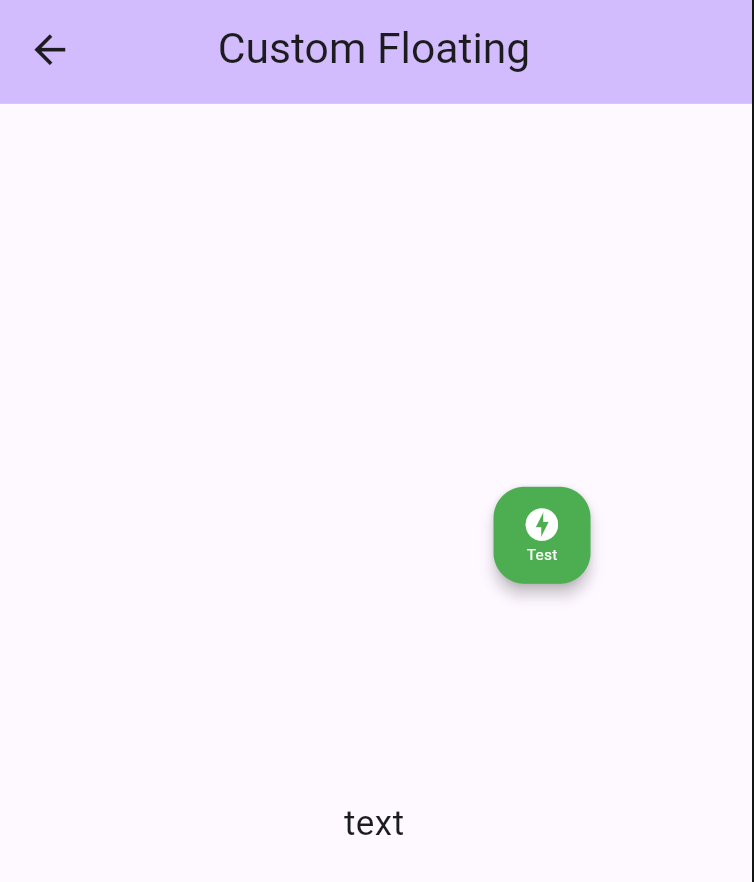
🎨 Add Style to Floating Widget

You can easily customize the appearance of your floating logger widget by using the style property. This allows you to adjust the background color, tooltip, icon, and even the size of the floating widget to match your app’s theme. 🎨✨

FloatingLoggerControl(
      style: FloatingLoggerStyle(
        backgroundColor: Colors.green,
        tooltip: "Testing",
        icon: Column(
          mainAxisAlignment: MainAxisAlignment.center,
          children: [
            Icon(
              Icons.offline_bolt,
              color: Colors.white,
              size: 20,
            ),
            Text(
              "Test",
              style: TextStyle(
                fontSize: 8.0,
                color: Colors.white,
              ),
            ),
          ],
        ),
      ),
      child : child,
),

🖌️ What You Can Customize:

  • backgroundColor: Set a vibrant color to make your floating widget stand out.
  • tooltip: Add a custom tooltip text to provide helpful hints when hovering over the widget.
  • icon: Choose an icon (like offline_bolt, info, etc.) and customize its size, color, and appearance.
  • size: Adjust the size using Size class to adjust floating widget size.

🛠️ Adding a Single Custom Interceptor

To add a single custom interceptor to DioLogger, you can use the addInterceptor method. Here’s an example of adding a custom InterceptorsWrapper that handles the onResponse and onError events.

/// Example to add a custom single interceptor
DioLogger.instance.addInterceptor(
  InterceptorsWrapper(
    onResponse: (response, handler) {
      // Add custom logic for onResponse
      print('Custom onResponse interceptor');
      handler.next(response);
    },
    onError: (error, handler) {
      // Add custom logic for onError
      print('Custom onError interceptor');
      handler.next(error);
    },
  ),
);

Explanation:

  • onResponse : This is triggered when a successful response is received. You can add custom logic here, such as logging or modifying the response.
  • onError : This is triggered when an error occurs. You can handle errors, log them, or perform recovery actions.
  • handler.next() : This ensures the interceptor chain continues to the next interceptor or the final handler.

🛠️ Add List Custom Interceptor

If you want to add multiple interceptors at once, you can use the addListInterceptor method. This is useful when you have several interceptors that need to be applied together.

Here’s an example:

DioLogger.instance.addListInterceptor(
  [
    InterceptorsWrapper(
      onResponse: (response, handler) {
        // Add custom logic for onResponse
        print('Custom onResponse interceptor');
        handler.next(response);
      },
      onError: (error, handler) {
        // Add custom logic for onError
        print('Custom onError interceptor');
        handler.next(error);
      },
    ),
    // You can add more interceptors in the list
  ],
);

Explanation:

  • List of Interceptors: You can define multiple InterceptorsWrapper objects in a list. Each interceptor will be executed in the order they are added.
  • Order Matters: The first interceptor in the list will be executed first, followed by the next, and so on.

⚡ Network Simulator (Built-in)

floating_logger comes with a powerful Network Simulator built right in! No extra packages needed. You can easily simulate different network conditions to test how your app handles:

  • Normal: Standard network behavior.
  • Slow: Simulates a 3-second delay (configurable).
  • Offline: Simulates no internet connection (throws error).
Usage
// Enable logs (default)
NetworkSimulator.instance.setSimulation(NetworkSimulation.normal);

// Simulate slow network (3s delay)
NetworkSimulator.instance.setSimulation(NetworkSimulation.slow);

// Simulate offline mode (throws error)
NetworkSimulator.instance.setSimulation(NetworkSimulation.offline);

🎯 Conclusion

floating_logger is a powerful tool that simplifies debugging API calls in Flutter applications. Whether you need to inspect responses, copy cURL commands, or customize the UI, this package provides a seamless experience for developers. Integrate it today and streamline your debugging process! 🚀

📌 For more details, visit the GitHub Repository. 📌 For floating logger boilerplate, visit the Boilerplate Repository.

カテゴリー

依存関係

依存関係一覧 2 件

ソースリポジトリ

このパッケージを使用しているプロジェクト

データはまだありません。