パッケージ、リポジトリ、アプリカテゴリを検索

floating_menu_panel のカバー
パッケージ詳細v0.0.2

floating_menu_panel

フローティングメニュー パネル

AndroidiOSWebmacOSWindowsLinux
30日間ダウンロード
42
いいね数
29
Pub ポイント
130

パッケージをインストール

flutter pub add floating_menu_panel

パッケージ概要

公開情報に基づく選定ガイドです。参考としてご利用ください。

Flutterパッケージで、インタラクティブでカスタマイズ可能なフローティングアクションインターフェースを提供するフローティングメニューのパネルです。コンパクトでアニメーション付きのパネルを通じて複数の操作にアクセスできるようにし、展開または折りたたみが可能です。UIを雑然とさせず、共通機能への迅速なアクセスが必要なアプリに最適です。パネルは位置、アニメーション、カスタム子ウィジェットなど、さまざまな設定をサポートしています。すべての主要プラットフォームで互換性があり、モバイルおよびデスクトップアプリケーションでの使いやすさを向上させます。

用途

  • アプリの操作への素早いアクセス
  • ユーザーのナビゲーションの向上
  • UIのごちゃごちゃを減らす
  • カスタマイズ可能なアクションパネル
  • モバイルおよびデスクトップアプリの統合

主な機能

  • アニメーション付きの展開と折りたたみ
  • カスタマイズ可能な位置とサイズ
  • 複数の子ウィジェットのサポート
  • クロスプラットフォーム互換性
  • カスタマイズ可能なアニメーション
  • 既存のUIとの簡単な統合

適している対象

  • モバイルおよびデスクトップアプリケーション
  • ジェスチャーに基づくメニューを必要とするアプリ
  • インタラクティブ要素を探しているUIデザイナー
  • 軽量なソリューションを求める開発者
  • スペース制約のあるインターフェースを持つプロジェクト

注意事項

  • 重複を避けるために慎重な配置が必要になる場合があります
  • 低価格デバイス上のアニメーションパフォーマンス
  • 完全カスタムウィジェットと比較してカスタマイズの選択肢が限られている
  • 複雑なネストされたメニューには適していない
  • アクセシビリティ基準に注意が必要です

元の README

関連するソースリポジトリの README 原文のスナップショットです。最新の内容はリポジトリをご覧ください。

floating_menu_panel

Floating menu panel

Basic:

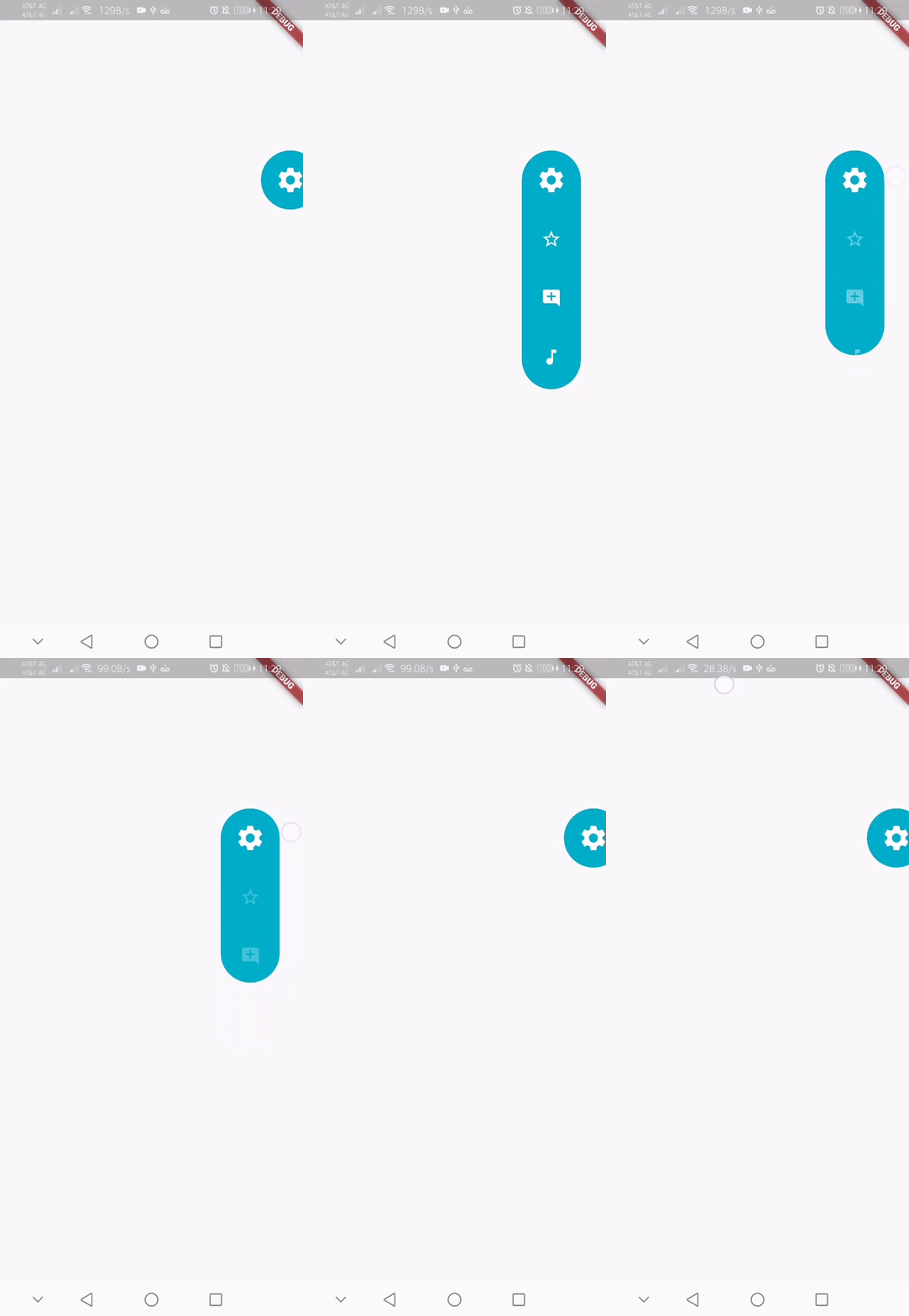
This is what you needs to get the widget working. Import Widget -> Add 'FloatingMenuPanel' at the bottom of your stack widget. Add icons inside the "buttons" list.

import 'package:floating_menu_panel/floating_menu_panel.dart'; // Import Floating Menu Panel

return MaterialApp(
      home: Scaffold(
        body: Stack(
          children: [
            FloatingMenuPanel(
              onPressed: (index) {
                print('SELECT__: $index');
              },
              buttons: [
                Icons.star_border_outlined,
                Icons.add_comment,
                Icons.music_note
              ],
            ),
          ],
        ),
      ),
    );

alt Floating Menu Panel

All Properties:

These are all the properties you can customize of the floating panel.

    import 'package:floating_menu_panel/floating_menu_panel.dart'; // Import Floating Menu Panel
    
    Stack(
        children: [
            ...
    
            // Add Float Box Panel at the bottom of the 'stack' widget.
            FloatingMenuPanel(
                positionTop: 0.0, // Initial Top Position
                positionLeft: 0.0, // Initial Left Position
                backgroundColor: Color(0xFFEDEDED), // Color of the panel
                contentColor: Colors.black, // Color of the icons
                panelShape: PanelShape.rectangle, // 'PanelShape.rectangle' or 'PanelShape.rounded', border radius property doesn't work in the rounded shape
                borderRadius: BorderRadius.circular(8.0), // Border radius of the panel
                dockType: DockType.inside, // 'DockType.inside' or 'DockType.outside', weather to dock the panel outside or inside the edge of the screen
                dockOffset: 5.0, // Offset the dock from the edge depending on the 'dockType' property
                panelAnimDuration: 300, // Duration for panel open and close animation
                panelAnimCurve: Curves.easeOut, // Curve for panel open and close animation
                dockAnimDuration: 300, // Auto dock to the edge of screen - animation duration
                dockAnimCurve: Curves.easeOut, // Auto dock animation curve
                panelOpenOffset: 20.0, // Offset from the edge of screen when panel is open
                panelIcon: Icons.menu, // Panel open/close icon
                size: 70.0, // Size of single button in the panel
                iconSize: 24.0, // Size of icons
                borderWidth: 1.0, // Width of panel border
                borderColor: Colors.black, // Color of panel border
                onPressed: (index) {
                    print("Clicked on item: $index");
                }
                buttons: [
                    // Add Icons to the buttons list.
                    Icons.message,
                    Icons.photo_camera,
                    Icons.video_library
                ]
            );
        ]
    );

カテゴリー

ソースリポジトリ

このパッケージを使用しているプロジェクト

データはまだありません。