パッケージ、リポジトリ、アプリカテゴリを検索

flutter_animated_reaction のカバー
パッケージ詳細v0.0.2

flutter_animated_reaction

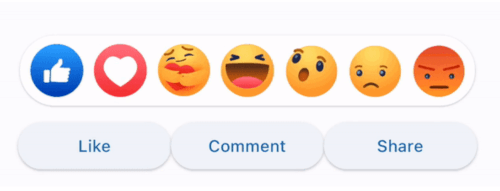
Flutter Animated Reaction は、アニメーションされたリアクションオーバーレイ(例:Facebook、LinkedIn)であり、独自のリアクションアイコン(画像/GIF)を使用してカスタマイズできます。

AndroidiOSWebmacOSWindowsLinux
30日間ダウンロード
36
いいね数
34
Pub ポイント
130

パッケージをインストール

flutter pub add flutter_animated_reaction

パッケージ概要

公開情報に基づく選定ガイドです。参考としてご利用ください。

Flutter Animated Reaction は、Facebook や LinkedIn に似たソーシャルメディア風のリアクション用のカスタマイズ可能なアニメーションオーバーレイです。ユーザーがコンテンツとインタラクションする際に、画像やGIFなどのアニメーションリアクションアイコンを表示できます。このパッケージは Android、iOS、Web、macOS、Windows、Linux など複数のプラットフォームをサポートしており、クロスプラットフォームアプリに最適です。pub add を通じた簡単な統合により、ダイナミックな視覚フィードバックを通じてユーザー参加度を高めます。

用途

  • ソーシャルメディアアプリのインタラクション
  • ユーザー反応アニメーション
  • インタラクティブな投稿フィード
  • エンゲージメント駆動型UI要素
  • メッセージアプリにおけるリアルタイムフィードバック

主な機能

  • カスタマイズ可能なリアクションアイコン
  • 画像およびGIFのサポート
  • クロスプラットフォーム互換性
  • Flutter とのシンプルな統合
  • アニメーションオーバーレイ効果

適している対象

  • ソーシャルネットワークアプリを開発する開発者
  • インタラクティブなフィードバックを求めているUIデザイナー
  • リアルタイムでのユーザー反応を必要とするアプリ
  • 複数のプラットフォームをターゲットにするプロジェクト
  • 軽量なアニメーションソリューションを求めるチーム

注意事項

  • アイコンの適切なアセット管理が必要です
  • 複雑な GIF によってパフォーマンスが異なる場合があります
  • アイコンとアニメーションスタイル以外のカスタマイズは限られている
  • 中規模のアニメーションに最適
  • 複雑なワークフローには追加の状態管理が必要になる場合があります

元の README

関連するソースリポジトリの README 原文のスナップショットです。最新の内容はリポジトリをご覧ください。

Flutter Animated Reaction

Flutter Animated Reaction is an animated reaction overlay(Example: Facebook, LinkedIn) which can be customized using your own reaction icons(images/gifs). Wherever your reaction button is on the screen, this package helps you to pop up an animated reaction overlay at the right location on the screen with your preferred reactions icon.

Demo

animated

Features

  • Customized reaction icon i.e. images, gifs can be added in the list
  • Cool animation to display the reaction overlay
  • Dragging any reaction icon generates nice animation
  • In built facebook reaction icons
  • Reaction sound feature

Getting started

import 'package:flutter_animated_reaction/flutter_animated_reaction.dart';

Usage

For better understanding, you can see example application.

AnimatedFlutterReaction().showOverlay(context: context,
                                      key: key,
                                      onReaction: (val){
                                         print(val);
                                      });
Parameters
Parameter Description
Key Global Key used in the reaction button . It is used to find the renderBox and measure it's position.
reactions List of all reaction icons which you want to show in the overlay.(Image/Gifs path)
onReaction(int) It is triggered when any of the reaction is tapped
backgroundColor It describes overlay background color
overlaySize It specifies overlay width
iconSize It can set the size of reaction icons. Default size is (45,45)

How to Contribute

  1. Fork it
  2. Create your feature branch (git checkout -b new-feature)
  3. Commit your changes (git commit -m 'Add some feature')
  4. Push to the branch (git push origin new-feature)
  5. Create new Pull Request

カテゴリー

依存関係

依存関係一覧 1 件

ソースリポジトリ

このパッケージを使用しているプロジェクト

データはまだありません。