パッケージ、リポジトリ、アプリカテゴリを検索

パッケージ詳細v1.2.0

flutter_asset_generator

pubspec.yaml に定義されたアセットをスキャンしてリソースファイルを生成し、R ファイルの短い名前を真似します。

AndroidiOSmacOSWindowsLinux
30日間ダウンロード
8200
いいね数
112
Pub ポイント
130

パッケージをインストール

flutter pub add flutter_asset_generator

パッケージ概要

公開情報に基づく選定ガイドです。参考としてご利用ください。

Flutter向けのコード生成ツールで、pubspec.yamlに記載されたアセットをスキャンして自動的にリソースクラスを作成します。AndroidのR.javaと同様です。型安全でコンパイル時チェック可能な参照を使用することで、アセットへのアクセスを簡略化し、エラーを減らし、保守性を向上させます。生成されたファイルは画像、フォント、その他のアセットに対して短く読みやすい名前を提供し、複数のプラットフォームでの開発ワークフローを効率化します。

用途

  • 大規模なFlutterプロジェクトにおけるアセット管理の簡素化
  • 誤ったアセットパスによる実行時エラーの削減
  • アプリリソースへの型安全なアクセスを有効にする
  • ビルド中にリソースクラスの生成を自動化する
  • 簡潔なアセット参照によるコードの可読性向上

主な機能

  • pubspec.yaml からリソースクラスを自動生成します
  • 短く、明確なアセット名を提供します
  • 型安全なアセットアクセス
  • 画像、フォント、その他のアセットをサポートします
  • クロスプラットフォーム互換性

適している対象

  • Flutterアプリで多数のアセットを管理する開発者
  • アセット関連のバグを減らしたいチーム
  • 一貫したアセット名付けの規則を必要とするプロジェクト
  • 自動リソース生成を必要とするビルドパイプラインを構築する
  • 複数のプラットフォームをターゲットにするアプリ

注意事項

  • build_runner および依存関係の設定が必要です
  • 生成されたファイルは手動で編集してはいけません
  • ビルド時間をわずかに増加させる可能性があります
  • pubspec.yaml を正しく設定する必要があります
  • コード解析ツールと併用するのが最適です

元の README

関連するソースリポジトリの README 原文のスナップショットです。最新の内容はリポジトリをご覧ください。

flutter_asset_generator

English | 中文文档

Automatically generate the dart file for pubspec.yaml

The purpose of this library is to help flutter developers automatically generate asset corresponding dart files to help developers release their hands from this meaningless job, and the open source community has a lot of the same functionality.

This library is based on dartlang's build library.

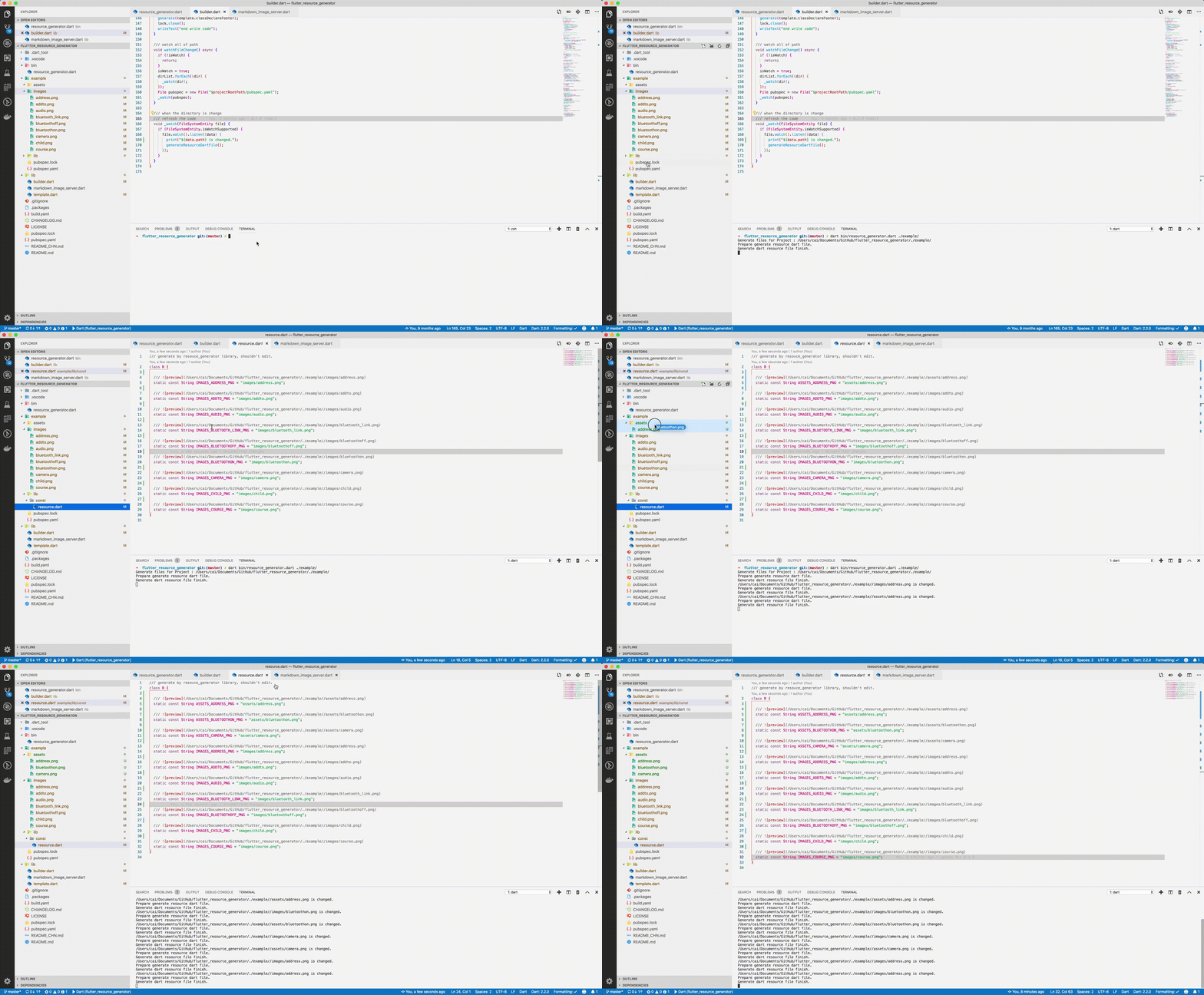
screenshot

img

Usage

Run from source

Add dart to your $PATH environment.

git clone https://github.com/fluttercandies/flutter_asset_generator
cd flutter_asset_generator
dart pub get
dart bin/asset_generator.dart $flutter_project
Run from pub global
  1. Install using pub global:
dart pub global activate flutter_asset_generator

# or 

dart pub global activate -s git https://github.com/fluttercandies/flutter_asset_generator.git                 
  1. Run below commands: fgen or fgen -s $flutter_project
Support options

Use $ fgen -h or $ fgen --help see usage document.

fgen -h
-w, --[no-]watch    Continue to monitor changes after execution of orders.
                    (defaults to on)

-p, --[no-]preview  Generate file with preview comments.
                    (defaults to on)

-o, --output        Your resource file path.
                    If it's a relative path, the relative flutter root directory
                    (defaults to "lib/const/resource.dart")

-s, --src           Flutter project root path
                    (defaults to ".")

-n, --name          The class name for the constant.
                    (defaults to "R")

-h, --[no-]help     Help usage

-d, --[no-]debug    debug info

File name

Space, '.' and '-' in the path will be converted to _. @ will be converted to _AT_.

convert filed name example:

images/1.png => IMAGES_PNG
images/hello_world.jpg => IMAGES_HELLO_WORLD_JPG
images/hello-world.jpg => IMAGES_HELLO_WORLD_JPG

Errors will occur in the following situations:

images/
├── main_login.png
├── main/
    ├── login.png

Because the two field names will be exactly the same.

Config file

The location of the configuration file is conventional. Configuration via commands is not supported. The specified path is fgen.yaml in the flutter project root directory.

Config schema for vscode

Install YAML Support plugin.

Config your vscode settings.json file.

It can be used to prompt the configuration file.

{
  "yaml.schemas": {
    "https://raw.githubusercontent.com/fluttercandies/flutter_asset_generator/master/fgen_schema.json": ["fgen.yaml"]
  }
}
exclude and include rules

The file is yaml format, every element is glob style.

The name of the excluded file is under the exclude node, and the type is a string array. If no rule is included, it means no file is excluded.

The include node is the name of the file that needs to be imported, and the type is a string array. If it does not contain any rules, all file are allowed.

In terms of priority, exclude is higher than include, in other words:

First import the file according to the include nodes, and then exclude the files.

Replacement Rules

File names can be replaced according to the configuration file as shown below:


replace:
  - from: “
    to: 
  - from: ”
    to: 
  - from: ’
    to:
  - from: (
    to:
  - from: )
    to:
  - from: "!"
    to:
Example
exclude:
  - "**/add*.png"
  - "**_**"

include:
  - "**/a*.png"
  - "**/b*"
  - "**/c*"
assets
├── address.png           # exclude by "**/add*.png"
├── address@at.png        # exclude by "**/add*.png"
├── bluetoothon-fjdfj.png
├── bluetoothon.png
└── camera.png

images
├── address space.png     # exclude by "**/add*.png"
├── address.png           # exclude by "**/add*.png"
├── addto.png             # exclude by "**/add*.png"
├── audio.png
├── bluetooth_link.png    # exclude by **_**
├── bluetoothoff.png
├── child.png
└── course.png
/// Generate by [asset_generator](https://github.com/fluttercandies/flutter_asset_generator) library.
/// PLEASE DO NOT EDIT MANUALLY.
class R {
  const R._();

  /// ![preview](file:///Users/jinglongcai/code/dart/self/flutter_resource_generator/example/assets/bluetoothon-fjdfj.png)
  static const String ASSETS_BLUETOOTHON_FJDFJ_PNG = 'assets/bluetoothon-fjdfj.png';

  /// ![preview](file:///Users/jinglongcai/code/dart/self/flutter_resource_generator/example/assets/bluetoothon.png)
  static const String ASSETS_BLUETOOTHON_PNG = 'assets/bluetoothon.png';

  /// ![preview](file:///Users/jinglongcai/code/dart/self/flutter_resource_generator/example/assets/camera.png)
  static const String ASSETS_CAMERA_PNG = 'assets/camera.png';

  /// ![preview](file:///Users/jinglongcai/code/dart/self/flutter_resource_generator/example/images/audio.png)
  static const String IMAGES_AUDIO_PNG = 'images/audio.png';

  /// ![preview](file:///Users/jinglongcai/code/dart/self/flutter_resource_generator/example/images/bluetoothoff.png)
  static const String IMAGES_BLUETOOTHOFF_PNG = 'images/bluetoothoff.png';

  /// ![preview](file:///Users/jinglongcai/code/dart/self/flutter_resource_generator/example/images/child.png)
  static const String IMAGES_CHILD_PNG = 'images/child.png';

  /// ![preview](file:///Users/jinglongcai/code/dart/self/flutter_resource_generator/example/images/course.png)
  static const String IMAGES_COURSE_PNG = 'images/course.png';
}
Other config

Since version 1.1.0:

Next command config option also support in config file.

But the command line option has a higher priority than the config file.


watch: false
# watch: true

preview: false

output: lib/const/r.dart
# output: lib/const/resource.dart

name: RRR

カテゴリー

依存関係

依存関係一覧 6 件

ソースリポジトリ

このパッケージを使用しているプロジェクト

データはまだありません。