The native Branch iOS SDK dependency is included automatically by this plugin. No need to add it manually in your project.
iOS 13+ UISceneDelegate Support: This plugin supports both traditional UIApplicationDelegate and modern UISceneDelegate lifecycle. The plugin will automatically use the appropriate lifecycle based on your app configuration. No additional setup is required — the plugin maintains full backward compatibility with apps using UIApplicationDelegate while supporting apps that have migrated to UISceneDelegate.
NativeLink™ Deferred Deep Linking
Use iOS pasteboard to enable deferred deep linking via Branch NativeLink™, which enables 100% matching on iOS through Installs.
Follow the steps on the page, section NativeLink™ Deferred Deep Linking,
Note: Code implementation in Swift is not necessary. The plugin already implements the code, requiring only configuration on the Dashboard.
Disable NativeLink™ Deferred Deep Linking
If you want to disable NativeLink™ Deferred Deep Linking, follow the instructions below:
Navigate to ios/Runner/Info.plist file.
Add the following in <dict> chapter:
<key>branch_disable_nativelink</key><true/>
(Optional) Defer SDK Initialization on iOS
By default, the Branch iOS SDK is initialized automatically by the plugin before FlutterBranchSdk.init() is called.
If you need to delay initialization — for example, to request tracking consent (ATT/GDPR) or perform other pre-initialization setup — you can configure the plugin to wait until FlutterBranchSdk.init() is explicitly called.
To enable this behavior:
Create a file named branch.json in ios/Runner/ of your Flutter project.
Important: creating ios/Runner/branch.json in your filesystem is not always enough. You must add the file to your Xcode project and include it in the Runner app bundle so the native SDK can read it at runtime. In Xcode, either enable the Runner target under the file's Target Membership or add the file to Build Phases → Copy Bundle Resources for the Runner target (the example project already includes branch.json in Runner resources).
Steps (Xcode):
In Xcode choose File → Add Files to "Runner"…, select ios/Runner/branch.json, and ensure the Runner target is checked in the dialog.
Or select the branch.json file in the Project Navigator and enable Target Membership → Runner in the File Inspector.
Verify the file appears under Runner target → Build Phases → Copy Bundle Resources so it will be bundled at runtime.
Add the following content:
{"deferInitForPluginRuntime":true}
With deferInitForPluginRuntime set to true, the Branch iOS SDK will not be initialized until await FlutterBranchSdk.init() is called in your Dart code.
Note: This is an optional configuration. If the file does not exist or the key is absent, the default behavior (automatic initialization on app start) is preserved.
Note:ios/Runner/branch.json is an iOS-only file that controls SDK initialization timing. It is different from assets/branch-config.json, which is used to configure Branch keys and settings for Android and iOS. See (Optional) Configuration via branch-config.json file.
Web Integration
You need add Branch Javascript in your web/index.html at the top of your <body> tag, to be able to use this package.
Change key_live_or_test_YOUR_KEY_GOES_HERE to match your Branch Dashboard
If branch.init() fails, all subsequent Branch methods will fail.
Full example index.html:
<!DOCTYPE html><html><head><!--
If you are serving your web app in a path other than the root, change the
href value below to reflect the base path you are serving from.
The path provided below has to start and end with a slash "/" in order for
it to work correctly.
For more details:
* https://developer.mozilla.org/en-US/docs/Web/HTML/Element/base
This is a placeholder for base href that will be replaced by the value of
the `--base-href` argument provided to `flutter build`.
--><basehref="$FLUTTER_BASE_HREF"><metacharset="UTF-8"><metacontent="IE=Edge"http-equiv="X-UA-Compatible"><metaname="description"content="Demonstrates how to use the flutter_branch_sdk plugin."><!-- iOS meta tags & icons --><metaname="apple-mobile-web-app-capable"content="yes"><metaname="apple-mobile-web-app-status-bar-style"content="black"><metaname="apple-mobile-web-app-title"content="Flutter Branch SDK Example"><linkrel="apple-touch-icon"href="icons/Icon-192.png"><!-- Favicon --><linkrel="icon"type="image/png"href="favicon.png"/><title>Flutter Branch SDK Example</title><linkrel="manifest"href="manifest.json"></head><body><script>// load Branch
(function(b,r,a,n,c,h,_,s,d,k){if(!b[n]||!b[n]._q){for(;s<_.length;)c(h,_[s++]);d=r.createElement(a);d.async=1;d.src="https://cdn.branch.io/branch-latest.min.js";k=r.getElementsByTagName(a)[0];k.parentNode.insertBefore(d,k);b[n]=h}})(window,document,"script","branch",function(b,r){b[r]=function(){b._q.push([r,arguments])}},{_q:[],_v:1},"addListener banner closeBanner closeJourney data deepview deepviewCta first init link logout removeListener setBranchViewData setIdentity track trackCommerceEvent logEvent disableTracking getBrowserFingerprintId crossPlatformIds lastAttributedTouchData setAPIResponseCallback qrCode setRequestMetaData setAPIUrl getAPIUrl setDMAParamsForEEA".split(" "), 0);
var options = { 'no_journeys': true, 'tracking_disabled' : false };
// init Branch - Replace key_live_YOUR_KEY_GOES_HERE with your Branch Key (live version)
branch.init('key_live_or_test_YOUR_KEY_GOES_HERE', options, function(err, data) {
if (err != null) {
console.log('err: ' + err);
}
});
</script><scriptsrc="flutter_bootstrap.js"async></script></body></html>
(Optional) Configuration via branch-config.json
One way to configure keys and other settings is through a JSON configuration file.
This method allows you to easily manage your test and active keys without modifying native code.
The plugin will automatically read this file on startup (only Android/iOS).
If you have configured branch-config.json, you do not need to manually add your Branch keys to AndroidManifest.xml or Info.plist.
Step 1: Create the Configuration File
In the root of your Flutter project, create a folder named assets if it doesn't already exist.
Inside the assets folder, create a new file named branch-config.json.
apiUrlAndroid: (Optional) Sets a custom base URL for all calls to the Branch API for Android apps. Requires HTTPS.
apiUrlIOS: (Optional) Sets a custom base URL for all calls to the Branch API for iOS apps. Requires HTTPS.
branchKey: (Optional) The Branch key that the SDK will use for initialization. It's recommended to set this to your liveKey or testKey depending on your current build environment.
liveKey: (Optional) Your Branch live key from the Branch Dashboard.
testKey: (Optional) Your Branch test key from the Branch Dashboard.
useTestInstance: (Optional, default: false) Set to true to use the test key for debugging and testing. Set to false for production releases. This allows you to easily switch between environments.
enableLogging: (Optional, default: false) Set to true to see detailed logs from the native Branch SDK in your device's log output (Logcat for Android, Console for iOS).
logLevel: (Optional, default: "VERBOSE") Controls the verbosity of logs. Valid values: "VERBOSE", "DEBUG", "INFO", "WARNING", "ERROR", "NONE". Only applies when enableLogging is true. This setting takes priority over the logLevel parameter in init().
installReferrerTimeout: (Optional, default: 0 (no timeout)) Sets the timeout in milliseconds for retrieving the Install Referrer string from Google Play Services. Only applicable on Android - iOS and Web ignore this setting. Must be an integer value >= 0.
Note: Branch SDK logs are only available through the FlutterBranchSdk.platformLogs stream. They will not appear in standard console output unless you explicitly listen to this stream. See Listening to Platform Logs for implementation details.
Note:
if branchKeyis present, it will override the useTestInstance/testKey/liveKey config
if branchKeyis missing, testKey/liveKey, must be present.
Finally, you need to inform your Flutter app about this new asset file. Open your pubspec.yaml and add the file path under the flutter: section:
flutter:assets:-assets/branch-config.json
Done! plugin will now automatically configure itself using the values in this file when your app starts, overriding the values set in AndroidManifest.xml and Info.plist.
Note: The disableTracking parameter is deprecated and should no longer be used. Please use branchAttributionLevel to control tracking behavior.
Initialization must be called from main or at any time, for example after getting consent for GDPR.
To guarantee the success of this function, ensure you've called the below in the app's main function
WidgetsFlutterBinding.ensureInitialized();
Test Branch Integration
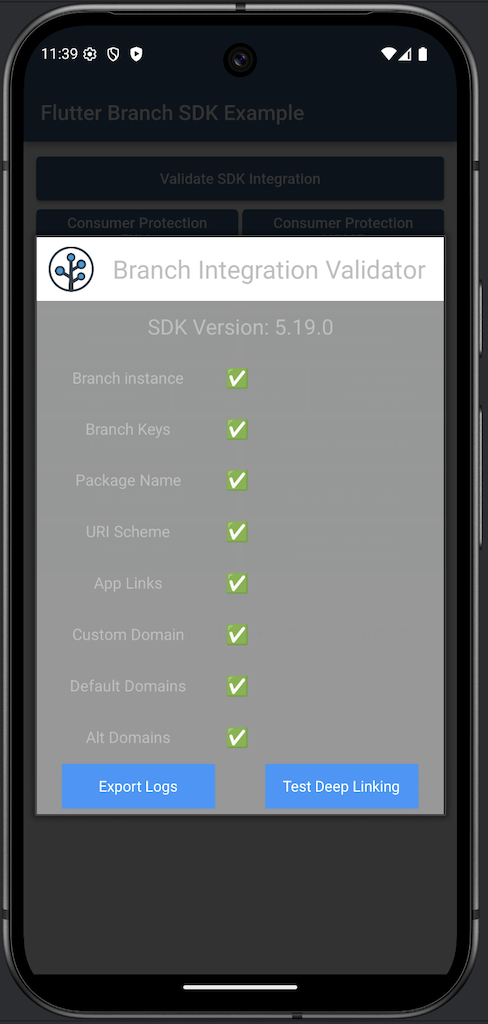
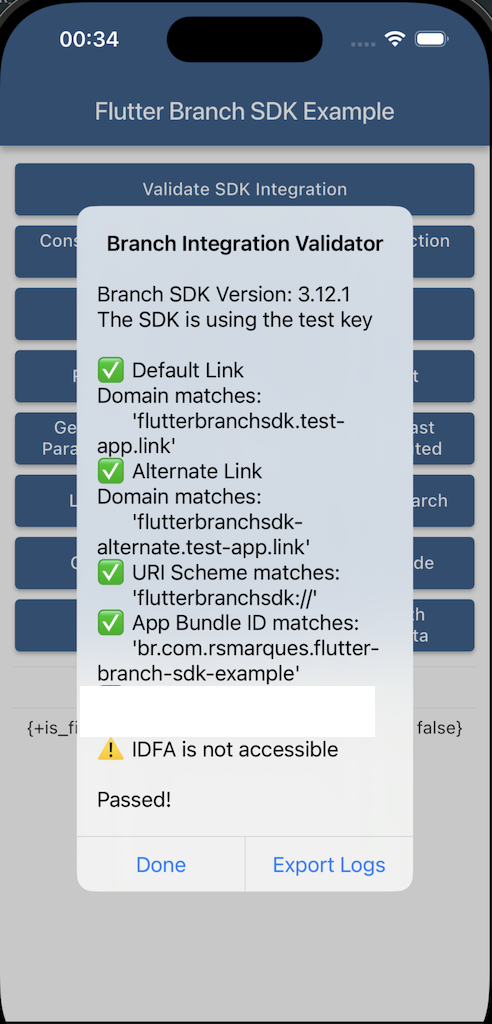
Test your Branch Integration by calling:
FlutterBranchSdk.validateSDKIntegration();
Android
iOS
Make sure to comment out or remove validateSDKIntegration in your release build.
Read deep link
To listen to the clicks on the deep link and retrieve the data it is necessary to add the code below:
StreamSubscription<Map> streamSubscription = FlutterBranchSdk.listSession().listen((data) {
if (data.containsKey("+clicked_branch_link") &&
data["+clicked_branch_link"] == true) {
//Link clicked. Add logic to get link dataprint('Custom string: ${data["custom_string"]}');
}
}, onError: (error) {
print('listSession error: ${error.toString()}');
});
When a deep link is clicked the above method will be called, with the app is open or closed.
Retrieve Install (Install Only) Parameters
If you ever want to access the original session params (the parameters passed in for the first install event only), you can use this line. This is useful if you only want to reward users who newly installed the app from a referral link.
Note: You must call this method on iOS to obtain installation data if the return of the FlutterBranchSdk.listSession() function is {+is_first_session: true, +clicked_branch_link: false}
Retrieve session (install or open) parameters
These session parameters will be available at any point later on with this command. If no parameters are available then Branch will return an empty dictionary. This refreshes with every new session (app installs AND app opens).
Allow retrieval of our last attributed touch data (LATD) from the client. This results in an asynchronous call being made to Branch’s servers with LATD data returned when possible.
Last attributed touch data contains the information associated with that user's last viewed impression or clicked link.
BranchResponse response =
awaitFlutterBranchSdk.getLastAttributedTouchData();
if (response.success) {
print(response.result.toString());
}
parameter canonicalUrl:
If your content lives both on the web and in the app, make sure you set its canonical URL (i.e. the URL of this piece of content on the web) when building any BUO.
By doing so, we’ll attribute clicks on the links that you generate back to their original web page, even if the user goes to the app instead of your website! This will help your SEO efforts.
parameter alias:
Instead of our standard encoded short url, you can specify the vanity alias.
For example, instead of a random string of characters/integers, you can set the vanity alias as *.app.link/devonaustin.
Aliases are enforced to be unique and immutable per domain, and per link - they cannot be reused unless deleted.
Access to Branch's QR Code API and SDK requires premium product access.
Please reach out to your account manager or https://branch.io/pricing/ to activate.
Will generates a custom QR Code with a unique Branch link which you can deep link and track analytics with.
Mark the content referred by this object as viewed. This increment the view count of the contents referred by this object.
FlutterBranchSdk.registerView(buo: buo);
Tracking User Actions and Events
Use the BranchEvent interface to track special user actions or application specific events beyond app installs, opens, and sharing. You can track events such as when a user adds an item to an on-line shopping cart, or searches for a keyword, among others.
The BranchEvent interface provides an interface to add contents represented by BranchUniversalObject in order to associate app contents with events.
Analytics about your app's BranchEvents can be found on the Branch dashboard, and BranchEvents also provide tight integration with many third party analytics providers.
//check if user is identifybool isUserIdentified = awaitFlutterBranchSdk.isUserIdentified();
Enable or Disable User Tracking (Deprecated. Read Consumer Preference Levels)
If you need to comply with a user's request to not be tracked for GDPR purposes, or otherwise determine that a user should not be tracked, utilize this field to prevent Branch from sending network requests. This setting can also be enabled across all users for a particular link, or across your Branch links.
FlutterBranchSdk.disableTracking(false);
FlutterBranchSdk.disableTracking(true);
You can choose to call this throughout the lifecycle of the app. Once called, network requests will not be sent from the SDKs. Link generation will continue to work, but will not contain identifying information about the user. In addition, deep linking will continue to work, but will not track analytics for the user.
Provides a setting to cancel the external Install Referrer string fetch. This is useful to optimize performance on Android by limiting the time the SDK waits for the Install Referrer. Only applicable on Android - iOS ignores this setting.
Via Dart:
// Set timeout to 5 seconds (5000 milliseconds)FlutterBranchSdk.setInstallReferrerTimeout(5000);
Via branch-config.json (recommended - applied on app startup):
{"installReferrerTimeout":5000}
Both approaches work, but configuring via branch-config.json is recommended as it applies the setting during SDK initialization. If you set it via Dart code, it will override the JSON configuration applied previously. The default for installReferrerTimeout is 0, and setting it to 0 explicitly is supported and disables the timeout (no timeout).
Parameters:
timeoutMs (Integer): Timeout in milliseconds. Must be >= 0. Default is 0. A value of 0 is meaningful and disables the timeout (no timeout).
Platform Notes:
Android: Sets the timeout for retrieving the Install Referrer string from Google Play Services.
iOS: Not supported.
Web: Not supported.
Listen to Platform Logs
The platformLogs stream provides real-time log messages emitted by the native Branch SDK (iOS/Android) for debugging and monitoring purposes. This is especially useful during development to understand SDK behavior without accessing native console logs.
Note: Web platform does not support this feature.
Important: You must set enableLogging: true and optionally configure logLevel in the init() method to receive logs through this stream.
// First, enable logging during initializationawaitFlutterBranchSdk.init(
enableLogging: true,
logLevel: BranchLogLevel.DEBUG // Choose your desired level
);
// Then listen to the logsFlutterBranchSdk.platformLogs.listen((logMessage) {
print('Branch Log: $logMessage');
}, onError: (error) {
print('Error in platform log stream: $error');
});
Platform-specific behavior:
Android: Captures all Branch SDK logs using BranchLogger callback and streams them to Flutter. Respects the logLevel setting.
iOS: Enables Branch SDK logging and streams messages to Flutter. Respects the logLevel setting.
Web: Not supported - shows debug message only
Log levels control:
You can control the verbosity of logs by setting the logLevel parameter during initialization:
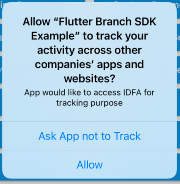
Starting with iOS 14.5, iPadOS 14.5, and tvOS 14.5, you’ll need to receive the user’s permission through the AppTrackingTransparency framework to track them or access their device’s advertising identifier. Tracking refers to the act of linking user or device data collected from your app with user or device data collected from other companies’ apps, websites, or offline properties for targeted advertising or advertising measurement purposes. Tracking also refers to sharing user or device data with data brokers.
New methods have been made available to deal with App Tracking Transparency.
First, update Info.plist file located in ios/Runner directory and add the NSUserTrackingUsageDescription key with a custom message describing your usage.
<key>NSUserTrackingUsageDescription</key><string>App would like to access IDFA for tracking purpose</string>
Show tracking authorization dialog and ask for permission
AppTrackingStatus status = awaitFlutterBranchSdk.requestTrackingAuthorization();
print(status);
Note: After the user's response, call the handleATTAuthorizationStatus Branch SDK method to monitor the performance of the ATT prompt.
Get tracking authorization status
AppTrackingStatus status = awaitFlutterBranchSdk.getTrackingAuthorizationStatus();
print(status);
Values available for AppTrackingStatus
enumAppTrackingStatus {
/// The user has not yet received an authorization request dialog
notDetermined,
/// The device is restricted, tracking is disabled and the system can't show a request dialog
restricted,
/// The user denies authorization for tracking
denied,
/// The user authorizes access to tracking
authorized,
/// The platform is not iOS or the iOS version is below 14.0
notSupported,
}
In response to the European Union's enactment of the Digital Markets Act (DMA), the Branch Android SDK includes the setDMAParamsForEEA method to help you pass consent information from your user to Google.