パッケージ、リポジトリ、アプリカテゴリを検索

flutter_card_swiper のカバー
パッケージ詳細v7.2.0

flutter_card_swiper

これはTinderのようなカードスワイプパッケージです。左右上下へのスワイプが可能で、各方向に対して独自のビジネスロジックを定義できます。

AndroidiOSWebmacOSWindowsLinux
30日間ダウンロード
8.4万
いいね数
712
Pub ポイント
160

パッケージをインストール

flutter pub add flutter_card_swiper

パッケージ概要

公開情報に基づく選定ガイドです。参考としてご利用ください。

左、右、上、下のジェスチャーをサポートするTinder風カードスワイプを可能にするFlutterパッケージです。開発者は各スワイプ方向に対してカスタムロジックを定義でき、デートアプリやプロダクト紹介、コンテンツ発見インターフェースに最適です。クロスプラットフォーム対応で、Android、iOS、Web、macOS、Windows、Linuxでスムーズに動作します。組み込みアニメーションとジェスチャーハンドリングにより、滑らかでカスタマイズ可能なスワイプ体験を提供します。

用途

  • デートアプリのインターフェース
  • 製品またはアイテムの発見
  • コンテンツ推薦システム
  • インタラクティブな物語
  • ユーザーの好み収集

主な機能

  • Tinder風のスワイプジェスチャー
  • 方向ごとにカスタマイズ可能なスワイプ論理
  • クロスプラットフォーム互換性
  • 組み込みアニメーション
  • ジェスチャー認識
  • 拡張可能なウィジェット設計

適している対象

  • スワイプベースのUIを構築している開発者
  • カードスワイプを通じたユーザー操作を必要とするアプリ
  • 直感的なナビゲーションパターンを必要とするプロジェクト
  • インタラクティブカード体験のプロトタイピング

注意事項

  • スワイプ状態管理の慎重な取り扱いが必要です
  • 複雑なレイアウトには追加のスタイルが必要になる場合があります
  • 大規模なデータセットによるパフォーマンスへの影響
  • カードベースのインタラクションのみに制限
  • 垂直スクロールリストに最適化されていません

元の README

関連するソースリポジトリの README 原文のスナップショットです。最新の内容はリポジトリをご覧ください。

flutter_card_swiper

Pub Version Pub Points Pub Likes Pub popularity Tests codecov

This is a Flutter package for a Tinder-like card swiper. ✨

It allows you to swipe left, right, up, and down and define your own business logic for each direction.

Very smooth animations supporting Android, iOS, Web & Desktop.

Why?

We built this package because we wanted to:

  • Have a fully customizable slider
  • Swipe in any direction
  • Undo swipes as many times as you want
  • Choose your own settings such as duration, angle, padding and more
  • Trigger swipes in any direction with the controller
  • Add callbacks while swiping, on end, or when the swiper is disabled
  • Detect the direction (left, right, top, bottom) the card was swiped

Show Cases

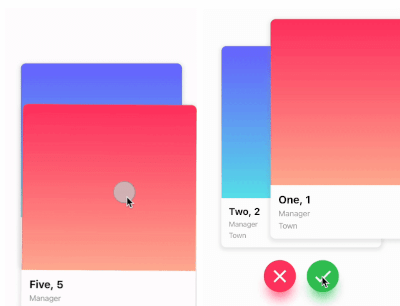
Swipe in any direction Trigger swipes Unswipe the cards
Fully customizable

Installation

Add this to your package's pubspec.yaml file:

card_swiper: ...

OR run

flutter pub add flutter_card_swiper

in your project's root directory.

Usage

You can place your CardSwiper inside of a Scaffold like we did here. Optional parameters can be defined to enable different features. See the following example:

import 'package:flutter_card_swiper/flutter_card_swiper.dart';
import 'package:flutter/material.dart';

class Example extends StatelessWidget {
  List<Container> cards = [
    Container(
      alignment: Alignment.center,
      child: const Text('1'),
      color: Colors.blue,
    ),
    Container(
      alignment: Alignment.center,
      child: const Text('2'),
      color: Colors.red,
    ),
    Container(
      alignment: Alignment.center,
      child: const Text('3'),
      color: Colors.purple,
    )
  ];

  @override
  Widget build(BuildContext context) {
    return Scaffold(
      body: Flexible(
        child: CardSwiper(
          cardsCount: cards.length,
          cardBuilder: (context, index, percentThresholdX, percentThresholdY) => cards[index],
        ),
      ),
    );
  }
}

Constructor

Basic
Parameter Default Description Required
cardBuilder - Widget builder for rendering cards true
cardsCount - Number of cards true
controller - Controller to trigger swipe actions false
duration 200 milliseconds The duration that every animation should last false
initialIndex 0 Index of the first card when the swiper is initialized false
isDisabled false Set to true if swiping should be disabled, has no impact when triggered from the outside false
isLoop true Set to true if the stack should loop false
maxAngle 30 Maximum angle that the card can reach during swiping false
allowedSwipeDirection AllowedSwipeDirection.all Sets the direction in which the card can be swiped. It can be set to any combination of left, right up or down. false
numberOfCardsDisplayed 2 Number of cards displayed at the same time false
onEnd - Callback when there are no more cards left to swipe false
onSwipe - Callback when the user swipes a card. If the function returns false, the swipe action is canceled. If it returns true, the swipe action is performed as expected false
onTapDisabled - Callback when a card is tapped and isDisabled is true false
onUndo - Callback when the controller calls undo. If the function returns false, the undo action is canceled. If it returns true, the undo action is performed as expected false
padding EdgeInsets.symmetric(horizontal: 20, vertical: 25) The padding around the swiper false
scale 0.9 Scale of the card that is behind the front card false
threshold 50 Threshold from which the card is swiped away false
onSwipeDirectionChange - A callback containing the horizontal and vertical swipe direction false
showBackCardOnUndo - If true, the previous card will be shown in the background when swiping, and the swipe action will trigger an undo false
undoSwipeThreshold 50 The horizontal swipe distance threshold, in pixels, after which the back card switches to the previous card. Only active when showBackCardOnUndo is true false
undoDirection UndoDirection.left The direction of the swipe to trigger an undo false
Controller

The Controller is used to swipe the card from outside of the widget. You can create a controller called CardSwiperController and save the instance for further usage. Please have a closer look at our Example for the usage.

Method Description
swipe Swipes the card to a specific direction.
undo Bring back the last card that was swiped away.
moveTo Change the top card to a specific index.

Credits

  • Ricardo Dalarme (Package maintainer)
  • Appinio GmbH (Original project creator)

カテゴリー

ソースリポジトリ

このパッケージを使用しているプロジェクト