パッケージ、リポジトリ、アプリカテゴリを検索

flutter_dynamic_icon のカバー
パッケージ詳細v2.1.0

flutter_dynamic_icon

アプリアイコンとアプリアイコンのバッチ番号を動的に変更するためのFlutterプラグイン

AndroidiOS
30日間ダウンロード
2230
いいね数
423
Pub ポイント
150

パッケージをインストール

flutter pub add flutter_dynamic_icon

パッケージ概要

公開情報に基づく選定ガイドです。参考としてご利用ください。

AndroidおよびiOSで動的なアプリアイコンの変更と一括番号の更新を可能にするFlutterプラグインです。開発者が実行時にプログラム的にアプリのアイコンを切り替えることができ、カスタムブランディングや季節テーマ、ユーザーの好みに役立ちます。プラグインは、プラットフォーム固有のアイコン管理とバッチ番号付けをサポートしており、バージョン管理やプロモーション目的に適しています。ネイティブコードの変更なしにFlutterアプリにスムーズに統合できるように設計されており、視覚的な柔軟性やインタラクティブなアイコン体験が必要なアプリに最適です。

用途

  • ユーザーの好みに応じてアプリアイコンを変更する
  • シーズンまたはイベントベースのアイコン更新
  • アプリブランドカスタマイズ
  • さまざまなアイコンバリアントのテスト
  • プロモーションキャンペーンアイコンの切り替え

主な機能

  • 実行時におけるダイナミックなアイコン切り替え
  • Android および iOS のサポート
  • バッチ番号管理
  • シンプルなAPI統合
  • ネイティブコードは不要です

適している対象

  • カスタマイズ可能なUIを持つアプリ
  • ブランディングに焦点を当てたアプリケーション
  • イベント駆動型または季節的なアプリ
  • アイコンテスト用の開発者ツール
  • マーケティングまたはプロモーションキャンペーン

注意事項

  • アイコン変更後にアプリの再起動が必要です
  • 一部の古いデバイスでのサポートが限定的
  • iOS には追加の構成が必要です
  • アイコンアセットは事前に定義する必要があります
  • 頻繁なアイコン変更には適していません

元の README

関連するソースリポジトリの README 原文のスナップショットです。最新の内容はリポジトリをご覧ください。

flutter_dynamic_icon

A flutter plugin for dynamically changing app icon and app icon batch number in the mobile platform. Supports only iOS (with version > 10.3).

Usage

To use this plugin, add flutter_dynamic_icon as a dependency in your pubspec.yaml file.

Getting Started

Check out the example directory for a sample app using flutter_dynamic_icon.

iOS Integration
Index
  • 2x - 120px x 120px
  • 3x - 180px x 180px

To integrate your plugin into the iOS part of your app, follow these steps

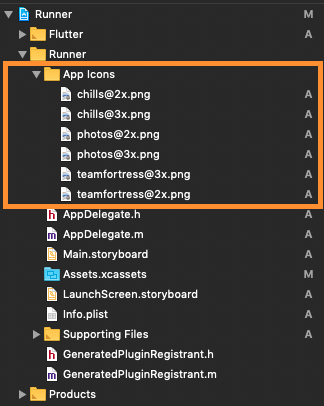
  1. First let us put a few images for app icons, they are
    • teamfortress@2x.png, teamfortress@3x.png
    • photos@2x.png, photos@3x.png,
    • chills@2x.png, chills@3x.png,
  2. These icons shouldn't be kept in Assets.xcassets folder, but outside. When copying to Xcode, you can select 'create folder references' or 'create groups', if not you will get and error when uploading the build to the AppStore saying: (Thanks to @nohli for this observation) TMS-90032: Invalid Image Path - - No image found at the path referenced under key 'CFBundleAlternateIcons':...

Here is my directory structure:

directory_structure

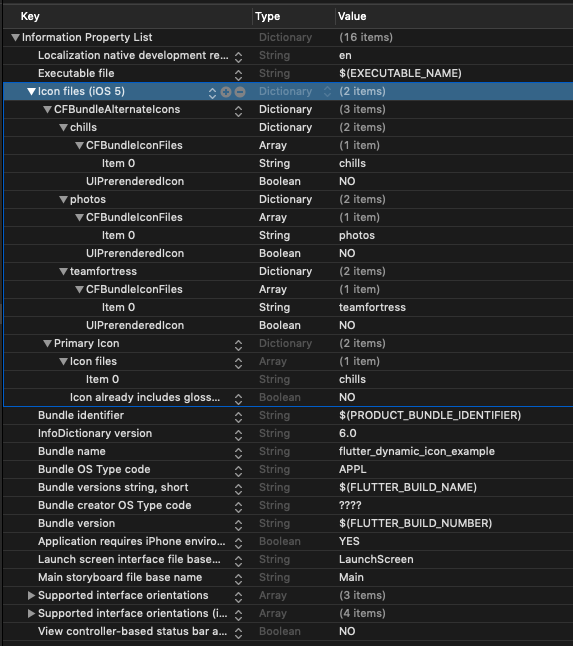
  1. Next, we need to setup the Info.plist
    1. Add Icon files (iOS 5) to the Information Property List
    2. Add CFBundleAlternateIcons as a dictionary, it is used for alternative icons
    3. Set 3 dictionaries under CFBundleAlternateIcons, they are correspond to teamfortress, photos, and chills
    4. For each dictionary, two properties — UIPrerenderedIcon and CFBundleIconFiles need to be configured
    5. If the sub-property UINewsstandIcon is showing under Icon files (iOS 5) and you don't plan on using it (it is intended for use with Newstand features), erase it or the app will get rejected upon submission on the App Store

Note that if you need it work for iPads, You need to add these icon declarations in CFBundleIcons~ipad as well. See here for more details.

Here is my Info.plist after adding Alternate Icons

Screenshot

info.plist

Raw
<?xml version="1.0" encoding="UTF-8"?>
<!DOCTYPE plist PUBLIC "-//Apple//DTD PLIST 1.0//EN" "http://www.apple.com/DTDs/PropertyList-1.0.dtd">
<plist version="1.0">
<dict>
	<key>CFBundleDevelopmentRegion</key>
	<string>en</string>
	<key>CFBundleExecutable</key>
	<string>$(EXECUTABLE_NAME)</string>
	<key>CFBundleIcons</key>
	<dict>
		<key>CFBundleAlternateIcons</key>
		<dict>
			<key>chills</key>
			<dict>
				<key>CFBundleIconFiles</key>
				<array>
					<string>chills</string>
				</array>
				<key>UIPrerenderedIcon</key>
				<false/>
			</dict>
			<key>photos</key>
			<dict>
				<key>CFBundleIconFiles</key>
				<array>
					<string>photos</string>
				</array>
				<key>UIPrerenderedIcon</key>
				<false/>
			</dict>
			<key>teamfortress</key>
			<dict>
				<key>CFBundleIconFiles</key>
				<array>
					<string>teamfortress</string>
				</array>
				<key>UIPrerenderedIcon</key>
				<false/>
			</dict>
		</dict>
		<key>CFBundlePrimaryIcon</key>
		<dict>
			<key>CFBundleIconFiles</key>
			<array>
				<string>chills</string>
			</array>
			<key>UIPrerenderedIcon</key>
			<false/>
		</dict>
	</dict>
	<key>CFBundleIdentifier</key>
	<string>$(PRODUCT_BUNDLE_IDENTIFIER)</string>
	<key>CFBundleInfoDictionaryVersion</key>
	<string>6.0</string>
	<key>CFBundleName</key>
	<string>flutter_dynamic_icon_example</string>
	<key>CFBundlePackageType</key>
	<string>APPL</string>
	<key>CFBundleShortVersionString</key>
	<string>$(FLUTTER_BUILD_NAME)</string>
	<key>CFBundleSignature</key>
	<string>????</string>
	<key>CFBundleVersion</key>
	<string>$(FLUTTER_BUILD_NUMBER)</string>
	<key>LSRequiresIPhoneOS</key>
	<true/>
	<key>UILaunchStoryboardName</key>
	<string>LaunchScreen</string>
	<key>UIMainStoryboardFile</key>
	<string>Main</string>
	<key>UISupportedInterfaceOrientations</key>
	<array>
		<string>UIInterfaceOrientationPortrait</string>
		<string>UIInterfaceOrientationLandscapeLeft</string>
		<string>UIInterfaceOrientationLandscapeRight</string>
	</array>
	<key>UISupportedInterfaceOrientations~ipad</key>
	<array>
		<string>UIInterfaceOrientationPortrait</string>
		<string>UIInterfaceOrientationPortraitUpsideDown</string>
		<string>UIInterfaceOrientationLandscapeLeft</string>
		<string>UIInterfaceOrientationLandscapeRight</string>
	</array>
	<key>UIViewControllerBasedStatusBarAppearance</key>
	<false/>
</dict>
</plist>

Now, you can call FlutterDynamicIcon.setAlternateIconName with the CFBundleAlternateIcons key as the argument to set that icon.

Dart/Flutter Integration

From your Dart code, you need to import the plugin and use it's static methods:

import 'package:flutter_dynamic_icon/flutter_dynamic_icon.dart';

try {
  if (await FlutterDynamicIcon.supportsAlternateIcons) {
    await FlutterDynamicIcon.setAlternateIconName("photos");
    print("App icon change successful");
    return;
  }
} on PlatformException {} catch (e) {}
print("Failed to change app icon");

...

// set batch number
try {
	await FlutterDynamicIcon.setApplicationIconBadgeNumber(9399);
} on PlatformException {} catch (e) {}

// gets currently set batch number
int batchNumber = FlutterDynamicIcon.getApplicationIconBadgeNumber();

Check out the example app for more details

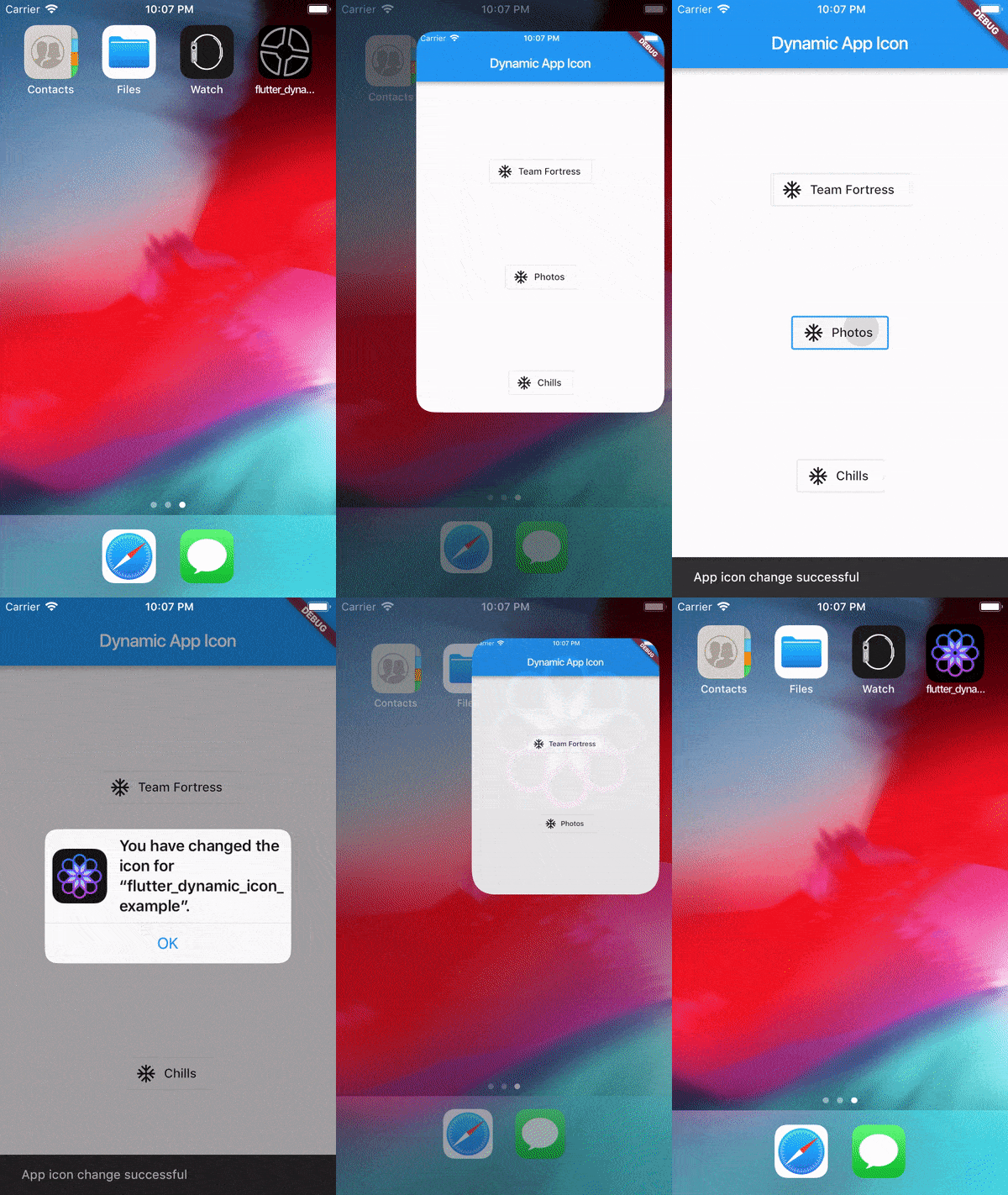
Screenrecord

Showing App Icon change

Screenrecording of the example

Showing Batch number on app icon change in SpringBoard

Screenrecording of the example

Reference

This was made possible because this blog. I borrowed a lot of words from this blog. https://medium.com/ios-os-x-development/dynamically-change-the-app-icon-7d4bece820d2

カテゴリー

ソースリポジトリ

このパッケージを使用しているプロジェクト

データはまだありません。