パッケージ、リポジトリ、アプリカテゴリを検索

flutter_fast_forms のカバー
パッケージ詳細v18.1.0

flutter_fast_forms

Flutter Fast Forms は、Flutter フォームを迅速に構築するために必要な唯一の Dart パッケージです。

AndroidiOSWebmacOSWindowsLinux
30日間ダウンロード
275
いいね数
91
Pub ポイント
90

パッケージをインストール

flutter pub add flutter_fast_forms

パッケージ概要

公開情報に基づく選定ガイドです。参考としてご利用ください。

Flutter Fast Forms は、Flutter フォームの作成を簡素化するための Dart パッケージで、開発者が迅速に堅牢で再利用可能なフォームコンポーネントを構築できるように設計されています。最小限のボイラープレートで、フォームフィールド、検証ルール、送信ロジックを簡単に宣言的に定義できるシンプルな API を提供します。Android、iOS、Web、macOS、Windows、Linux といった主要プラットフォームすべてをサポートしており、クロスプラットフォームアプリに最適です。一般的な入力タイプとカスタマイズ可能なバリデーターを内蔵しているため、柔軟性やパフォーマンスを損なうことなく開発を加速できます。

用途

  • 迅速なフォームプロトタイピング
  • クロスプラットフォームフォーム開発
  • 複雑な検証ワークフロー
  • 再利用可能なフォームコンポーネント
  • スムーズなユーザー登録フロー

主な機能

  • 宣言的フォーム構文
  • 組み込みの検証ヘルパー
  • クロスプラットフォーム互換性
  • 拡張可能なフィールドタイプ
  • 最小限のボイラープレートコード

適している対象

  • 初心者向け Flutter 開発者
  • スピードを重視するチーム
  • 動的フォームを必要とするアプリ
  • タイトな締切のあるプロジェクト
  • フォームの複雑さを避ける開発者

注意事項

  • デフォルトのウィジェット以外のカスタマイズが限られている
  • 新しいDSLのような構文を学ぶ必要がある可能性があります
  • 非常にユニークなフォームレイアウトには適していません
  • パッケージのメンテナンスに依存する
  • 標準フォームパターンに最適

元の README

関連するソースリポジトリの README 原文のスナップショットです。最新の内容はリポジトリをご覧ください。

Flutter Fast Forms

CI Pub Version codecov

Flutter Fast Forms is the only Dart package you need to build Flutter forms fast.

It adds these missing features to the Flutter SDK:

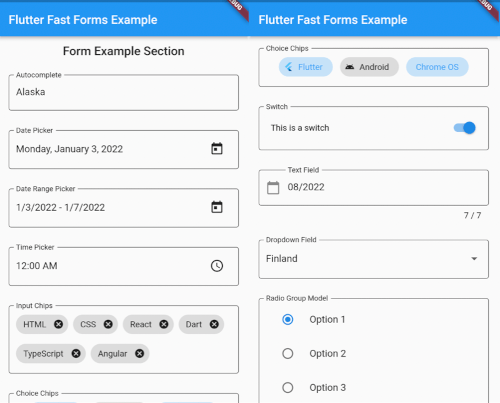
  • FastFormControl<T> convenience widgets that wrap Material / Cupertino form controls in a FormField<T> according to the already built-in TextFormField / DropdownButtonFormField
  • FastForm widget that wraps the built-in Form widget for providing the current form field values in onChanged callback
  • FastFormArray widget that aggregates a flexible number of homogeneous controls in a single FormField<T>
  • FastChipsInput widget that converts text input into chips as defined by Material Design
  • Conditional form fields
  • touched validation state
  • Common FormFieldValidator<T> functions

Table of Contents


Getting Started

1. Add a FastForm to your widget tree:

class MyFormPage extends StatelessWidget {
  MyFormPage({Key? key, required this.title}) : super(key: key);

  final formKey = GlobalKey<FormState>();
  final String title;

  @override
  Widget build(BuildContext context) {
    return Scaffold(
      appBar: AppBar(
        title: Text(title),
      ),
      body: SafeArea(
        child: SingleChildScrollView(
          child: FastForm(
            formKey: formKey,
            children: [],
          ),
        ),
      ),
    );
  }
}

2. Add FastFormControl<T> children to the FastForm:

FastForm(
  formKey: formKey,
  children: [
    const FastTextField(
      name: 'field_destination',
      labelText: 'Destination',
      placeholder: 'Where are you going?',
    ),
    FastDateRangePicker(
      name: 'field_check_in_out',
      labelText: 'Check-in - Check-out',
      firstDate: DateTime.now(),
      lastDate: DateTime.now().add(const Duration(days: 365)),
    ),
    const FastCheckbox(
      name: 'field_travel_purpose',
      labelText: 'Travel purpose',
      titleText: 'I am travelling for work',
    ),
  ],
),

3. Wrap the children in a FastFormSection for visual grouping and consistent padding:

FastForm(
  formKey: formKey,
  children: [
    FastFormSection(
      header: const Text('My Form'),
      padding: EdgeInsets.all(16.0),
      children: [
        const FastTextField(
          name: 'field_destination',
          labelText: 'Destination',
          placeholder: 'Where are you going?',
        ),
        // ...
      ],
    ),
  ]
),

Widget Catalog

FastFormControl<T> field value type wraps Material widget wraps Cupertino widget
when adaptive: true
FastAutocomplete<O> String Autocomplete<O> no
FastCheckbox bool CheckboxListTile CupertinoCheckbox
FastChoiceChips<T> Set<T> ChoiceChip no
FastCalendar DateTime CalendarDatePicker no
FastChipsInput List<String> RawAutocomplete<String> + InputChip no
FastDatePicker DateTime showDatePicker CupertinoDatePicker
FastDateRangePicker DateTimeRange showDateRangePicker no
FastDropdown<T> T DropdownButtonFormField<T> no
FastRadioGroup<T> T RadioListTile<T> no
FastRangeSlider RangeValues RangeSlider no
FastSegmentedButton<T> Set<T> SegmentedButton<T> no
FastSegmentedControl<T> T extends Object no CupertinoSlidingSegmentedControl<T>
FastSlider double Slider.adaptive CupertinoSlider
FastSwitch bool SwitchListTile CupertinoSwitch
FastTextField String TextFormField CupertinoTextFormFieldRow
FastTimePicker TimeOfDay showTimePicker no
use FastDatePicker with
CupertinoDatePickerMode.time

Adaptive Form Fields

While some form controls are unique to a certain platform, various others are present in multiple design languages.

By default, Flutter Fast Forms uses Material widgets on any platform.

This behavior is adjustable so that platform-specific Cupertino widgets are automatically rendered on iOS.

[!TIP] The widget catalog tells you which FastFormControl is adaptive.


📓 Example: Always use Cupertino widgets on iOS in a FastForm.

FastForm(
  formKey: formKey,
  adaptive: true,
  children: [
    const FastSwitch(
      name: 'switch',
      titleText: 'Disable text field',
    ),
    FastTextField(
      name: 'text_field',
      labelText: 'Just some sample text field',
    ),    
  ]
),

[!NOTE]

  • When adaptive is set to true any built-in FormFieldBuilder returns a corresponding Cupertino widget on iOS, if it exists.

📓 Example: Only use the Cupertino widget on iOS for a dedicated FastSwitch.

FastForm(
  formKey: formKey,
  children: [
    const FastSwitch(
      name: 'switch',
      adaptive: true,
      titleText: 'Disable text field',
    ),
  ]
),

Conditional Form Fields

Not all controls in a form are autonomous and act independent of each other.

Occasionally, the state of a form field might be directly related to the state of some other form field as well.

Flutter Fast Forms allows you to define such conditions declaratively.


📓 Example: A FastTextField that is disabled when a FastSwitch is selected.

1. Add the conditions property to the conditional form field and assign an empty Map:

const FastSwitch(
  name: 'switch',
  titleText: 'Disable text field',
),
FastTextField(
  name: 'text_field',
  labelText: 'Just some sample text field',
  conditions: {},
),

2. Choose a suitable FastConditionHandler as Map key and assign a FastConditionList:

const FastSwitch(
  name: 'switch',
  titleText: 'Disable text field when selected',
),
FastTextField(
  name: 'text_field',
  labelText: 'Just some sample text field',
  conditions: {
    FastCondition.disabled: FastConditionList([]),
  },
)

[!NOTE] A FastConditionHandler is a function that runs whenever a FastConditionList is checked and determines what happens when the condition is either met or not.

3. Add a FastCondition relating the field to another field:

const FastSwitch(
  name: 'switch',
  titleText: 'Disable text field when selected',
),
FastTextField(
  name: 'text_field',
  labelText: 'Just some sample text field',
  conditions: {
    FastCondition.disabled: FastConditionList([
      FastCondition(
        target: 'switch',
        test: (value, field) => value is bool && value,
      ),
    ]),
  },
),

[!NOTE] target is the name of the FastFormField that the form field depends on.


📓 Example: A FastTextField that is enabled when a FastSwitch or a FastCheckbox is selected.

const FastCheckbox(
  name: 'checkbox',
  titleText: 'Enable text field when selected',
),
const FastSwitch(
  name: 'switch',
  titleText: 'Enable text field when selected',
),
FastTextField(
  name: 'text_field',
  enabled: false,
  labelText: 'Just some sample text field',
  conditions: {
    FastCondition.enabled: FastConditionList([
      FastCondition(
        target: 'switch',
        test: (value, field) => value is bool && value,
      ),
      FastCondition(
        target: 'checkbox',
        test: (value, field) => value is bool && value,
      ),
    ]),
  },
),

📓 Example: A FastTextField that is disabled when both a FastSwitch and a FastCheckbox are selected.

const FastCheckbox(
  name: 'checkbox',
  titleText: 'Disable text field when selected',
),
const FastSwitch(
  name: 'switch',
  titleText: 'Disable text field when selected',
),
FastTextField(
  name: 'text_field',
  labelText: 'Just some sample text field',
  conditions: {
    FastCondition.enabled: FastConditionList(
      [
        FastCondition(
          target: 'switch',
          test: (value, field) => value is bool && value,
        ),
        FastCondition(
          target: 'checkbox',
          test: (value, field) => value is bool && value,
        ),
      ],
      match: FastConditionMatch.every,
    ),
  },
),

[!NOTE] match specifies how all individual test results in the list are evaluated to determine whether the condition is met.

Custom Form Fields

There are use cases where the widget catalog does not fully satisfy your individual requirements.

As a consequence you have to add non-standard controls to your form.

With Flutter Fast Forms you're free to wrap any custom widget into a form field.


📓 Example: A simple widget that provides a random integer whenever a button is pressed.

1. Create a stateful widget class extending FastFormField<T> with a corresponding FastFormFieldState<T>:

class MyCustomField extends FastFormField<int> {
  const MyCustomField({
    super.builder = myCustomFormFieldBuilder,
    super.key,
    required super.name,
  });

  @override
  MyCustomFieldState createState() => MyCustomFieldState();
}

class MyCustomFieldState extends FastFormFieldState<int> {
  @override
  MyCustomField get widget => super.widget as MyCustomField;
}

[!NOTE]

  • builder and name are required constructor parameters of FastFormField.
  • builder is a standard Flutter FormFieldBuilder<T>.

2. Implement the FormFieldBuilder<T> returning your custom widget:

Widget myCustomFormFieldBuilder(FormFieldState<int> field) {
  field as MyCustomFieldState;
  final MyCustomFieldState(:decoration, :didChange, :value) = field;

  return InputDecorator(
    decoration: decoration,
    child: Row(
      children: [
        ElevatedButton(
          child: const Text('Create random number'),
          onPressed: () => didChange(Random().nextInt(1 << 32)),
        ),
        if (value is int)
          Padding(
            padding: const EdgeInsets.symmetric(horizontal: 12.0),
            child: Text(value.toString()),
          )
      ],
    ),
  );
}

[!NOTE]

  • Casting field is mandatory to access FastFormField properties and functions.
  • Always call field.didChange() to update the value of the form field.

3. Add all super-initializer parameters that the form field should support:

class MyCustomField extends FastFormField<int> {
  const MyCustomField({
    super.builder = myCustomFormFieldBuilder,
    super.decoration,
    super.enabled,
    super.helperText,
    super.initialValue,
    super.key,
    super.labelText,
    required super.name,
    super.onChanged,
    super.onReset,
    super.onSaved,
    super.onTouched,
    super.validator,
  });

  @override
  MyCustomFieldState createState() => MyCustomFieldState();
}

[!NOTE] Always make sure that you apply certain super-initializer parameters like decoration or enabled in your builder functions. Otherwise assigning those arguments when invoking the constructor won't have any effect.

カテゴリー

依存関係

依存関係一覧 1 件

ソースリポジトリ

このパッケージを使用しているプロジェクト

データはまだありません。