パッケージ、リポジトリ、アプリカテゴリを検索

flutter_flavor のカバー
パッケージ詳細v3.1.4

flutter_flavor

異なるフラーバーを作成することで、App StoreおよびGoogle Playに公開する前に、アプリの異なるインスタンスを持つことができます。

AndroidiOSWebmacOSWindowsLinux
30日間ダウンロード
3.4万
いいね数
479
Pub ポイント
160

パッケージをインストール

flutter pub add flutter_flavor

パッケージ概要

公開情報に基づく選定ガイドです。参考としてご利用ください。

flutter_flavor は、開発者向けツールであり、開発、ステージング、本番など、さまざまな環境用に異なる構成とビルドを可能にするためのアプリの「フレーバー」を作成できるようにします。APIエンドポイント、ログレベル、ブランディングなどの環境固有の設定をコードの複製なしに管理しやすくします。このパッケージは、Android、iOS、Web、macOS、Windows、Linux を含むすべてのサポートされているプラットフォームで、Flutter のビルドシステムとシームレスに統合されます。テストおよびデプロイ用のクリーンで設定可能なワークフローをチームが維持するのを助けます。

用途

  • 複数の環境を管理する
  • ビルド構成のカスタマイズ
  • リリース前のテスト
  • 開発/ステージング/プロダクション設定の分離
  • CI/CDパイプラインの最適化

主な機能

  • 環境固有の設定
  • クロスプラットフォーム対応
  • Flutter との簡単な統合
  • ビルド時フレーバーの区別
  • 最小限のボイラープレート

適している対象

  • 開発チーム
  • CI/CDワークフロー
  • マルチ環境アプリ
  • リリースごとのアプリカスタマイズ
  • 異なるデプロイステージを使用するチーム

注意事項

  • ビルドスクリプトでのセットアップが必要です
  • フレーバー名は、プラットフォーム間で一貫している必要があります
  • 制限付き実行時切り替え
  • ユーザー向けのフレーバー選択には意図されていません
  • チームメンバー間の調整が必要です

元の README

関連するソースリポジトリの README 原文のスナップショットです。最新の内容はリポジトリをご覧ください。

flutter_flavor

pub package Star on Github License: MIT

Flavors helps us to create builds for different instances of our app. For example, we can create a flavor for development, a flavor for production and another flavor for a demo of the app. In this way we can create different flavors, and thus have different instances of our apps before publishing it on the App Store and Google Play.

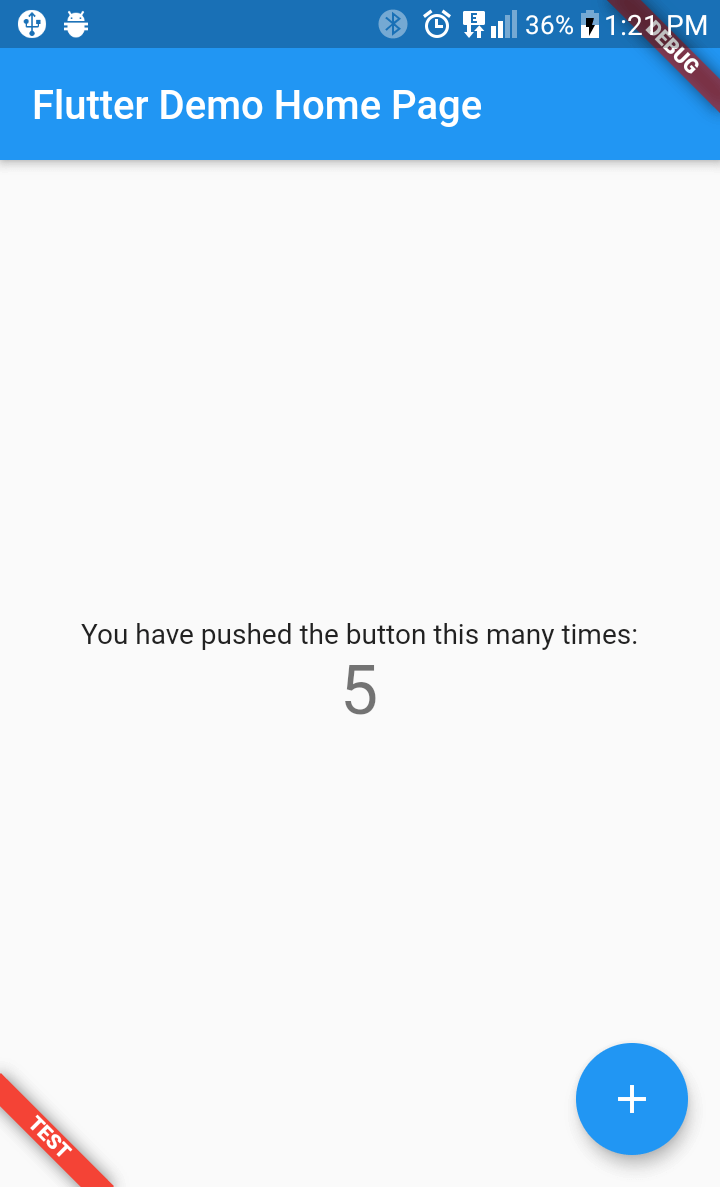
flutter_favor allows you to quickly configure and define dynamic variables for each flavor in your project. The flavors, as well as their names; they are dynamically defined by the developer or development team. In the configuration of a flavor you can set the name of each flavor, as well as the color and location of its banner. When attribute name is undefined or empty, the banner is hidden.

You can also configure the banners independently. The aforementioned attributes are globally configured in FlavorConfig, but can be changed in the FlavorBanner.

Screenshot

PROD DEV TEST
Screenshot Prod Screenshot Dev Screenshot Test

Note By default the banner is shown in BannerLocation.topStart and is visibility only when the attribute name of configuration is defined and not empty.

Getting Started

Adding package
flutter_flavor: ^3.1.4
Importing package
import 'package:flutter_flavor/flutter_flavor.dart';
Configuring
FlavorConfig(
    name: "DEVELOP",
    color: Colors.red,
    location: BannerLocation.bottomStart,
    variables: {
        "counter": 0,
        "baseUrl": "https://www.example.com",
    }
);
Using variables
 int _counter = FlavorConfig.instance.variables["counter"];

Example

Main
import 'package:flutter/material.dart';
import 'package:flutter_flavor/flutter_flavor.dart';

import 'app.dart';

void main() {
  FlavorConfig(
    name: "DEVELOP",
    color: Colors.red,
    location: BannerLocation.topStart,
    variables: {
      "counter": 5,
      "baseUrl": "https://www.example2.com",
    },
  );

  runApp(const MyApp());
}
App
import 'package:flutter/material.dart';
import 'package:flutter_flavor/flutter_flavor.dart';

class MyApp extends StatelessWidget {
  const MyApp({super.key});

  @override
  Widget build(BuildContext context) {
    return FlavorBanner(
      child: MaterialApp(
        title: 'Flutter Demo',
        theme: ThemeData(
          colorScheme: ColorScheme.fromSeed(seedColor: Colors.deepPurple),
          useMaterial3: true,
        ),
        home: const MyHomePage(title: 'Flutter Demo Home Page'),
      ),
    );
  }
}

class MyHomePage extends StatefulWidget {
  const MyHomePage({super.key, required this.title});
  final String title;

  @override
  State<MyHomePage> createState() => _MyHomePageState();
}

class _MyHomePageState extends State<MyHomePage> {
  int _counter = 0;

  void _incrementCounter() {
    setState(() {
      _counter++;
    });
  }

  @override
  Widget build(BuildContext context) {
    return Scaffold(
      appBar: AppBar(
        backgroundColor: Theme.of(context).colorScheme.inversePrimary,
        title: Text(widget.title),
      ),
      body: Center(
        child: Column(
          mainAxisAlignment: MainAxisAlignment.center,
          children: <Widget>[
            const Text(
              'You have pushed the button this many times:',
            ),
            Text(
              '$_counter',
              style: Theme.of(context).textTheme.headlineMedium,
            ),
          ],
        ),
      ),
      floatingActionButton: FloatingActionButton(
        onPressed: _incrementCounter,
        tooltip: 'Increment',
        child: const Icon(Icons.add),
      ),
    );
  }
}

VSCode Configuration

The .vscode folder is created in the workspace, if it does not exist it can be created by hand. Inside that folder a launch.json file is created and the configuration is established inside the file. For more information, visit: https://code.visualstudio.com/docs/editor/debugging and https://go.microsoft.com/fwlink/?linkid=830387

{
  "version": "0.2.0",
  "configurations": [
    {
      "name": "PROD-Flavor",
      "program": "[project-folder]/lib/main_prod.dart",
      "request": "launch",
      "type": "dart"
    },
    {
      "name": "DEV-Flavor",
      "program": "[project-folder]/lib/main_dev.dart",
      "request": "launch",
      "type": "dart"
    }
  ]
}

License

MIT License

カテゴリー

ソースリポジトリ

このパッケージを使用しているプロジェクト