パッケージ、リポジトリ、アプリカテゴリを検索

flutter_funding_choices のカバー
パッケージ詳細v1.1.0

flutter_funding_choices

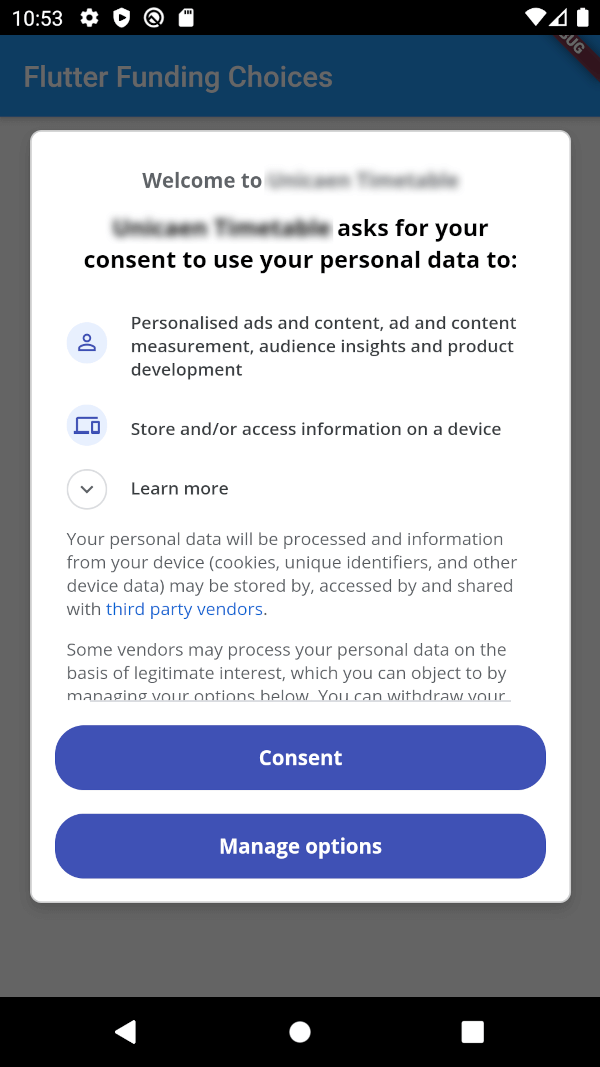
Funding Choices の Flutter 実装。Google のサービスで、AdMob におけるパーソナライズ広告のユーザー同意を取得できます。

AndroidiOS
30日間ダウンロード
76
いいね数
55
Pub ポイント
150

パッケージをインストール

flutter pub add flutter_funding_choices

パッケージ概要

公開情報に基づく選定ガイドです。参考としてご利用ください。

Flutter Funding Choices は、Google の Funding Choices API を統合する Flutter パッケージであり、AdMob でパーソナライズ広告のユーザー同意を要求できるようにします。このパッケージは、Android および iOS プラットフォーム上で必要な同意ダイアログを表示することで、プライバシー規制に準拠するためのスムーズな方法を提供します。同意状態の確認や同意フローの開始を簡単なメソッドで行えるようになり、実装が容易になります。GDPR およびその他のプライバシー基準への準拠を保ちつつ、既存の広告配信ワークフローとの互換性も維持しています。

用途

  • パーソナライズ広告のためのユーザー同意を依頼する
  • GDPRおよびプライバシー規制に準拠する
  • FlutterアプリでのAdMobの統合
  • Android および iOS で同意ダイアログを表示する
  • 広告のパーソナライズ設定の管理

主な機能

  • 公式 Google ファンディングチョイス統合
  • Android および iOS の両方に対応
  • 同意チェックおよびダイアログ用のシンプルな API
  • 同意状態の自動処理
  • 軽量で統合が簡単

適している対象

  • AdMob を使用する Flutter アプリ
  • EUユーザーをターゲットにする開発者
  • GDPR準拠を必要とするアプリ
  • 広告パーソナライゼーションを管理する出版者
  • プライバシーに焦点を当てたモバイルアプリ開発者

注意事項

  • AdMob の設定が必要です
  • パーソナライズ広告を表示する前に同意を得る必要があります
  • Googleのファウンディング・チョイスサービスに限定
  • 同意管理のための追加のUIが必要になる可能性があります
  • パーソナライズされていない広告シナリオには該当しない

元の README

関連するソースリポジトリの README 原文のスナップショットです。最新の内容はリポジトリをご覧ください。

Flutter Funding Choices

Flutter Funding Choices is an unofficial Flutter implementation of Funding Choices, a Google service that allows to request user consent for personalized ads in AdMob.

Prerequisites

You must have linked your FundingChoices account to your Admob account. See this documentation on Google Support.

Installation

Android

Your app must use Android Embedding V2. Also, you need to add an app id in your AndroidManifest.xml (in the application tag) :

<?xml version="1.0" encoding="utf-8"?>
<manifest xmlns:android="http://schemas.android.com/apk/res/android"
   package="fr.skyost.example">

   <application
       <!--
         Some attributes here...
        -->
    >
       <meta-data
           android:name="com.google.android.gms.ads.APPLICATION_ID"
           android:value="YOUR-APP-ID"/>
       <!--
         Activities, ...
        -->
   </application>

</manifest>

You can obtain your app ID by following these instructions.

iOS

You need to add an app id in your Info.plist :

<key>GADApplicationIdentifier</key>
<string>YOUR-APP-ID</string>

You can obtain your app ID by following these instructions. You may also need to handle Apple's App Tracking Transparency message by putting this in your Info.plist :

<key>NSUserTrackingUsageDescription</key>
<string>This identifier will be used to deliver personalized ads to you.</string>

Feel free to configure the message as you want.

How to use

There are three methods :

  • FlutterFundingChoices.requestConsentInformation() : Allows to get current user consent information (whether you need to show the consent form, whether the user wants personalized ads, ...).
  • FlutterFundingChoices.showConsentForm() : Loads and shows the consent form. You must check first that there is a consent form (with isConsentFormAvailable on the returned object of the previous method).
  • FlutterFundingChoices.reset() : Resets the consent information.

You typically want to use it like this on Android :

@override
void initState() {
  super.initState();
  WidgetsBinding.instance.addPostFrameCallback((_) async {
    ConsentInformation consentInfo = await FlutterFundingChoices.requestConsentInformation();
    if (consentInfo.isConsentFormAvailable && consentInfo.consentStatus == ConsentStatus.required) {  
      await FlutterFundingChoices.showConsentForm();
      // You can check the result by calling `FlutterFundingChoices.requestConsentInformation()` again !
    }
  });
}

Contributions

You have a lot of options to contribute to this project ! You can :

カテゴリー

ソースリポジトリ

このパッケージを使用しているプロジェクト

データはまだありません。