パッケージ、リポジトリ、アプリカテゴリを検索

flutter_mapbox_navigation のカバー
パッケージ詳細v0.2.2

flutter_mapbox_navigation

MapBox を使用して、Flutter アプリにステップバイステップナビゲーションを追加します。ユーザーをある場所に案内する必要があるときに、アプリから離れることなく済みます。

AndroidiOS
30日間ダウンロード
622
いいね数
305
Pub ポイント
120

パッケージをインストール

flutter pub add flutter_mapbox_navigation

パッケージ概要

公開情報に基づく選定ガイドです。参考としてご利用ください。

flutter_mapbox_navigation パッケージは、Mapbox のルート案内およびマップサービスを使用して、Flutter アプリでステップバイステップのナビゲーションを可能にします。開発者はアプリ内にシームレスなリアルタイムナビゲーションを統合でき、外部の地図アプリに切り替える必要がありません。Android および iOS の両方をサポートしており、ルートの可視化、音声案内、ライブトラッキングを含むネイティブに近いナビゲーション体験を提供します。このパッケージは、統合とカスタマイズが簡単であり、位置ベースのナビゲーション機能を必要とするアプリに最適です。

用途

  • アプリ内ナビゲーション
  • ライドシェアアプリ
  • 配達状況の追跡
  • 観光ガイドアプリケーション
  • 現場サービス管理

主な機能

  • ステップバイステップの案内
  • リアルタイム位置追跡
  • 音声ガイド
  • Mapbox 統合
  • カスタマイズ可能なUI

適している対象

  • ナビゲーション重視のアプリ
  • 位置ベースのサービス
  • モバイルフリート管理
  • 旅行と物流アプリ

注意事項

  • Mapbox API キーが必要です
  • 限定的なオフラインサポート
  • Mapbox SDK に依存
  • ナビゲーション中のバッテリー消費が高くなる
  • 場所へのアクセス権限が必要です

元の README

関連するソースリポジトリの README 原文のスナップショットです。最新の内容はリポジトリをご覧ください。

Pub BuyMeACoffee

flutter_mapbox_navigation

Add Turn By Turn Navigation to Your Flutter Application Using MapBox. Never leave your app when you need to navigate your users to a location.

Features

IOS Configuration

  1. Go to your Mapbox account dashboard and create an access token that has the DOWNLOADS:READ scope. PLEASE NOTE: This is not the same as your production Mapbox API token. Make sure to keep it private and do not insert it into any Info.plist file. Create a file named .netrc in your home directory if it doesn’t already exist, then add the following lines to the end of the file:

    machine api.mapbox.com
      login mapbox
      password PRIVATE_MAPBOX_API_TOKEN
    

    where PRIVATE_MAPBOX_API_TOKEN is your Mapbox API token with the DOWNLOADS:READ scope.

  2. Mapbox APIs and vector tiles require a Mapbox account and API access token. In the project editor, select the application target, then go to the Info tab. Under the “Custom iOS Target Properties” section, set MBXAccessToken to your access token. You can obtain an access token from the Mapbox account page.

  3. In order for the SDK to track the user’s location as they move along the route, set NSLocationWhenInUseUsageDescription to:

    Shows your location on the map and helps improve OpenStreetMap.

  4. Users expect the SDK to continue to track the user’s location and deliver audible instructions even while a different application is visible or the device is locked. Go to the Capabilities tab. Under the Background Modes section, enable “Audio, AirPlay, and Picture in Picture” and “Location updates”. (Alternatively, add the audio and location values to the UIBackgroundModes array in the Info tab.)

Android Configuration

  1. Mapbox APIs and vector tiles require a Mapbox account and API access token. Add a new resource file called mapbox_access_token.xml with it's full path being <YOUR_FLUTTER_APP_ROOT>/android/app/src/main/res/values/mapbox_access_token.xml. Then add a string resource with name "mapbox_access_token" and your token as it's value as shown below. You can obtain an access token from the Mapbox account page.
<?xml version="1.0" encoding="utf-8"?>
<resources xmlns:tools="http://schemas.android.com/tools">
    <string name="mapbox_access_token" translatable="false" tools:ignore="UnusedResources">ADD_MAPBOX_ACCESS_TOKEN_HERE</string>
</resources>
  1. Add the following permissions to the app level Android Manifest
<manifest>
    ...
    <uses-permission android:name="android.permission.ACCESS_COARSE_LOCATION" />
    <uses-permission android:name="android.permission.ACCESS_FINE_LOCATION" />
    <uses-permission android:name="android.permission.ACCESS_NETWORK_STATE" />
    ...
</manifest>
  1. Add the MapBox Downloads token with the downloads:read scope to your gradle.properties file in Android folder to enable downloading the MapBox binaries from the repository. To secure this token from getting checked into source control, you can add it to the gradle.properties of your GRADLE_HOME which is usually at $USER_HOME/.gradle for Mac. This token can be retrieved from your MapBox Dashboard. You can review the Token Guide to learn more about download tokens
MAPBOX_DOWNLOADS_TOKEN=sk.XXXXXXXXXXXXXXX

After adding the above, your gradle.properties file may look something like this:

org.gradle.jvmargs=-Xmx1536M
android.useAndroidX=true
android.enableJetifier=true
MAPBOX_DOWNLOADS_TOKEN=sk.epe9nE9peAcmwNzKVNqSbFfp2794YtnNepe9nE9peAcmwNzKVNqSbFfp2794YtnN.-HrbMMQmLdHwYb8r
  1. Update MainActivity.kt to extends FlutterFragmentActivity vs FlutterActivity. Otherwise you'll get Caused by: java.lang.IllegalStateException: Please ensure that the hosting Context is a valid ViewModelStoreOwner.
//import io.flutter.embedding.android.FlutterActivity
import io.flutter.embedding.android.FlutterFragmentActivity

class MainActivity: FlutterFragmentActivity() {
}
  1. Add implementation platform("org.jetbrains.kotlin:kotlin-bom:1.8.0") to android/app/build.gradle

Usage

Set Default Route Options (Optional)
    MapBoxNavigation.instance.setDefaultOptions(MapBoxOptions(
                     initialLatitude: 36.1175275,
                     initialLongitude: -115.1839524,
                     zoom: 13.0,
                     tilt: 0.0,
                     bearing: 0.0,
                     enableRefresh: false,
                     alternatives: true,
                     voiceInstructionsEnabled: true,
                     bannerInstructionsEnabled: true,
                     allowsUTurnAtWayPoints: true,
                     mode: MapBoxNavigationMode.drivingWithTraffic,
                     mapStyleUrlDay: "https://url_to_day_style",
                     mapStyleUrlNight: "https://url_to_night_style",
                     units: VoiceUnits.imperial,
                     simulateRoute: true,
                     language: "en"))
Listen for Events
  MapBoxNavigation.instance.registerRouteEventListener(_onRouteEvent);
  Future<void> _onRouteEvent(e) async {

        _distanceRemaining = await _directions.distanceRemaining;
        _durationRemaining = await _directions.durationRemaining;
    
        switch (e.eventType) {
          case MapBoxEvent.progress_change:
            var progressEvent = e.data as RouteProgressEvent;
            _arrived = progressEvent.arrived;
            if (progressEvent.currentStepInstruction != null)
              _instruction = progressEvent.currentStepInstruction;
            break;
          case MapBoxEvent.route_building:
          case MapBoxEvent.route_built:
            _routeBuilt = true;
            break;
          case MapBoxEvent.route_build_failed:
            _routeBuilt = false;
            break;
          case MapBoxEvent.navigation_running:
            _isNavigating = true;
            break;
          case MapBoxEvent.on_arrival:
            _arrived = true;
            if (!_isMultipleStop) {
              await Future.delayed(Duration(seconds: 3));
              await _controller.finishNavigation();
            } else {}
            break;
          case MapBoxEvent.navigation_finished:
          case MapBoxEvent.navigation_cancelled:
            _routeBuilt = false;
            _isNavigating = false;
            break;
          default:
            break;
        }
        //refresh UI
        setState(() {});
      }
Begin Navigating

    final cityhall = WayPoint(name: "City Hall", latitude: 42.886448, longitude: -78.878372);
    final downtown = WayPoint(name: "Downtown Buffalo", latitude: 42.8866177, longitude: -78.8814924);

    var wayPoints = List<WayPoint>();
    wayPoints.add(cityHall);
    wayPoints.add(downtown);
    
    await MapBoxNavigation.instance.startNavigation(wayPoints: wayPoints);
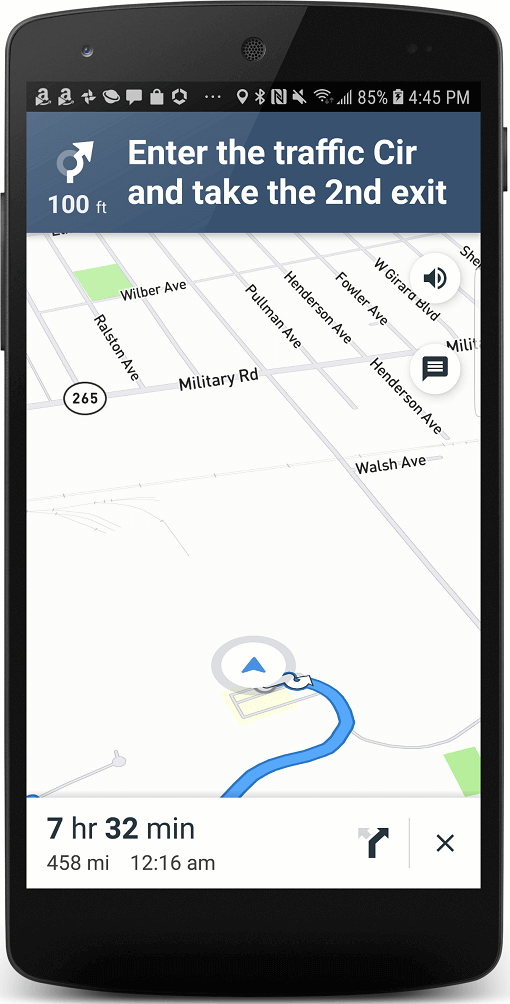
Screenshots
Navigation View Android View
iOS View Android View

Embedding Navigation View

Declare Controller
      MapBoxNavigationViewController _controller;
Add Navigation View to Widget Tree
            Container(
                color: Colors.grey,
                child: MapBoxNavigationView(
                    options: _options,
                    onRouteEvent: _onRouteEvent,
                    onCreated:
                        (MapBoxNavigationViewController controller) async {
                      _controller = controller;
                    }),
              ),
Build Route
        var wayPoints = List<WayPoint>();
                            wayPoints.add(_origin);
                            wayPoints.add(_stop1);
                            wayPoints.add(_stop2);
                            wayPoints.add(_stop3);
                            wayPoints.add(_stop4);
                            wayPoints.add(_origin);
                            _controller.buildRoute(wayPoints: wayPoints);
Start Navigation
    _controller.startNavigation();
Additional IOS Configuration

Add the following to your info.plist file

    <dict>
        ...
        <key>io.flutter.embedded_views_preview</key>
        <true/>
        ...
    </dict>
Embedding Navigation Screenshots
Navigation View Navigation View
Embedded iOS View Embedded Android View

To Do

  • [DONE] Android Implementation
  • [DONE] Add more settings like Navigation Mode (driving, walking, etc)
  • [DONE] Stream Events like relevant navigation notifications, metrics, current location, etc.
  • [DONE] Embeddable Navigation View
  • Offline Routing

カテゴリー

依存関係

依存関係一覧 2 件

ソースリポジトリ

このパッケージを使用しているプロジェクト

データはまだありません。