パッケージ、リポジトリ、アプリカテゴリを検索

パッケージ詳細v0.0.6

flutter_paginator

Flutter用のカスタマイズ可能なページネーションパッケージ。このパッケージを使用して、APIからページ単位でデータを取得および表示できます。

30日間ダウンロード
52
いいね数
27
Pub ポイント
40

パッケージをインストール

flutter pub add flutter_paginator

パッケージ概要

公開情報に基づく選定ガイドです。参考としてご利用ください。

Flutter用のカスタマイズ可能なページネーションパッケージで、APIからページ単位でデータを効率的に読み込み、表示できます。プルトゥリフレッシュとインフィニットスクロールのインタラクションをサポートしており、大規模なデータセットを持つリストベースのアプリに最適です。このパッケージは柔軟性を重視しており、UI、ローディングインジケーター、エラー状態をカスタマイズできます。非同期データ取得とシームレスに統合され、空の結果やネットワーク障害などのエッジケースも処理します。

用途

  • リストに大規模なデータセットを読み込む
  • 無限スクロールの実装
  • REST APIからデータを取得する
  • ページネーションされた検索結果を表示しています
  • ニュースやソーシャルメディアフィードの構築

主な機能

  • カスタマイズ可能な UI コンポーネント
  • プルトゥリフレッシュサポート
  • 無限スクロールの統合
  • エラーおよび空状態の処理
  • 設定可能なロードインジケーター

適している対象

  • 広範なデータリストを備えたアプリ
  • API駆動型コンテンツ表示
  • 遅延読み込みを必要とするユーザーインターフェース
  • 再利用可能なページネーションロジックを求める開発者
  • レスポンシブなページネーションUXを必要とするプロジェクト

注意事項

  • 手動でのAPIリクエスト処理が必要です
  • 制限された組み込みキャッシュ
  • 非常に高頻度の更新には最適化されていない
  • 外部の状態管理に依存する
  • 複雑なレイアウトには追加のスタイリングが必要になる場合があります

元の README

関連するソースリポジトリの README 原文のスナップショットです。最新の内容はリポジトリをご覧ください。

Flutter Paginator

pub package

A customizable pagination package for Flutter. This package can be used to fetch and display data from an API page by page.

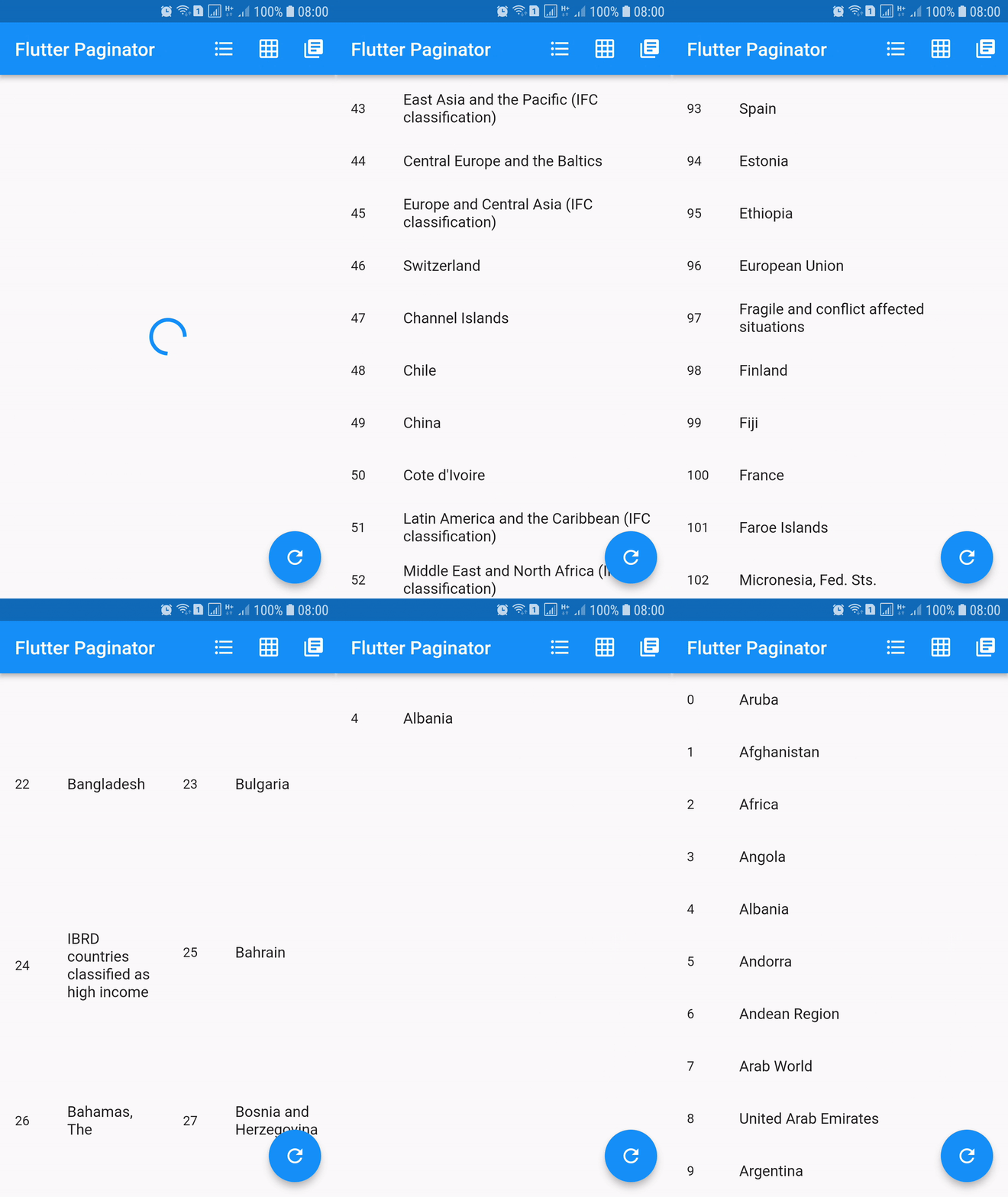
Screenshots

Installing

dependencies:
  flutter_paginator: ^0.0.6

Description

Paginator extends StatefulWidget has 3 constructors namely Paginator.listView, Paginator.gridView and Paginator.pageView. Paginator.listView, Paginator.gridView and Paginator.pageView are descendants of ListView, GridView and PageView. Paginator.listView, Paginator.gridView and Paginator.pageView got all the features of their ancestors and they are need to provide additional functions that are essential in doing their task.

PageLoadFuture
  • Loads the page asynchronously when the page number is given.
  • This should return an instance of a Future.
  • Called when the next page is needed to be loaded.
PageItemsGetter
  • This function should return list of page item data when page data is given.
  • This is called after successful completion of PageLoadFuture.
  • The page items returned by this method is added to the list of all the page items.
ListItemBuilder
  • Builds list item when item data and item index are given.
  • This should return an instance of a Widget.
LoadingWidgetBuilder
  • Builds loading widget.
  • This should return an instance of a Widget.
ErrorWidgetBuilder
  • Builds error widget when page data and error callback are given.
  • This should return an instance of a Widget.
EmptyListWidgetBuilder
  • Builds empty list widget.
  • This is displayed when the total number of list items is zero.
  • This should return an instance of a Widget.
TotalItemsGetter
  • This should return total number of list items when page data is given.
PageErrorChecker
  • This should return true if page has error else false, when page data is given.

Using

import 'dart:async';
import 'dart:convert';
import 'dart:io';

import 'package:flutter/material.dart';
import 'package:http/http.dart' as http;

import 'package:flutter_paginator/flutter_paginator.dart';
import 'package:flutter_paginator/enums.dart';

void main() => runApp(MyApp());

class MyApp extends StatelessWidget {
  @override
  Widget build(BuildContext context) {
    return MaterialApp(
      title: 'Flutter Paginator',
      home: HomePage(),
    );
  }
}

class HomePage extends StatefulWidget {
  @override
  State<StatefulWidget> createState() {
    return HomeState();
  }
}

class HomeState extends State<HomePage> {
  GlobalKey<PaginatorState> paginatorGlobalKey = GlobalKey();

  @override
  Widget build(BuildContext context) {
    return Scaffold(
      appBar: AppBar(
        title: Text('Flutter Paginator'),
        actions: <Widget>[
          IconButton(
            icon: Icon(Icons.format_list_bulleted),
            onPressed: () {
              paginatorGlobalKey.currentState
                  .changeState(listType: ListType.LIST_VIEW);
            },
          ),
          IconButton(
            icon: Icon(Icons.grid_on),
            onPressed: () {
              paginatorGlobalKey.currentState.changeState(
                listType: ListType.GRID_VIEW,
                gridDelegate: SliverGridDelegateWithFixedCrossAxisCount(
                    crossAxisCount: 2),
              );
            },
          ),
          IconButton(
            icon: Icon(Icons.library_books),
            onPressed: () {
              paginatorGlobalKey.currentState
                  .changeState(listType: ListType.PAGE_VIEW);
            },
          ),
        ],
      ),
      body: Paginator.listView(
        key: paginatorGlobalKey,
        pageLoadFuture: sendCountriesDataRequest,
        pageItemsGetter: listItemsGetter,
        listItemBuilder: listItemBuilder,
        loadingWidgetBuilder: loadingWidgetMaker,
        errorWidgetBuilder: errorWidgetMaker,
        emptyListWidgetBuilder: emptyListWidgetMaker,
        totalItemsGetter: totalPagesGetter,
        pageErrorChecker: pageErrorChecker,
        scrollPhysics: BouncingScrollPhysics(),
      ),
      floatingActionButton: FloatingActionButton(
        onPressed: () {
          paginatorGlobalKey.currentState.changeState(
              pageLoadFuture: sendCountriesDataRequest, resetState: true);
        },
        child: Icon(Icons.refresh),
      ),
    );
  }

  Future<CountriesData> sendCountriesDataRequest(int page) async {
    try {
      String url = Uri.encodeFull(
          'http://api.worldbank.org/v2/country?page=$page&format=json');
      http.Response response = await http.get(url);
      return CountriesData.fromResponse(response);
    } catch (e) {
      if (e is IOException) {
        return CountriesData.withError(
            'Please check your internet connection.');
      } else {
        print(e.toString());
        return CountriesData.withError('Something went wrong.');
      }
    }
  }

  List<dynamic> listItemsGetter(CountriesData countriesData) {
    List<String> list = [];
    countriesData.countries.forEach((value) {
      list.add(value['name']);
    });
    return list;
  }

  Widget listItemBuilder(value, int index) {
    return ListTile(
      leading: Text(index.toString()),
      title: Text(value),
    );
  }

  Widget loadingWidgetMaker() {
    return Container(
      alignment: Alignment.center,
      height: 160.0,
      child: CircularProgressIndicator(),
    );
  }

  Widget errorWidgetMaker(CountriesData countriesData, retryListener) {
    return Column(
      mainAxisAlignment: MainAxisAlignment.center,
      children: <Widget>[
        Padding(
          padding: const EdgeInsets.all(16.0),
          child: Text(countriesData.errorMessage),
        ),
        FlatButton(
          onPressed: retryListener,
          child: Text('Retry'),
        )
      ],
    );
  }

  Widget emptyListWidgetMaker(CountriesData countriesData) {
    return Center(
      child: Text('No countries in the list'),
    );
  }

  int totalPagesGetter(CountriesData countriesData) {
    return countriesData.total;
  }

  bool pageErrorChecker(CountriesData countriesData) {
    return countriesData.statusCode != 200;
  }
}

class CountriesData {
  List<dynamic> countries;
  int statusCode;
  String errorMessage;
  int total;
  int nItems;

  CountriesData.fromResponse(http.Response response) {
    this.statusCode = response.statusCode;
    List jsonData = json.decode(response.body);
    countries = jsonData[1];
    total = jsonData[0]['total'];
    nItems = countries.length;
  }

  CountriesData.withError(String errorMessage) {
    this.errorMessage = errorMessage;
  }
}

カテゴリー

ソースリポジトリ

このパッケージを使用しているプロジェクト

データはまだありません。