パッケージ、リポジトリ、アプリカテゴリを検索

flutter_persistent_keyboard_height のカバー
パッケージ詳細v1.0.5

flutter_persistent_keyboard_height

キーボードの高さを取得するためのFlutterパッケージ。正しい高さでステッカー/絵文字モーダルを表示するために使用できます。

AndroidiOS
30日間ダウンロード
52
いいね数
33
Pub ポイント
150

パッケージをインストール

flutter pub add flutter_persistent_keyboard_height

パッケージ概要

公開情報に基づく選定ガイドです。参考としてご利用ください。

スクリーンキーボードの高さを継続的に提供するFlutterパッケージで、正確なUI調整を可能にします。特に、スタンプや絵文字モーダルなどの要素をキーボードに対して位置合わせする場合に特に有用です。このパッケージはAndroidおよびiOSの両方のプラットフォームで動作し、一貫した挙動を保証します。キーボード状態の変化をリッスンし、ストリームを通じて現在の高さを公開するため、応答性のあるレイアウトへの統合が簡単です。

用途

  • キーボードが表示されたときにUIレイアウトを調整する
  • キーボードの上にモーダルを配置する
  • 入力中にコンテンツが表示されたままになることを確認する
  • 動的入力領域を備えたチャットインターフェースの作成
  • リアルタイムキーボード認識を活用したフォーム作成

主な機能

  • リアルタイムキーボード高さモニタリング
  • クロスプラットフォーム対応(Android および iOS)
  • リアクティブな更新のためのストリームベースのAPI
  • 最小限のセットアップとインテグレーション
  • アニメーション中でも正確な高さ検出が可能

適している対象

  • チャットアプリ開発者
  • フォームビルダー
  • キーボードの意識を必要とするUIコンポーネント
  • 入力中心のインターフェースを開発する開発者
  • キーボード近くのフローティングアクションボタンを備えたアプリ

注意事項

  • メモリリークを避けるために、ストリームの適切な破棄が必要です
  • スプリットキーボードのようなエッジケースに対応するための追加ロジックが必要になる可能性があります
  • 静的キーボード高さのシナリオには適していません
  • プラットフォーム固有のキーボードイベントに依存する
  • 複数のデバイスおよびOSバージョンでテストする必要があります

元の README

関連するソースリポジトリの README 原文のスナップショットです。最新の内容はリポジトリをご覧ください。

flutter_persistent_keyboard_height Pub version

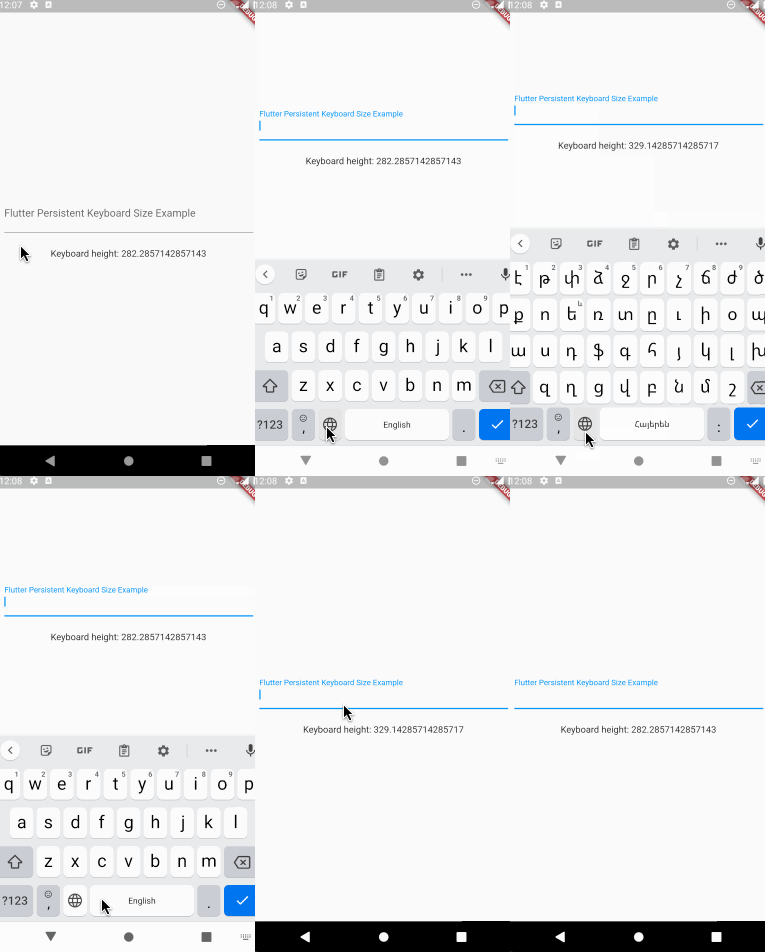
Flutter package to get keyboard height. The height is persisted during app sessions and keyboard states (you can use the height when keyboard is closed).

Usage

Registering the provider

First thing you need to do is wrap a widget from children of which you want to get the keyboard height with PersistentKeyboardHeightProvider. Add it to the builder of your app widget (perhaps MaterialApp) if you want to get keyboard height from all widgets.

class MyApp extends StatelessWidget {
  const MyApp({Key? key}) : super(key: key);

  @override
  Widget build(BuildContext context) {
    return MaterialApp(
      title: 'Flutter Persistent Keyboard Height Example',
      home: const FlutterPersistentKeyboardHeightExample(),
      builder: (context, child) => PersistentKeyboardHeightProvider(
        child: child!,
      ),
    );
  }
}
Getting the keyboard height

In order to get keyboard height use the PersistentKeyboardHeight inherited widget:

Widget build(BuildContext context) {
  final keyboardHeight = PersistentKeyboardHeight.of(context).keyboardHeight;

  return Scaffold(
    body: Column(
      mainAxisAlignment: MainAxisAlignment.center,
      children: [
        const Padding(
          padding: EdgeInsets.all(16.0),
          child: TextField(
            decoration: InputDecoration(
              labelText: 'Flutter Persistent Keyboard Size Example',
            ),
          ),
        ),
        const SizedBox(height: 8),
        Text('Keyboard height: $keyboardHeight'),
      ],
    ),
  );
}
Using a custom storage provider

By default, the package uses shared_preferences to preserve the keyboard height but if you want to use a custom solution for preserving the height you can do that by implementing the IPersistentKeyboardHeightStorageProvider interface and passing an instance of the class to PersistentKeyboardHeightProvider:

class CustomPersistentKeyboardHeightStorageProvider
    implements IPersistentKeyboardHeightStorageProvider {
  const CustomPersistentKeyboardHeightStorageProvider();

  @override
  Future<double> getHeight() {
    // read the height from storage
  }

  @override
  Future<void> setHeight(double height) {
    // save the height to storage
  }
}

class MyApp extends StatelessWidget {
  const MyApp({Key? key}) : super(key: key);

  @override
  Widget build(BuildContext context) {
    return MaterialApp(
      title: 'Flutter Persistent Keyboard Height Example',
      home: const FlutterPersistentKeyboardHeightExample(),
      builder: (context, child) => PersistentKeyboardHeightProvider(
        child: child!,
      ),
    );
  }
}

Check out the example directory for a complete example app.

The development process

The first version of this package was developed in two livestreams. Unfortunately, my voice disappeared at the middle of the first livestream but the second livestream is okay. In case you want to check them out, here are the links: Part 1, Part 2.

Thanks to

カテゴリー

依存関係

依存関係一覧 2 件

ソースリポジトリ

このパッケージを使用しているプロジェクト

データはまだありません。