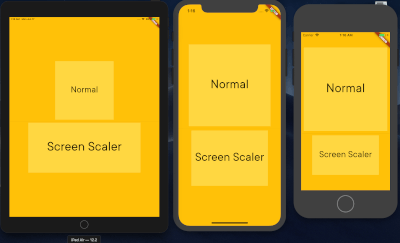
A Flutter package to effortlessly scale widget dimensions and font sizes based on screen percentages, now with convenient extension methods like 50.h, 30.w, and 16.sp.
This package helps you create responsive UIs that adapt to various screen sizes by simplifying the process of using screen-relative dimensions.
Static Initialization: Simple one-time setup with ScreenScaler.init(context).
Extension Methods: Intuitive syntax for scaling:
value.h: Percentage of screen height.
value.w: Percentage of screen width.
value.sp: Responsive font size, scales linearly with screen width.
Direct Percentage Scaling: getWidth() and getHeight() now provide straightforward percentage-based values.
Parent-Relative Scaling: Scale dimensions based on a percentage of an immediate parent widget's size using scaleWidthFrom(parentSize, percentage) and scaleHeightFrom(parentSize, percentage).
Utility Methods: Includes helpers for EdgeInsets (padding, margins) and BorderRadius.
Before using any screen-relative scaling methods or extension getters (.h, .w, .sp), you must initialize the ScreenScaler with a BuildContext. This is typically done once in your app, for example, in the build method of your main app widget or a root page.
@overrideWidgetbuild(BuildContext context) {
// Initialize the ScreenScalerScreenScaler.init(context);
returnMaterialApp(
// ... your app code
);
}
If ScreenScaler.init(context) is not called, a debug warning will be printed, and the scaler will operate with default (potentially incorrect) screen dimensions.
Usage Examples
Once initialized, you can use the extension methods or call methods on ScreenScaler.I.
1. Screen Percentage Scaling (Height and Width)
Use the .h and .w extension getters on any num (int or double) for concise scaling.
// In your widget's build method (after ScreenScaler.init has been called elsewhere)Container(
height: 50.h, // 50% of screen height
width: 80.w, // 80% of screen width
color: Colors.blue,
child: Center(child: Text('Scaled Container')),
);
2. Responsive Font Scaling
Use the .sp extension getter for font sizes that scale linearly with screen width.
Text(
  'Responsive Text',
  style: TextStyle(
    fontSize: 16.sp, // Font size 16, scaled for screen width
  ),
);
3. Direct Singleton Usage (Alternative)
You can also call methods directly on the ScreenScaler.I instance:
The package continues to provide utility methods for creating scaled EdgeInsets and BorderRadius values. These methods internally use the core screen scaling logic.
// Example using screen-relative scalingContainer(
padding: ScreenScaler.I.getPaddingAll(5.w), // Padding of 5% of screen width on all sides
margin: ScreenScaler.I.getMarginLTRB(2.w, 1.h, 2.w, 1.h),
decoration: BoxDecoration(
color: Colors.lightBlueAccent,
borderRadius: ScreenScaler.I.getBorderRadiusCircular(10.sp), // Radius scaled using .sp logic
),
child: Text('Styled Container'),
);
Note on getTextSize and getFullScreen
The methods getTextSize(percentage) (alias for getFullScreen(percentage)) are still available. However, please note that getFullScreen calculates its value using the formula (percentage / 100)^2 * (screenWidth + screenHeight). This results in a quadratic scaling for the percentage, which might not be intuitive for typical font size scaling. For standard linear font scaling, prefer using the .sp extension or ScreenScaler.I.getResponsiveFontSize().
Why Use This Package?
When developing Flutter applications, you often define widget sizes explicitly. While this works on your test device, these fixed sizes can lead to UI overflows or awkward layouts on devices with different screen dimensions.
flutter_screen_scaler solves this by allowing you to define sizes and font scales as percentages of the screen dimensions (or parent dimensions). This approach, similar to using percentages in web development, helps create UIs that are more adaptive and look consistent across a wider range of devices.
Example
Refer to the updated example/lib/main.dart for a comprehensive demonstration of the new API and features.