パッケージ、リポジトリ、アプリカテゴリを検索

パッケージ詳細v0.0.5

flutter_shine

Flutter Shine は、美しい影、動的な光の位置、非常にカスタマイズ可能な影、ライブラリ依存関係なし、コンテンツに基づいたテキストまたはボックスの影を提供するライブラリです。

30日間ダウンロード
49
いいね数
49
Pub ポイント
35

パッケージをインストール

flutter pub add flutter_shine

パッケージ概要

公開情報に基づく選定ガイドです。参考としてご利用ください。

Flutter Shine は、軽量で依存関係のないライブラリであり、Flutter アプリケーションで視覚的に魅力的かつダイナミックな影を実現します。コンテンツに応じて自動調整されるテキストおよびボックスの影をサポートし、リアルな照明効果を得られるように光源の位置をカスタマイズ可能です。シンプルさと柔軟性を重視して設計されており、外部ライブラリを必要とせず、繊細でアニメーション付きの影をUIに追加できます。深みとインタラクティビティが重要な現代的で洗練されたインターフェースに最適です。

用途

  • ボタンにダイナミックな影を作成する
  • 現実的な照明効果でテキストを強化する
  • インタラクティブなUI要素の設計
  • カードとコンテナに奥行きを加える
  • アニメーション化された視覚フィードバックの構築
  • 最小限のコードでアプリの美しさを向上させる

主な機能

  • 動的ライトポジショニング
  • カスタマイズ可能な影の強度と色
  • 外部の依存関係なし
  • テキストおよびボックスの影をサポート
  • コンテンツに応じたシャドウレンダリング
  • 軽量でパフォーマンスに優れる

適している対象

  • 視覚的な洗練を求めるUIデザイナー
  • 最小限のセットアップを希望する開発者
  • インタラクティブまたはアニメーション要素を備えたアプリ
  • モダンなマテリアルデザインに焦点を当てるプロジェクト
  • パフォーマンスとサイズを重視するチーム

注意事項

  • シャドウ効果のみに制限
  • 組み込みのアニメーションコントロールなし
  • 複雑な動作を実現するには手動での設定が必要です
  • 重い3Dエフェクトには適していません
  • シンプルで洗練されたUIレイアウトと併用するのが最適です

元の README

関連するソースリポジトリの README 原文のスナップショットです。最新の内容はリポジトリをご覧ください。

Image 1

Flutter Shine

Pub Build Status Awesome Flutter

Show some :heart: and star the repo to support the project

GitHub stars GitHub forks GitHub watchers GitHub followers
Twitter Follow

Flutter widget inspired by Shine

Installation

Add the Package

dependencies:
  flutter_shine: ^0.0.5

❔ Usage

Import this class
import 'package:flutter_shine/flutter_shine.dart';
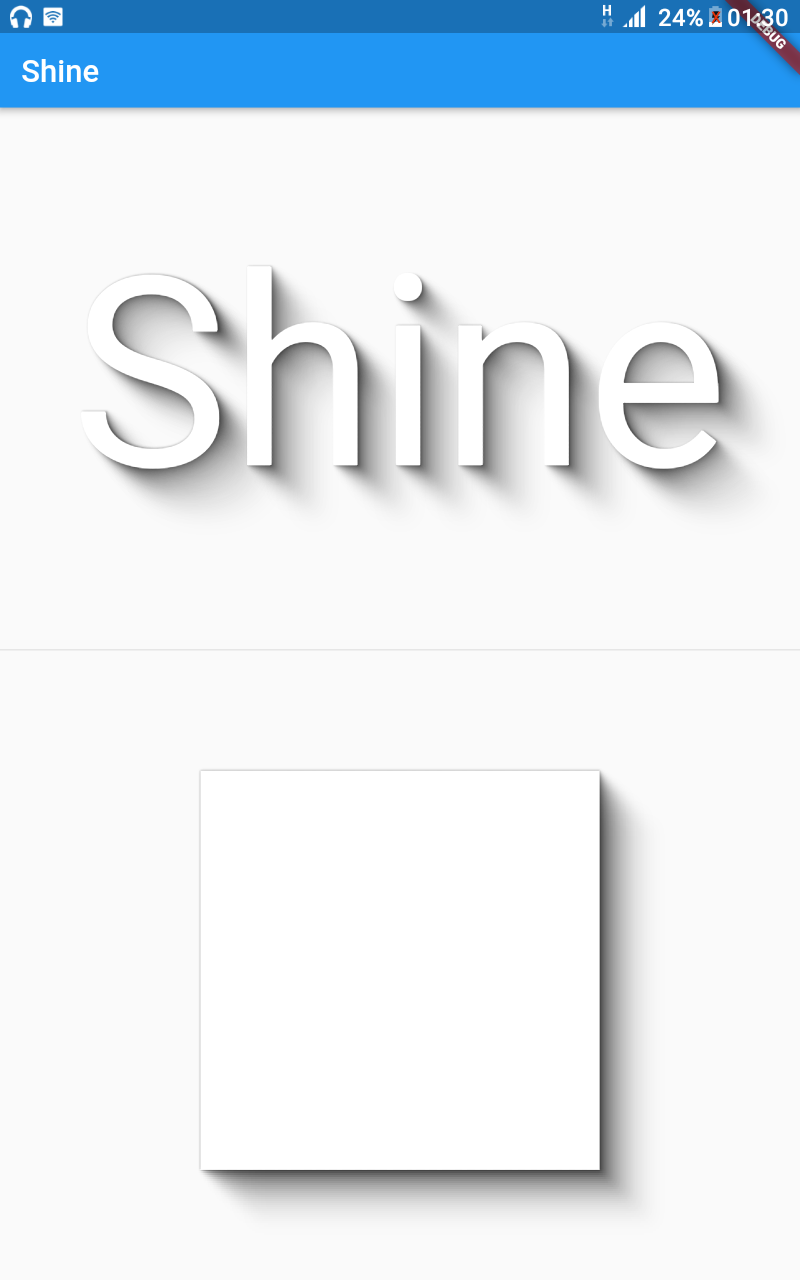
Flutter Shine

See how easy it is to create a shadow on text and on a container.

Exemple
FlutterShine(
    builder: (BuildContext context, ShineShadow shineShadow) {
        return Column(
            crossAxisAlignment: CrossAxisAlignment.center,
            mainAxisAlignment: MainAxisAlignment.spaceEvenly,
            mainAxisSize: MainAxisSize.max,
            children: <Widget>[
                Text(
                    "Shine",
                    style: TextStyle(
                        fontSize: 100,
                        color: Colors.white,
                        shadows: shineShadow.shadows),
                ),
                Divider(),
                Container(
                    width: 300,
                    height: 300,
                    decoration: BoxDecoration(
                        color: Colors.white, boxShadow: shineShadow.boxShadows),
                )
            ],
        );
    },
),

Extremely customizable shadow with a dynamic light positions.

You can customize follows values :

  • number of Steps : The density of the shadow
  • opacity : The opacity of the shadow
  • opacity Power : The opacity power
  • offset : The offset of the shadow
  • offset Power : The offset power
  • blur : The blur of the shadow
  • blur Power : The blur power
  • shadow Color : The color of the shadow
Exemple
FlutterShine(
    [config: Config(shadowColor: Colors.red[300]),]
    [light: Light(intensity: 1, position: Point(x, y)),]
    builder: (BuildContext context, ShineShadow shineShadow) {
        return Column(
            crossAxisAlignment: CrossAxisAlignment.center,
            mainAxisAlignment: MainAxisAlignment.spaceEvenly,
            mainAxisSize: MainAxisSize.max,
            children: <Widget>[
                Text(
                    "Shine",
                    style: TextStyle(
                        fontSize: 100,
                        color: Colors.white,
                        shadows: shineShadow.shadows),
                ),
                Divider(),
                Container(
                    width: 300,
                    height: 300,
                    decoration: BoxDecoration(
                        color: Colors.white, boxShadow: shineShadow.boxShadows),
                )
            ],
        );
    },
),

Examples

Web and command-line examples can be found in the example folder.

Web Examples

In order to run the web examples, please follow these steps:

  1. Clone this repo and enter the directory
  2. Run pub get
  3. Run pub run build_runner serve example
  4. Navigate to http://localhost:8080/web/ in your browser
Command Line Examples

In order to run the command line example, please follow these steps:

  1. Clone this repo and enter the directory
  2. Run pub get
  3. Run dart example/lib/main.dart
Flutter Example
Install Flutter

In order to run the flutter example, you must have Flutter installed. For installation instructions, view the online documentation.

Run the app
  1. Open up an Android Emulator, the iOS Simulator, or connect an appropriate mobile device for debugging.
  2. Open up a terminal
  3. cd into the example/lib/ directory
  4. Run flutter doctor to ensure you have all Flutter dependencies working.
  5. Run flutter packages get
  6. Run flutter run

Stargazers over time

Stargazers over time

License

MIT License

Copyright (c) 2020 Jonathan Monga

Permission is hereby granted, free of charge, to any person obtaining a copy
of this software and associated documentation files (the "Software"), to deal
in the Software without restriction, including without limitation the rights
to use, copy, modify, merge, publish, distribute, sublicense, and/or sell
copies of the Software, and to permit persons to whom the Software is
furnished to do so, subject to the following conditions:

The above copyright notice and this permission notice shall be included in all
copies or substantial portions of the Software.

THE SOFTWARE IS PROVIDED "AS IS", WITHOUT WARRANTY OF ANY KIND, EXPRESS OR
IMPLIED, INCLUDING BUT NOT LIMITED TO THE WARRANTIES OF MERCHANTABILITY,
FITNESS FOR A PARTICULAR PURPOSE AND NONINFRINGEMENT. IN NO EVENT SHALL THE
AUTHORS OR COPYRIGHT HOLDERS BE LIABLE FOR ANY CLAIM, DAMAGES OR OTHER
LIABILITY, WHETHER IN AN ACTION OF CONTRACT, TORT OR OTHERWISE, ARISING FROM,
OUT OF OR IN CONNECTION WITH THE SOFTWARE OR THE USE OR OTHER DEALINGS IN THE
SOFTWARE.


カテゴリー

ソースリポジトリ

このパッケージを使用しているプロジェクト

データはまだありません。