パッケージ、リポジトリ、アプリカテゴリを検索

flutter_stripe_payment のカバー
パッケージ詳細v0.0.18

flutter_stripe_payment

Strong SCA 3DS準拠のPayment Intentsを使用して、FlutterアプリにStripeを追加し、カード決済を受け入れます。

AndroidiOS
30日間ダウンロード
85
いいね数
57
Pub ポイント
125

パッケージをインストール

flutter pub add flutter_stripe_payment

パッケージ概要

公開情報に基づく選定ガイドです。参考としてご利用ください。

flutter_stripe_payment は、モバイルアプリケーションに Stripe の決済処理をスムーズに統合できる Flutter パッケージです。Payment Intents を通じたカード決済をサポートしており、強力な顧客認証(SCA)および 3D セキュア(3DS)要件への準拠を保証しています。Android および iOS 向けに設計されており、トークン化とリアルタイムの支払い確認を内蔵したサポートにより、安全な取引処理を簡素化しています。開発者は、機密カードデータを直接管理することなく、堅牢で PCI 対応の決済フローを実装できます。SDK は複雑な認証フローを処理し、高いセキュリティ基準を維持しながらチェックアウト成功率を向上させます。

用途

  • アプリ内購入
  • 電子商取引チェックアウト
  • サブスクリプション課金
  • デジタルサービスの支払い
  • オンライン寄付

主な機能

  • SCAおよび3DS準拠
  • 支払い意図のサポート
  • セキュアなカードトークン化
  • リアルタイム決済確認
  • クロスプラットフォーム(Android & iOS)

適している対象

  • モバイルECアプリ
  • サブスクリプションベースのサービス
  • 安全な支払いを必要とするアプリ
  • Stripe を使用する開発者
  • SCA準拠を必要とするプロジェクト

注意事項

  • Stripeアカウントの設定が必要です
  • 支払いインテントの作成にはバックエンドが必要です
  • Stripe の決済方法に限定
  • ネットワーク接続に依存する
  • テスト環境用に追加の構成が必要になる場合があります

元の README

関連するソースリポジトリの README 原文のスナップショットです。最新の内容はリポジトリをご覧ください。

flutter_stripe_payment

Add Stripe to your Flutter Application to Accept Card Payments using Payment Intents and the Latest SCA Compliance 3DS Requirements

Getting Started

Strong Customer Authentication (SCA), a new rule coming into effect on September 14, 2019, as part of PSD2 regulation in Europe, will require changes to how your European customers authenticate online payments. Card payments will require a different user experience, namely 3D Secure, in order to meet SCA requirements. Transactions that don’t follow the new authentication guidelines may be declined by your customers’ banks.

The Payment Intents API is a new way to build dynamic payment flows. It tracks the lifecycle of a customer checkout flow and triggers additional authentication steps when required by regulatory mandates, custom Radar fraud rules, or redirect-based payment methods.

Initialize

final _stripePayment = FlutterStripePayment();
_stripePayment.onCancel = (){
  print("User Cancelled the Payment Method Form");
};

Setup Stripe Environment


_stripePayment.setStripeSettings(
        appConfig.values.stripePublishableKey,
        appConfig.values.applePayMerchantId);

Show Payment Form

var paymentResponse = await _stripePayment.addPaymentMethod();
if(paymentResponse.status == PaymentResponseStatus.succeeded)
  {
    print(paymentResponse.paymentMethodId);
  }

Create Payment Intent On Server

var intent = PaymentIntent();
    intent.amount = widget.order.cart.total;
    intent.isManual = true;
    intent.isConfirmed = false;
    intent.paymentMethodId = paymentResponse.paymentMethodId;
    intent.currency = "usd";
    intent.isOnSession = true;
    intent.isSuccessful = false;
    intent.statementDescriptor = "Dorm Mom, Inc";
    var response = await widget.clientDataStore.createPaymentIntent(intent);

Confirm Payment Intent to Kick Off 3D Authentication

var intentResponse = await _stripePayment.confirmPaymentIntent(
          response.clientSecret, paymentResponse.paymentMethodId, widget.order.cart.total);

      if (intentResponse.status == PaymentResponseStatus.succeeded) {
        widget.order.paymentIntentId = intentResponse.paymentIntentId;
        widget.order.paymentMethodId = paymentResponse.paymentMethodId;
        _submitOrder();
      } else if (intentResponse.status == PaymentResponseStatus.failed) {
        setState(() {
          hideBusy();
        });
        globals.Utility.showAlertPopup(
            context, "Error Occurred", intentResponse.errorMessage);
      } else {
        setState(() {
          hideBusy();
        });
      }

Setup Payment Intent For Future Payments

var intentResponse = await _stripePayment.setupPaymentIntent(
        response.clientSecret, paymentResponse.paymentMethodId);

    if (intentResponse.status == PaymentResponseStatus.succeeded) {
      await _addCardToAccount(paymentResponse.paymentMethodId);
    } else if (intentResponse.status == PaymentResponseStatus.failed) {
      setState(() {
        hideBusy();
      });
      globals.Utility.showAlertPopup(
          context, "Error Occurred", intentResponse.errorMessage);
    } else {
      setState(() {
        hideBusy();
      });
    }

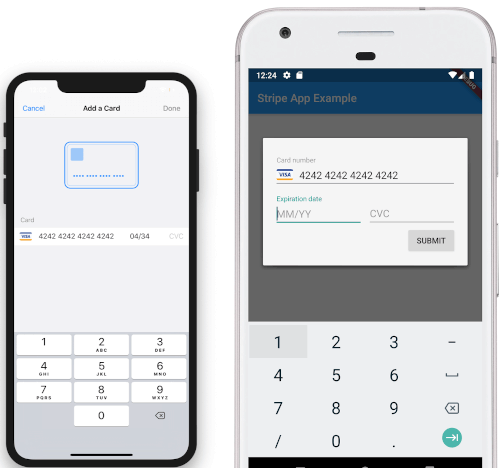
Screenshots

iOS View Android View

To Do

  • [DONE]Android Implementation
  • STPaymentCardTextField Inline Embedding

カテゴリー

ソースリポジトリ

このパッケージを使用しているプロジェクト

データはまだありません。