パッケージ、リポジトリ、アプリカテゴリを検索

footer のカバー
パッケージ詳細v0.0.4

footer

AndroidおよびiOSアプリ用のカスタマイズ可能なフッターを作成するための新しいFlutterパッケージです。

AndroidiOSWebmacOSWindowsLinux
30日間ダウンロード
1910
いいね数
35
Pub ポイント
140

パッケージをインストール

flutter pub add footer

パッケージ概要

公開情報に基づく選定ガイドです。参考としてご利用ください。

footer パッケージは、Android、iOS、Web、macOS、Windows、Linux アプリ向けに一貫性があり応答性のあるフッターを作成するためのカスタマイズ可能な Flutter ソリューションです。組み込みのスタイル、アニメーション、レイアウトの柔軟性により、ボトムナビゲーションやコンテンツセクションの実装を簡素化します。ボイラープレートコードを書かずに統一されたフッター体験を得たい開発者向けに設計されており、動的なコンテンツと適応型デザインをサポートしています。このパッケージは pub.dev を通じて既存の Flutter プロジェクトにスムーズに統合できます。

用途

  • 一貫した下部ナビゲーションバーを追加する
  • 動的コンテンツを使用したカスタムアプリフッターの作成
  • 複数のプラットフォームでレスポンシブレイアウトを実装する
  • インタラクティブなボトムパネルのデザイン
  • 再利用可能なフッター コンポーネントの構築
  • デバイス間でのUIの一貫性の向上

主な機能

  • クロスプラットフォーム互換性
  • カスタマイズ可能な外観と動作
  • 組み込みのアニメーションとトランジション
  • 動的コンテンツのサポート
  • Flutter プロジェクトへの簡単な統合
  • すべての画面サイズに対応するレスポンシブデザイン

適している対象

  • マルチプラットフォームアプリを構築するFlutter開発者
  • 複数のデバイスにわたって一貫したUIを必要とするチーム
  • フッターのボイラープレートを減らしたい開発者
  • Flutterプロジェクトで協働するUI/UXデザイナー
  • 調整可能な下部パネルを必要とするプロジェクト

注意事項

  • 複雑なレイアウトには追加のスタイル設定が必要になる場合があります
  • 基本的な使用法以外のドキュメントは限られている
  • 重いアニメーションによるパフォーマンスへの潜在的影響
  • フッターコンテンツ内の非常に大きなデータセットに対して最適化されていない
  • Flutterのバージョン互換性に依存しています

元の README

関連するソースリポジトリの README 原文のスナップショットです。最新の内容はリポジトリをご覧ください。

Flutter Footer Widget

The released package here on pubstore A new Flutter package which helps developers in creating Customisable Footer for both Android and IOS Apps.

Show some :heart: and :star: the repo to support the project

Support my work and fuel the next open source project! 🙌 ☕ Buy Me a Coffee: https://buymeacoffee.com/stackdev.io

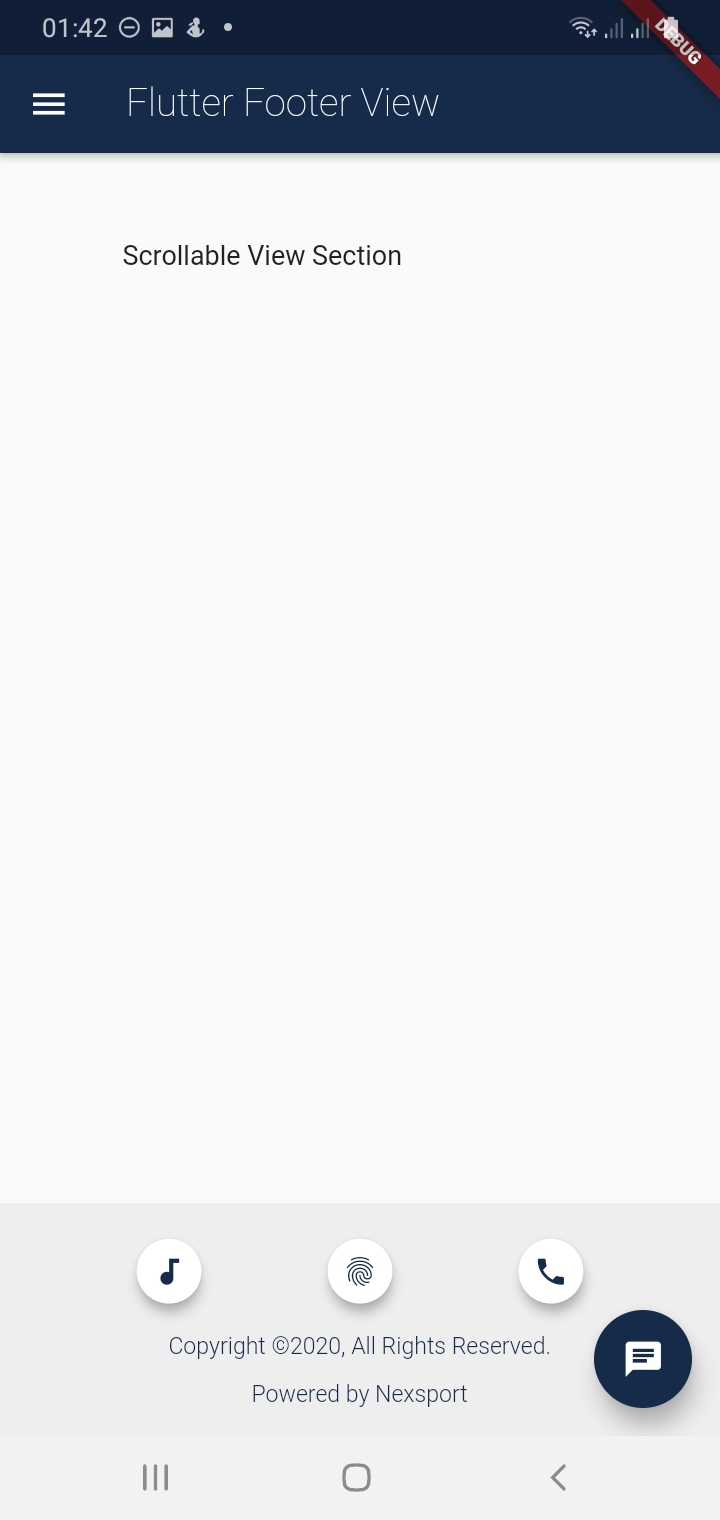
Screenshots

Getting Started

Usage

Example

To use this package :

    dependencies:
     flutter:
       sdk:flutter
     footer:
How to Use

The flutter footer uses a component called FooterView. The FooterView Component takes three arguments which are as follows:

    1. children : this is a Scrollable List of Widgets
    1. footer : Takes a Footer Component that takes a Customizable Widget e.g a Container Widget
    1. flex : This takes an interger from 1-10. This flex the footer space of the screen with 2 being the default.
  • NB: The children and footer parameters are mandatory. See Example

FooterView(
  children: <Widget>[
    ...                      //this is a Scrollable List of Widgets
  ],
  footer : Footer(           //this takes the Footer Component which has 4 arguments with one being mandatory ie the child
    child:  Container(),     //This take a Cusstomisable Widget eg Container, Column e.t.c
    ...                      //See Description Below for the other arguments of the Footer Component
  ),
  flex: 2                    //this take an interger that ranges from 1-10 with 2 being the default for the Footer Area
)

The Footer Component takes four arguments with one being Mandatory ie child Widget ,see Fig below.

Footer(
  child: Container(),  //The child Widget is mandatory takes any Customisable Widget for the footer
  backgroundColor : Colors.grey.shade200  // defines the background Colors of the Footer with default Colors.grey.shade200
  padding: EdgeInsets.all(5.0),// Takes EdgeInsetsGeometry with default being EdgeInsets.all(5.0)
  alignment: Alignment.bottomCenter //this is of type Aligment with default being Alignment.bottomCenter
)

Imports

After installing the footer package remember the imports

import 'package:footer/footer.dart';
import 'package:footer/footer_view.dart';

Simple Example

In this Example i will show you how you can simply use the FooterView Widget inside a Scaffold body.

  • Note that when the children list is not overflowing the Footer will be fixed right at the bottom of the Page.
  • If there is overflow the whole page will become scrollable and the footer wont be fixed . See gif image below.
import 'package:footer/footer.dart';
import 'package:footer/footer_view.dart';


@override
  Widget build(BuildContext context) {
    return Scaffold(
      appBar:AppBar(
        title: new Text('Footer View Example')
      ),
      body: new FooterView(
        children:<Widget>[
          new Padding(
            padding: new EdgeInsets.only(top:200.0),
            child: Center(
              child: new Text('Scrollable View'),
            ),
          ),
        ],
        footer: new Footer(
          child: Text('I am a Customizable footer!!'),
          padding: EdgeInsets.all(10.0),
        ),
        flex: 1, //default flex is 2
      ),
    );
  }

Below is a Full Example

import 'package:flutter/material.dart';
import 'package:footer/footer.dart';
import 'package:footer/footer_view.dart';
void main() {
  runApp(MyApp());
}

class MyApp extends StatelessWidget {
  // This widget is the root of your application.
  static Map<int, Color> color = {
    50:Color.fromRGBO(4, 131, 184, .1),
    100:Color.fromRGBO(4, 131, 184, .2),
    200:Color.fromRGBO(4, 131, 184, .3),
    300:Color.fromRGBO(4, 131, 184, .4),
    400:Color.fromRGBO(4, 131, 184, .5),
    500:Color.fromRGBO(4, 131, 184, .6),
    600:Color.fromRGBO(4, 131, 184, .7),
    700:Color.fromRGBO(4, 131, 184, .8),
    800:Color.fromRGBO(4, 131, 184, .9),
    900:Color.fromRGBO(4, 131, 184, 1),
  };
  //MaterialColor myColor = MaterialColor(0xFF162A49, color);
  
  @override
  Widget build(BuildContext context) {
    return MaterialApp(
      title: 'Flutter Footer',
      theme: ThemeData(
        primarySwatch: MaterialColor(0xFF162A49, color),
        visualDensity: VisualDensity.adaptivePlatformDensity,
      ),
      home: FooterPage(),
    );
  }
}

class FooterPage extends StatefulWidget {
  @override
  FooterPageState createState() {
    return new FooterPageState();
  }
}

class FooterPageState extends State<FooterPage> {

  @override
  Widget build(BuildContext context) {
    return Scaffold(
      appBar: AppBar(
        title: new  Text('Flutter Footer View',style: TextStyle(fontWeight:FontWeight.w200),)
      ),
      drawer: new Drawer(),
      body: FooterView(
          children: <Widget>[
            new Column(
              crossAxisAlignment: CrossAxisAlignment.start,
              children: <Widget>[
                new Padding(
                  padding: EdgeInsets.only(top:50,left: 70),
                    child: new Text('Scrollable View Section'),
                )
              ],
            ),
          ],
          footer: new Footer(
              child: new Column(
                crossAxisAlignment: CrossAxisAlignment.center,
                mainAxisAlignment: MainAxisAlignment.spaceAround,
                children:<Widget>[
                  new Center(
                    child:new Row(
                      mainAxisAlignment: MainAxisAlignment.spaceEvenly,
                      children: <Widget>[
                        new Container(
                          height: 45.0,
                          width: 45.0,
                          child: Center(
                            child:Card(
                              elevation: 5.0,
                              shape: RoundedRectangleBorder(
                                borderRadius: BorderRadius.circular(25.0), // half of height and width of Image
                              ),
                              child: IconButton(
                                icon: new Icon(Icons.audiotrack,size: 20.0,),
                                color: Color(0xFF162A49),
                                onPressed: () {},
                              ),
                            ),
                          )
                        ),
                        new Container(
                          height: 45.0,
                          width: 45.0,
                          child: Center(
                            child:Card(
                              elevation: 5.0,
                              shape: RoundedRectangleBorder(
                                borderRadius: BorderRadius.circular(25.0), // half of height and width of Image
                              ),
                              child: IconButton(
                                icon: new Icon(Icons.fingerprint,size: 20.0,),
                                color: Color(0xFF162A49),
                                onPressed: () {},
                              ),
                            ),
                          )
                        ),
                        new Container(
                          height: 45.0,
                          width: 45.0,
                          child: Center(
                            child:Card(
                              elevation: 5.0,
                              shape: RoundedRectangleBorder(
                                borderRadius: BorderRadius.circular(25.0), // half of height and width of Image
                              ),
                              child: IconButton(
                                icon: new Icon(Icons.call,size: 20.0,),
                                color: Color(0xFF162A49),
                                onPressed: () {},
                              ),
                            ),
                          )
                        ),
                      ],
                    ),
                  ),

                  Text('Copyright ©2020, All Rights Reserved.',style: TextStyle(fontWeight:FontWeight.w300, fontSize: 12.0, color: Color(0xFF162A49)),),
                  Text('Powered by Nexsport',style: TextStyle(fontWeight:FontWeight.w300, fontSize: 12.0,color: Color(0xFF162A49)),),
                ]
              ),
              padding: EdgeInsets.all(5.0),
            
          )
      ),
      floatingActionButton: new FloatingActionButton(
              elevation: 10.0,
              child: new Icon(Icons.chat),
              backgroundColor: Color(0xFF162A49),
              onPressed: (){
              }
      ),
    );
  }
}

Scrollable FooterView

Pull Requests

I Welcome and i encourage all Pull Requests

Created and Maintained by

  • Author: Tafadzwa Lameck Nyamukapa :
  • Email: [tafadzwalnyamukapa@gmail.com]
  • Open for any colleboration and Remote Work!!
  • Happy Fluttering!!
License
MIT License

Copyright (c) 2020 Tafadzwa Lameck Nyamukapa

Permission is hereby granted, free of charge, to any person obtaining a copy
of this software and associated documentation files (the "Software"), to deal
in the Software without restriction, including without limitation the rights
to use, copy, modify, merge, publish, distribute, sublicense, and/or sell
copies of the Software, and to permit persons to whom the Software is
furnished to do so, subject to the following conditions:

The above copyright notice and this permission notice shall be included in all
copies or substantial portions of the Software.

THE SOFTWARE IS PROVIDED "AS IS", WITHOUT WARRANTY OF ANY KIND, EXPRESS OR
IMPLIED, INCLUDING BUT NOT LIMITED TO THE WARRANTIES OF MERCHANTABILITY,
FITNESS FOR A PARTICULAR PURPOSE AND NONINFRINGEMENT. IN NO EVENT SHALL THE
AUTHORS OR COPYRIGHT HOLDERS BE LIABLE FOR ANY CLAIM, DAMAGES OR OTHER
LIABILITY, WHETHER IN AN ACTION OF CONTRACT, TORT OR OTHERWISE, ARISING FROM,
OUT OF OR IN CONNECTION WITH THE SOFTWARE OR THE USE OR OTHER DEALINGS IN THE
SOFTWARE.


This project is a starting point for a Dart package, a library module containing code that can be shared easily across multiple Flutter or Dart projects.

カテゴリー

ソースリポジトリ

このパッケージを使用しているプロジェクト

データはまだありません。