パッケージ、リポジトリ、アプリカテゴリを検索

gender_picker のカバー
パッケージ詳細v1.1.0

gender_picker

水平または垂直の方法で性別を選択するための非常に優れた反応性のあるライブラリ

AndroidiOSWebmacOSWindowsLinux
30日間ダウンロード
120
いいね数
42
Pub ポイント
140

パッケージをインストール

flutter pub add gender_picker

パッケージ概要

公開情報に基づく選定ガイドです。参考としてご利用ください。

水平および垂直レイアウトをサポートする、性別を選択するための反応型Flutterライブラリです。ユーザーが性別オプションを選択できる直感的でカスタマイズ可能なインターフェースを提供し、プロフィール設定やユーザー登録フローに最適です。軽量で簡単に統合できるように設計されており、プラットフォーム間でスムーズなUIフィードバックとレスポンシブデザインを提供します。Android、iOS、Web、macOS、Windows、Linuxでスムーズに動作します。

用途

  • ユーザープロフィールの作成
  • 登録フォーム
  • 個人設定
  • チャットアプリユーザー詳細
  • 性別選択を必要とするフォーム入力

主な機能

  • 水平および垂直レイアウトのオプション
  • リアクティブUIの更新
  • クロスプラットフォーム互換性
  • カスタマイズ可能な外観
  • Flutter とのシンプルな統合
  • レスポンシブデザイン

適している対象

  • ユーザープロファイルを構築するアプリ開発者
  • 性別入力が必要なフォーム
  • クロスプラットフォームのFlutterアプリ
  • UI中心のアプリケーション
  • ミニマリストフォームコンポーネント

注意事項

  • 性別の選択のみに制限されています
  • 組み込みの検証なし
  • 選択された値の手動処理が必要です
  • 複雑なフォームには適していません
  • 大規模なアプリで使用される場合、外部の状態管理に依存します

元の README

関連するソースリポジトリの README 原文のスナップショットです。最新の内容はリポジトリをご覧ください。

gender_picker 1.1.0

An awesome gender picker widget comes with latest feature to support in your project design.

The goal of this project is to provide an ultimate widget for selecting the gender.

The source code is 100% Dart, and everything resides in the /lib folder.

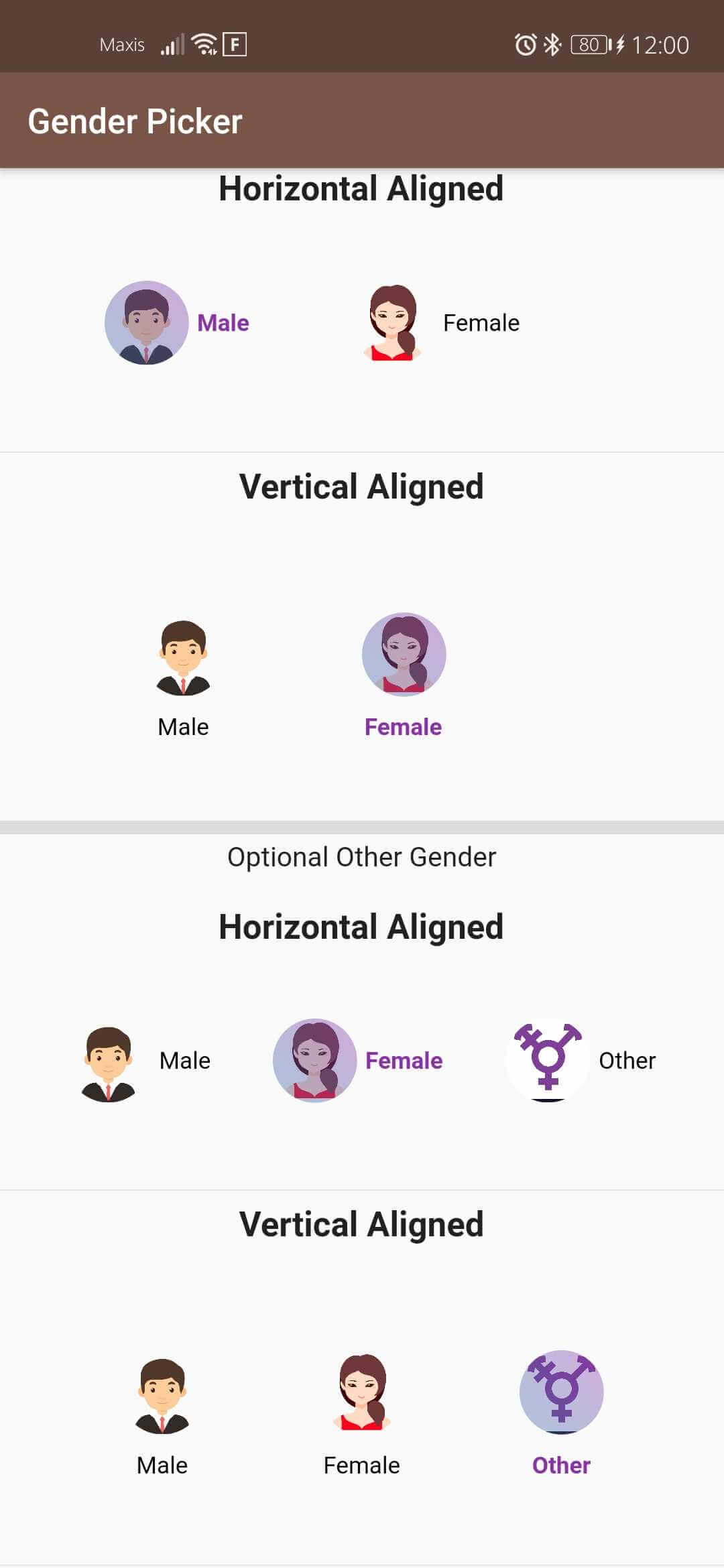
Screenshot_20200314_120050_com mateen example

Installing

Add this to your package's pubspec.yaml file:

dependencies: gender_picker: ^1.1.0

Sample Usage

import 'package:gender_picker/source/enums.dart';
import 'package:gender_picker/source/gender_picker.dart';
GenderPickerWithImage(
              showOtherGender: true,
              verticalAlignedText: false,
              selectedGender: Gender.Male,
              selectedGenderTextStyle: TextStyle(
                  color: Color(0xFF8b32a8), fontWeight: FontWeight.bold),
              unSelectedGenderTextStyle: TextStyle(
                  color: Colors.white, fontWeight: FontWeight.normal),
              onChanged: (Gender gender) {
                print(gender);
              },
              equallyAligned: true,
              animationDuration: Duration(milliseconds: 300),
              isCircular: true,
              // default : true,
              opacityOfGradient: 0.4,
              padding: const EdgeInsets.all(3),
              size: 50, //default : 40
            )

This project is a starting point for a Dart package, a library module containing code that can be shared easily across multiple Flutter or Dart projects.

For help getting started with Flutter, view our online documentation, which offers tutorials, samples, guidance on mobile development, and a full API reference.

カテゴリー

ソースリポジトリ

このパッケージを使用しているプロジェクト

データはまだありません。