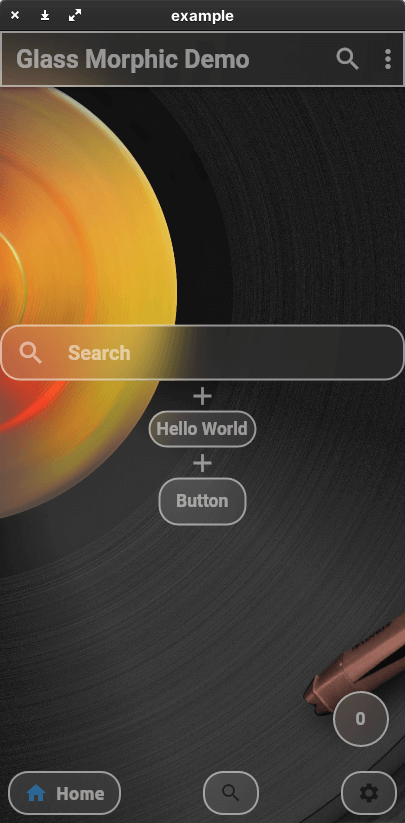
This package allows you to easily create a Glassmorphism UI.
The AppBar, ListTile, and even the BottomNavigationBar work like Material Design widgets.
The color, shape, and size of the glass are all up to you.
Create your ideal Glassmorphism App!
This package currently supports only stable channel.
Getting started
You should add the following to the pubspec.yaml file:
dependencies:glassmorphism_widgets:
You should then run flutter packages get in your terminal so as to get the package.
Here is an example of how to use Glassmorphism Widgets.
Many of the parameters are based on the original Material Design widget.
If you want to know glass specific parameter.
You should look here.
You should add parameter radius or borderRadius.
borderRadius takes precedence over radius.
I want to create more clear glass or more frosted glass
You should add parameter blur.
If you set blur lower value. GlassWidgets will become clear.
Problem
Master Channel cannot use GlassFloatingActionButton.
Contact
If you have anything you want to inform me (@yama-yeah), such as suggestions to enhance this package or functionalities you want etc, feel free to make issues on GitHub