パッケージ、リポジトリ、アプリカテゴリを検索

hashtagable のカバー
パッケージ詳細v2.3.0+1

hashtagable

ハッシュタグ付きテキストを実装するためのウィジェットと関数。Twitterのように、`#` で始まる単語を飾ります。

30日間ダウンロード
151
いいね数
136
Pub ポイント
70

パッケージをインストール

flutter pub add hashtagable

パッケージ概要

公開情報に基づく選定ガイドです。参考としてご利用ください。

Twitterのスタイルに似たハッシュタグ装飾テキストの作成を可能にするFlutterパッケージです。'#'記号で始まる単語を自動的に検出し、スタイルを適用するためのウィジェットとユーティリティ関数を提供し、ソーシャルメディア風のテキスト表示を強化します。ユーザー生成コンテンツにインタラクティブまたは視覚的に際立ったハッシュタグが必要なアプリに最適です。シンプルなコマンドで簡単に統合でき、GitHub上でオープンソースでホスティングされています。現在、プラットフォーム固有の制限は一切ありませんが、高度なスタイリングには追加のカスタマイズが必要になる場合があります。

用途

  • ソーシャルメディアアプリフィード
  • ユーザーのコメントセクション
  • ハッシュタグトラッキングインターフェース
  • インタラクティブなテキスト入力フィールド
  • コンテンツタグ付けシステム

主な機能

  • 自動ハッシュタグ検出
  • Twitter風のハッシュタグスタイル
  • カスタマイズ可能な装飾オプション
  • pubを介したシンプルなインテグレーション
  • オープンソースコードベース

適している対象

  • ソーシャルプラットフォームを構築する開発者
  • ユーザー生成コンテンツを含むアプリ
  • メタデータ強調付きのテキストレンダリング
  • 視覚的なハッシュタグの区別を必要とするUI
  • 軽量テキスト装飾を使用するプロジェクト

注意事項

  • 基本的なハッシュタグスタイルに限定
  • タップで組み込みナビゲーションなし
  • エッジケースのカスタム処理が必要になる可能性があります
  • 外部のGitHubリポジトリに依存しています
  • ソースコード以外の公式ドキュメントはありません

元の README

関連するソースリポジトリの README 原文のスナップショットです。最新の内容はリポジトリをご覧ください。

All Contributors

hashtagable

test pub package License: MIT

Widgets and functions to implement hashTag decorated text.

Detects the words start with # like a Twitter.

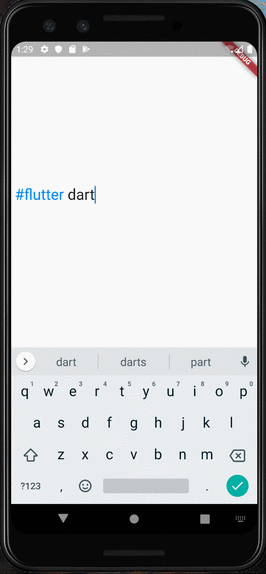
RPReplay_Final1599932903

Usage

  • As TextField

You can use HashTagTextField to decorate input text.

    HashTagTextField(
    decoratedStyle: TextStyle(fontSize: 14, color: Colors.blue),
    basicStyle: TextStyle(fontSize: 14, color: Colors.black),
    ),

decoratedStyle is the textStyle of tagged text. basicStyle is for untagged text.

Other arguments are basically same as those of material TextField

  • As ReadOnlyText

If you want to decorate the text only to display, HashTagText will help you.

    HashTagText(
        text: "#Welcome to #hashtagable \n This is #ReadOnlyText",
        decoratedStyle: TextStyle(fontSize: 22,color:Colors.red),
        basicStyle: TextStyle(fontSize: 22,color:Colors.black),
        onTap: (text) {
          print(text);
        },
    )

The argument onTap(String) is called when user tapped a hashTag.

You can add some actions in this callback with the tapped hashTag.

Customize with useful functions

  • Check if the text has hashTags
   print(hasHashtags("Hello #World")); 
   // true
   
   print(hasHashtags("Hello World"));
   // false
   
  • Extract hashTags from text
   final List<String> hashTags = extractHashTags("#Hello World #Flutter Dart #Thank you");
   // ["#Hello", "#Flutter", "#Thank"]

Tips

  • DetectableTextField is published as a refinement of this package. hashtagale forces you to use hashtag, but this one allows you to detect anything you want.

  • If you also want to decorate At sign, you can do that by adding the argument decorateAtSign: true.

    HashTagText(
        text: "#Hello World @flutter_developers",
        decoratedStyle: TextStyle(fontSize: 14,color:Colors.red),
        basicStyle: TextStyle(fontSize: 14,color:Colors.black),
        onTap: (text) {
          print(text);
        },
        decorateAtSign: true,
    )

Then HashTagText and HashtagTextField come to decorate the words start with # or @.

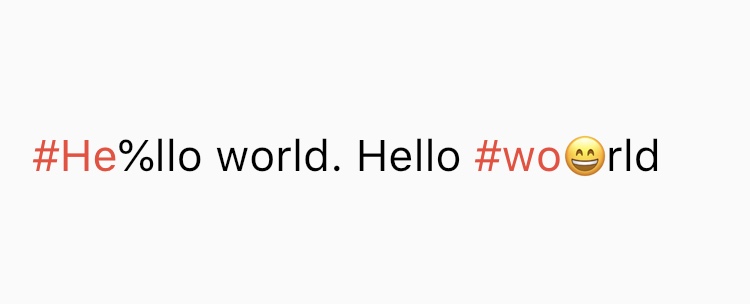
  • The decoration rules are almost same as twitter. It does not decorate the tags which contain emoji or symbol. It needs space before # (or @) to decorate.
  • Supported Languages are English, Japanese, Korean, Spanish, Arabic, Thai, Norwegian and German.

If you have any requests or questions, please feel free to ask on github.


Contributors: Santa Takahashi, Matheus Perez, Marcel Schneider, Ho Kim, Burak

Contributors ✨

Thanks goes to these wonderful people (emoji key):

JorisObert
JorisObert

💻

This project follows the all-contributors specification. Contributions of any kind welcome!

カテゴリー

ソースリポジトリ

このパッケージを使用しているプロジェクト

データはまだありません。