パッケージ、リポジトリ、アプリカテゴリを検索

パッケージ詳細v1.8.0

highlight_text

このパッケージを使用すると、単語を強調表示し、特定のスタイルとアクションを作成できます。

AndroidiOSWebmacOSWindowsLinux
30日間ダウンロード
1.1万
いいね数
133
Pub ポイント
150

パッケージをインストール

flutter pub add highlight_text

パッケージ概要

公開情報に基づく選定ガイドです。参考としてご利用ください。

highlight_text パッケージは、開発者がテキスト内の特定の単語を強調表示し、カスタムスタイルやインタラクティブなアクションを適用できるようにします。特定のキーワードに視覚的な強調や機能性(例:クリック可能な用語)が必要なリッチテキスト表示に最適です。このパッケージは Android、iOS、Web、macOS、Windows、Linux など複数のプラットフォームをサポートしており、クロスプラットフォームアプリケーションに非常に柔軟に対応できます。Flutter の pub add を通じた簡単な統合により、ダイナミックなテキストインタラクションを通じてユーザー参加度を高めます。

用途

  • 記事内のキーワードを強調する
  • インタラクティブなテキスト要素の作成
  • 検索結果のプレビューの向上
  • スタイル付きのメンションやハッシュタグを表示する
  • リッチテキストエディタの構築
  • クリック可能な単語操作の実装

主な機能

  • カスタマイズ可能なハイライトスタイル
  • 強調された単語に対するタップジェスチャーのサポート
  • クロスプラットフォーム互換性
  • Flutter との簡単な統合
  • 柔軟なテキストレンダリング
  • カスタマイズ可能なハイライトカラーとエフェクト

適している対象

  • コンテンツが豊富なアプリ
  • 教育アプリケーション
  • インタラクティブなドキュメント
  • ソーシャルメディア機能
  • 検索およびフィルターインターフェース
  • ユーザー生成コンテンツプラットフォーム

注意事項

  • 大規模なテキストブロックによるパフォーマンスへの影響
  • 基本的なカスタマイズ以外の組み込みスタイルオプションは限られている
  • ネストされたウィジェットの取り扱いに注意が必要です
  • 複雑な相互作用には追加のロジックが必要になる場合があります
  • リアルタイム共同編集には最適化されていません
  • 中程度のテキストの複雑さに最適

元の README

関連するソースリポジトリの README 原文のスナップショットです。最新の内容はリポジトリをご覧ください。

Highlight Text Plugin

A flutter package to highlight words from a text.

Usage

To use this package, add highlight_text as a dependency in your pubspec.yaml file.

Getting Started

With this package you can highlight words and create specific actions for each highlighted word, you can customize the style of each word separately or create a unique style for all of them, you can also customize the style of the rest of the text.

Example

Import the highlight library

import 'package:highlight_text/highlight_text.dart';

You should use the HighlightedWord class to specify the dictionary words in a Map object

Map<String, HighlightedWord> words = {
    "Flutter": HighlightedWord(
        onTap: () {
            print("Flutter");
        },
        textStyle: textStyle,
    ),
    "open-source": HighlightedWord(
        onTap: () {
            print("open-source");
        },
        textStyle: textStyle,
    ),
    "Android": HighlightedWord(
        onTap: () {
            print("Android");
        },
        textStyle: textStyle,
    ),
};

Now you can call the TextHighlight widget

TextHighlight(
    text: text, // You need to pass the string you want the highlights
    words: words, // Your dictionary words
    textStyle: TextStyle( // You can set the general style, like a Text()
        fontSize: 20.0,
        color: Colors.black,
    ),
    textAlign: TextAlign.justify, // You can use any attribute of the RichText widget
),

Package example image

1.1.0 Update

Now you can customize better the words you highlight, just like a Container. It was added decoration and padding fields to HighlightedWord object, so you can do whatever you want to customize it.

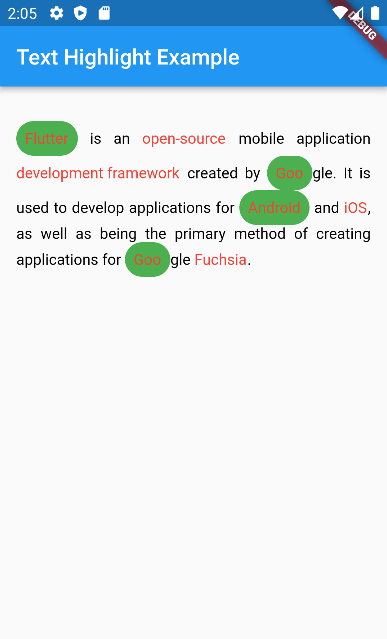
HighlightedWord(
    onTap: () {},
    textStyle: textStyle,
    decoration: BoxDecoration(
        color: Colors.green,
        borderRadius: BorderRadius.circular(50),
    ),
    padding: EdgeInsets.all(8.0),
),

1.2.0 Breaking changes

enableCaseSensitive renamed to matchCase to be clearer about what it does

TextHighlight(
    text: text,
    words: words,
    matchCase: true // will highlight only exactly the same string
),

カテゴリー

ソースリポジトリ

このパッケージを使用しているプロジェクト