パッケージ、リポジトリ、アプリカテゴリを検索

パッケージ詳細v0.0.3

highlighter_coachmark

コッチマークは、背景をぼかしてターゲット要素を強調することで、オーバーレイに提供されたヒントや指示を表示します。

30日間ダウンロード
63
いいね数
142
Pub ポイント
40

パッケージをインストール

flutter pub add highlighter_coachmark

パッケージ概要

公開情報に基づく選定ガイドです。参考としてご利用ください。

Highlighter Coachmark は、オーバーレイとしてヒントや説明を表示することで、アプリの機能をユーザーにガイドするためのFlutterパッケージです。背景をぼかし、特定のUI要素を強調することで、オンボーディングや機能紹介に最適です。主要なコンポーネントに注目を向けながらインターフェースを乱さないことで、ユーザー体験を向上させます。カスタマイズ可能なスタイルとスムーズなアニメーションにより、洗練された外観を実現します。シンプルで統合が容易な設計により、開発者は最小限の努力で直感的なガイダンスフローを実装できます。

用途

  • 新規ユーザーのオンボーディング
  • 新しい機能の強調
  • ガイド付きチュートリアル
  • アプリにおけるユーザー教育
  • 複雑なインターフェースのUX向上

主な機能

  • 背景のぼかし効果
  • ターゲット要素のハイライト
  • カスタマイズ可能なオーバーレイデザイン
  • スムーズなトランジションアニメーション
  • 既存のウィジェットとの簡単な統合

適している対象

  • モバイルアプリのオンボーディング
  • 機能発見ツール
  • ユーザー向けトレーニングモジュール
  • UX改善イニシアチブ
  • 軽量なコーチマークを探している開発者

注意事項

  • 制限されたプラットフォーム固有のカスタマイズ
  • 組み込みのローカリゼーションサポートなし
  • タップイベントの手動処理が必要です
  • 低スペックデバイスでのパフォーマンスに影響を与える可能性があります
  • 正しいウィジェットの配置に依存します

元の README

関連するソースリポジトリの README 原文のスナップショットです。最新の内容はリポジトリをご覧ください。

Highlighter Coach Mark

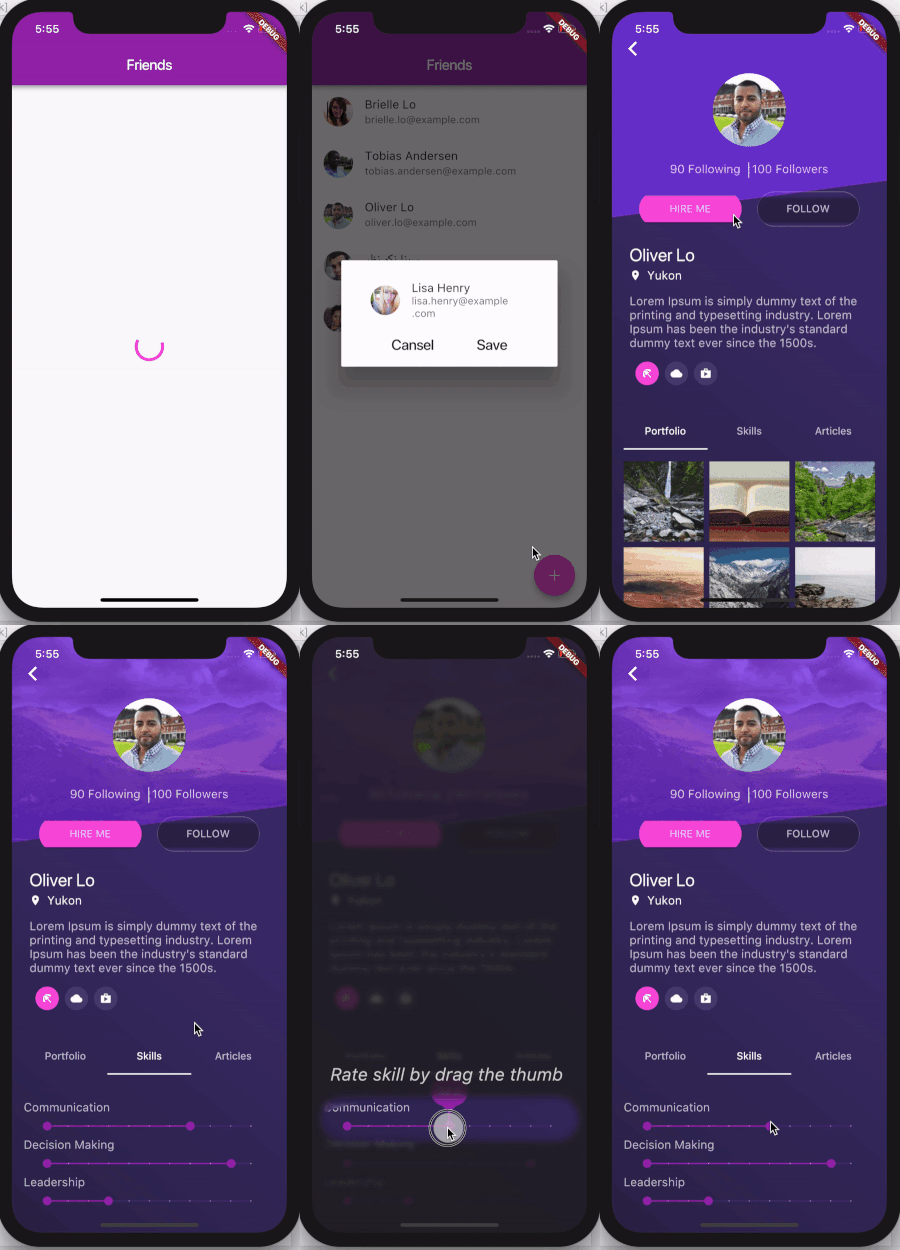
There are different ways for user on-boarding. It can be a show of screenshots or overlay with directions to features, feature discovery as in Material design or coach mark. This coach mark makes blurred background and highlights desired element.

This coach mark makes blurred background and highlights desired element.

A picture is worth a thousand words, so take a look at gif

And a few tips from UX

Presenting hints one-by-one, at the right moment, makes it a lot easier for users to understand and learn instructions.

To have their full effect, coach marks should focus on particularly innovative or unexpected elements.

Usage

Take a look at example folder. There are also 4 coach marks there. They are all presented in gif above

  CoachMark coachMark = CoachMark();
  RenderBox target = targetGlobalKey.currentContext.findRenderObject();
  Rect markRect = target.localToGlobal(Offset.zero) & target.size;
  markRect = Rect.fromCircle(center: markRect.center, radius: markRect.longestSide * 0.6);
  coachMark.show(
      targetContext: targetGlobalKey.currentContext,
      markRect: markRect,
      children: [
        Positioned(
            top: markRect.top + 5.0,
            right: 10.0,
            child: Text("Long tap on button to see options",
                style: const TextStyle(
                  fontSize: 24.0,
                  fontStyle: FontStyle.italic,
                  color: Colors.white,
                )))
      ],
      duration: null,
      onClose: () {
         appState.setCoachMarkIsShown(true);
      });
Similar packages
Thanks

カテゴリー

ソースリポジトリ

このパッケージを使用しているプロジェクト

データはまだありません。