パッケージ、リポジトリ、アプリカテゴリを検索

image_fade のカバー
パッケージ詳細v0.6.2

image_fade

画像の読み込み中にプレースホルダーとオプションの進行状況インジケーターを表示し、その後ロードされた画像にクロスフェードするウィジェット。FadeInImage を改善しています。CachedNetworkImageProvider と互換性があります。

AndroidiOSWebmacOSWindowsLinux
30日間ダウンロード
7950
いいね数
87
Pub ポイント
150

パッケージをインストール

flutter pub add image_fade

パッケージ概要

公開情報に基づく選定ガイドです。参考としてご利用ください。

ImageFade は、画像が完全に読み込まれるまでプレースホルダーとオプションのプログレスインジケーターを表示することで、画像の読み込み体験を向上させる Flutter ウィジェットです。画像が読み込まれると、滑らかにクロスフェードで最終画像に切り替わり、洗練された視覚的遷移を提供します。FadeInImage の改善版として作成され、CachedNetworkImageProvider をサポートし、Android、iOS、Web、macOS、Windows、Linux などのすべての主要プラットフォームで動作します。画像読み込み中の視覚フィードバックが重要なアプリケーションに最適です。

用途

  • 視覚フィードバック付きで画像を読み込む
  • 画像レンダリング中のUIトランジションの向上
  • ネットワーク画像の読み込み中にプレースホルダを表示する
  • 画像が多く含まれるアプリにおけるパフォーマンスの認識向上
  • キャッシュされたネットワーク画像との併用
  • 滑らかな画像フェード効果の作成

主な機能

  • 画像の読み込み時のクロスフェードアニメーション
  • プレースホルダーウィジェットのサポート
  • オプションの進行状況インジケーター
  • CachedNetworkImageProviderとの互換性
  • プラットフォーム間のスムーズな遷移
  • 軽量で統合が簡単

適している対象

  • 頻繁に画像を読み込むアプリ
  • より良い画像読み込みのユーザーエクスペリエンスを求める開発者
  • CachedNetworkImage を使用するプロジェクト
  • UI中心のFlutterアプリケーション
  • 視覚的な仕上がりを重視するチーム

注意事項

  • プログレスインジケータの追加設定が必要です
  • プレースホルダにカスタムスタイルが必要になる場合があります
  • 静的または非動的な画像には適していません
  • 外部の画像キャッシュソリューションに依存しています
  • 基本的なフェード動作を超えるカスタマイズは限定的

元の README

関連するソースリポジトリの README 原文のスナップショットです。最新の内容はリポジトリをご覧ください。

ImageFade

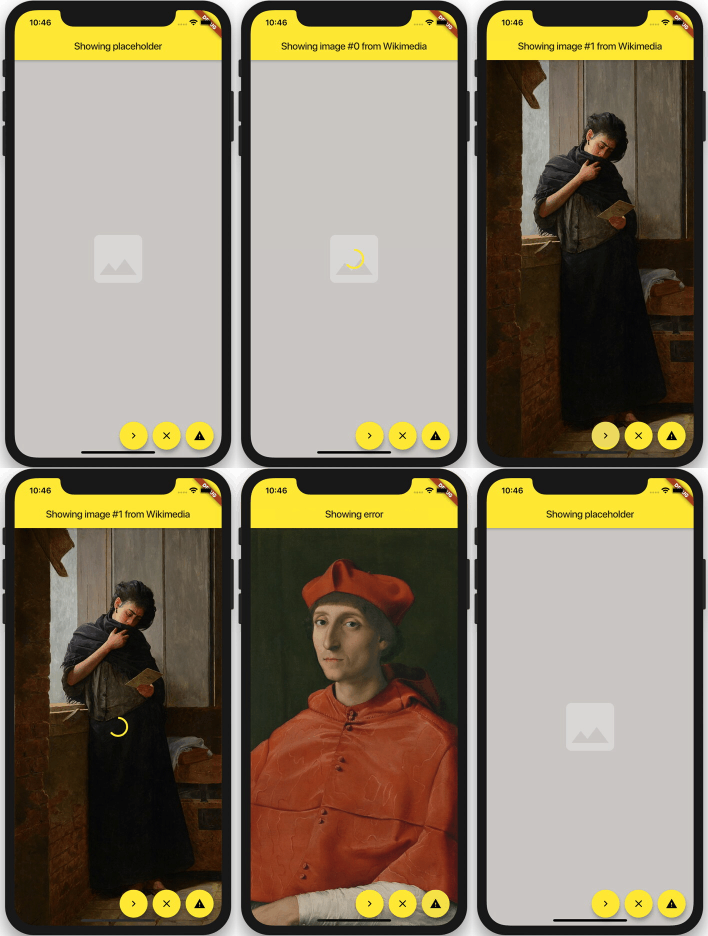
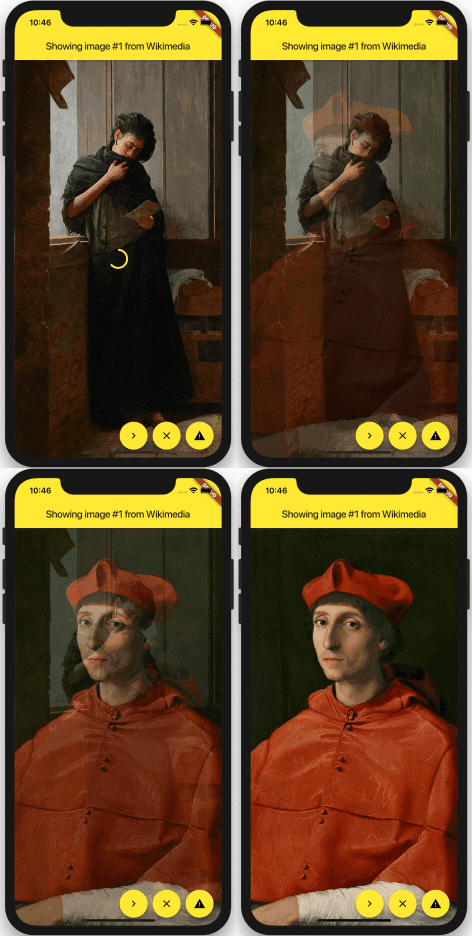
A widget for Flutter that displays a placeholder widget while a specified image loads, then cross-fades to the loaded image. Also handles progress and errors. It uses Image.opacity when appropriate for improved performance.

If image is changed, it will cross-fade to the new image once it is finished loading. Setting image to null will cross-fade back to the placeholder.

example image

You can set duration and curve, as well as most Image properties: width, height, fit, alignment, repeat, matchTextDirection, excludeFromSemantics and semanticLabel.

Use loadingBuilder and errorBuilder to display load progress or error states. Optionally specify syncDuration to use a different (usually faster) duration for fading in a synchronously loaded image, error, or placeholder.

ImageFade(
  // whenever the image changes, it will be loaded, and then faded in: 
  image: NetworkImage(url),

  // slow fade for newly loaded images:
  duration: const Duration(milliseconds: 900),

  // if the image is loaded synchronously (ex. from memory), fade in faster:
  syncDuration: const Duration(milliseconds: 150),

  // supports most properties of Image:
  alignment: Alignment.center,
  fit: BoxFit.cover,
  
  // shown behind everything:
  placeholder: Container(
    color: const Color(0xFFCFCDCA),
    alignment: Alignment.center,
    child: const Icon(Icons.photo, color: Colors.white30, size: 128.0),
  ),
  
  // shows progress while loading an image:
  loadingBuilder: (context, progress, chunkEvent) =>
    Center(child: CircularProgressIndicator(value: progress)),

  // displayed when an error occurs:
  errorBuilder: (context, error) => Container(
    color: const Color(0xFF6F6D6A),
    alignment: Alignment.center,
    child: const Icon(Icons.warning, color: Colors.black26, size: 128.0),
  ),
)

Image Caching

ImageFade is compatible with CachedNetworkImageProvider.

Installing

The published version of this package is availble on pub.dev.

Example

See the example directory for a simple example.

カテゴリー

ソースリポジトリ

このパッケージを使用しているプロジェクト