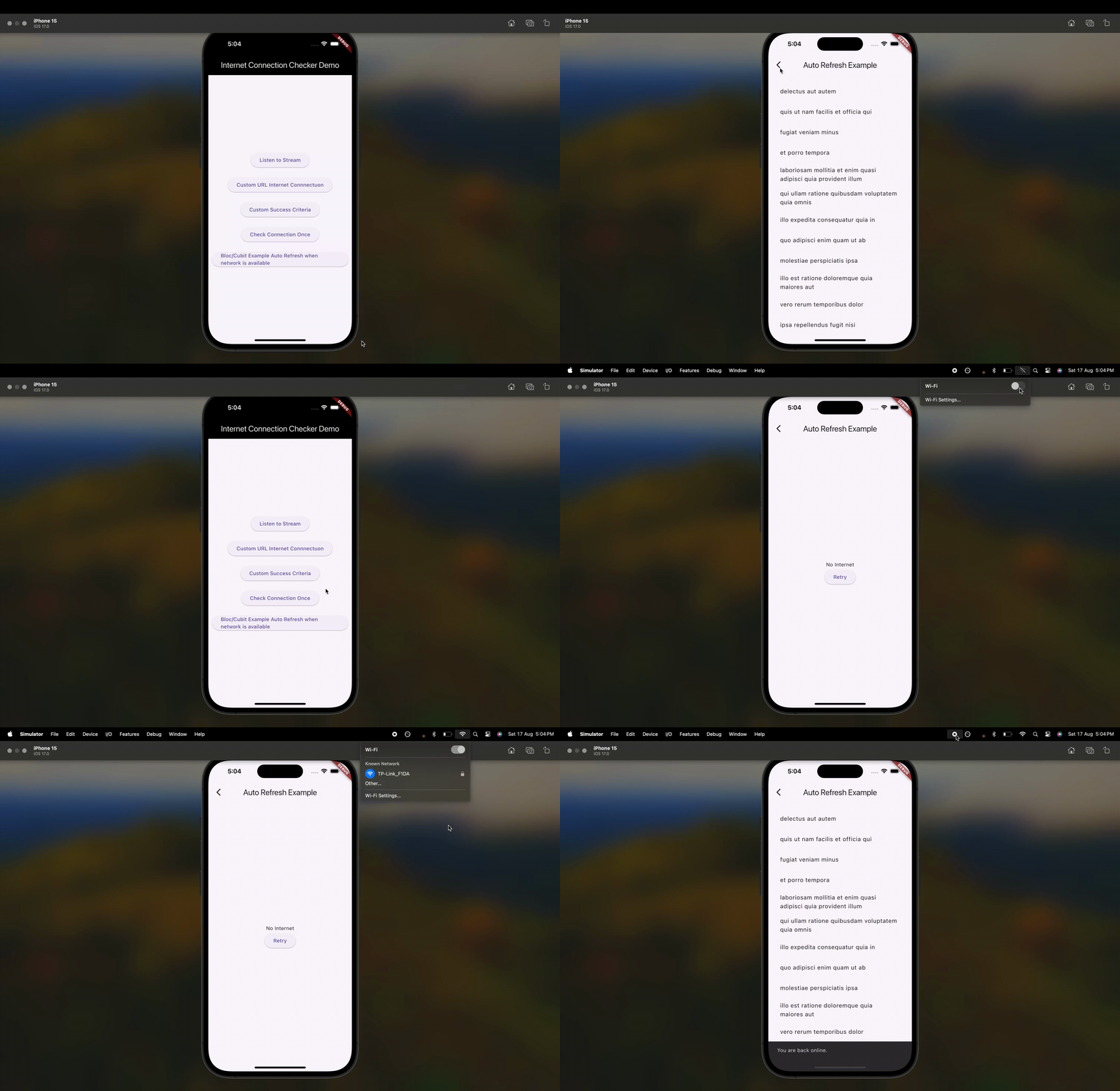
A library designed for seamless internet connectivity checks.
This library enables you to verify your internet connection
and can also detect slow internet connectivity.
Backend Server Checks:
Seamlessly verify internet connectivity and server reachability using built-in default addresses or by configuring custom backend server URLs tailored to your application needs.
Slow Internet Detection:
Efficiently detect and manage slow internet connections on the user's device to ensure a smooth user experience.
Auto Refresh:
Automatically refresh pages in your app when the internet becomes available, providing a dynamic and seamless user experience.
For detailed implementation, refer to the example files:
To prevent memory leaks, always dispose of the InternetConnectionChecker instance when it's no longer needed. For example, in a StatefulWidget's dispose method:
@overridevoiddispose() {
connectionChecker.dispose(); // Dispose of the InternetConnectionChecker instancesuper.dispose();
}
Description
Checks for an internet (data) connection, by checking accessible Uri's.
The defaults of the plugin should be sufficient to reliably determine if
the device is currently connected to the global network, e.i. has access to the Internet.
Platform Support
Android
iOS
MacOS
Web
Linux
Windows
✅
✅
✅
✅
✅
✅
Demo
Quick start
Add the following dependencies to your pubspec.yaml:
dependencies:internet_connection_checker:^2.0.0
Android Configuration
On Android, for correct working in release mode, you must add INTERNET & ACCESS_NETWORK_STATE
permissions to AndroidManifest.xml, follow the next lines:
On MacOS, you'll need to add the following entry to your DebugProfile.entitlements and Release.entitlements (located under macos/Runner) to allow access to internet.
The reason this package exists is that connectivity_plus package cannot reliably determine if a data connection is actually available. More info on its page here: https://pub.dev/packages/connectivity_plus.
Getting Started
The InternetConnectionChecker can be used as a singleton or can be instantiated with a custom instance with your curated AddressCheckOption's.
Best usage with Flutter Bloc/Cubit
The InternetConnectionChecker package is particularly useful in scenarios where you need to handle changes in network connectivity dynamically. For instance, you can use it to refresh the page or trigger specific actions when the device goes offline and then reconnects to the internet. This is useful for applications where real-time updates or data synchronization is critical.
See example folder for one specific example which illustrates how to retry page refresh when internet connection is available. The example files paths are listed below:
import'package:internet_connection_checker/internet_connection_checker.dart';
voidmain() async {
finalbool isConnected = awaitInternetConnectionChecker.instance.hasConnection;
if (isConnected) {
print('Device is connected to the internet');
} else {
print('Device is not connected to the internet');
}
}
Listen to Stream for Internet Connection availability changes:
import'package:internet_connection_checker/internet_connection_checker.dart';
voidmain() {
final connectionChecker = InternetConnectionChecker.instance;
final subscription = connectionChecker.onStatusChange.listen(
(InternetConnectionStatus status) {
if (status == InternetConnectionStatus.connected) {
print('Connected to the internet');
} else {
print('Disconnected from the internet');
}
},
);
// Remember to cancel the subscription when it's no longer needed
subscription.cancel();
}
Note: Remember to dispose of any listeners and the instance of InternetConnectionChecker,
when they're not required to prevent memory leaks.
e.g. in aStatefulWidget's dispose() method:
Note: Remember to dispose of InternetConnectionChecker instance,
when it's not needed to prevent memory leaks,
e.g. in aStatefulWidget's dispose() method:
Note: Ensure your slowConnectionThreshold's duration is not more than the checkInternal and checkTimeout Duration.
Using requireAllAddressesToRespond
To ensure that the internet connection status is marked as connected only when all specified addresses are reachable, you can enable the requireAllAddressesToRespond configuration.
import'package:internet_connection_checker/internet_connection_checker.dart';
voidmain() async {
// Create a custom instance with requireAllAddressesToRespond set to true/// Remember to dispose of [customChecker] instance, when it's not needed /// to prevent memory leaks.final customChecker = InternetConnectionChecker.createInstance(
requireAllAddressesToRespond: true,
addresses: [
AddressCheckOption(uri: Uri.parse('https://dummyapi.online/api/movies/1')),
AddressCheckOption(
uri: Uri.parse('https://jsonplaceholder.typicode.com/albums/1'),
),
],
);
// Check connectivityfinalbool isConnected = await customChecker.hasConnection;
if (isConnected) {
print('All specified backend servers are reachable.');
} else {
print('Not all specified backend servers are reachable.');
}
}
See example folder for more examples.
Features and bugs
Please file feature requests and bugs at the issue tracker.
Credits
NOTE: This package is a continuation of data_connection_checker which currently is not continued. *