パッケージ、リポジトリ、アプリカテゴリを検索

keyboard_dismisser のカバー
パッケージ詳細v3.0.0

keyboard_dismisser

ジェスチャーをキーボード外で実行したときにキーボードを非表示にする簡単なFlutterパッケージ。

AndroidiOSWebmacOSWindowsLinux
30日間ダウンロード
3.2万
いいね数
247
Pub ポイント
160

パッケージをインストール

flutter pub add keyboard_dismisser

パッケージ概要

公開情報に基づく選定ガイドです。参考としてご利用ください。

ユーザーがテキスト入力フィールドの外をタップすると、キーボードを自動的に非表示にする軽量なFlutterパッケージです。専用ボタンや手動操作なしで、スムーズにキーボードを閉じられるようにすることで、ユーザーエクスペリエンスを向上させます。このパッケージはモバイル、Web、デスクトップを含むすべての主要プラットフォームで動作し、フォームや入力中心のインターフェースに最適です。既存のウィジェットと簡単に統合でき、最小限のセットアップで利用可能です。

用途

  • 頻繁なキーボード切り替えを伴うフォーム入力
  • 直感的なキーボードの非表示が必要なモバイルおよびウェブアプリ
  • テキストフィールドを備えたデスクトップアプリケーション
  • チャットやメッセージインターフェースにおけるUXの改善
  • 余分な閉じるボタンを削除して雑然とした状態を減らす

主な機能

  • 外部タップ時にキーボードを自動的に非表示にする
  • クロスプラットフォーム互換性
  • 最小限のコード統合
  • すべての入力タイプをサポートしています
  • 追加の依存関係なし

適している対象

  • 簡単なキーボード管理を求める開発者
  • 複数のテキストフィールドを備えたアプリ
  • ユーザーエクスペリエンスを重視したアプリケーション設計
  • 複数のプラットフォームをターゲットにするプロジェクト

注意事項

  • 他のジェスチャーデテクターと干渉する可能性があります
  • 複雑なジェスチャー操作には向いていない
  • Widgetツリーにおける慎重な配置が必要です
  • 制限されたカスタマイズオプション
  • キーボードの表示状態をプログラム的に処理しない

元の README

関連するソースリポジトリの README 原文のスナップショットです。最新の内容はリポジトリをご覧ください。

keyboard_dismisser

A simple Flutter package to hide the keyboard when performing a gesture outside of it.

Pub

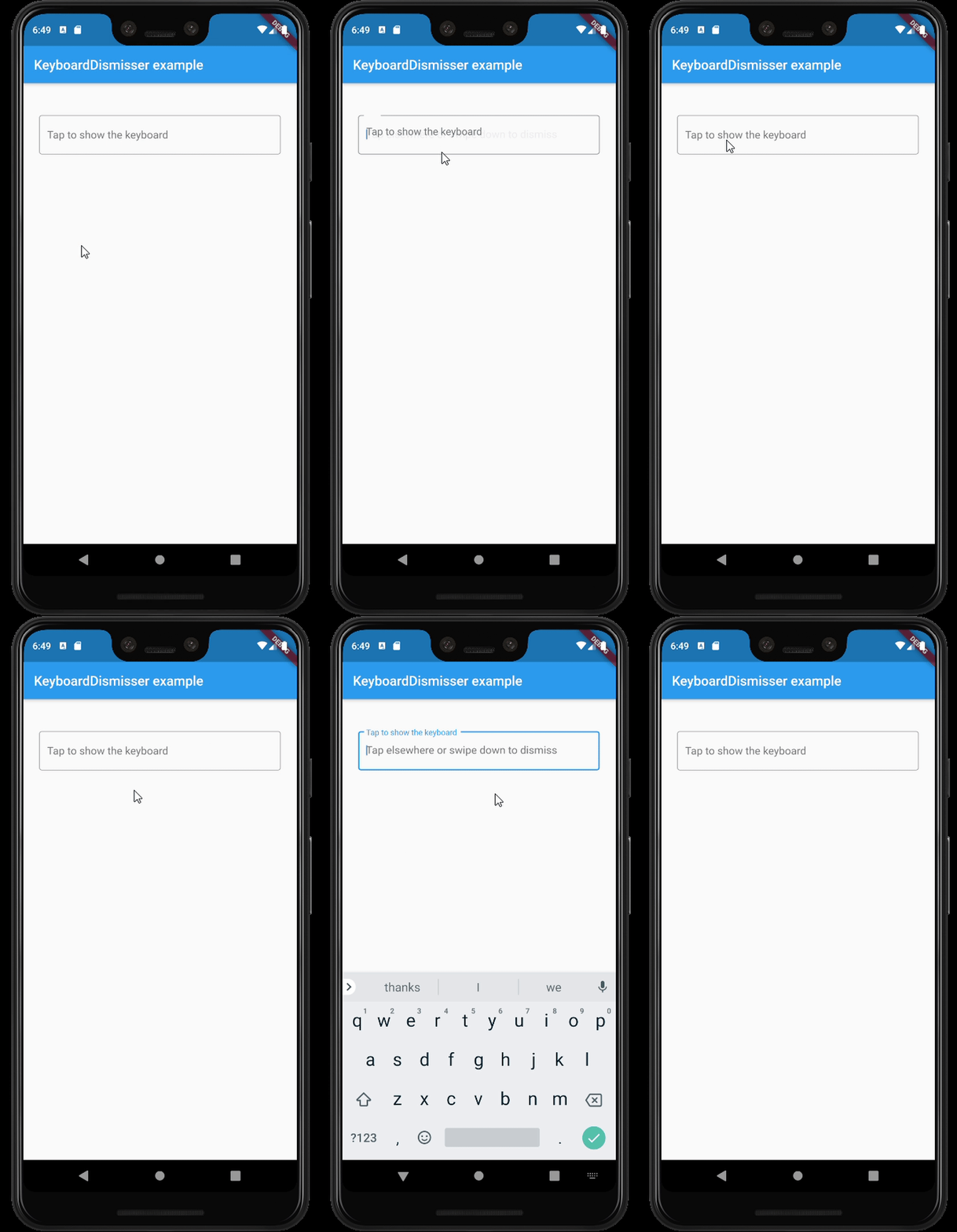
Example

Features

  • By default, dismisses the keyboard when tapping outside of it on an inactive widget.
  • Supports several gestures at the same time.
  • Supports all the gestures available in Flutter's GestureDetector.
  • Supports directional swipes to dismiss the keyboard.
  • Can be applied to a whole page by wrapping its Scaffold.
  • Can be applied to a whole app, by wrapping its MaterialApp, WidgetsApp, or CupertinoApp.
  • Customizable drag start behavior and gesture hit testing behavior.
  • Can be excluded from the semantics tree.

Usage

This package exposes a KeyboardDismisser stateless widget. You can wrap your widget with it, and your widget will be able to dismiss the keyboard when performing a gesture.

    Widget build(BuildContext context) => KeyboardDismisser(
        child: Scaffold(
            body: ...,
        ),
      );

KeyboardDismisser takes a gestures parameter, which is a list of GestureType enum cases. This way, you can pass any gesture you like for the keyboard dismissal. By default, KeyboardDismisser will dismiss the keyboard when tapping outside of it, but it handles several gestures at the same time.

    Widget build(BuildContext context) => KeyboardDismisser(
        gestures: [GestureType.onTap, GestureType.onPanUpdateDownDirection],
        child: Scaffold(
            body: ...,
        ),
      );

Getting started

In the pubspec.yaml of your flutter project, add the following dependency:

dependencies:
  keyboard_dismisser: "^[LATEST_VERSION]"

Then run $ flutter pub get. In your library, add the following import:

import 'package:keyboard_dismisser/keyboard_dismisser.dart';

Author

Diego Rogel - GitHub

Changelog

Check the Changelog page to see what's recently changed.

License

This project is licensed under the MIT License - see the LICENSE file for details.

カテゴリー

ソースリポジトリ

このパッケージを使用しているプロジェクト