パッケージ、リポジトリ、アプリカテゴリを検索

list_treeview のカバー
パッケージ詳細v0.4.2

list_treeview

Flutter用のツリービュー。ListViewに基づく。子レベルと子ノードが無限に増加します。

AndroidiOSmacOSWindowsLinux
30日間ダウンロード
486
いいね数
37
Pub ポイント
150

パッケージをインストール

flutter pub add list_treeview

パッケージ概要

公開情報に基づく選定ガイドです。参考としてご利用ください。

ListTreeView は、ListView をベースにしたツリー表示 UI コンポーネントを提供する Flutter パッケージです。子レベルとノードの無限のネストを可能にし、ブランチの動的な展開と折りたたみをサポートしています。ファイルシステム、組織図、ネストされたカテゴリなどの階層データを表示するのに最適です。パッケージは軽量で、既存の Flutter アプリにスムーズに統合できます。Android、iOS、macOS、Windows、Linux など、すべての主要プラットフォームで動作します。

用途

  • 階層データの表示
  • ファイルシステムのナビゲーション
  • 組織図
  • ネストされたカテゴリーブラウジング
  • 動的ツリー構造

主な機能

  • 無限の子レベルをサポート
  • パフォーマンス向上のため ListView に基づいて構築されています
  • 展開可能/折りたたみ可能なノード
  • クロスプラットフォーム互換性
  • 軽量で統合が簡単

適している対象

  • ネストされたデータを備えたアプリ
  • ファイルエクスプローラー
  • グループ化されたオプションを備えた設定
  • データ可視化ツール
  • カスタムツリー型UI

注意事項

  • 非常に大きなツリーではパフォーマンスに影響を与える可能性があります
  • ノード状態の手動管理が必要です
  • 制限された組み込みスタイルオプション
  • 非常に深い階層構造には最適化されていない
  • 組み込みの検索またはフィルタリングなし

元の README

関連するソースリポジトリの README 原文のスナップショットです。最新の内容はリポジトリをご覧ください。

English | 简体中文

ListTreeView

pub package License: MIT Platform

A tree view for Flutter, built on top of ListView. It manages the tree structure of your data and leaves the UI entirely to you.

Features

  • Bring your own UI. The widget only manages the tree structure of the data — you design every row yourself in an itemBuilder.
  • Efficient. Rows are recycled through ListView's builder, so only visible nodes are built.
  • Unlimited depth. Child levels and child nodes can grow infinitely.
  • Imperative control. Insert, remove, expand/collapse, and select nodes through a controller.
  • Flutter 3.0+ / Dart 3.

Preview

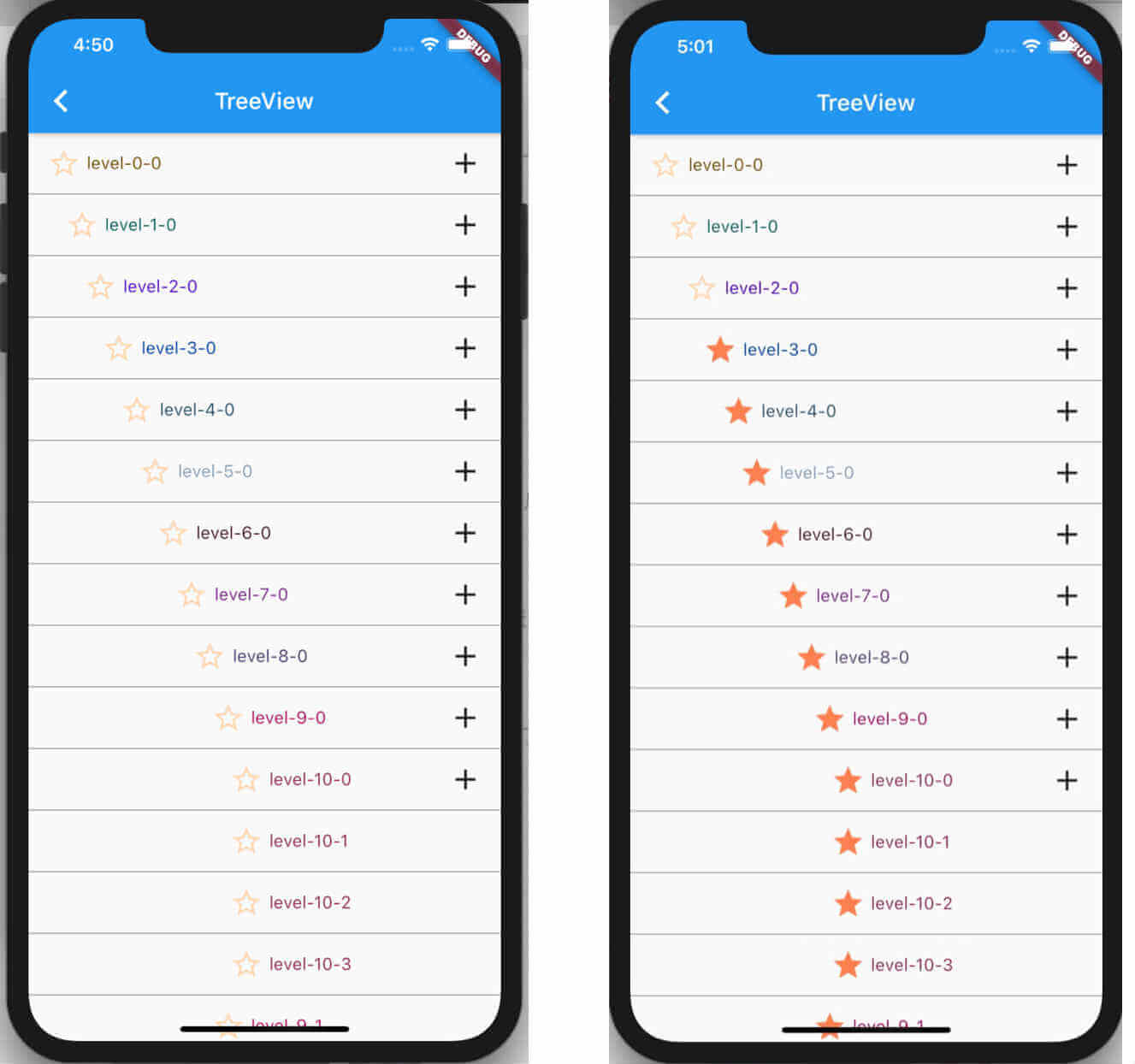
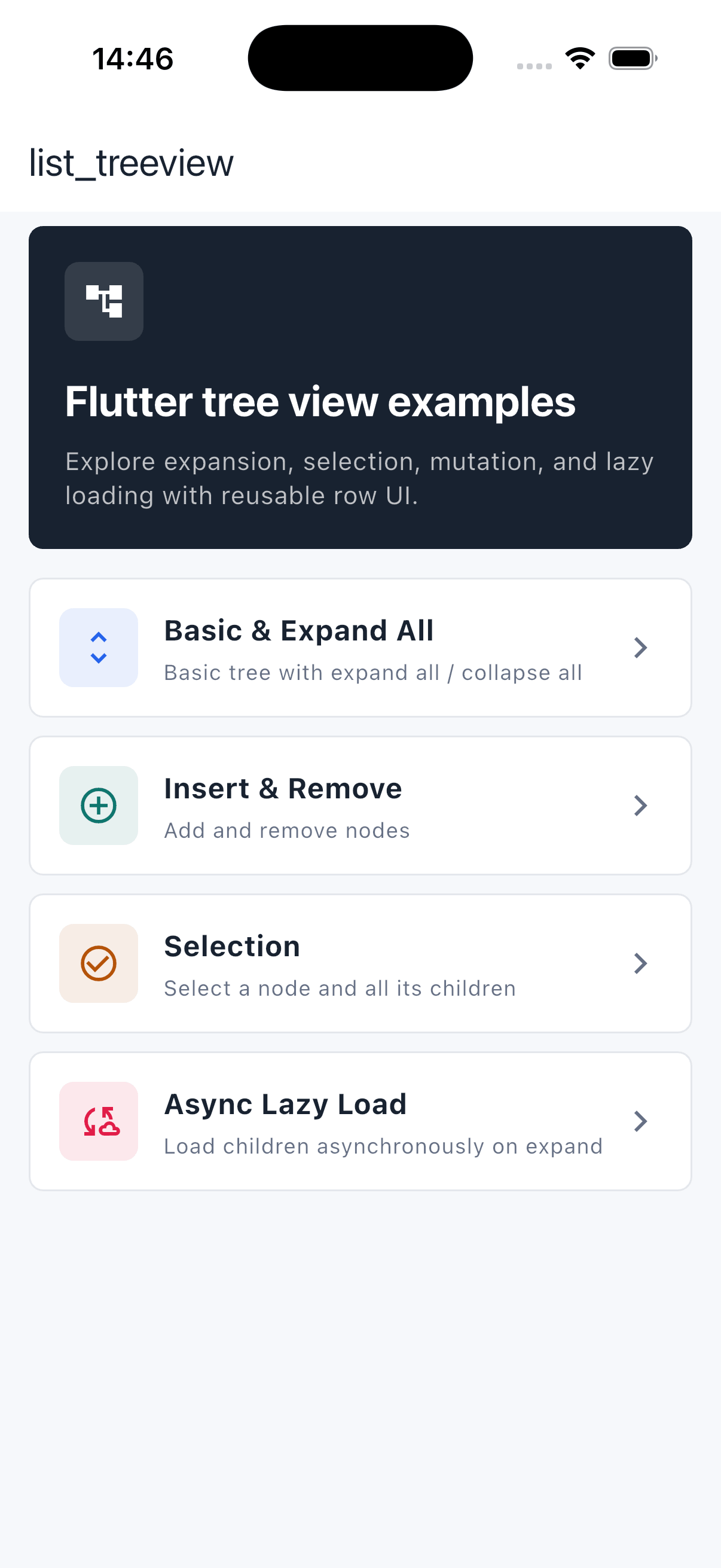
ListTreeView demo animation ListTreeView example overview

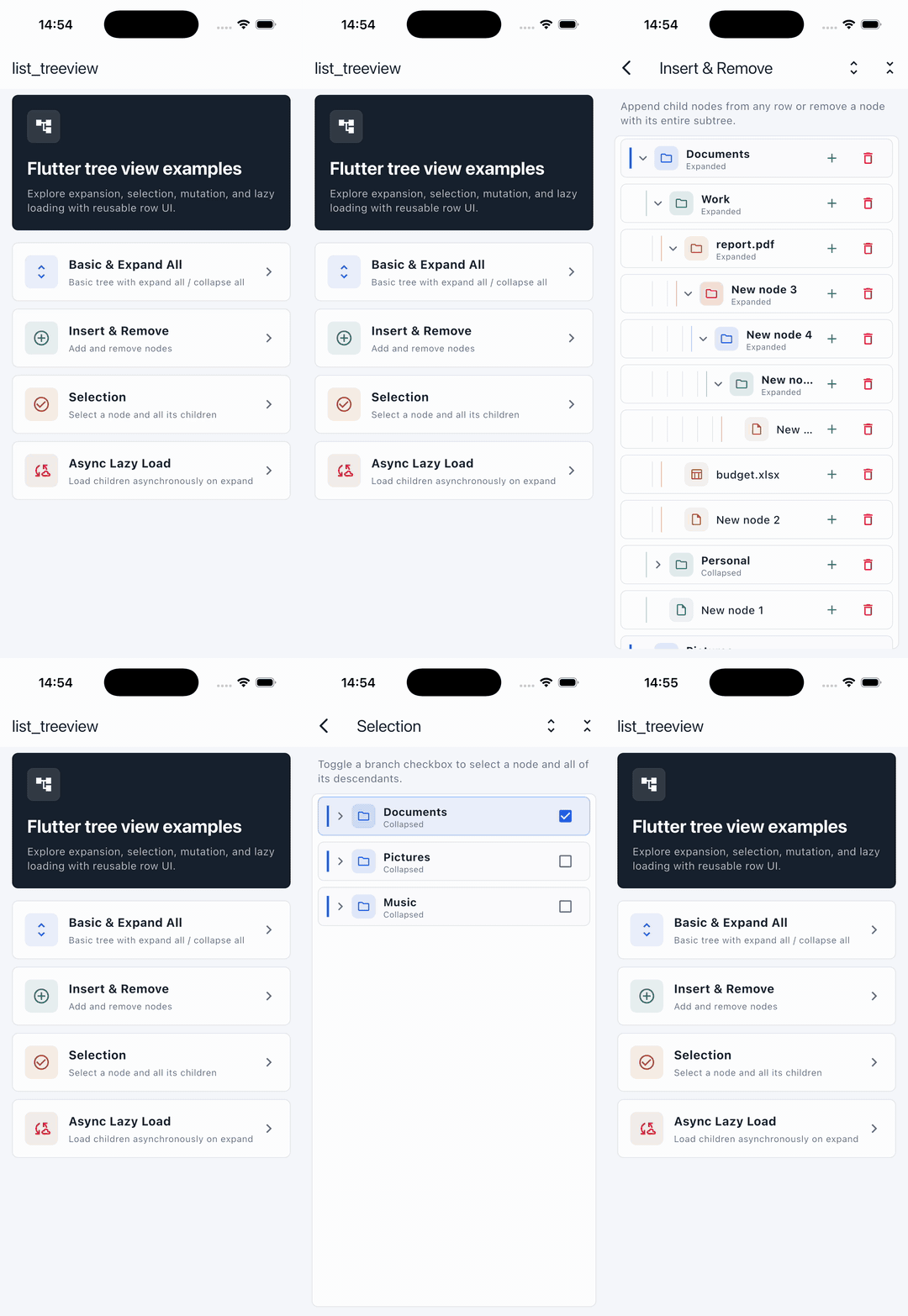
Basic & Expand All Insert & Remove Selection Async Lazy Load
Basic and expand-all example Insert and remove example Selection example Async lazy-load example

Installation

Run this command:

flutter pub add list_treeview

This adds a line like the following to your package's pubspec.yaml (and runs an implicit flutter pub get):

dependencies:
  list_treeview: ^0.4.0

Then import it in your Dart code:

import 'package:list_treeview/list_treeview.dart';

Quick start

1. Initialize the controller

The controller must be created before the tree view is built — usually in initState.

class _TreePageState extends State<TreePage> {
  late TreeViewController _controller;

  @override
  void initState() {
    super.initState();
    _controller = TreeViewController();
  }
}
2. Define your data model

Your data class must extend NodeData. Beyond that you can add any properties you like. Make your own fields nullable (or give them defaults) so they remain optional.

/// The data bound to each node.
/// You must extend [NodeData]; everything else is up to you.
class TreeNodeData extends NodeData {
  TreeNodeData({this.label, this.color}) : super();

  final String? label;
  final Color? color;
}
3. Provide the data

Build your node hierarchy with addChild and hand the root-level nodes to the controller via treeData. Data can be loaded synchronously or asynchronously.

Future<void> loadData() async {
  // Data may be fetched asynchronously.
  await Future.delayed(const Duration(seconds: 1));

  final colors = TreeNodeData(label: 'Colors');
  colors.addChild(TreeNodeData(
      label: 'rgb(0,139,69)', color: const Color.fromARGB(255, 0, 139, 69)));
  colors.addChild(TreeNodeData(
      label: 'rgb(0,191,255)', color: const Color.fromARGB(255, 0, 191, 255)));

  final shapes = TreeNodeData(label: 'Shapes');
  shapes.addChild(TreeNodeData(label: 'Circle'));
  shapes.addChild(TreeNodeData(label: 'Square'));

  // Set the root-level nodes.
  _controller.treeData([colors, shapes]);

  setState(() {});
}
4. Build the tree

Render the tree with ListTreeView. Inside itemBuilder, cast the NodeData back to your own type and use level to indent each row.

ListTreeView(
  controller: _controller,
  itemBuilder: (BuildContext context, NodeData data) {
    final item = data as TreeNodeData;
    return Padding(
      padding: EdgeInsets.only(left: item.level * 16.0),
      child: ListTile(
        title: Text(item.label ?? ''),
        // Show a chevron only for nodes that have children.
        trailing: item.children.isNotEmpty
            ? Icon(item.isExpand ? Icons.expand_less : Icons.expand_more)
            : null,
      ),
    );
  },
  onTap: (NodeData item) => debugPrint('tapped index ${item.index}'),
  onLongPress: (NodeData item) => _controller.removeItem(item),
);

By default, tapping a row automatically expands or collapses it (toggleNodeOnTap is true). Set toggleNodeOnTap: false to drive expansion yourself with expandOrCollapse.

Operations

Insert
// Insert as the first child of [parent].
_controller.insertAtFront(parent, newNode);

// Append as the last child.
_controller.insertAtRear(parent, newNode);

// Insert at a specific index.
_controller.insertAtIndex(1, parent, newNode);

// Insert several nodes at the front in one call.
_controller.insertAllAtFront(parent, [nodeA, nodeB]);

Pass null as parent to insert at the root level:

_controller.insertAtFront(null, newNode);   // prepend a root node
_controller.insertAtRear(null, newNode);    // append a root node
_controller.insertAtIndex(1, null, newNode); // insert at root index 1

By default a node is inserted only when its parent is expanded. Pass closeCanInsert: true to insert even when the parent is collapsed:

_controller.insertAtFront(parent, newNode, closeCanInsert: true);
Remove
_controller.removeItem(item);
Expand / collapse
/// Toggle the node at a visible [index] (e.g. `item.index`).
_controller.expandOrCollapse(item.index);

/// Expand or collapse the whole tree at once.
_controller.expandAll();
_controller.collapseAll();

/// Query the current state.
final expanded = _controller.isExpanded(item);

Lazy loading note: child controllers are created only when a parent expands, so expandAll() expands every node whose children are already loaded. Nodes that fetch their children asynchronously are skipped until they have been loaded.

Select
/// Select / deselect a single node.
_controller.selectItem(item);

/// Select / deselect a node together with all of its descendants.
_controller.selectAllChild(item);

Read the result via item.isSelected inside your itemBuilder.

API reference

ListTreeView
Property Type Default Description
controller TreeViewController required Manages the tree data and operations.
itemBuilder Widget Function(BuildContext, NodeData) required Builds the widget for each visible node.
onTap Function(NodeData)? null Called when a row is tapped.
onLongPress Function(NodeData)? null Called when a row is long-pressed.
toggleNodeOnTap bool true Auto expand/collapse a node on tap. Set false to control it yourself.
shrinkWrap bool false Forwarded to the underlying ListView.
reverse bool false Forwarded to the underlying ListView.
padding EdgeInsetsGeometry EdgeInsets.all(0) Padding around the list.
removeTop bool true Remove the top MediaQuery padding.
removeBottom bool true Remove the bottom MediaQuery padding.
TreeViewController
Method Returns Description
treeData(List? data) void Sets the root-level nodes.
insertAtFront(parent, node, {closeCanInsert}) void Inserts node as the first child of parent. Pass null for root level.
insertAllAtFront(parent, nodes, {closeCanInsert}) void Inserts multiple nodes at the front. Pass null for root level.
insertAtRear(parent, node, {closeCanInsert}) void Appends node as the last child. Pass null for root level.
insertAtIndex(index, parent, node, {closeCanInsert}) void Inserts node at index. Pass null for root level.
removeItem(item) void Removes item from the tree.
expandOrCollapse(index) TreeNode Toggles the node at the visible index.
expandItem(treeNode) / collapseItem(treeNode) void Expands / collapses a node.
expandAll() void Expands every (loaded) node in the tree.
collapseAll() void Collapses every node in the tree.
isExpanded(item) bool Whether item is expanded.
selectItem(item) void Toggles the selection of item.
selectAllChild(item) void Toggles the selection of item and all descendants.
indexOfItem(item) int Visible index of item.
levelOfNode(item) int Depth level of item.
parentOfItem(item) NodeData? Parent of item (null for root-level nodes).
itemChildrenLength(item) int Number of direct children.
numberOfVisibleChild() int Total number of currently visible rows.
rebuild() void Forces the tree to rebuild.
NodeData

Extend this class for your own model. The tree keeps the following fields up to date, so you can read them inside itemBuilder:

Property Type Description
children List<NodeData> Direct child nodes. Use addChild() to append.
level int Depth of the node (root level is 0). Use for indenting.
index int Index among all currently visible nodes.
indexInParent int Index within the parent's children.
isExpand bool Whether the node is currently expanded.
isSelected bool Whether the node is selected.
addChild(NodeData child) void Appends a child node.

Example

The example directory is a gallery of focused, runnable demos, each on its own detail page:

  • Basic & Expand All — a nested tree with expand-all / collapse-all toolbar actions.
  • Insert & Remove — add child nodes from any row and remove subtrees.
  • Selection — select a node together with all of its descendants.
  • Async Lazy Load — fetch a branch's children on first tap.

Run it with:

cd example
flutter run

License

Released under the MIT License.

カテゴリー

ソースリポジトリ

このパッケージを使用しているプロジェクト

データはまだありません。