パッケージ、リポジトリ、アプリカテゴリを検索

loadmore のカバー
パッケージ詳細v2.1.0

loadmore

ListView を下にスクロールすると、さらにデータを読み込むことができます。開発者がページングでデータを読み込むのを支援します。

AndroidiOSWebmacOSWindowsLinux
30日間ダウンロード
1万
いいね数
226
Pub ポイント
150

パッケージをインストール

flutter pub add loadmore

パッケージ概要

公開情報に基づく選定ガイドです。参考としてご利用ください。

loadmore パッケージは、ListView が下端に到達したときにデータの読み込みをトリガーし、Flutter アプリで無限スクロールを実装することを簡素化します。開発者がコンテンツの遅延読み込みを効率的に管理できるようにし、メモリ使用量を削減し、大規模なデータセットのレンダリング時のパフォーマンスを向上させます。ListView および他のスクロール可能なウィジェットとのシームレスな統合を目的としており、Android、iOS、Web、macOS、Windows、Linux など複数のプラットフォームをサポートしています。このパッケージは軽量で使いやすく、ユーザーがスクロールする際にスムーズかつオンデマンドでデータを取得できるように最小限の設定で利用可能です。

用途

  • 無限スクロールフィード
  • ラジーローディングリスト
  • ページングされたデータの取得
  • 動的コンテンツの読み込み
  • eコマース製品グリッド

主な機能

  • 自動スクロール検出
  • ListView との簡単な統合
  • 複数のプラットフォームをサポートしています
  • 最小限のボイラープレートコード
  • 設定可能なロードインジケーター

適している対象

  • スクロール可能なコンテンツを構築する開発者
  • 大規模なデータセットを持つアプリケーション
  • ページネーション重視の UI
  • クロスプラットフォームモバイルおよびWebアプリ
  • 効率的なデータ読み込みの実装

注意事項

  • データステートの手動処理が必要
  • 固定長さのリストには適していません
  • カスタムエラー処理が必要になる可能性があります
  • 外部データソースに依存しています
  • 複雑なスクロール動作に対するカスタマイズの制限

元の README

関連するソースリポジトリの README 原文のスナップショットです。最新の内容はリポジトリをご覧ください。

loadmore

pub package GitHub

A loadMore library

Support ListView and SliverList

中文构思思路和使用说明可以看简书

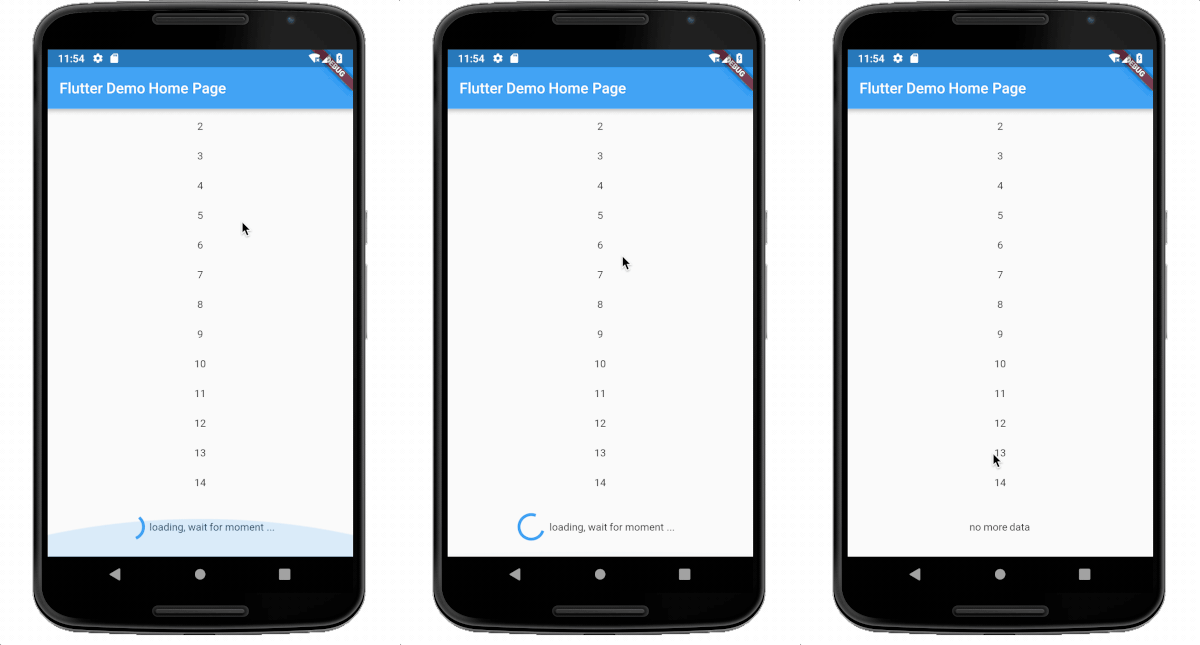
screenshot

img

whole example

show https://github.com/CaiJingLong/flutter_listview_loadmore

install

in pubspec.yaml

dependencies:
  loadmore: ^2.0.1

import in dartfile:

import 'package:loadmore/loadmore.dart';

use in build:

  @override
  Widget build(BuildContext context) {
    return new Scaffold(
      appBar: new AppBar(
        title: new Text(widget.title),
      ),
      body: Container(
        child: LoadMore(
          isFinish: count >= 60,
          onLoadMore: _loadMore,
          child: ListView.builder(
            itemBuilder: (BuildContext context, int index) {
              return Container(
                child: Text(list[index].toString()),
                height: 40.0,
                alignment: Alignment.center,
              );
            },
            itemCount: count,
          ),
        ),
      ),
    );
  }

  Future<bool> _loadMore() async {
    print("onLoadMore");
    await Future.delayed(Duration(seconds: 0, milliseconds: 100));
    load();
    return true;
  }

properties use:

child: Widget ,required , support ListView ListView.builder ListView.separated, other is not support.
onLoadMore:required A Function , `typedef Future<bool> FutureCallBack();` , reture true is success and status delay,return false or null ,then the status will change to fail.
isFinish: bool, optional, if true, then the status will change to finish ,default is false
delegate: LoadMoreDelegate,optional, see the LoadMoreDelegate class,default is DefaultLoadMoreDelegate
textBuilder: optional, the result will show in loading view ,if you use default delegate. default is DefaultLoadMoreText.chinese,
whenEmptyLoad: bool ,optional, default is true, when [whenEmptyLoad] is true, and when listView children length is 0,or the itemCount is 0,not build loadMoreWidget.
abstract class LoadMoreDelegate {
  const LoadMoreDelegate();

  double widgetHeight(LoadMoreStatus status) => _defaultLoadMoreHeight; // the loadMore height. default is 80.0

  Duration loadMoreDelay() => Duration(milliseconds: _loadMoreDelay);// When widget is created, the refresh delay time is triggered.

  Widget buildChild(LoadMoreStatus status); // build your widget in the loadmore widget.
}

other

homePage: https://github.com/CaiJingLong/flutter_listview_loadmore emailto me : cjl_spy@163.com

LICENSE

APACHE 2.0

カテゴリー

ソースリポジトリ

このパッケージを使用しているプロジェクト

データはまだありません。