パッケージ、リポジトリ、アプリカテゴリを検索

パッケージ詳細v0.8.1

model_viewer

glTF および GLB 形式のインタラクティブな 3D モデルをレンダリングするための Flutter ウィジェットです。

30日間ダウンロード
32
いいね数
142
Pub ポイント
30

パッケージをインストール

flutter pub add model_viewer

パッケージ概要

公開情報に基づく選定ガイドです。参考としてご利用ください。

glTFおよびGLB形式の3Dモデルのレンダリングとインタラクションを可能にするFlutterウィジェットです。Flutterアプリケーション内に3Dコンテンツを埋め込み、操作するための簡単な方法を提供し、回転、ズーム、パンなどの機能をサポートしています。製品紹介や教育ツールなど、没入型の視覚体験が必要なアプリに最適です。最適なパフォーマンスとスムーズなインタラクションを実現するために、ネイティブプラットフォーム機能を利用しています。

用途

  • eコマースアプリにおける製品のビジュアライゼーション
  • インタラクティブな3D教育コンテンツ
  • ファッションやアクセサリーのバーチャルトライオン
  • 拡張現実の統合
  • デザインツールにおける3Dモデルのプレビュー

主な機能

  • glTFおよびGLB 3Dモデル形式をサポートしています
  • 回転およびズーム用の内蔵タッチジェスチャー
  • ネイティブバックエンドを使用した高パフォーマンスレンダリング
  • Flutterウィジェットとの簡単な統合
  • 軽量でコアな3D表示に焦点を当てる

適している対象

  • 3D対応のFlutterアプリを開発する開発者
  • 製品を紹介するECプラットフォーム
  • 教育またはトレーニングアプリケーション
  • 3Dアセットを搭載したAR/VR体験

注意事項

  • glTF/GLB形式のサポートに制限されています
  • 組み込みのアニメーションや物理処理なし
  • 最高のパフォーマンスを得るためには、3Dモデルの最適化が必要です
  • プラットフォーム固有のレンダリング動作は異なる場合があります

元の README

関連するソースリポジトリの README 原文のスナップショットです。最新の内容はリポジトリをご覧ください。

3D Model Viewer for Flutter

Project license Dart compatibility Pub package Dartdoc reference

This is a Flutter widget for rendering interactive 3D models in the glTF and GLB formats.

The widget embeds Google's <model-viewer> web component in a WebView.

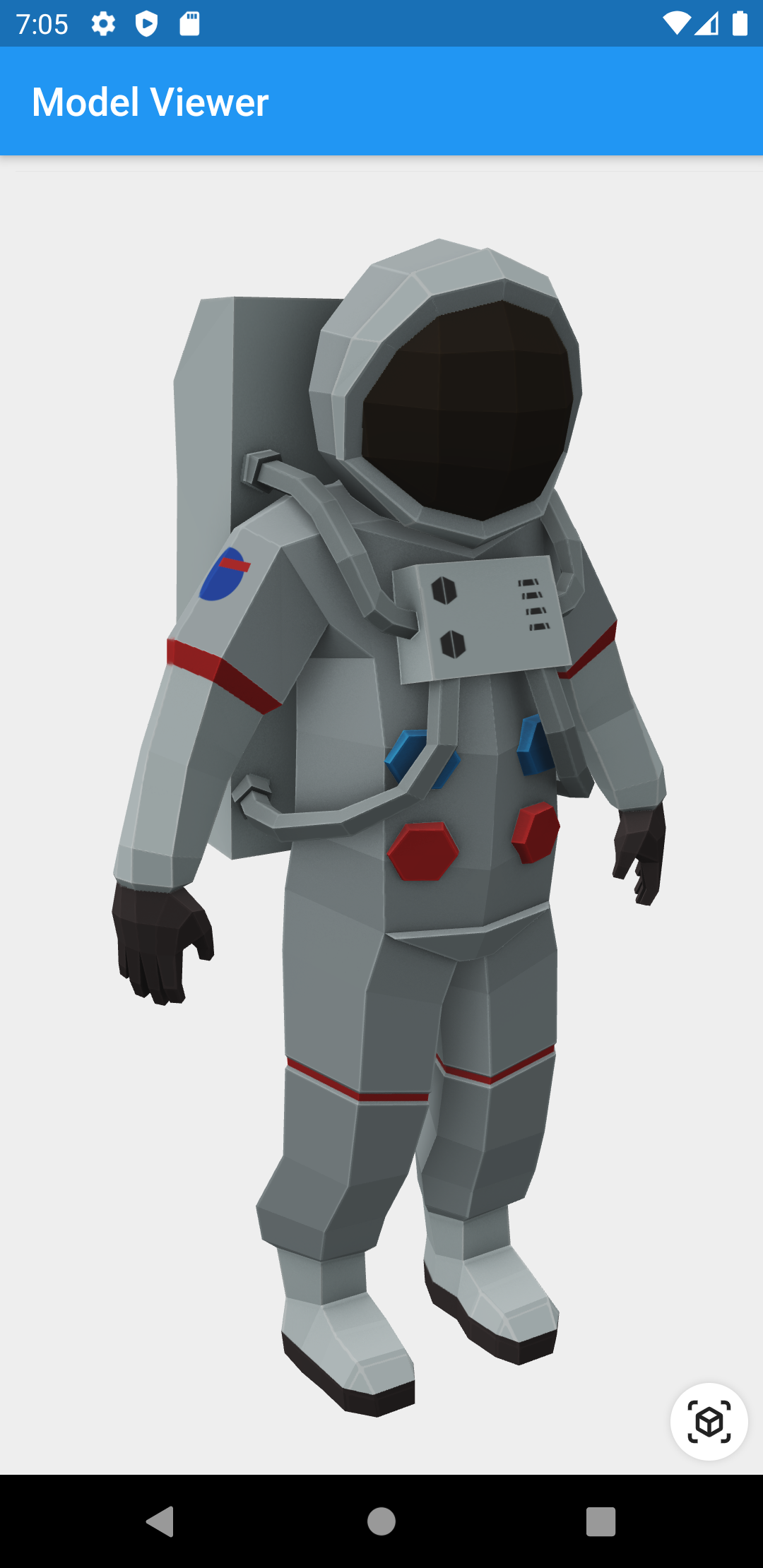
Screenshot

Screenshot of astronaut model

Prerequisites

Compatibility

Android and iOS, with a recent system browser version.

Installation

pubspec.yaml
dependencies:
  model_viewer: ^0.8.1
AndroidManifest.xml (Android 9+ only)

To use this widget on Android 9+ devices, your app must be permitted to make an HTTP connection to http://localhost:XXXXX. Android 9 (API level 28) changed the default for android:usesCleartextTraffic from true to false, so you will need to configure your app's android/app/src/main/AndroidManifest.xml as follows:

--- a/example/android/app/src/main/AndroidManifest.xml
+++ b/example/android/app/src/main/AndroidManifest.xml
@@ -8,7 +8,8 @@
     <application
         android:name="io.flutter.app.FlutterApplication"
         android:label="model_viewer_example"
-        android:icon="@mipmap/ic_launcher">
+        android:icon="@mipmap/ic_launcher"
+        android:usesCleartextTraffic="true">
         <activity
             android:name=".MainActivity"
             android:launchMode="singleTop"

This does not affect Android 8 and earlier. See #7 for more information.

Info.plist (iOS only)

To use this widget on iOS, you need to opt-in to the embedded views preview by adding a boolean property to your app's ios/Runner/Info.plist file, with the key io.flutter.embedded_views_preview and the value YES:

<key>io.flutter.embedded_views_preview</key>
<true/>

Features

  • Renders glTF and GLB models. (Also, USDZ models on iOS 12+.)

  • Supports animated models, with a configurable auto-play setting.

  • Optionally supports launching the model into an AR viewer.

  • Optionally auto-rotates the model, with a configurable delay.

  • Supports a configurable background color for the widget.

Examples

Importing the library
import 'package:model_viewer/model_viewer.dart';
Creating a ModelViewer widget
class MyApp extends StatelessWidget {
  @override
  Widget build(BuildContext context) {
    return MaterialApp(
      home: Scaffold(
        appBar: AppBar(title: Text("Model Viewer")),
        body: ModelViewer(
          src: 'https://modelviewer.dev/shared-assets/models/Astronaut.glb',
          alt: "A 3D model of an astronaut",
          ar: true,
          autoRotate: true,
          cameraControls: true,
        ),
      ),
    );
  }
}
Loading a bundled Flutter asset
class MyApp extends StatelessWidget {
// ...
          src: 'assets/MyModel.glb',
// ...
}
Loading a model from the file system
class MyApp extends StatelessWidget {
// ...
          src: 'file:///path/to/MyModel.glb',
// ...
}
Loading a model from the web
class MyApp extends StatelessWidget {
// ...
          src: 'https://modelviewer.dev/shared-assets/models/Astronaut.glb',
// ...
}

Note that due to browsers' CORS security restrictions, the model file must be served with a Access-Control-Allow-Origin: * HTTP header.

Frequently Asked Questions

Q: Why do I get the error net::ERR_CLEARTEXT_NOT_PERMITTED?

You didn't configure your AndroidManifest.xml as per the installation instructions earlier in this document. See also #7.

Q: Why does the example app just show a blank screen?

A: Most likely, the platform browser version on your device or emulator is too old and does not support the features that Model Viewer needs.

For example, the stock Chrome version on the Android 10 emulator is too old and will display a blank screen; it must be upgraded from the Play Store in order to use this package. (The stock Chrome version on the Android 11 emulator works fine, however.) See google/model-viewer#1109.

Q: Why doesn't my 3D model load and/or render?

A: There are several reasons why your model URL could fail to load and render:

  1. It might not be possible to load the model URL due to CORS security restrictions. The server hosting the model file must send appropriate CORS response headers for Model Viewer to be able to load the file. See google/model-viewer#1015.

  2. It might not be possible to parse the provided glTF or GLB file. Some tools can produce invalid files when exporting glTF. Always run your model files through the glTF Validator to check for this.

  3. The platform browser might not support the features that Model Viewer needs. See google/model-viewer#1109.

カテゴリー

依存関係

依存関係一覧 3 件

ソースリポジトリ

このパッケージを使用しているプロジェクト