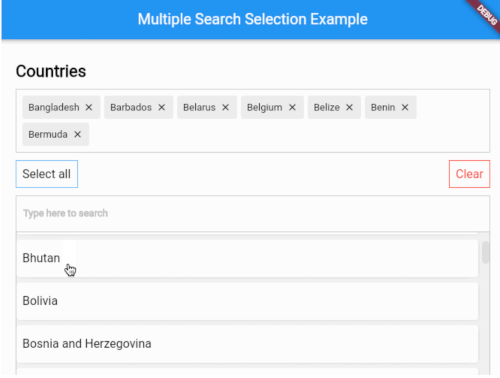
A highly customizable multiple selection widget with fuzzy search functionality
// Use this controller to adjust the behaviour of the widget// 1. getAllItems// 2. getPickedItems// 3. searchItems// 4. clearSearchField// 5. clearAllPickedItems// 6. selectAllItems// 7. minCharsToShowItems// 8. allowDuplicateSelection// 9. isSelectableMultipleSearchController controller = MultipleSearchController();
MultipleSearchSelection<Country>(
// The TextField that is used to search items.//// You can use this to customize the search field.// The `onChanged` of the `searchField` is used internally to search items,// so you can use the `onSearchChanged` callback to get the search query.
searchField: TextField(
decoration: InputDecoration(
hintText: 'Search countries',
border: OutlineInputBorder(
borderRadius: BorderRadius.circular(6),
),
),
),
onSearchChanged: (text) {
print('Text is $text');
},
items: countries, // List<Country>
fieldToCheck: (c) {
return c.name; // String
},
itemBuilder: (country,index,isPicked) {
returnPadding(
padding: constEdgeInsets.all(6.0),
child: Container(
decoration: BoxDecoration(
borderRadius: BorderRadius.circular(6),
color: Colors.white,
),
child: Padding(
padding: constEdgeInsets.symmetric(
vertical: 20.0,
horizontal: 12,
),
child: Text(country.name),
),
),
);
},
pickedItemBuilder: (country) {
returnContainer(
decoration: BoxDecoration(
color: Colors.white,
border: Border.all(color: Colors.grey[400]!),
),
child: Padding(
padding: constEdgeInsets.all(8),
child: Text(country.name),
),
);
},
onTapShowedItem: () {},
onPickedChange: (items) {},
onItemAdded: (item) {},
onItemRemoved: (item) {},
sortShowedItems: true,
sortPickedItems: true,
fuzzySearch: FuzzySearch.jaro,
itemsVisibility: ShowedItemsVisibility.alwaysOn,
title: Text(
'Countries',
style: kStyleDefault.copyWith(
fontSize: 22,
fontWeight: FontWeight.bold,
),
),
showSelectAllButton: true,
maximumShowItemsHeight: 200,
)
MultipleSearchSelection<T>.creatable
MultipleSearchSelection<T>.creatable constructor can now create new item when search result does not return any results. It takes a new required parameter, createOptions e.g :
// [T] here is [Country]
createOptions: CreateOptions<Country>(
// You need to create and return the item you want to add since [T] is not always [String].
create: (text) {
returnCountry(name: text, iso: text);
},
// A callback when the item is succesfully created.
onCreated: (c) => print('Country ${c.name} created'),
// Create item Widget that appears instead of no results.
createBuilder: (text) => Align(
alignment: Alignment.centerLeft,
child: Padding(
padding: constEdgeInsets.all(8.0),
child: Text('Create "$text"'),
),
),
// Whether you want to pick the newly created item or just add it to your list. Defaults to false.
pickCreated: true,
),
Showed items visibility
itemsVisibility behaviour for the default & creatable constructors
ShowedItemsVisibility.alwaysOn
ShowedItemsVisibility.onType
ShowedItemsVisibility.toggle
Issues / Features
Found a bug or want a new feature? Open an issue in the Github repository of the project.