パッケージ、リポジトリ、アプリカテゴリを検索

native_video_player のカバー
パッケージ詳細v4.0.1

native_video_player

ネイティブ実装を使用して、iOS および Android で動画を再生するための Flutter ウィジェットです。

AndroidiOSmacOS
30日間ダウンロード
8740
いいね数
89
Pub ポイント
140

パッケージをインストール

flutter pub add native_video_player

パッケージ概要

公開情報に基づく選定ガイドです。参考としてご利用ください。

iOS、Android、macOSでネイティブプラットフォーム実装を使用して動画再生を可能にするFlutterパッケージです。各オペレーティングシステムのネイティブ動画プレイヤーを利用することで、Flutterアプリに動画コンテンツを信頼性とパフォーマンスを兼ね備えた形で統合する方法を提供します。これにより、さまざまな動画形式およびハードウェアアクセラレーションとの互換性が向上します。このパッケージは、クロスプラットフォームの抽象化に依存せずにシームレスな動画再生を実現したい開発者向けに設計されています。

用途

  • ローカル動画ファイルの再生
  • URLからの動画ストリーミング
  • メディア豊富なアプリケーションに動画を統合する
  • フルスクリーン動画再生のサポート
  • ネイティブパフォーマンスでビデオプレイヤーインターフェースを構築する

主な機能

  • iOS および Android でネイティブのビデオプレイヤーを使用
  • 動画ストリーミングとローカルファイルのサポート
  • ハードウェアアクセラレーテッド再生
  • クロスプラットフォーム互換性(iOS、Android、macOS)
  • Flutterウィジェットとの簡単な統合

適している対象

  • 高性能な動画再生が必要な開発者
  • ネイティブな動画機能を必要とするアプリ
  • メディアまたは教育アプリケーション
  • 複数のプラットフォームをターゲットにし、動画の動作が一貫するプロジェクト

注意事項

  • iOS、Android、macOS に限定
  • Webサポートなし
  • 高度な機能にはネイティブプラットフォームのセットアップが必要です
  • プラットフォーム固有の動画形式のサポートに依存します

元の README

関連するソースリポジトリの README 原文のスナップショットです。最新の内容はリポジトリをご覧ください。

native_video_player

Pub

A Flutter widget to play videos on iOS, macOS and Android using a native implementation.

Perfect for building video-centric apps like TikTok, Instagram Reels, or YouTube Shorts, as well as general video playback needs.

Android iOS macOS
Support 16+ 9.0+ 10.11+
Implementation

Usage

Loading a video
@override
Widget build(BuildContext context) {
  return NativeVideoPlayerView(
    onViewReady: (controller) async {
      await controller.loadVideo(
        VideoSource(
          path: 'path/to/file',
          type: VideoSourceType.asset,
        ),
      );
    },
  );
}
Listen to events
StreamSubscription<void>? _eventsSubscription;

_eventsSubscription = controller.events.listen((event) {
  switch (event) {
    case PlaybackStatusChangedEvent():
      // Emitted when playback status changes (playing, paused, or stopped)
      final playbackStatus = controller.playbackStatus;
    case PlaybackPositionChangedEvent():
      // Emitted when playback position changes
      final position = controller.playbackPosition;
    case PlaybackReadyEvent():
      // Emitted when video is loaded and ready to play
      final height = controller.videoInfo?.height;
      final width = controller.videoInfo?.width;
      final duration = controller.videoInfo?.duration;
    case PlaybackEndedEvent():
      // Emitted when video playback ends
    case PlaybackSpeedChangedEvent():
      // Emitted when playback speed changes
    case VolumeChangedEvent():
      // Emitted when volume changes
    case PlaybackErrorEvent():
      // Emitted when an error occurs
      print('Playback error: ${event.errorMessage}');
  }
});

// Don't forget to dispose the subscription
@override
void dispose() {
  _eventsSubscription?.cancel();
  super.dispose();
}
Autoplay
bool isAutoplayEnabled = false;

Future<void> _loadVideoSource() async {
  await controller.loadVideo(videoSource);
  if (isAutoplayEnabled) {
    await controller.play();
  }
}
Playback loop
bool isPlaybackLoopEnabled = false;

void _onPlaybackEnded() {
  if (isPlaybackLoopEnabled) {
    controller.stop();
    controller.play();
  }
}

// Set up event listener
_eventsSubscription = controller.events.listen((event) {
  switch (event) {
    case PlaybackEndedEvent():
      _onPlaybackEnded();
    // ... handle other events ...
  }
});
Controller disposal
class VideoPlayerState extends State<VideoPlayer> {
  NativeVideoPlayerController? _controller;
  StreamSubscription<void>? _eventsSubscription;

  Future<void> _initController(NativeVideoPlayerController controller) async {
    _controller = controller;
    _eventsSubscription = _controller?.events.listen((event) {
      // ... handle events ...
    });
  }

  @override
  void dispose() {
    // Cancel any event subscriptions
    _eventsSubscription?.cancel();
    // Dispose of the controller
    _controller?.dispose();
    _controller = null;
    super.dispose();
  }
}

It's important to properly dispose of both the controller and any event subscriptions when you're done with them to prevent memory leaks. This typically happens in the dispose() method of your widget's State.

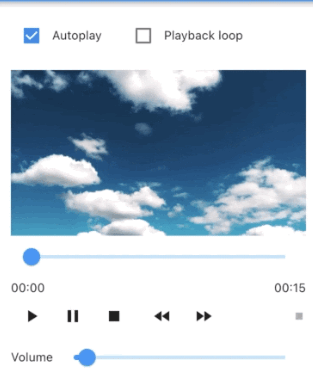
Advanced usage

See the example app for a complete usage example.

Support this project

Sponsors:

Thank you to all sponsors for supporting this project! ❤️

Other projects

All my projects

Credits

Created by @albemala (Twitter)

カテゴリー

依存関係

依存関係一覧 2 件

ソースリポジトリ

このパッケージを使用しているプロジェクト