パッケージ、リポジトリ、アプリカテゴリを検索

ncscolor のカバー
パッケージ詳細v1.0.0

ncscolor

NCS(自然色システム)の色をRGB、HSL、HEX形式に変換するための包括的なDartパッケージと、追加のRGB変換ユーティリティ。

AndroidiOSWebmacOSWindowsLinux
30日間ダウンロード
22
いいね数
4
Pub ポイント
150

パッケージをインストール

flutter pub add ncscolor

パッケージ概要

公開情報に基づく選定ガイドです。参考としてご利用ください。

ncscolor は、NCS(自然色システム)カラーと RGB、HSL、HEX などの一般的な形式との間でスムーズに変換できる Dart パッケージです。正確な色の変換を提供し、正確な色表現が必要なデザインおよび開発ワークフローに不可欠です。また、RGB の操作を補助するユーティリティも含まれており、UI/UX アプリケーションでの使いやすさを高めています。クロスプラットフォーム対応で、Android、iOS、Web、macOS、Windows、Linux をサポートしています。

用途

  • デザインシステムの実装
  • デジタルインターフェースにおけるカラーマッチング
  • クリエイティブツール開発
  • アクセシビリティ対応の色選択
  • UIプロトタイピング

主な機能

  • NCSからRGB/HSL/HEXへの変換
  • RGBユーティリティ関数
  • 高精度のカラーカルクレーション
  • クロスプラットフォーム互換性
  • シンプルなAPI統合

適している対象

  • NCS色基準を使用するデザイナー
  • カラーピッカーを開発する開発者
  • 正確な色の翻訳を必要とするアプリケーション
  • デザインシステムを使用するフロントエンドチーム
  • NCSを統合するクリエイティブソフトウェア

注意事項

  • NCSカラーモデルの理解が必要です
  • カラーフォーマット変換に限定
  • 組み込みのカラーピッカーUIがありません
  • デザインツールと併用するのが最適です
  • リアルタイムカラー編集に最適化されていません

元の README

関連するソースリポジトリの README 原文のスナップショットです。最新の内容はリポジトリをご覧ください。

NCSColor 🎨

pub package License: MIT

A comprehensive Dart package for converting NCS (Natural Color System) colors to RGB, HSL, and HEX formats, with additional RGB conversion utilities. Perfect for Flutter apps and Dart projects that need to work with NCS color specifications.

🌐 Live Demo

🚀 Try the Interactive Web Demo

Experience NCSColor in action with our live Flutter web demo! Test color conversions, explore the NCS color system, and see real-time previews of your color transformations.

✨ Features

  • 🎯 NCS to RGB conversion - Convert NCS color codes to RGB values
  • 🌈 NCS to HSL conversion - Get HSL representation of NCS colors
  • 🎨 NCS to HEX conversion - Generate hex color codes from NCS
  • 🔄 RGB to HSL conversion - Convert RGB values to HSL format
  • 🔄 RGB to HEX conversion - Convert RGB values to hex format
  • ✅ Input validation - Proper NCS format validation with clear error messages
  • 📱 Flutter ready - Works seamlessly with Flutter Color widgets
  • 🚀 Modern Dart - Built with latest Dart features and null safety

🚀 Installation

Add this to your package's pubspec.yaml file:

dependencies:
  ncscolor: ^1.0.0

Then run:

flutter pub get

📖 Usage

Import the package
import 'package:ncscolor/ncscolor.dart';
NCS Color Conversions
// Create an NCS color instance
final ncsColor = NCSColor(ncsCode: '2060-R60B');

// Convert to RGB
final rgb = ncsColor.toRgb();
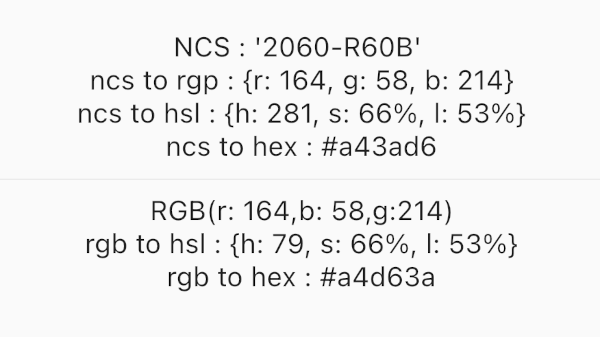
print(rgb); // {r: 164, g: 58, b: 214}

// Convert to HSL
final hsl = ncsColor.toHsl();
print(hsl); // {h: 281, s: 66%, l: 53%}

// Convert to HEX
final hex = ncsColor.toHex();
print(hex); // #a43ad6
RGB Conversions
// RGB to HSL
final hsl = ColorConvert.rgbToHsl(r: 164, g: 58, b: 214);
print(hsl); // {h: 281, s: 66%, l: 53%}

// RGB to HEX
final hex = ColorConvert.rgbToHex(r: 164, g: 58, b: 214);
print(hex); // #a43ad6
Using with Flutter Colors
final ncsColor = NCSColor(ncsCode: '2060-R60B');
final rgb = ncsColor.toRgb();

// Create a Flutter Color
final flutterColor = Color.fromRGBO(
  rgb['r']!,
  rgb['g']!,
  rgb['b']!,
  1.0,
);

// Use in your widgets
Container(
  color: flutterColor,
  child: Text('Hello NCS!'),
)

🎨 NCS Color Format

The Natural Color System (NCS) uses a specific format for color codes:

  • Format: ####-[RGBY][##[RGBY]]
  • Examples:
    • 2060-R60B (Red-Blue with 20% blackness, 60% chromaticness, 60% blue)
    • 1050-Y90R (Yellow-Red with 10% blackness, 50% chromaticness, 90% red)
    • 0505-B (Blue with 5% blackness, 5% chromaticness)
Format breakdown:
  • First two digits: Blackness (00-99)
  • Next two digits: Chromaticness (00-99)
  • Letter: Hue (R=Red, G=Green, B=Blue, Y=Yellow)
  • Optional: Hue percentage and secondary hue

📱 Example App

Check out the /example folder for a complete Flutter app demonstrating all features:

  • Interactive NCS color input
  • Real-time color preview
  • All conversion formats displayed
  • Error handling and validation

NCS Color Demo

🔧 API Reference

NCSColor Class
Constructor
NCSColor({required String ncsCode})
Methods
  • Map<String, int> toRgb() - Returns RGB values
  • Map<String, String> toHsl() - Returns HSL values
  • String toHex() - Returns hex color code
  • String toString() - String representation
  • bool operator ==(Object other) - Equality comparison
  • int get hashCode - Hash code
ColorConvert Class
Static Methods
  • Map<String, String> rgbToHsl({required int r, required int g, required int b})
  • String rgbToHex({required int r, required int g, required int b})

⚠️ Error Handling

The package provides clear error messages for invalid NCS codes:

try {
  final ncsColor = NCSColor(ncsCode: 'invalid-code');
  final rgb = ncsColor.toRgb();
} catch (e) {
  print(e); // ArgumentError: Invalid NCS color format...
}

🧪 Testing

Run the test suite:

flutter test

🤝 Contributing

Contributions are welcome! Please feel free to submit a Pull Request. For major changes, please open an issue first to discuss what you would like to change.

  1. Fork the repository
  2. Create your feature branch (git checkout -b feature/amazing-feature)
  3. Commit your changes (git commit -m 'Add some amazing feature')
  4. Push to the branch (git push origin feature/amazing-feature)
  5. Open a Pull Request

📚 Resources

📄 License

This project is licensed under the MIT License - see the LICENSE file for details.

🙏 Acknowledgments

  • Based on the Natural Color System specification
  • Inspired by W3Schools color converter algorithms
  • Built with ❤️ for the Flutter community

Made with Flutter 💙

カテゴリー

ソースリポジトリ

このパッケージを使用しているプロジェクト

データはまだありません。