パッケージ、リポジトリ、アプリカテゴリを検索

パッケージ詳細v2.0.5

nfc_in_flutter

Android および iOS で NFC タグの読み取りと書き込みを行うための Flutter プラグイン。現在は NDEF 形式のタグの読み取りのみをサポートしています。

30日間ダウンロード
124
いいね数
107
Pub ポイント
40

パッケージをインストール

flutter pub add nfc_in_flutter

パッケージ概要

公開情報に基づく選定ガイドです。参考としてご利用ください。

nfc_in_flutter は、Android および iOS での NFC タグの読み取りを可能にする Flutter プラグインであり、現在は NDEF 形式のタグのみをサポートしています。このプラグインは、NFC タグからデータを検出および取得するためのシンプルなインターフェースを提供し、非接触型データ交換を必要とするアプリケーションに最適です。最小限のセットアップでクロスプラットフォームの NFC 機能を実現したい開発者向けに設計されています。読み取り機能は利用可能ですが、書き込み操作はまだサポートされていません。このパッケージは積極的にメンテナンスされており、オープンソースで、GitHub リポジトリにはドキュメントとサンプルが用意されています。

用途

  • 小売アプリでNDEFタグを読み取る
  • コンタクトレスアクセス制御の有効化
  • イベントチェックインの促進
  • NFCを介した小規模データの転送
  • スマートポスターとの統合

主な機能

  • クロスプラットフォーム対応(Android および iOS)
  • NDEFタグの読み取りのみ
  • NFC検出用のシンプルなAPI
  • オープンソースで、積極的にメンテナンスされています
  • 軽量統合

適している対象

  • NFCデータ取得を必要とするモバイルアプリ
  • コンタクトレスソリューションを開発する開発者
  • NDEF形式のタグを使用するプロジェクト
  • NFC対応機能のプロトタイピング
  • Android および iOS ユーザー向けのアプリ

注意事項

  • 書き込み操作はサポートされていません
  • NDEF形式に限定
  • デバイスの互換性が必要です
  • iOS はバックグラウンドスキャンを制限している可能性があります
  • プラットフォーム固有の権限が必要です

元の README

関連するソースリポジトリの README 原文のスナップショットです。最新の内容はリポジトリをご覧ください。

nfc_in_flutter

NFC in Flutter is a plugin for reading and writing NFC tags in Flutter. It works on both Android and iOS with a simple stream interface.

⚠️ Currently only NDEF formatted tags are supported.

Usage

Read NFC tags
// NFC.readNDEF returns a stream of NDEFMessage
Stream<NDEFMessage> stream = NFC.readNDEF();

stream.listen((NDEFMessage message) {
    print("records: ${message.records.length}");
});
Read one NFC tag
NDEFMessage message = await NFC.readNDEF(once: true).first;
print("payload: ${message.payload}");
// once: true` only scans one tag!
Writing to tags

You can access a message's NFC tag using the NDEFMessage's .tag property. The tag has a .write method, which allows you to write a NDEF message to the tag.

Note that the read stream must still be open when the .write method is called. This means that the once argument in .readNDEF() cannot be used.

Stream<NDEFMessage> stream = NFC.readNDEF();

stream.listen((NDEFMessage message) {
    NDEFMessage newMessage = NDEFMessage.withRecords(
        NDEFRecord.mime("text/plain", "hello world")
    );
    message.tag.write(newMessage);
});

You can also use the NFC.writeNDEF(NDEFMessage) method, which wraps the code above with support for the once argument.

NDEFMessage newMessage = NDEFMessage.withRecords(
    NDEFRecord.mime("text/plain", "hello world")
);
Stream<NDEFTag> stream = NFC.writeNDEF(newMessage);

stream.listen((NDEFTag tag) {
    print("wrote to tag");
});

If you only want to write to one tag, you can set the once argument to true.

NDEFMessage newMessage = NDEFMessage.withRecords(
    NDEFRecord.mime("text/plain", "hello world")
);
Stream<NDEFTag> stream = NFC.writeNDEF(newMessage, once: true);

stream.listen((NDEFTag tag) {
    print("only wrote to one tag!");
});

And if you would rather use a Future based API, you can await the returned stream's .first method.

NDEFMessage newMessage = NDEFMessage.withRecords(
    NDEFRecord.type("text/plain", "hello world")
);

await NFC.writeNDEF(newMessage, once: true).first;

Example

import 'package:nfc_in_flutter/nfc_in_flutter.dart';

class NFCReader extends StatefulWidget {
    @override
    _NFCReaderState createState() => _NFCReaderState();
}

class _NFCReaderState extends State {
    bool _supportsNFC = false;
    bool _reading = false;
    StreamSubscription<NDEFMessage> _stream;

    @override
    void initState() {
        super.initState();
        // Check if the device supports NFC reading
        NFC.isNDEFSupported
            .then((bool isSupported) {
                setState(() {
                    _supportsNFC = isSupported;
                });
            });
    }

    @override
    Widget build(BuildContext context) {
        if (!_supportsNFC) {
            return RaisedButton(
                child: const Text("You device does not support NFC"),
                onPressed: null,
            );
        }

        return RaisedButton(
            child: Text(_reading ? "Stop reading" : "Start reading"),
            onPressed: () {
                if (_reading) {
                    _stream?.cancel();
                    setState(() {
                        _reading = false;
                    });
                } else {
                    setState(() {
                        _reading = true;
                        // Start reading using NFC.readNDEF()
                        _stream = NFC.readNDEF(
                            once: true,
                            throwOnUserCancel: false,
                        ).listen((NDEFMessage message) {
                            print("read NDEF message: ${message.payload}"),
                        }, onError: (e) {
                            // Check error handling guide below
                        });
                    });
                }
            }
        );
    }
}

Full example in example directory

Installation

Add nfc_in_flutter to your pubspec.yaml

dependencies:
    nfc_in_flutter: 2.0.5
iOS

On iOS you must add turn on the Near Field Communication capability, add a NFC usage description and a NFC entitlement.

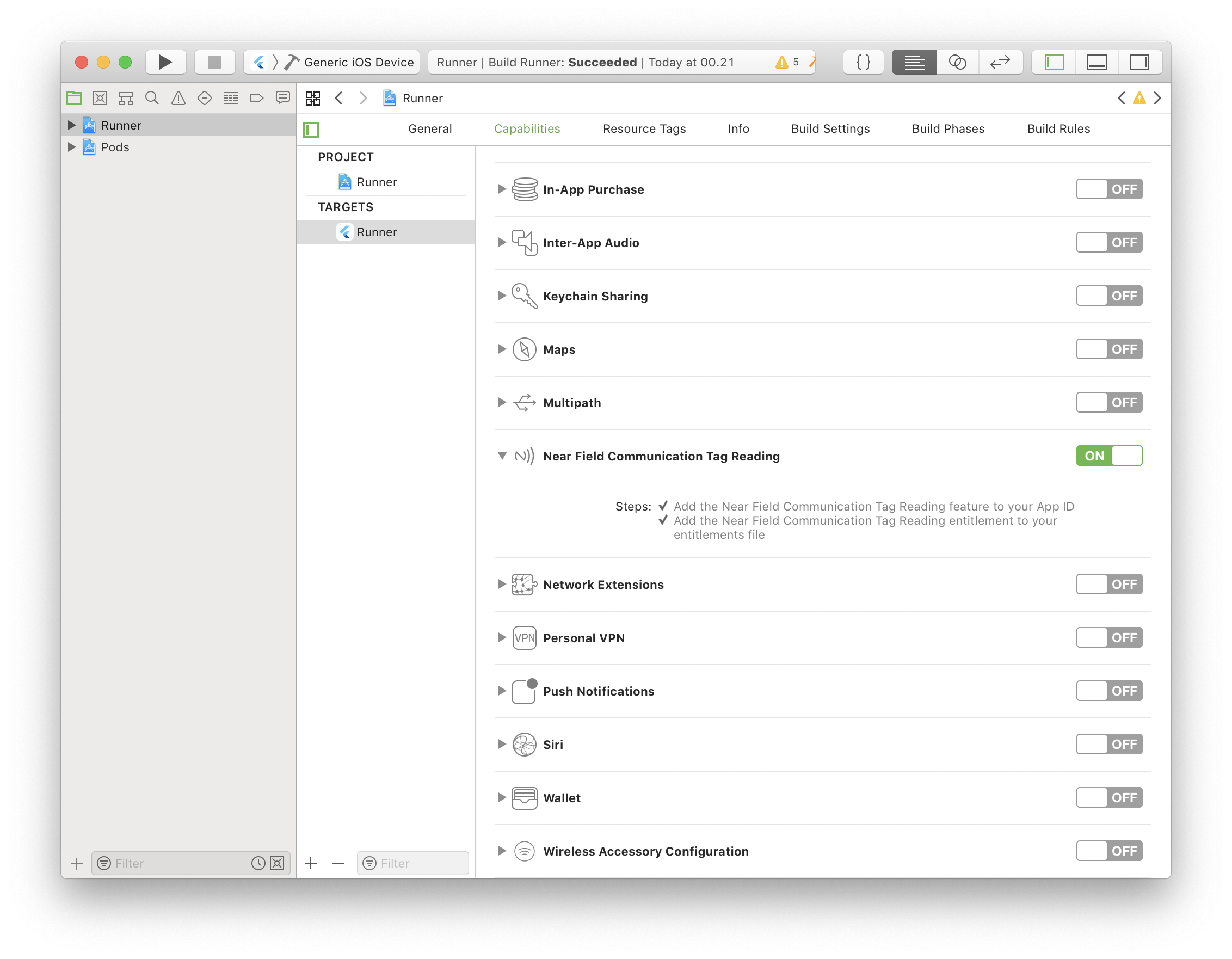
Turn on Near Field Communication Tag Reading

Open your iOS project in Xcode, find your project's target and navigate to Capabilities. Scroll down to 'Near Field Communication Tag Reading' and turn it on.

Turning on 'Near Field Communication Tag reading'

  • Adds the NFC tag-reading feature to the App ID.
  • Adds the Near Field Communication Tag Reader Session Formats Entitlement to the entitlements file.

from developer.apple.com: Building an NFC Tag-Reader app

'Turn on Near Field Communication Tag Reading' capability  turned on for a project in Xcode

NFC Usage Description

Open your ios/Runner/Info.plist file and add a new NFCReaderUsageDescription key. It's value should be a description of what you plan on using NFC for.

<key>NFCReaderUsageDescription</key>
<string>...</string>
Android

Add the following to your app's AndroidManifest.xml file:

<uses-permission android:name="android.permission.NFC" />

If your app requires NFC, you can add the following to only allow it to be downloaded on devices that supports NFC:

<uses-feature android:name="android.hardware.nfc" android:required="true" />

"What is NDEF?"

If you're new to NFC you may come to expect a lot of readNFC() calls, but instead you see readNDEF() and NDEFMessage. NDEF is just a formatting standard the tags can be encoded in. There are other encodings than NDEF, but NDEF is the most common one. Currently NFC in Flutter only supports NDEF formatted tags.

Host Card Emulation

NFC in Flutter supports reading from emulated host cards*.

To read from emulated host cards, you need to do a few things.

  • Call readNDEF() with the readerMode argument set to an instance of NFCDispatchReaderMode.
  • Insert the following <intent-filter /> in your AndroidManifest.xml activity:
<intent-filter>
    <action android:name="android.nfc.action.NDEF_DISCOVERED" />
    <category android:name="android.intent.category.DEFAULT" />
</intent-filter>
  • Not properly tested on iOS
⚠️ Multiple reader modes

If you start a readNDEF() stream with the reader mode set to an instance of NFCDispatchReaderMode, while another stream is active with the NFCNormalReaderMode, it will throw a NFCMultipleReaderModesException.

Platform differences

When you call readNDEF() on iOS, Core NFC (the iOS framework that allows NFC reading) opens a little window. On Android it just starts listening for NFC tag reads in the background.

image from developer.apple.com: Near Field Communication

⚠️ This will also freeze Flutter while open. Please send a Pull Request if you can fix this.

Error handling

Errors are no exception to NFC in Flutter (hah, get it). The stream returned by NFC.readNDEF() can send 7 different exceptions, and even worse: they are different for each platform!

See the full example in the example directory for an example on how to check for errors.

Exceptions for both platforms
NDEFReadingUnsupportedException

Thrown when a reading session is started, but not actually supported.

iOS
NFCUserCanceledSessionException

Thrown when the user clicks Cancel/Done core NFC popup. If you don't need to know if the user canceled the session you can start reading with the throwOnUserCancel argument set to false like so: readNDEF(throwOnUserCancel: false)

NFCSessionTimeoutException

Core NFC limits NFC reading sessions to 60 seconds. NFCSessionTimeoutException is thrown when the session has been active for 60 seconds.

NFCSessionTerminatedUnexpectedlyException

Thrown when the reading session terminates unexpectedly.

NFCSystemIsBusyException

Throw when the reading session fails because the system is too busy.

Android
NFCIOException

Thrown when a I/O exception occurs. Will for example happen if a tag is lost while being read or a tag could not be connected to.

NDEFBadFormatException

Thrown when the tag is expected to NDEF formatted, but it is incorrectly formatted.

カテゴリー

ソースリポジトリ

このパッケージを使用しているプロジェクト

データはまだありません。