パッケージ、リポジトリ、アプリカテゴリを検索

observe_internet_connectivity のカバー
パッケージ詳細v1.0.3

observe_internet_connectivity

カスタマイズ可能な観察戦略を介してインターネット接続を監視するのに役立つFlutterパッケージです。

AndroidiOSmacOSWindowsLinux
30日間ダウンロード
6410
いいね数
33
Pub ポイント
160

パッケージをインストール

flutter pub add observe_internet_connectivity

パッケージ概要

公開情報に基づく選定ガイドです。参考としてご利用ください。

カスタマイズ可能な観察戦略を備えたインターネット接続の監視を目的としたFlutterパッケージです。Android、iOS、macOS、Windows、Linuxなど複数のプラットフォームでネットワーク状態のリアルタイム更新を提供します。開発者は接続変更の検出および対応方法をカスタマイズでき、信頼性の高いネットワーク認識が必要なアプリへの柔軟な統合が可能になります。基本的な機能に関しては外部依存なしにオンライン/オフライン状態の処理を簡素化します。

用途

  • リアルタイムネットワーク状態モニタリング
  • アプリケーションにおけるオフラインモードの処理
  • 接続性に基づくダイナミックなUIの更新
  • バックグラウンドネットワーク状態のトラッキング
  • 接続性の変更時のアプリ動作の適応
  • 失敗したリクエストに対する自動再試行ロジック

主な機能

  • カスタマイズ可能な観測戦略
  • クロスプラットフォーム対応
  • リアルタイム接続の更新
  • 軽量で最小限の依存関係
  • 統合用のシンプルなAPI
  • 設定可能なポーリング間隔

適している対象

  • 応答性のあるネットワークフィードバックが必要なアプリ
  • オフライン対応機能を構築している開発者
  • プラットフォームに依存しない接続チェックを必要とするプロジェクト
  • クリーンで保守しやすいコードを重視するチーム
  • 頻繁なネットワーク操作を行うアプリケーション

注意事項

  • 一部のプラットフォームでは追加の権限が必要になる場合があります
  • カスタム戦略は慎重な実装が必要です
  • バッテリーの使用状況はポーリング頻度に依存します
  • 高周波・低レイテンシネットワークチェックには適していません
  • 基本的な接続検出に限定(速度や品質のメトリクスなし)

元の README

関連するソースリポジトリの README 原文のスナップショットです。最新の内容はリポジトリをご覧ください。

A flutter package that helps to observe internet connection via a customizable observing strategy

Problem Statement

I found that just using the connectivity package was not enough to tell if the internet was available or not. It only checks if there is WIFI or if mobile data is turned on, it does not check for an actual internet connection...

Read more about the issue here

Available Features

  1. Check to know if a device has an internet connection
  final hasInternet = await InternetConnectivity().hasInternetConnection;
  if (hasInternet) {
    //You are connected to the internet
  } else {
    //"No internet connection
  }
  1. Listen to internet connection changes via stream
  final subscription =
      InternetConnectivity().observeInternetConnection.listen((bool hasInternetAccess) {
        if(!hasInternetAccess){
          showToast('No Internet Connection');
        }
      });

   await Future.delayed(const Duration(seconds: 10 ));
   subscription.cancel();

Note:bell:: This example uses the DefaultObServingStrategy therefore you need to remember to cancel the subscription manually, Other available strategies have a mechanism in which the subscription is automatically cancelled.

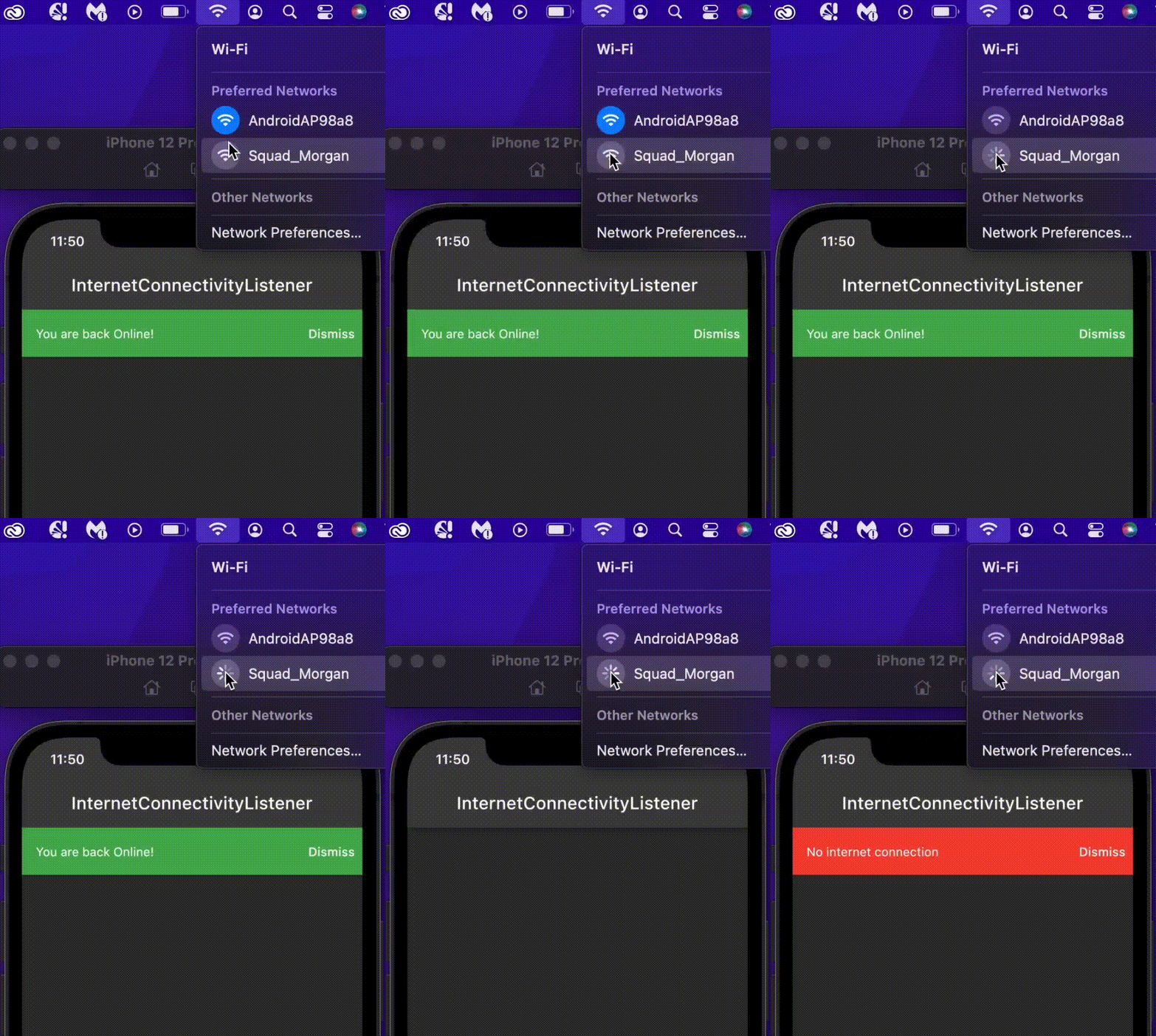
  1. Use InternetConnectivityListener to listen to internet connectivity changes inside a flutter widget
    return InternetConnectivityListener(
      connectivityListener: (BuildContext context, bool hasInternetAccess) {
        if (hasInternetAccess) {
          context.showBanner('You are back Online!', color: Colors.green);
        } else {
          context.showBanner('No internet connection', color: Colors.red);
        }
      },
      child: Scaffold(
        body: Container(),
      ),
    );

This is mostly useful if you want to get notified of internet connection changes in the widget class, either to retry a failed request or to give the user some feedback about their network state.

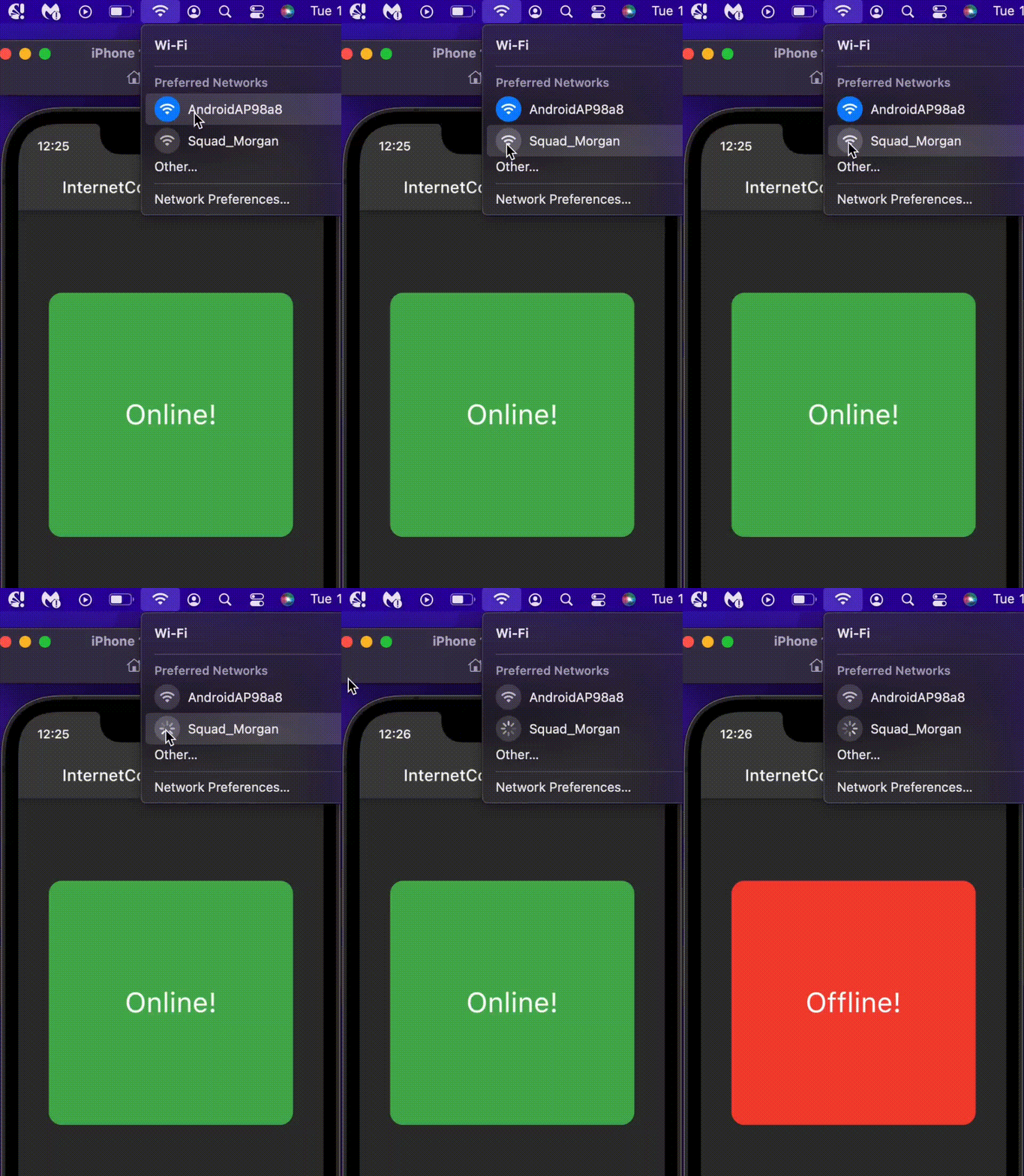
  1. Use InternetConnectivityBuilder to build internet connection aware widgets
    return InternetConnectivityBuilder(
      connectivityBuilder: (BuildContext context, bool hasInternetAccess, Widget? child) { 
        if(hasInternetAccess) {
          return OnlineWidget();
        } else {
          return OfflineWidget();
        }
      },
      child: ChildWidget(),
    );

This returns the OnlineWidget when the user has an internet connection and returns the OfflineWidget widget when the user is disconnected

Deep Dive

The InternetConnectivity class is responsible for observing the internet connectivity using the InternetObservingStrategy and a StreamController to emit internet connection changes. If no strategy is supplied when creating InternetConnectivity, the DefaultObServingStrategy will be used.

  InternetConnectivity({InternetObservingStrategy? internetObservingStrategy}) {
    _internetObservingStrategy =
        internetObservingStrategy ?? DefaultObServingStrategy();
    _internetAccessCheckController = StreamController<bool>.broadcast(
        onCancel: _onCancelStream, onListen: _emitInitialInternetAccess);
  }

The package checks for active internet connection by opening a socket to a list of specified addresses, each with an individual port and timeout using SocketObservingStrategy. If you'd like to implement a different type of observing strategy, you can create a new strategy by extending InternetObservingStrategy. All observing strategies are a sub-class of InternetObservingStrategy

SocketObservingStrategy
abstract class SocketObservingStrategy extends InternetObservingStrategy {
  /// The initial duration to wait before observing internet access
  ///
  /// Defaults to [kDefaultInitialDuration] (0 seconds)
  @override
  final Duration? initialDuration;

  /// The interval between periodic observing.
  ///
  /// Defaults to [kDefaultInterval] (5 seconds).
  @override
  final Duration interval;

  /// The timeout period before a check request is dropped and an address is
  /// considered unreachable.
  ///
  /// If not null, it is set to the [timeOut] for each of the [internetAddresses].
  ///  if (timeOut != null) {
  ///       internetAddresses = internetAddresses
  ///           .map((e) => e.copyWith(timeOut: timeOut))
  ///           .toList(growable: false);
  ///     }
  final Duration? timeOut;

  /// A list of internet addresses (with port and timeout) to ping.
  ///
  /// These should be globally available destinations.
  ///
  /// Default is [kDefaultInternetAddresses].
  List<InternetAddress> internetAddresses;

  SocketObservingStrategy(
      {this.initialDuration,
      required this.interval,
      this.timeOut,
      required this.internetAddresses}) {
    if (timeOut != null) {
      internetAddresses = internetAddresses
          .map((e) => e.copyWith(timeOut: timeOut))
          .toList(growable: false);
    }
  }

  /// The observing strategy is to ping each of the [internetAddresses] supplied,
  /// Using [stream.any] to check for the first address to connect.
  /// Once an address connects, it is assumed that there is internet access and the process stops
  ///
  @override
  Future<bool> get hasInternetConnection async {
    final futures = internetAddresses
        .map((internetAddress) => _hasInternet(internetAddress));
    final stream = Stream.fromFutures(futures);
    return stream.any((element) => element);
  }

  Future<bool> _hasInternet(InternetAddress internetAddress) async {
    Socket? sock;
    try {
      sock = await Socket.connect(
        internetAddress.host,
        internetAddress.port,
        timeout: internetAddress.timeOut,
      )
        ..destroy();
      return true;
    } catch (_) {
      sock?.destroy();
      return false;
    }
  }
}

The library comes with 4 different strategies that extend SocketObservingStrategy for a different use cases, namely;

  1. DefaultObServingStrategy: This is the strategy used if you don't supply any strategy to the InternetConnectivity class, you will have to cancel the subscription manually.

  2. DisposeOnFirstConnectedStrategy: This strategy cancels the subscription automatically after the first connected event, i.e once the device has an internet connection, the stream subscription will be automatically closed.

  3. DisposeOnFirstDisconnectedStrategy: This strategy cancels the subscription automatically after the first disconnected event, i.e once the device is offline, the stream subscription will be automatically closed.

  4. DisposeAfterDurationStrategy: This strategy set the duration to listen for the internet connection events, the subscription will be closed once the duration elapses

class DisposeAfterDurationStrategy extends SocketObservingStrategy {
  @override
  final Duration duration;
  
  DisposeAfterDurationStrategy(
      {required this.duration,
      super.timeOut,
      super.interval = kDefaultInterval,
      super.initialDuration = kDefaultInitialDuration,
      super.internetAddresses = kDefaultInternetAddresses});
}

each of the strategies is initiated with default values for convenience, you can override any of the default values. e.g creating a DefaultObServingStrategy with a timeOut of 5 sec and initialDuration of 2 mins.

    DefaultObServingStrategy(
      timeOut: const Duration(seconds: 5),
      initialDuration: const Duration(minutes: 2)
    )
The Default values

const kDefaultInternetAddresses = [
 InternetAddress(
     host: _googleHost, port: _defaultPort, timeOut: _defaultTimeOut),
 InternetAddress(
     host: _cloudFlareHost, port: _defaultPort, timeOut: _defaultTimeOut),
];

const kDefaultInterval = Duration(seconds: 5);
const kDefaultInitialDuration = Duration(seconds: 0);
const _googleHost = '8.8.8.8';
const _cloudFlareHost = '1.1.1.1';
const _defaultPort = 53;
const _defaultTimeOut = Duration(seconds: 3);

Implementing your own InternetObservingStrategy

For example, you can implement a fake observing strategy for testing as follows;

class FakeObservingStrategy extends InternetObservingStrategy{
  @override
  Future<bool> get hasInternetConnection async=> true;

  @override
  Duration? get initialDuration => const Duration(seconds: 0);

  @override
  Duration get interval => const Duration(seconds: 5);
}

You can also implement an HttpsObservingStrategy as follows;

class HttpsObservingStrategy extends InternetObservingStrategy {
  final String lookUpAddress;

  HttpsObservingStrategy({this.lookUpAddress = 'www.google.com'});

  @override
  Duration? get initialDuration => const Duration(seconds: 0);

  @override
  Duration get interval => const Duration(seconds: 10);

  @override
  Future<bool> get hasInternetConnection async {
    try {
      var url = Uri.https(lookUpAddress, '',);
     await http.get(url);
     return true;
    } catch (_) {
      return false;
    }
  }
}

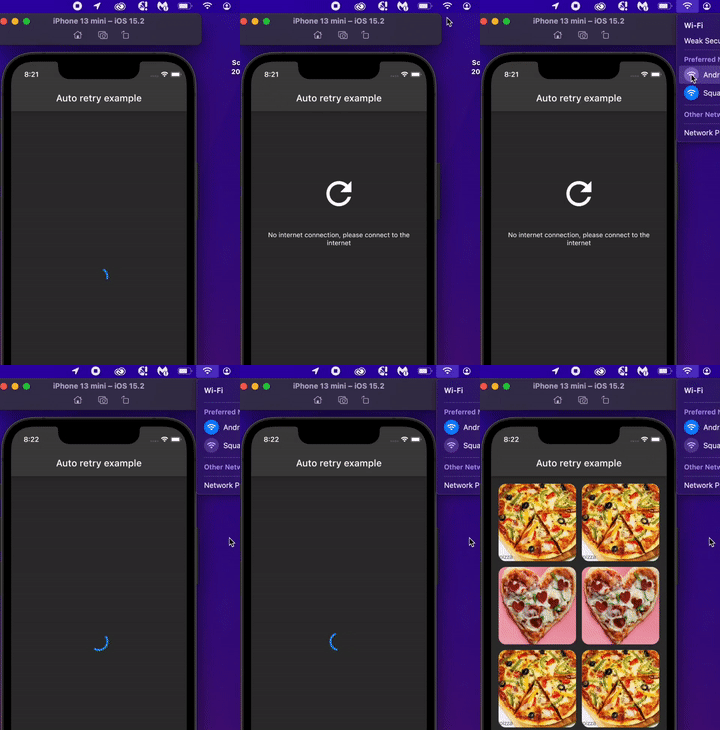
Auto retry example

This example showcase how you can use the InternetConnectivityListener and the DisposeOnFirstConnectedStrategy to automaticaly retry a failed network request once the device is back online.

class _RetryWidget extends ConsumerWidget {
  const _RetryWidget({Key? key}) : super(key: key);

  @override
  Widget build(BuildContext context, WidgetRef ref) {
    return InternetConnectivityListener(
      internetConnectivity: ref.read(disposeOnFirstConnectedProvider),
      connectivityListener: (BuildContext context, bool hasInternetAccess) {
        if (hasInternetAccess) {
          ref.read(dataProvider.notifier).fetchData();
        }
      },
      child: Column(
        crossAxisAlignment: CrossAxisAlignment.center,
        children: const [
          Spacer(flex: 3,),
          Icon(Icons.refresh_outlined, size: 80,),
          Spacer(),
          Text('No internet connection, please connect to the internet', textAlign: TextAlign.center,),
          Spacer(flex: 10,),
        ],
      ),
    );
  }
}

Please check auto_retry_widget.dart for the complete code.

Additional information

Note:bell:: The InternetConnectivity is not a singleton, for the ease of testing. If you would like to maintain a single instance throughout the app lifecycle, you can:

  1. provide a global instance (not recommended)
final globalInstance = InternetConnectivity(
  internetObservingStrategy:   DefaultObServingStrategy(
      timeOut: const Duration(seconds: 5),
      initialDuration: const Duration(minutes: 2)
  )
);
  1. Register it with any dependency injection framework e.g GetIt
  GetIt.instance.registerSingleton<InternetConnectivity>(
      InternetConnectivity(
          internetObservingStrategy:   DefaultObServingStrategy(
              timeOut: const Duration(seconds: 5),
              initialDuration: const Duration(minutes: 2)
          )
      )
  );
  1. Use Riverpod Provider (recommended)
final observingStrategyProvider = Provider<InternetObservingStrategy>((ref)=> 
    DefaultObServingStrategy(
    timeOut: const Duration(seconds: 5),
    initialDuration: const Duration(minutes: 2)
));

final internetConnectivityProvider = Provider<InternetConnectivity>((ref) {
  return InternetConnectivity(internetObservingStrategy: ref.watch(observingStrategyProvider));
});

Check more examples in the example folder. If you like the project, don't forget to star ⭐️

License

This package is licensed under the MIT license. See LICENSE for details.

カテゴリー

ソースリポジトリ

このパッケージを使用しているプロジェクト

データはまだありません。