パッケージ、リポジトリ、アプリカテゴリを検索

optimal_wrap_text のカバー
パッケージ詳細v1.5.0

optimal_wrap_text

より良い視覚的なバランスを得るために、短い複数行テキストを同程度のサイズの行にラップするFlutter Textの代替品。

AndroidiOSWebmacOSWindowsLinux
30日間ダウンロード
825
いいね数
25
Pub ポイント
160

パッケージをインストール

flutter pub add optimal_wrap_text

パッケージ概要

公開情報に基づく選定ガイドです。参考としてご利用ください。

OptimalWrapText は、複数行のテキストを知的に折り返して、長さが似た視覚的にバランスの取れた行を作成することで、テキストレイアウトを強化する Flutter ウィジェットです。標準の Text ウィジェットとは異なり、不均一な行の切り替えを最小限に抑え、短い段落やラベルを含む UI での読みやすさと美的魅力を向上させます。ダッシュボード、カード、フォームなど、タイポグラフィの調和が重要なインターフェースに最適です。このパッケージはすべての主要プラットフォームをサポートしており、既存の Flutter プロジェクトにスムーズに統合できます。

用途

  • テキストが多く含まれるUIの視覚的バランスの向上
  • コンパクトなレイアウトでの読みやすさの向上
  • ラベルとカードでの一貫した行長さの作成
  • レスポンシブデザインにおけるテキスト表示の最適化
  • ダッシュボードおよびデータ概要で使用

主な機能

  • 行の長さを知的にバランス調整します
  • 不自然な行の折り返しを削減する
  • すべての Flutter プラットフォームをサポートしています
  • 既存の Text ウィジェットとの簡単な統合
  • 元のテキストコンテンツおよびスタイルを保持する

適している対象

  • 文字組みの調和を重視するデザイナー
  • 応答性のあるUIを構築する開発者
  • 濃密なテキストコンテンツを含むアプリ
  • 洗練されたテキスト表示を必要とするプロジェクト
  • ユーザー体験に焦点を当てたチームの詳細

注意事項

  • レンダリングの複雑さがわずかに増す可能性があります
  • パフォーマンスの関係で、非常に長いテキストには適していません
  • ラインバランスを超えるカスタマイズは限定的
  • さまざまな画面サイズでの慎重なテストが必要です
  • 短〜中程度のテキストブロックと併用するのが最適です

元の README

関連するソースリポジトリの README 原文のスナップショットです。最新の内容はリポジトリをご覧ください。

Optimal Wrap Text

A Flutter Text replacement that wraps short multi-line text over similarly sized lines for better visual balance.

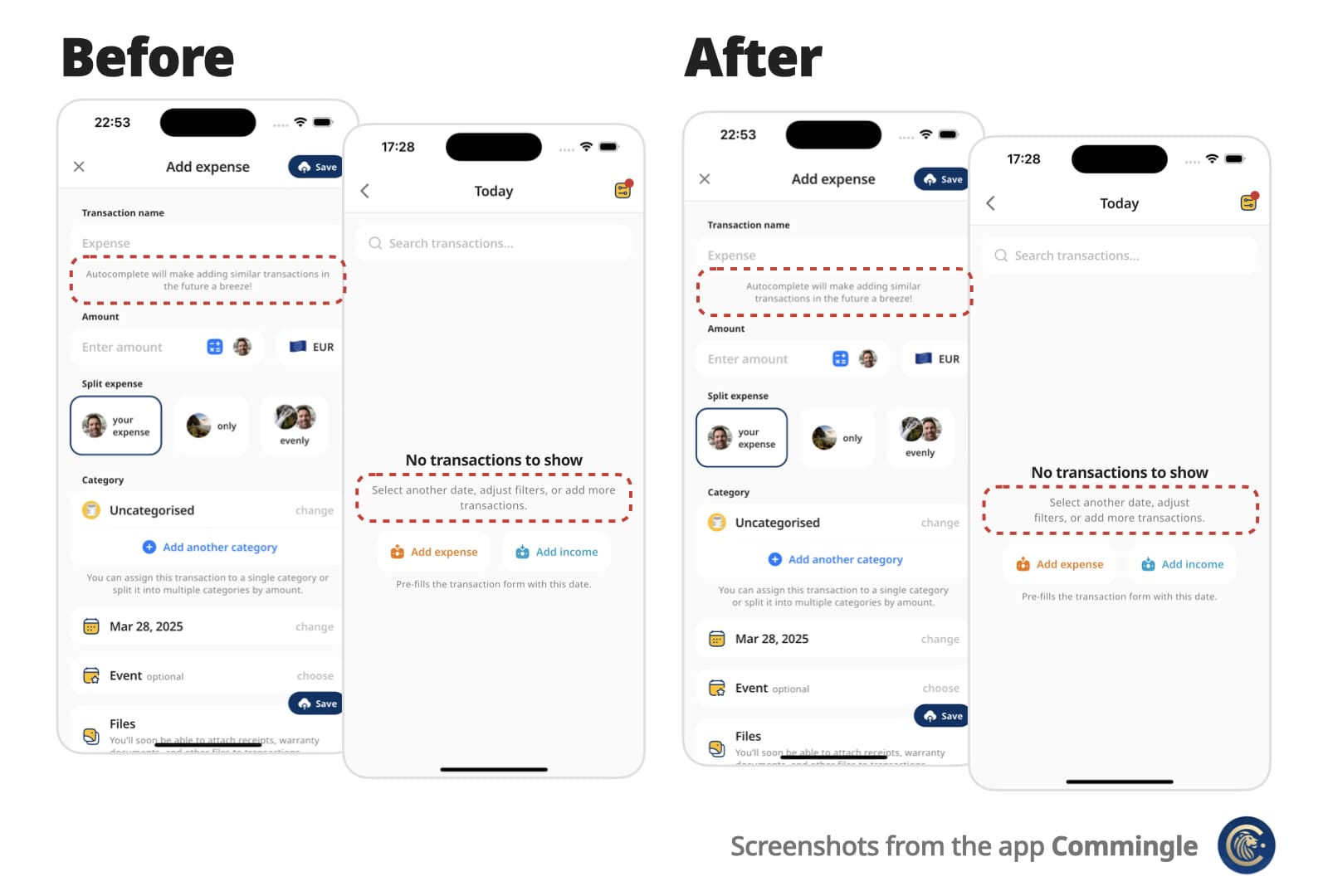
Instead of awkward standard line breaks like these:

My slightly longer text that will span 2 or
3 lines

My slightly longer text that will span 2 or
                  3 lines

You get cleaner, balanced output like these:

My slightly longer text that 
will span 2 or 3 lines

        My slightly longer text that       
           will span 2 or 3 lines

Perfect for small, informative footnotes or short multi-line messages that deserve to look good.

Before and After Comparison

✨ Features

  • Drop-in replacement for the Text widget
  • Supports all Text attributes, including style, textDirection (RTL), textHeightBehavior…
  • Rich text via OptimalWrapRichText, including WidgetSpan (icons and other inline widgets)
  • Automatically finds optimal line breaks — no more manual \n
  • Optional minLines to wrap onto at least that many lines when there are enough words
  • Adjusts to different screen sizes and text scaling

🚀 Getting started

Add optimal_wrap_text to your pubspec.yaml:

dependencies:
  ...
  optimal_wrap_text: 1.5.0
  ...

Then import it:

import 'package:optimal_wrap_text/optimal_wrap_text.dart';

Use it just like the Text widget:

OptimalWrapText(
  'My slightly longer text that will span 2 or 3 lines',
)

For rich text, use OptimalWrapRichText the same way you would use Text.rich:

OptimalWrapRichText(
  TextSpan(
    children: [
      TextSpan(text: 'My slightly '),
      TextSpan(
        text: 'longer',
        style: TextStyle(fontWeight: FontWeight.bold),
      ),
      TextSpan(text: ' rich text that will span 2 or 3 lines'),
    ],
  ),
)

WidgetSpans (for example icons) are supported too:

OptimalWrapRichText(
  TextSpan(
    children: [
      WidgetSpan(
        alignment: PlaceholderAlignment.middle,
        child: Icon(Icons.info_outline, size: 16),
      ),
      TextSpan(text: ' My slightly longer text that will span 2 or 3 lines'),
    ],
  ),
)

With all supported properties:

OptimalWrapText(
  'My slightly longer text that will span 2 or 3 lines',
  key: ...
  style: Theme.of(context).textTheme.bodyLarge,
  textAlign: TextAlign.center,
  strutStyle: ...,
  textDirection: ...,
  locale: ...,
  softWrap: ...,
  overflow: ...,
  textScaler: ...,
  minLines: ...,
  maxLines: ...,
  semanticsLabel: ...,
  textWidthBasis: ...,
  textHeightBehavior: ...,
  selectionColor: ...,
)

📌 For centered or right-aligned text, you may still want to wrap it in a Center, Align, or Row, just like with a regular Text widget.

Use minLines to wrap onto at least that many lines when the text has enough words. A single unbreakable word is never forced to break.

OptimalWrapText(
  'Hello there friend',
  minLines: 2,
  textAlign: TextAlign.center,
)

Use shrinkWrap: true when the parent should hug the optimally wrapped width (for example a chip or speech bubble). By default the widgets expand to the available width via Align, matching typical full-width text layout.

OptimalWrapRichText(
  textSpan,
  shrinkWrap: true,
  textAlign: TextAlign.center,
)

For custom rich-text children, wrap them with the exported OptimalWrapChild primitive instead.

🧠 How does it work?

  1. Optimal Wrap Text uses TextPainter to determine how many lines your text will take at full available width in the given widget tree.

  2. It runs a binary search to find the narrowest width that still fits in the same number of lines — ensuring optimal wrapping. With minLines, that target is raised so the text wraps onto at least that many lines when there are enough words.

    e.g.

    300px → 2 lines (width from the current BuildContext)
    150px → 4 lines ❌
    225px → 2 lines ✅
    188px → 3 lines ❌
    206px → 2 lines ✅
    ... and so on
    

    Worst-case scenario for mobile screen widths (e.g. iPhone) is about 9 iterations, but typical cases resolve in 6 attempts.

  3. It wraps the final Text in a SizedBox constrained to that optimal width.

⚠️ Known Limitations

It uses LayoutBuilder to get width in the given widget tree, which doesn’t work inside some slivers, such as SliverFillRemaining, which rely on intrinsic sizing.

For OptimalWrapRichText with WidgetSpans, prefer intrinsically sized inline children (icons, small badges, fixed-size boxes). Same as Flutter’s Text.rich, each inline widget is constrained by the paragraph’s max width — very wide or full-bleed children can prevent meaningful narrowing.

💡 You can work around this by passing a manual width:

CustomScrollView(
  slivers: [
    ...,
    SliverFillRemaining(
      child: Padding(
        padding: EdgeInsets.only(left: 15, right: 30),
        child: OptimalWrapText(
          'My slightly longer text that will span 2 or 3 lines',
          width: MediaQuery.sizeOf(context).width - 15 - 30
        ),
      )
    ),
  ]
)

📄 Copyright and License

Optimal Wrap Text is maintained by Chris Rutkowski as part of the Commingle app, and open-sourced under the MIT License.

カテゴリー

ソースリポジトリ

このパッケージを使用しているプロジェクト

データはまだありません。