パッケージ、リポジトリ、アプリカテゴリを検索

overlay_pop_up のカバー
パッケージ詳細v1.0.6+6

overlay_pop_up

Androidでアプリが閉じられているか強制終了された場合でも、他のアプリの上にポップアップや画面を表示するための新しいFlutterプラグインです。

Android
30日間ダウンロード
50
いいね数
53
Pub ポイント
160

パッケージをインストール

flutter pub add overlay_pop_up

パッケージ概要

公開情報に基づく選定ガイドです。参考としてご利用ください。

Flutterプラグインで、アプリが閉じられているか終了していても、Android上でポップアップまたはオーバーレイ画面を表示できます。他のアプリの上にコンテンツを表示するために、Androidのシステムレベルのオーバーレイ権限を利用しており、通知やクイックアクション、恒久的なUI要素に役立ちます。このプラグインはFlutterとシームレスに統合されており、正常に機能するにはユーザーの許可が必要です。iOSはサポートしておらず、Android専用です。開発者はプログラム的にオーバーレイの外観と挙動をカスタマイズできます。

用途

  • 永続的な通知を表示する
  • フローティングアクションパネルの作成
  • アプリがバックグラウンドにあるときにアラートを表示する
  • クイックアクセスツールの実装
  • 他のアプリを通じてリアルタイムの更新を提供する

主な機能

  • アプリが終了したときでも動作します
  • Android専用のオーバーレイサポート
  • カスタマイズ可能なオーバーレイコンテンツ
  • システムレベルの権限処理
  • Flutter との簡単な統合

適している対象

  • 常にオンのUIコンポーネントを開発する開発者
  • 永続的なオーバーレイを必要とするアプリ
  • 前面の可視性を必要とするツール
  • 通知を強化したアプリケーション
  • 浮動インターフェースを備えたユーティリティアプリ

注意事項

  • Android システムオーバーレイ権限が必要です
  • iOS では利用できません
  • デバイスメーカーによって制限される可能性があります
  • ユーザーは権限を手動で有効にする必要があります
  • バッテリーおよびパフォーマンスに影響を与える可能性があります

元の README

関連するソースリポジトリの README 原文のスナップショットです。最新の内容はリポジトリをご覧ください。

overlay_pop_up

A new Flutter plugin to display pop ups or screens over other apps in Android even when app is closed or killed.

Buy Me A Coffee

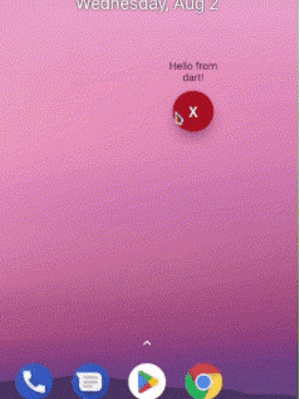
Demo

Preview

Android

add this to your AndroidManifest.xml

 <uses-permission android:name="android.permission.SYSTEM_ALERT_WINDOW" />

 <application>
        ...
        <service
           android:name="com.requiemz.overlay_pop_up.OverlayService"
           android:exported="false" />
    </application>
Android 14

applications that target SDK 34 and use foreground service should include foregroundServiceType attribute(see documentation).

 <uses-permission android:name="android.permission.SYSTEM_ALERT_WINDOW" />

 <application>
        ...
        <service
           android:name="com.requiemz.overlay_pop_up.OverlayService"
           android:exported="false"
           <!-- add this -->
           android:foregroundServiceType="camera, dataSync, location, etc" />
    </application>

Flutter implementation

configure your main.dart entry point a widget to display (make sure to add @pragma('vm:entry-point'))

NOTE: Now you can pass as parameter the dart entry point method name when showOverlay is called

@pragma("vm:entry-point")
void overlayPopUp() {
  WidgetsFlutterBinding.ensureInitialized();
  runApp(const MaterialApp(
    debugShowCheckedModeBanner: false,
    home: Text('Hello Pub.dev!'),
  ));
}

Overlay Methods

returns true when overlay permission is alreary granted if permission is not granted then open app settings

await OverlayPopUp.requestPermission();

returns true or false according to permission status

await OverlayPopUp.checkPermission();

display your overlay and return true if is showed

PARAMS

  • height is not required by default is MATCH_PARENT

  • width is not required by default is MATCH_PARENT

  • verticalAlignment is not required by default is CENTER for more info see: https://developer.android.com/reference/android/view/Gravity

  • horizontalAlignment is not required by default is CENTER for more info see: https://developer.android.com/reference/android/view/Gravity

  • backgroundBehavior by default is focusable flag that is you can take focus inside a overlay for example inside a textfield and [tapThrough] you can tap through the overlay background even if has MATCH_PARENT sizes.

  • screenOrientation by default orientation is portrait.

  • closeWhenTapBackButton by default when user presses back button the overlay no has any action if you pass true then back button will close overlay.

  • isDraggable by default is false therefore the overlay can´t be dragged.

  • entryPointMethodName by default is 'overlayPopUp' if you want you can change it

    await OverlayPopUp.showOverlay();
    

    returns true if overlay closed correctly or already is closed

    await OverlayPopUp.closeOverlay();
    

    returns the overlay status true = open, false = closed

    await OverlayPopUp.isActive();
    

    returns the last overlay position if drag is enabled

    await OverlayPopUp.getOverlayPosition();
    

    share dynamic data to overlay

    await OverlayPopUp.sendToOverlay({'data':'hello!'});
    await OverlayPopUp.sendToOverlay('hello');
    

    receive the data from flutter as stream

    await OverlayPopUp.dataListener();
    

カテゴリー

依存関係

依存関係一覧 1 件

  • plugin_platform_interface^2.1.8

ソースリポジトリ

このパッケージを使用しているプロジェクト

データはまだありません。