パッケージ、リポジトリ、アプリカテゴリを検索

overlay_tutorial のカバー
パッケージ詳細v3.0.0

overlay_tutorial

ウィジェットに穴を空けてオーバーレイチュートリアルを表示するためのFlutterパッケージです。穴の隣にヒントを追加することもできます。

AndroidiOSWebmacOSWindowsLinux
30日間ダウンロード
1580
いいね数
69
Pub ポイント
130

パッケージをインストール

flutter pub add overlay_tutorial

パッケージ概要

公開情報に基づく選定ガイドです。参考としてご利用ください。

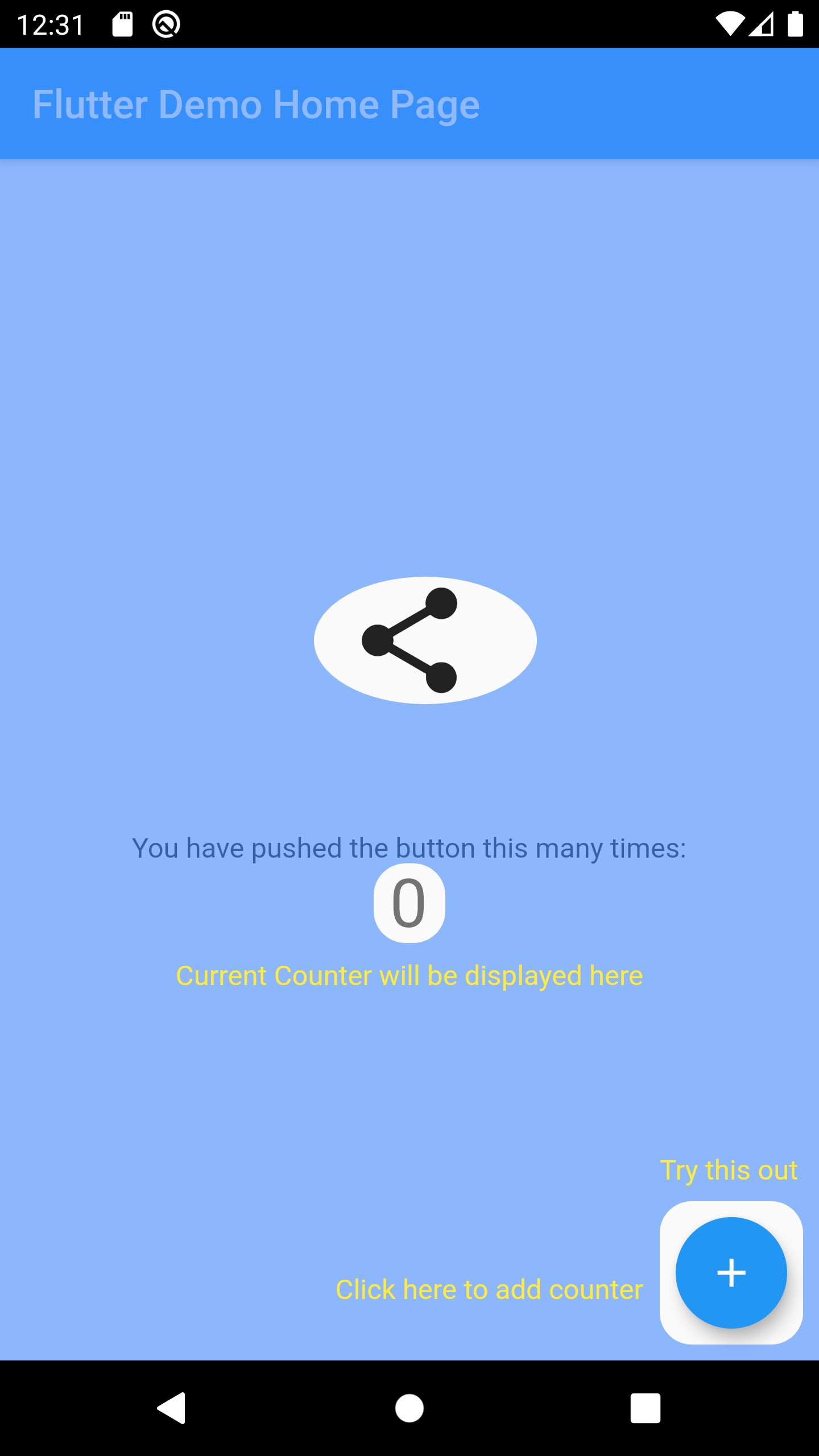
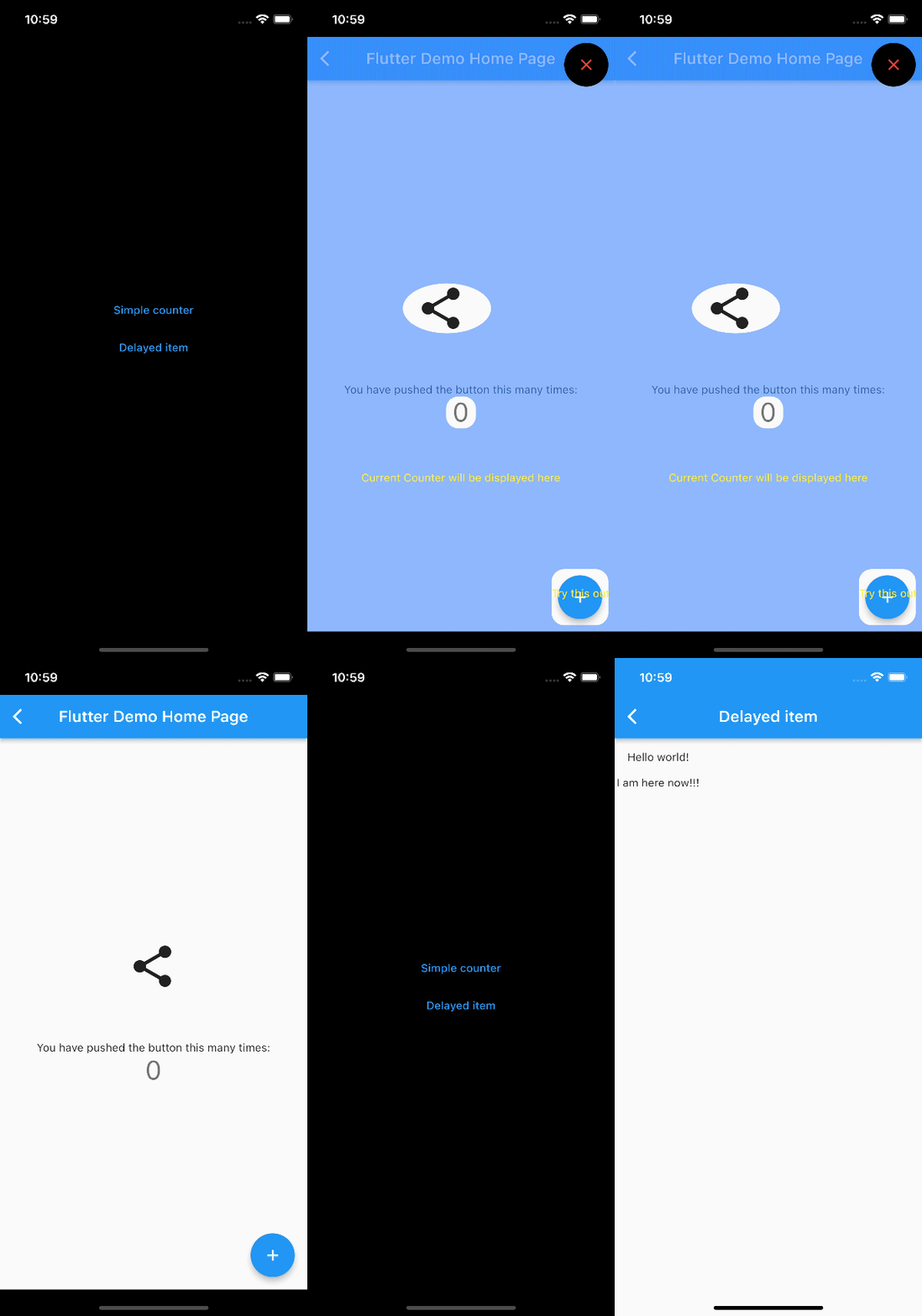
OverlayTutorial は、特定のウィジェットをカットアウトオーバーレイで強調することで、アプリの機能をユーザーに案内するためのFlutterパッケージです。開発者は強調された領域の隣にインタラクティブなヒントを表示でき、オンボーディングとユーザー参加を向上させます。このパッケージはAndroid、iOS、Web、macOS、Windows、Linuxなど複数のプラットフォームをサポートしており、クロスプラットフォームアプリに適しています。pub addによる簡単な統合により、UIを損なうことなく機能の発見性が向上します。

用途

  • 新規ユーザーのオンボーディング
  • 重要なUI要素の強調表示
  • 複雑なワークフローに沿ってユーザーを案内する
  • アプリの使いやすさの向上
  • 新機能の紹介
  • ユーザーにアプリ機能について教育する

主な機能

  • ターゲットウィジェット上のカットアウトホール
  • カスタマイズ可能なヒントの配置
  • クロスプラットフォーム対応
  • pub との簡単な統合
  • カスタマイズ可能なオーバーレイの外観
  • 複数のプラットフォームターゲットをサポート

適している対象

  • アプリオンボーディングフロー
  • 機能発見ツール
  • ユーザー教育インターフェース
  • モバイルおよびウェブアプリケーション
  • UX改善プロジェクト
  • インタラクティブなチュートリアル

注意事項

  • 最適なUXを実現するためには、慎重な配置が必要になる場合があります
  • 多数のオーバーレイを使用した際のパフォーマンスへの影響
  • 基本的なスタイリングを超えるカスタマイズは限られている
  • 正しいウィジェット階層に依存しています
  • 静的ドキュメントには適していません
  • すべてのターゲットプラットフォームでテストが必要です

元の README

関連するソースリポジトリの README 原文のスナップショットです。最新の内容はリポジトリをご覧ください。

overlay_tutorial

A Flutter package for displaying overlay tutorial.

Feature

  • Allow to display an overlay tutorial with hole cropping.
  • Allow to display hint aside hole.
  • Allow to customize hole shape.

Usage

Wrap the widget that you want to create a hole using OverlayTutorialHole. Ensure you have OverlayTutorialScope as a parent of these holes.

  1. Use OverlayTutorialScope.enabled property to control the visibility of the overlay tutorial. If this is false, the entire overlay tutorial will be hidden.
  2. Use OverlayTutorialHole.enabled property to control the visibility of the holes.

Wrap your UI


Widget build(BuildContext context) {
  final textTheme = Theme.of(context).textTheme;
  const tutorialColor = Colors.yellow;
  return SafeArea(
    child: Stack(
      children: [
        OverlayTutorialScope(
          enabled: _isTutorialEnabled,
          overlayColor: Colors.blueAccent.withOpacity(.6),
          // Disable all the widgets. All the widgets are now non-interactive.
          child: AbsorbPointer(
            absorbing: _isTutorialEnabled,
            child: Scaffold(
              appBar: AppBar(
                title: Text(widget.title),
              ),
              body: Center(
                child: Column(
                  mainAxisAlignment: MainAxisAlignment.center,
                  children: <Widget>[
                    AnimatedBuilder(
                      animation: _tweenAnimation,
                      builder: (context, child) {
                        return SlideTransition(
                          position: _tweenAnimation,
                          child: child,
                        );
                      },
                      child: OverlayTutorialHole(
                        enabled: true,
                        overlayTutorialEntry: OverlayTutorialCustomShapeEntry(
                          shapeBuilder: (rect, path) {
                            path = Path.combine(
                              PathOperation.difference,
                              path,
                              Path()
                                ..addOval(Rect.fromLTWH(
                                  rect.left - 16,
                                  rect.top,
                                  112,
                                  64,
                                )),
                            );
                            return path;
                          },
                        ),
                        child: const Icon(
                          Icons.share,
                          size: 64,
                        ),
                      ),
                    ),
                    const SizedBox(height: 64),
                    const Text(
                      'You have pushed the button this many times:',
                    ),
                    OverlayTutorialHole(
                      enabled: true,
                      overlayTutorialEntry: OverlayTutorialRectEntry(
                        padding: const EdgeInsets.symmetric(horizontal: 8.0),
                        radius: const Radius.circular(16.0),
                        overlayTutorialHints: <OverlayTutorialWidgetHint>[
                          OverlayTutorialWidgetHint(
                            position: (rect) => Offset(0, rect.bottom),
                            builder: (context, entryRect) {
                              return SizedBox(
                                width: MediaQuery.of(context).size.width,
                                child: Center(
                                  child: Padding(
                                    padding: const EdgeInsets.all(8.0),
                                    child: Text(
                                      'Current Counter will be displayed here',
                                      style: textTheme.bodyText2!
                                          .copyWith(color: tutorialColor),
                                    ),
                                  ),
                                ),
                              );
                            },
                          ),
                        ],
                      ),
                      child: Text(
                        '$_counter',
                        style: Theme.of(context).textTheme.headline4,
                      ),
                    ),
                  ],
                ),
              ),
              floatingActionButton: OverlayTutorialHole(
                enabled: true,
                overlayTutorialEntry: OverlayTutorialRectEntry(
                  padding: const EdgeInsets.all(8.0),
                  radius: const Radius.circular(16.0),
                  overlayTutorialHints: [
                    OverlayTutorialWidgetHint(
                      builder: (context, entryRect) {
                        return Positioned(
                          top: entryRect.rRect!.top - 24.0,
                          left: entryRect.rRect!.left,
                          child: Text(
                            'Try this out',
                            style: textTheme.bodyText2!
                                .copyWith(color: tutorialColor),
                          ),
                        );
                      },
                    ),
                    OverlayTutorialWidgetHint(
                      position: (rect) => Offset(0, rect.center.dy),
                      builder: (context, entryRect) {
                        return SizedBox(
                          width: entryRect.rRect!.left,
                          child: Padding(
                            padding: const EdgeInsets.only(right: 8.0),
                            child: Row(
                              mainAxisAlignment: MainAxisAlignment.end,
                              children: [
                                Flexible(
                                  child: Text(
                                    'Click here to add counter',
                                    style: textTheme.bodyText2!
                                        .copyWith(color: tutorialColor),
                                  ),
                                ),
                              ],
                            ),
                          ),
                        );
                      },
                    ),
                  ],
                ),
                child: FloatingActionButton(
                  onPressed: _incrementCounter,
                  tooltip: 'Increment',
                  child: const Icon(Icons.add),
                ),
              ),
            ),
          ),
        ),
        if (_isTutorialEnabled)
          Align(
            alignment: Alignment.topRight,
            child: GestureDetector(
              onTap: () {
                _isTutorialEnabled = false;
                setState(() {});
              },
              child: Padding(
                padding: const EdgeInsets.all(8.0),
                child: Container(
                  padding: const EdgeInsets.all(16),
                  decoration: const BoxDecoration(
                    shape: BoxShape.circle,
                    color: Colors.black,
                  ),
                  child: const Icon(
                    Icons.close,
                    color: Colors.red,
                  ),
                ),
              ),
            ),
          ),
      ],
    ),
  );
}

Hole Shape

  • OverlayTutorialRectEntry draws a Rectangle shape
  • OverlayTutorialCircleEntry draws a Circle shape
  • OverlayTutorialCustomShapeEntry allows to draw a customized shape

Disabling Widget

Disabling widget is not provided by this package out of the box. You can achieve this using one of the Flutter widget: AbsorbPointer or IgnorePointer. Make sure you do not wrap the OverlayTutorialScope with these widgets as this will disable the widget in OverlayTutorialWidgetHint.

Screenshot

API

Check Dart Documentation

License

License.

カテゴリー

依存関係

依存関係一覧 3 件

ソースリポジトリ

このパッケージを使用しているプロジェクト

データはまだありません。