パッケージ、リポジトリ、アプリカテゴリを検索

page_animator のカバー
パッケージ詳細v1.0.1

page_animator

カスタマイズ可能な効果を備えた滑らかなページ遷移とアニメーションを提供するFlutterパッケージ。水平なページナビゲーションを持つ魅力的なユーザーインターフェースを作成するのに最適です。

AndroidiOSWebmacOSWindowsLinux
30日間ダウンロード
14
いいね数
9
Pub ポイント
160

パッケージをインストール

flutter pub add page_animator

パッケージ概要

公開情報に基づく選定ガイドです。参考としてご利用ください。

PageAnimator は、水平ナビゲーション用のスムーズでカスタマイズ可能なページ遷移とアニメーションを提供することを目的としたFlutterパッケージです。流れるような視覚効果により、ユーザーインターフェースを強化し、アプリのナビゲーションをより魅力的かつ直感的にします。オンボーディングフロー、ダッシュボード、マルチステッププロセスなど、動的な画面変更が必要なアプリに最適です。このパッケージはAndroid、iOS、Web、macOS、Windows、Linuxを含むすべての主要プラットフォームをサポートしており、デバイス間で一貫したパフォーマンスを確保しています。

用途

  • オンボーディング画面
  • ダッシュボードナビゲーション
  • マルチステップフォーム
  • インタラクティブなチュートリアル
  • スワイプ可能なコンテンツ
  • アニメーション付きタブ遷移

主な機能

  • カスタマイズ可能な遷移エフェクト
  • スムーズな水平ページアニメーション
  • クロスプラットフォーム互換性
  • PageView との簡単な統合
  • ジェスチャーによるナビゲーションのサポート
  • カスタマイズ可能な期間とカーブ

適している対象

  • アニメーションナビゲーションを求める開発者
  • スワイプ可能なインターフェースを持つアプリ
  • デザイン重視のUI実装
  • 豊富なインタラクションを備えたモバイルおよびWebアプリケーション
  • ユーザー体験を最優先とするチーム

注意事項

  • 複雑なアニメーションではパフォーマンスに影響を与える可能性があります
  • 最適なUXを得るためには慎重な調整が必要です
  • 限定された組み込みプリセット(カスタマイズが必要)
  • シンプルな静的ページには適していない
  • 中程度のアニメーションの複雑さに最適

元の README

関連するソースリポジトリの README 原文のスナップショットです。最新の内容はリポジトリをご覧ください。

Page Animator

A Flutter package that provides smooth page transitions and animations with customizable effects. Perfect for creating engaging user interfaces with horizontal page navigation.

Features

  • Multiple animation types for page transitions, switchable in realtime
  • Infinite scrolling in both directions, with ability to set bounds in realtime
  • Animated switcher - tap on a page, and it will zoom out, similar to Kindle reader
  • Immersive mode support

Animation Types

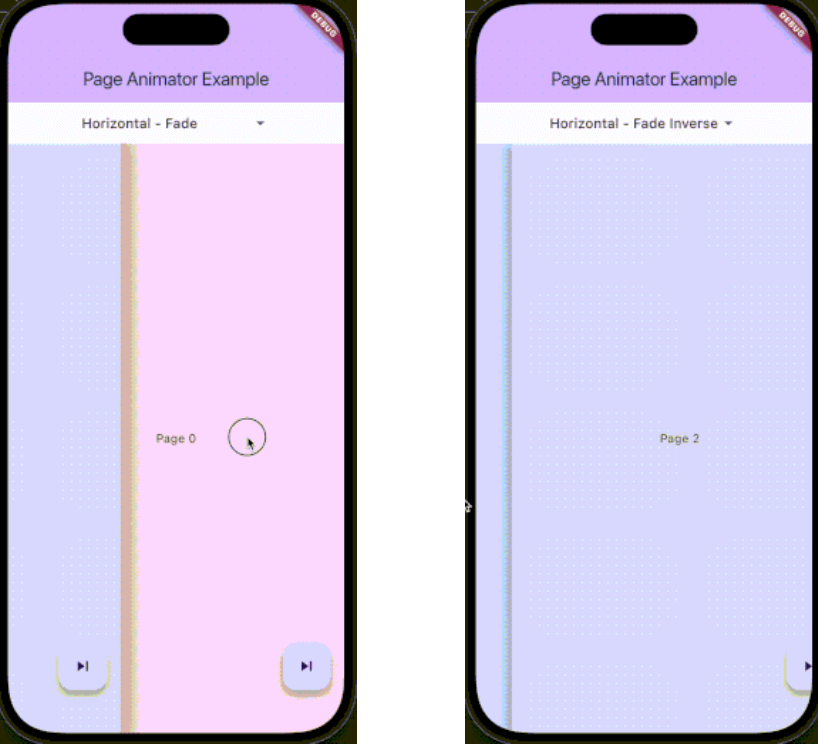
The package supports various animation types through PageAnimatorType. Here's a comprehensive list of all available animations:

Preview Preview Preview
Uncompressed gif
animatedSwitcher - Animated switcher transition
Uncompressed gif
noAnimation - No animation effect, instant page switch
Uncompressed gif
horizontalSimple - Simple horizontal slide transition
Uncompressed gif
horizontalFade - Horizontal slide with fade effect
Uncompressed gif
horizontalFadeInverse - Horizontal slide with inverse fade effect
Uncompressed gif
verticalSimple - Simple vertical slide transition
Uncompressed gif
verticalFade - Vertical slide with fade effect
Uncompressed gif
verticalFadeInverse - Vertical slide with inverse fade effect

You can change the animation type dynamically using the controller:

pageAnimatorController.type.value = PageAnimatorType.verticalFade;

Installation

Add this to your package's pubspec.yaml file:

dependencies:
  page_animator: ^1.0.0

Usage

  1. Import the package:
import 'package:page_animator/page_animator.dart';
  1. Create a PageAnimatorController:
final pageAnimatorController = PageAnimatorController(
  type: PageAnimatorType.horizontalFade,
);
  1. Use the PageAnimator widget:
PageAnimator(
  controller: pageAnimatorController,
  onPageChanged: (int currentPage) {
    print('Page offset: $currentPage');
  },
  leftMostIndex: -3,
  rightMostIndex: 3,
  children: [
    // Your page widgets here
  ],
  enableImmersiveSwitch: true,
)
Page Bounds

The PageAnimator widget allows you to set bounds for page navigation using leftMostIndex and rightMostIndex parameters:

  • leftMostIndex: The minimum page offset that can be reached by swiping left
  • rightMostIndex: The maximum page offset that can be reached by swiping right

These bounds can be changed in realtime, allowing you to dynamically control the navigation range. For example:

// Initially allow navigation indefinitelly
PageAnimator(
  leftMostIndex: null,
  rightMostIndex: null,
  // ... other parameters
)

// Later, you can update the bounds
PageAnimator(
  leftMostIndex: -3,
  rightMostIndex: 3,
  // ... other parameters
)

When a bound is reached, the page will stop scrolling in that direction, providing a natural end to the navigation.

Example

Here's a complete example showing how to use the package:

class MyPage extends StatefulWidget {
  @override
  State<MyPage> createState() => _MyPageState();
}

class _MyPageState extends State<MyPage> {
  final pageAnimatorController = PageAnimatorController(
    type: PageAnimatorType.horizontalFade,
  );

  @override
  Widget build(BuildContext context) {
    return Scaffold(
      body: PageAnimator(
        controller: pageAnimatorController,
        onPageChanged: (int currentPage) {
          print('Page offset: $currentPage');
        },
        leftMostIndex: -3,
        rightMostIndex: 3,
        children: [
          for (final page in List.generate(3, (index) => index))
            _buildPage(page),
        ],
        enableImmersiveSwitch: true,
      ),
    );
  }

  Widget _buildPage(int page) {
    return Scaffold(
      body: Center(
        child: Text('Page $page'),
      ),
      floatingActionButton: FloatingActionButton(
        onPressed: () => pageAnimatorController.animateToOffset(1),
        child: const Icon(Icons.skip_next),
      ),
    );
  }
}

Controller Methods

The PageAnimatorController provides several methods to control page transitions:

  • animateToOffset(int offset): Animate to a specific page offset
  • type: Change the animation type dynamically
  • switcherActive: Control the page switcher state

Contributing

Contributions are welcome! Please feel free to submit a Pull Request.

License

This project is licensed under the MIT License - see the LICENSE file for details.

Parameters

  • children: List of widgets to display as pages
  • onPageChanged: Callback when page is changed
  • leftMostIndex: The first page user can go to
  • rightMostIndex: The last page user can go to
  • controller: PageAnimatorController instance
  • enableImmersiveSwitch: Optional boolean that controls whether to enable immersive mode while switcher is inactive, and automatically disable it when user enters switcher. If not specified, defaults to true.
  • onDragStart: Optional callback when drag starts
  • onDragEnd: Optional callback when drag ends
  • onDragAnimationStart: Optional callback when animation starts
  • onDragAnimationEnd: Optional callback when animation ends

カテゴリー

依存関係

依存関係一覧 1 件

ソースリポジトリ

このパッケージを使用しているプロジェクト

データはまだありません。