パッケージ、リポジトリ、アプリカテゴリを検索

paperfold のカバー
パッケージ詳細v1.0.4

paperfold

このパッケージは、子要素にペーパーフォールド効果を適用するウィジェットを提供します。

AndroidiOSWebmacOSWindowsLinux
30日間ダウンロード
21
いいね数
34
Pub ポイント
150

パッケージをインストール

flutter pub add paperfold

パッケージ概要

公開情報に基づく選定ガイドです。参考としてご利用ください。

Paperfold は、任意のウィジェット子要素にリアルな紙の折りたたみ効果を適用できる Flutter パッケージです。滑らかなアニメーションを通じて、折りたたまれた紙の視覚的な外観をシミュレートし、ダイナミックでタッチ感のあるインタラクションによりユーザーインターフェースを強化します。インタラクティブなカード、ドキュメントプレビュー、魅力的な UI トランジションを作成するのに最適で、Android、iOS、Web、macOS、Windows、Linux などの主要プラットフォームすべてで動作します。パッケージは軽量であり、簡単な追加コマンドで既存の Flutter プロジェクトにスムーズに統合できます。

用途

  • インタラクティブカードアニメーション
  • ドキュメントプレビューインターフェース
  • 動的UIのトランジション
  • アプリオンボーディング画面
  • クリエイティブなダッシュボード要素
  • ジェスチャー駆動の折りたたみ効果

主な機能

  • 現実的な紙の折りたたみアニメーション
  • クロスプラットフォーム互換性
  • pub を通じたシンプルな統合
  • カスタマイズ可能な折りたたみ角度
  • すべてのデバイスでのスムーズなパフォーマンス
  • ネストされたウィジェットをサポートしています

適している対象

  • 視覚的な魅力を求めるUIデザイナー
  • インタラクティブなアプリを開発する開発者
  • タクトイルフィードバックを必要とするプロジェクト
  • 教育用またはプレゼンテーション用アプリ
  • ドキュメントまたはカードベースのレイアウトを持つアプリ

注意事項

  • 低性能デバイスでのパフォーマンスに影響を与える可能性があります
  • 折り畳みスタイルの変換に限定
  • 複雑な3Dシーンには適していません
  • 慎重なレイアウト計画が必要です
  • アニメーションは、異なる画面サイズに合わせて調整が必要になる場合があります
  • 視覚的な混雑を避けるために控えめに使用することをお勧めします

元の README

関連するソースリポジトリの README 原文のスナップショットです。最新の内容はリポジトリをご覧ください。

Paperfold

Pub Style Style Style


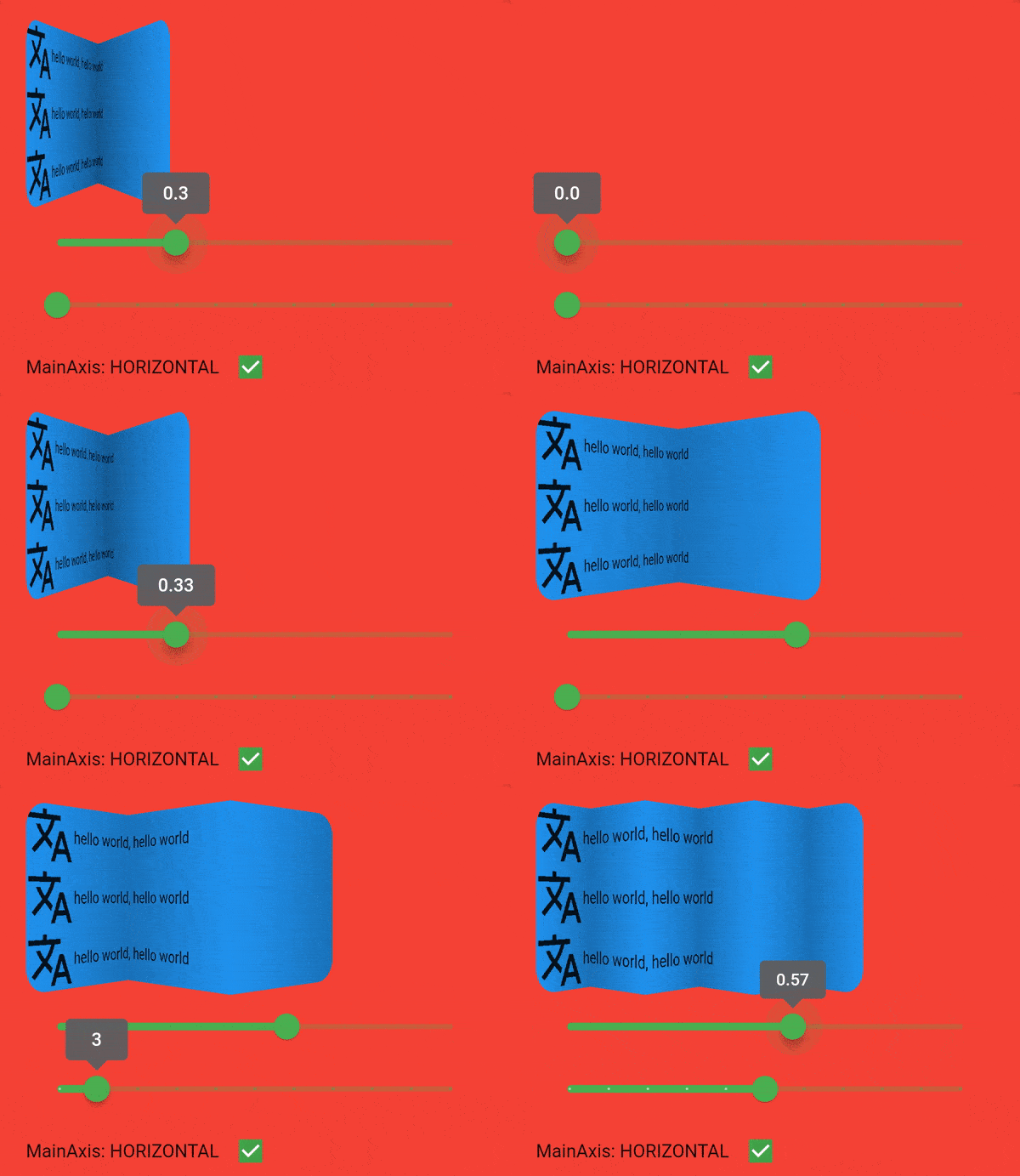
This package provides a widget which applies a paper fold effect on it's child. You can choose between horizontal and vertical fold direction. The number of strips has to be at least two.

preview

Getting started

Installation

Add paperfold as a dependency in your pubspec.yaml file. Or run pub add paperfold in your terminal.

Usage

Just add the widget to your tree and you're done :). Take a look at example to see more.

PaperFold(
  mainAxis: PaperFoldMainAxis.vertical,
  strips: 4,
  foldValue: .5,
  pixelRatio: 1,//works best if you query the device pixel ration with MediaQuery.of
  child: ClipRRect(
    borderRadius: BorderRadius.all(Radius.circular(20)),
    child: Container(
      color: Colors.green,
      height: 150,
      child: ListView.builder(
        itemCount: 30,
        itemBuilder: (context, index) {
          return Column(
            children: [
              Row(
                children: const [
                  Icon(
                    Icons.translate,
                    size: 50,
                  ),
                  Text("hello world, hello world")
                ],
              ),
            ],
          );
        },
      ),
    ),
  ),
);

Limitation

  • User interactions (gestures etc.) with child only possible in unfold state. (0 <= fold value < 1)
  • Child widgets can't be animated. This is also valid for videos. You can wrap it by the paperfold, but the content will not update in folded state.

Issues

Feel free to file any issues, bugs, or feature requests. All contributions are welcome :)

License

BSD-3-Clause

Special thx

Special thanks to GwaedGlas for reviewing and sparring this package

カテゴリー

依存関係

依存関係一覧 1 件

ソースリポジトリ

このパッケージを使用しているプロジェクト

データはまだありません。