パッケージ、リポジトリ、アプリカテゴリを検索

パッケージ詳細v0.3.1+1

parallax_image

Flutterウィジェットで、メインスクロールコンテンツよりも遅い速度で画像を描画して移動させます。

30日間ダウンロード
15
いいね数
94
Pub ポイント
40

パッケージをインストール

flutter pub add parallax_image

パッケージ概要

公開情報に基づく選定ガイドです。参考としてご利用ください。

Parallax_image は、周囲のコンテンツよりも遅い速度で画像を移動させることで、パララックススクロール効果を作成する Flutter ウィジェットです。この視覚的手法により、スクロール可能なインターフェースに奥行きと魅力が加わり、カバーフローまたはカルーセルのような没入型体験に最適です。このウィジェットは ListView および他のスクロール可能コンポーネントとシームレスに統合され、微細な動きを通じてユーザーインタラクションを強化できます。軽量でパフォーマンスに最適化されており、低スペックデバイスでも滑らかなアニメーションを実現します。

用途

  • 没入型カルーセルインターフェースの作成
  • アプリのオンボーディング画面の向上
  • 製品紹介ページに深みを加える
  • スクロールベースのコンテンツにおけるユーザー参加の向上
  • 視覚的にダイナミックなランディングページの設計

主な機能

  • スムーズなパララックススクロール効果
  • ListView との簡単な統合
  • カスタマイズ可能なパララックス速度
  • 軽量でパフォーマンスに優れる
  • 静的およびアニメーション画像の両方をサポートしています

適している対象

  • 視覚的な奥行きを求めるアプリデザイナー
  • インタラクティブなカルーセルを開発する開発者
  • ユーザー体験の向上に注力するチーム
  • 繊細なアニメーション効果を必要とするプロジェクト
  • 豊かなビジュアルストーリーテリングを備えたモバイルアプリ

注意事項

  • 低価格端末でのパフォーマンスに影響する可能性があります
  • パララックス速度の正確な調整が必要です
  • スクロール可能なコンテキストに限定
  • 複雑なアニメーションには適していません
  • 高品質な画像と併用するのが最適です

元の README

関連するソースリポジトリの README 原文のスナップショットです。最新の内容はリポジトリをご覧ください。

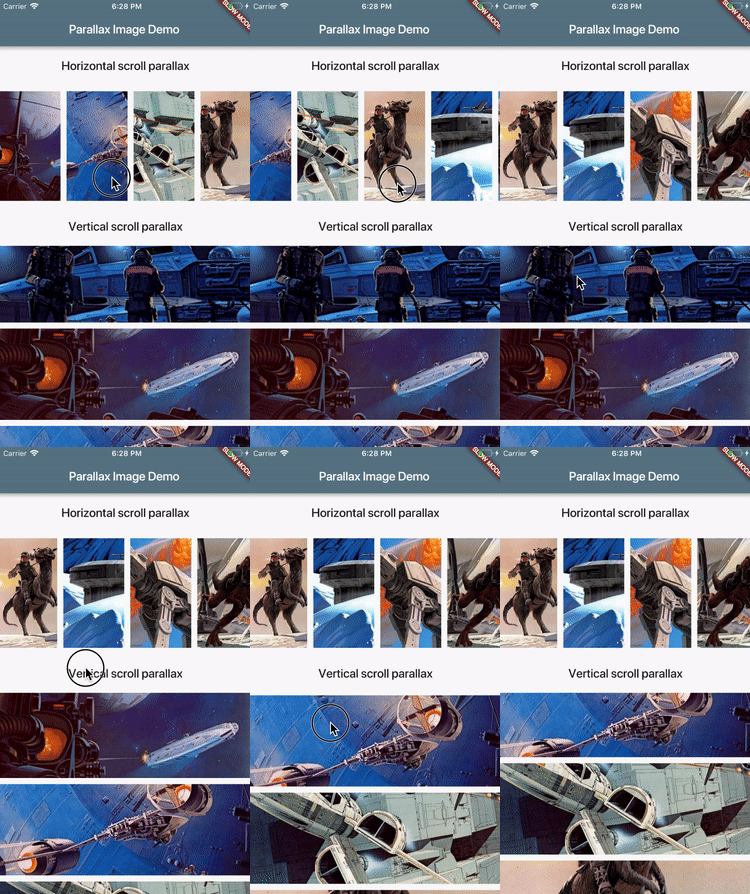
A Flutter widget that paints an image and moves it at a slower speed than the main scrolling content.

demo.gif

Installation

Add dependency to your pubspec.yaml:

dependencies:
  parallax_image: [latest version]

Usage

ParallaxImage can be used with any Scrollable (ListView for instance). When created, it subscribes to scroll updates on nearest Scrollable ancestor. It is also possible to specify custom ScrollController in which case this widget subscribes to updates on ScrollController.position (assumes that controller is attached to only one Scrollable).

class MyWidget extends StatefulWidget {
  @override
  MyWidgetState createState() => new MyWidgetState();
}

class MyWidgetState extends State<MyWidget> {
  final _controller = new ScrollController();

  @override
  Widget build(BuildContext context) {
    return new ListView(controller: _controller, children: [
      new ParallaxImage(
        image: new AssetImage('images/january.jpg'),
        // Extent of this widget in scroll direction.
        // In this case it is vertical scroll so extent defines
        // the height of this widget.
        // The image is scaled with BoxFit.fitWidth which makes it
        // occupy full width of this widget.
        // After image is scaled it should normally have height greater
        // than this value to allow for parallax effect to be
        // visible.
        extent: 100.0,
        // Optionally specify child widget.
        child: new Text('January'),
        // Optinally specify scroll controller.
        controller: _controller,
      ),
      // ...add more list items
    ]);
  }
}

See example/ folder for a complete demo.

Features and bugs

Please file feature requests and bugs at the issue tracker.

カテゴリー

ソースリポジトリ

このパッケージを使用しているプロジェクト