パッケージ、リポジトリ、アプリカテゴリを検索

passkeys のカバー
パッケージ詳細v2.24.1

passkeys

シンプルなパスキー認証を可能にするFlutterプラグイン。利用可能なリライングパーティーサーバー(Corbado)またはカスタムのリライングパーティーサーバーと併用できます。

AndroidiOSWebmacOSWindows
30日間ダウンロード
24.1万
いいね数
115
Pub ポイント
150

パッケージをインストール

flutter pub add passkeys

パッケージ概要

公開情報に基づく選定ガイドです。参考としてご利用ください。

passkeys パッケージは、Android、iOS、Web、macOS、Windows を含む複数のプラットフォームでパスキー基盤の認証を簡素化するFlutterプラグインです。Corbadoの即時利用可能なリライングパーティサーバーまたはカスタムリライングパーティ実装との統合をサポートしています。セキュアでパスワード不要なログイン体験を目的としており、各プラットフォームのネイティブなバイオメトリクスおよびデバイス認証メカニズムを利用します。複雑な暗号化操作を抽象化し、開発者が最小限のセットアップで現代的な認証フローを実装できるようにしています。セキュリティとユーザー利便性を重視するアプリに最適です。

用途

  • パスワードなしログイン
  • バイオメトリック認証
  • セキュアなアプリアクセス
  • クロスプラットフォーム認証
  • IDプロバイダーとの統合

主な機能

  • Corbado およびカスタム信頼される当事者をサポートしています
  • プラットフォームネイティブなバイオメトリクス
  • クロスプラットフォーム互換性
  • パスキー管理のためのシンプルな API
  • セキュアな資格情報の保存

適している対象

  • 強力な認証を必要とするアプリ
  • パスワードレスシステムを構築する開発者
  • Corbado やカスタム IdP を使用するチーム
  • モバイルおよびデスクトップアプリケーション
  • セキュリティを重視したアプリケーション

注意事項

  • バックエンド信頼パーティのセットアップが必要です
  • サポートされているプラットフォームに限定
  • デバイスの生体認証の利用可能性に依存します
  • カスタムサーバー用に追加の構成が必要になる場合があります
  • バイオメトリクス環境以外には適していません

元の README

関連するソースリポジトリの README 原文のスナップショットです。最新の内容はリポジトリをご覧ください。

GitHub Repo Cover

Flutter passkeys

Flutter packages to enable passkey authentication (based on WebAuthn / FIDO2).

Android iOS Linux macOS Web Windows
Support :white_check_mark: :white_check_mark: :x: :white_check_mark: :white_check_mark: :white_check_mark:
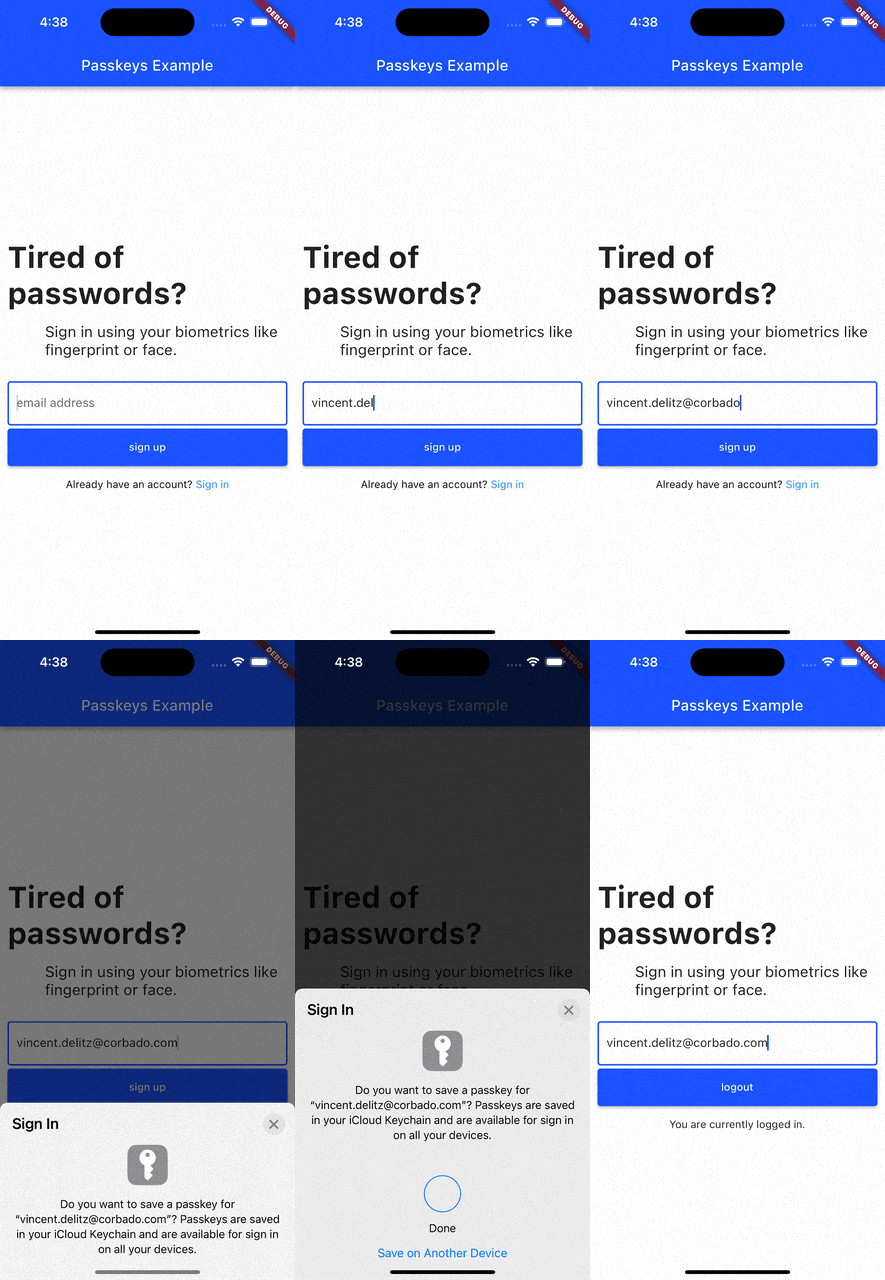
passkey-signup

Current list of packages

1. Passkeys
Description

A Flutter package that enables simple passkey authentication. Currently Android, iOS, macOS, Web and Windows are supported.

Features
  • sign up and login users with passkeys
  • connect your own relying party server or use pre-implemented ones

Read more

2. Corbado Auth
Description

A Flutter package that builds on the passkeys package. It adds additional functionalities to make it simpler to use passkey authentication in your own Flutter app.

integration-guides

Features
  • sign up and login users with passkeys
  • connect Corbado as pre-implemented relying party server
  • keep users logged in even if they close the app (automatic session refresh)

Read more

3. Corbado Auth Firebase

A Flutter package that builds on the corbado_auth and the passkeys package. It helps you to integrate passkey authentication into your Flutter app that uses Firebase as a backend.

Note: This package is currently broken and will be fixed in the future. There is no specific ETA on when the fix will be available.

Features
  • allow new users to sign up and log in using passkeys
  • allow existing users (that you created with Firebase authentication) to setup a passkey and then log in with it
  • email OTP codes as fallback mechanism for situations when passkeys can not be used (e.g. when a user logs in to a device where none of his passkeys is available)

Read more

4. Supabase

The passkeys package can be used as the platform authenticator for supabase_flutter. Supabase Auth acts as the relying party server, while passkeys handles the native passkey prompts on iOS, Android, macOS, Windows and Web.

It requires supabase_flutter 2.15.0 or later and passkeys 2.21.0 or later.

Setup

Add both packages to your pubspec.yaml:

dependencies:
  supabase_flutter: ^2.15.0
  passkeys: ^2.21.0

Initialize Supabase as usual and create a PasskeyAuthenticator that you pass to the passkey methods:

import 'package:passkeys/authenticator.dart';
import 'package:supabase_flutter/supabase_flutter.dart';

await Supabase.initialize(
  url: supabaseUrl,
  anonKey: supabaseAnonKey,
);

final supabase = Supabase.instance.client;
final authenticator = PasskeyAuthenticator();
Registering a passkey

Registering a passkey requires a signed in (non-anonymous) user. It adds a passkey to the current account:

try {
  final passkey = await supabase.auth.registerPasskey(authenticator);
  print('Registered passkey ${passkey.id}');
} on AuthException catch (e) {
  print(e);
}
Signing in with a passkey
try {
  final res = await supabase.auth.signInWithPasskey(authenticator);
  print('Signed in as ${res.user?.email}');
} on AuthException catch (e) {
  print(e);
}

For custom flows there is also a two-step API under the supabase.auth.passkey namespace (startRegistration/verifyRegistration and startAuthentication/verifyAuthentication), as well as methods to list, rename and delete passkeys.

For the full guide and configuration steps, see the Supabase passkeys documentation.

Contributing

We're happy to receive your pull requests. For major changes, please open an issue first to discuss what you would like to change.

Support

If you have questions, feedback or wishes regarding features, please reach out to us via [email](mailto:contact@corbado.com) or join our passkeys community on Slack.

License

BSD-3-clause

カテゴリー

依存関係

依存関係一覧 8 件

ソースリポジトリ

このパッケージを使用しているプロジェクト