パッケージ、リポジトリ、アプリカテゴリを検索

patterns_canvas のカバー
パッケージ詳細v0.6.0

patterns_canvas

キャンバス要素やウィジェットにストライプやドットのパターンを描画します。

AndroidiOSWebmacOSWindowsLinux
30日間ダウンロード
2.3万
いいね数
116
Pub ポイント
160

パッケージをインストール

flutter pub add patterns_canvas

パッケージ概要

公開情報に基づく選定ガイドです。参考としてご利用ください。

キャンバス要素やウィジェットにストライプ、ドット、グリッドなどのカスタマイズ可能なパターンを作成できるFlutterパッケージです。デザインと美的感覚を重視したアプリで装飾的な背景、テクスチャ、視覚効果を追加するのに最適です。Android、iOS、Web、macOS、Windows、Linuxなど複数のプラットフォームをサポートしており、クロスプラットフォーム開発に非常に柔軟に対応しています。シンプルなAPIにより、開発者はUIコンポーネントにパターンレンダリングを簡単に統合できます。

用途

  • テクスチャ付きの背景を作成する
  • カスタムUI要素の設計
  • 装飾的なオーバーレイを追加する
  • 繰り返しパターンの生成
  • シェーダーによるアプリのビジュアル向上
  • アート的なインターフェースの構築

主な機能

  • ストライプ、ドット、グリッドパターンをサポート
  • クロスプラットフォーム互換性
  • Canvas および Widgets との簡単な統合
  • カスタマイズ可能なパターンのサイズと色
  • 高パフォーマンスレンダリング
  • 拡張可能なパターン定義

適している対象

  • 視覚的なバリエーションを求めるUIデザイナー
  • アートやクリエイティブなアプリを開発する開発者
  • 動的な背景効果を必要とするアプリ
  • 描画および絵画に焦点を当てたプロジェクト
  • マルチプラットフォームデザインに取り組むチーム

注意事項

  • 複雑なパターンではパフォーマンスに影響する可能性があります
  • Canvas レンダリングの理解が必要です
  • パターンベースのグラフィックスに限定
  • 高精度のベクター画像には適していません
  • 最適化されたレンダリング戦略と併用するのが最適です

元の README

関連するソースリポジトリの README 原文のスナップショットです。最新の内容はリポジトリをご覧ください。

Patterns

Flutter library to draw patterns like stripes or dots on Canvas elements or widgets.

patterns_canvas Pub Version

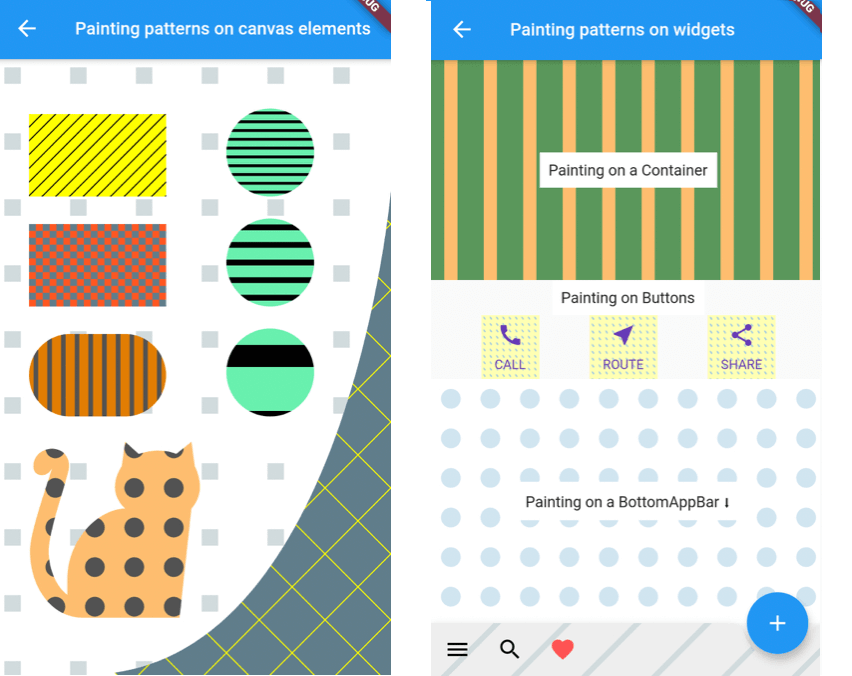
A utility library that lets you paint Canvas shapes or widgets with patterns like dots, stripes, squares, etc.:


Simple Example

Inside your CustomPainter class's paint method, create a Pattern class with background (bgColor) and foreground (fgColor) colors and use one of its paintOn methods:

class MyPainter extends CustomPainter {
  @override
  void paint(Canvas canvas, Size size) {
  
    // Prepare a rectangle shape to draw the pattern on.
    final rect = Rect.fromLTWH(80, 50, 200, 100);
    
    // Create a Pattern object of diagonal stripes with the colors we want.
    final Pattern pattern = DiagonalStripesThick(bgColor: Colors.lightGreenAccent, fgColor: Colors.black);
    
    // Paint the pattern on the rectangle. 
    pattern.paintOnRect(canvas, size, rect);
    
  }
}

Results in this pattern drawn:

Pattern constructors and types:

You can construct a Pattern with three different ways:

  1. Directly with a Pattern type constructor:
final Pattern p1 = DiagonalStripesLight(bgColor: Colors.yellowAccent, fgColor: Colors.black);
  1. With the Pattern.fromValues factory constructor:
final Pattern p2 = Pattern.fromValues(patternType: PatternType.diagonalLight, bgColor: Colors.yellowAccent, fgColor: Colors.black);
  1. From a String representation in the form of patternType_backgroundHex_foregroundHex:
final Pattern p3 = Pattern.fromString("diagonalLight_ffff00_000000");

Usage

Painting patterns on a Canvas shape:
  • Create your Canvas element inside the paint function of your CustomPaint.
  • Create a Pattern object with the desired type and colors.
  • Use the corresponding paint method to draw the pattern on the object.
// In the build method of your screen:
...
body: Center(
    child: CustomPaint(
      size: const Size(double.infinity, double.infinity),
      painter: MyPainter(),
    ),
  ),
...

// In your CustomPainter:
class MyPainter extends CustomPainter {
  @override
  void paint(Canvas canvas, Size size) {
  
    final rect = Rect.fromLTWH(80, 50, 200, 100);
    DiagonalStripesLight(bgColor: Colors.lightGreenAccent, fgColor: Colors.black).paintOnRect(canvas, size, rect);
    
    final path = Path();
    path.moveTo(120, 200);
    path.lineTo(300, 280);
    path.quadraticBezierTo(20, 400, 40, 300);
    path.close();
    Crosshatch(bgColor: Colors.yellow, fgColor: Colors.black).paintOnPath(canvas, size, path);
    
  }
}

You can use the below methods to draw on Canvas shapes:

pattern.paintOnPath(canvas, size, path);
pattern.paintOnRect(canvas, size, rect);
pattern.paintOnRRect(canvas, size, rRect);
pattern.paintOnCircle(canvas, size, center, radius);

Check the Scale behavior setting section for more info on how the Pattern can be drawn.

Painting patterns on the whole Canvas:

As above, but you can use the paintOnCanvas method to draw the pattern on the whole Canvas:

TexturePattern(bgColor: Colors.white, fgColor: Colors.blueGrey).paintOnCanvas(canvas, size);

The result of the above paints:

Painting patterns on a Widget:

To draw patterns on a Widget, you need to:

  • Wrap the Widget with a CustomPaint:
CustomPaint(
  painter: ContainerPatternPainter(),
  child: Container(
    width: 600,
    height: 200,
    child: Center(
      child: Text("Painting on a Container"),
    ),
  ),
),
  • Inside your CustomPainter, create a Pattern and use its paintOnWidget method to paint with it:
class ContainerPatternPainter extends CustomPainter {
  @override
  void paint(Canvas canvas, Size size) {
    VerticalStripesThick(bgColor: Color(0xff0509050), fgColor: Color(0xfffdbf6f)).paintOnWidget(canvas, size);
  }

  @override
  bool shouldRepaint(CustomPainter oldDelegate) => true;
}

Rectangular widgets, like Containers, Rows, Columns, IconButtons, etc. can be painted directly with the above method. For widgets that have a custom shape, like a BottomAppbar, you need to provide a different clipBehavior property, e.g. Clip.antiAlias, to make sure the pattern is clipped to the special shape. Check the second screen in the example app for more.

Patterns and settings

Available patterns

All Patterns require a background and foreground color on instantiation. The currently available patterns are:

Description Class PatternType enum
Horizontal Stripes Light HorizontalStripesLight(Color bgColor, Color fgColor) PatternType.horizontalLight
Horizontal Stripes Thick HorizontalStripesThick(Color bgColor, Color fgColor) PatternType.horizontalThick
Vertical Stripes Light VerticalStripesLight(Color bgColor, Color fgColor) PatternType.verticalLight
Vertical Stripes Thick VerticalStripesThick(Color bgColor, Color fgColor) PatternType.verticalThick
Diagonal Stripes Light DiagonalStripesLight(Color bgColor, Color fgColor) PatternType.diagonalLight
Diagonal Stripes Thick DiagonalStripesThick(Color bgColor, Color fgColor) PatternType.diagonalThick
Checkers Checkers(Color bgColor, Color fgColor) PatternType.checkers
Crosshatch Crosshatch(Color bgColor, Color fgColor) PatternType.crosshatch
Dots Dots(Color bgColor, Color fgColor) PatternType.dots
Raindrops Raindrops(Color bgColor, Color fgColor) PatternType.raindrops
Subtle Patch SubtlePatch(Color bgColor, Color fgColor) PatternType.subtlepatch
Texture TexturePattern(Color bgColor, Color fgColor) PatternType.texture
Setting the number of pattern features to draw

You can pass a featuresCount argument when creating a Pattern, to set how many features, e.g. how many stripes, you want to be drawn.

DiagonalStripesThick(bgColor: bgColor, fgColor: fgColor, featuresCount: 40).paintOnRect(canvas, size, rect1);
Dots(bgColor: bgColor, fgColor: fgColor, featuresCount: 5).paintOnRect(canvas, size, rect2);
Scale behavior setting

All patterns are by default scaled to their container (patternScaleBehavior = PatternScaleBehavior.container). This means that, regardless of its size, a Rectangle will contain 15 diagonal stripes or 10 dots.

DiagonalStripesThick(bgColor: bgColor, fgColor: fgColor).paintOnRect(canvas, size, rect1);
Dots(bgColor: bgColor, fgColor: fgColor).paintOnRect(canvas, size, rect2);

You can change this behavior by providing a different argument to the paintOn method:

Pass patternScaleBehavior: PatternScaleBehavior.canvas to scale the pattern to the whole Canvas area. Now the Canvas will contain 15 diagonal stripes or 10 dots, so, a Rectangle will contain as many dots or stripes as it can fit:

DiagonalStripesThick(bgColor: bgColor, fgColor: fgColor).paintOnRect(canvas, size, rect1, patternScaleBehavior: PatternScaleBehavior.canvas);
Dots(bgColor: bgColor, fgColor: fgColor).paintOnRect(canvas, size, rect2, patternScaleBehavior: PatternScaleBehavior.canvas);

Pass patternScaleBehavior: PatternScaleBehavior.customRect and a customRect (e.g. a Rectangle with half the Canvas height) to further customize the Pattern size:

final Rect halfCanvas = Rect.fromLTWH(0, size.height / 2, size.width, size.height / 2); // a Rectangle with half the Canvas height.
DiagonalStripesThick(bgColor: bgColor, fgColor: fgColor).paintOnRect(canvas, size, rect1, patternScaleBehavior: PatternScaleBehavior.customRect, customRect: halfCanvas );
Dots(bgColor: bgColor, fgColor: fgColor).paintOnRect(canvas, size, rect2, patternScaleBehavior: PatternScaleBehavior.customRect, customRect: halfCanvas );

カテゴリー

ソースリポジトリ

このパッケージを使用しているプロジェクト

ランキング