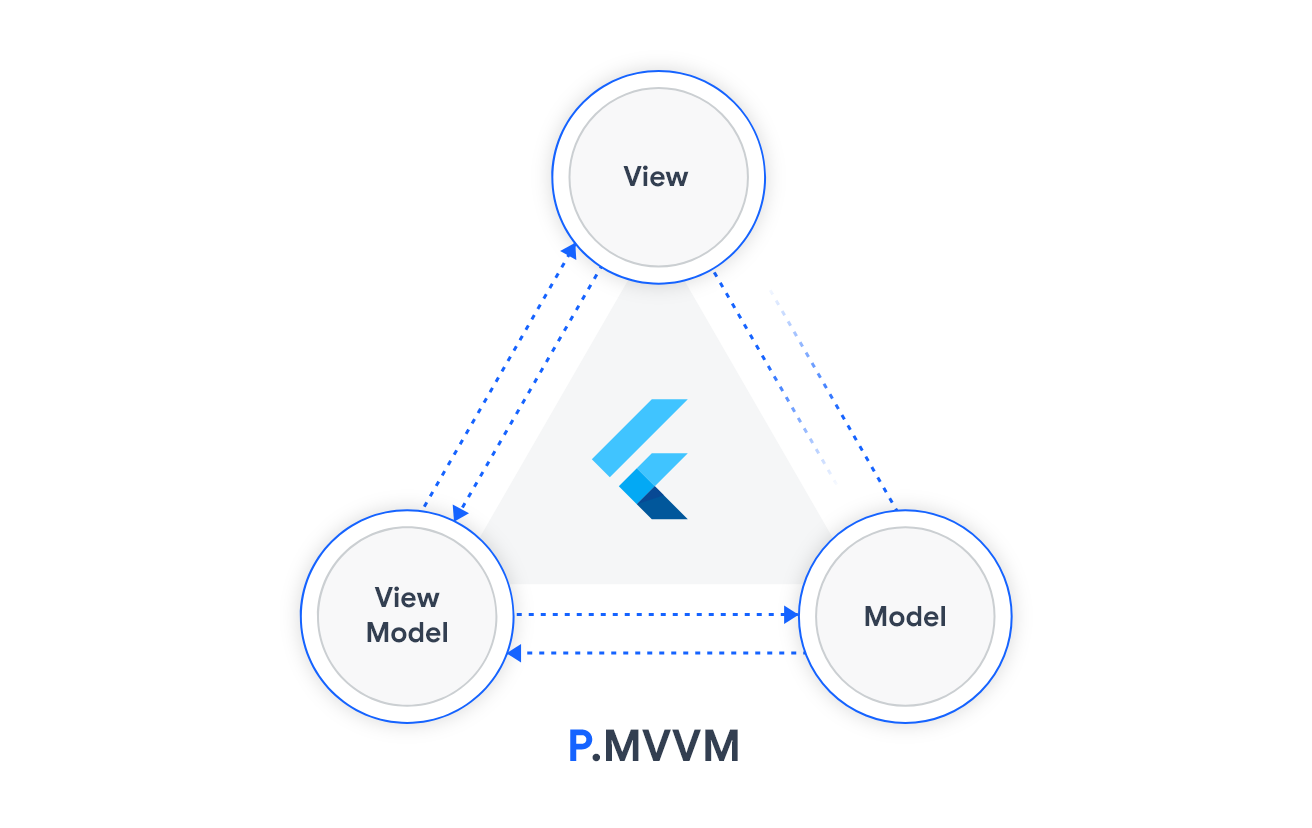
PMVVM is a Flutter package for simple and scalable state management based on the MVVM pattern, it uses Provider & Hooks under the hood. PMVVM serves the same purpose BloC, but unlike BloC it doesn’t require too much boilerplate.
It's worth mentioning that the package adopts some concepts from the Stacked package, but with a much simpler and cleaner approach.
How does it work ⚙️
Three major pieces are needed, everything else is up to you. These pieces are:
View
It represents the UI of the application devoid of any application logic. The view model sends notifications to the view to update the UI whenever the state changes.
ViewModel
Which holds the state and the events of the view. Additionally, It acts as a bridge between the model and the view.
The view model is platform-independent and doesn't know its view. Therefore, it can be easily bound to a web, mobile, or desktop view.
Model
Holds app data and the business logic. It consists of the business logic (e.g. local and remote data sources, model classes, and repositories). They’re usually simple classes.
When should you use PMVVM? 👌
To keep it simple, use it whenever your widget has its own events that can mutate the state directly e.g: pages, posts, ...etc.
Usage 👨💻
The best way to get to know PMVVM is to get your hands dirty and try it out. Let's look at the code:
Build your ViewModel.
classMyViewModelextendsViewModel{
int counter = 0;
// Optional@overridevoidinit() {
// It's called after the MVVM widget's initState is called
}
// Optional@overridevoidonBuild() {
// A callback when the `build` method of the view is called.
}
voidincrease() {
counter++;
notifyListeners();
}
}
You can also access the context inside the ViewModel directly.
classMyViewModelextendsViewModel{
@overridevoidinit() {
var height = MediaQuery.of(context).size.height;
}
}
PMVVM supports immutability as well, it also allows you to observe the changes/actions applied to the variables through the Observable class.
First wrap your variable with the Observable:
/// 'MyCounter' is an alias for the variable, this comes handy in loggingfinal counter = Observable<int>('MyCounter');
// Orfinal counter = Observable.initialized(0, 'MyCounter');
final counter = 0.observable('MyCounter');
/// NOTE: make sure that it's initialized before using the [value] getter/// by checking [counter.hasValue] or just use [counter.valueOrNull] or [counter.valueOrDefault]
counter.value;
counter.stream.listen((value) { });
You can also make the view model observe, unobserve to any list of observables, or clear clearAllObservers
The observe method has an optional boolean parameter reset that clears all the previous observers before listening to the new observables.
Observable API
Getter / Method
Description
value
Returns the current value of the observable
valueOrNull
Returns the current value or null if it's not initialized
prevValue
Returns the previous value from history if it exists
hasValue
Checks whether the observable is initialized or not
history
Returns a history of all actions applied to the observable
stream
Returns a stream for the observable values
valueOrDefault
A method that returns the current value or default if it's not initialized
setValue
A method to change the current value of the observable
log
A method that allows changing the shape of the logs
clearHistory
Remove all stored actions
resetLogCallback
To clear the custom log functions.
Patterns 🧩
In this section Let's discuss some patterns that can help your view model to access your widget properties:
Naive approach: Using cascade notation to initialize your view model with the widget properties. The problem with this approach is that your view model becomes non-reactive when the widget's dependencies (properties) are updated.
You can use context.fetch<T>(listen: true/false) which is equivalent to Provider.of<T>(context)
You can use the PMVVMConfig to control enableLogging and trackObservablesHistory. If trackObservablesHistory is false, the observables won't store the history of the actions applied to them.
To make the view ignore the state notifications from the ViewModel , set reactive to false when you are constructing the StatelessView or HookView :
ViewModel Lifecycle methods (All of them are optional)
/// A callback after the MVVM widget's initState is called.////// See also:////// * [onDependenciesChange], which is called when the MVVM widget's [didChangeDependencies]/// is called.voidinit() {}
/// A callback when the MVVM widget's [didChangeDependencies] is called.////// For example, when `context.fetch<T>(listen: true/false)` is used within the view model,/// then the [onDependenciesChange] method will be called every time these dependencies change.voidonDependenciesChange() {}
/// A callback when the `build` method of the view is called.voidonBuild() {}
/// A callback when the view is mounted.voidonMount() {}
/// A callback when the view is unmountedvoidonUnmount() {}
/// Event callback when the application is visible and responding to user input.voidonResume() {}
/// Event callback when the application is not currently visible to the user, not responding to/// user input, and running in the background.voidonPause() {}
/// Event callback when the application is in an inactive state and is not receiving user input./// /// For [IOS] only.voidonInactive() {}
/// Event callback when the application is still hosted on a flutter engine but/// is detached from any host views.////// For [Android] only.voidonDetach() {}
FAQ 🤔
Can I use it in production?
Yep! It's stable and ready to rock
What is the difference between Stacked & PMVVM since both adopt the same principles?
Stacked
PMVVM
You can't access the BuildContext from the ViewModel.
BuildContext can be accessed inside the ViewModel using: - Provider.of<T>(context) - context.watch<T>() - context.read<T>() - context.select<T, R>(R cb(T value))
You should implement the Initialisable interface to call initialise.
init event is called by default, all you need to do is to override it (optional).
There is no build method in the ViewModel.
onBuild method is called by default every time the View is rebuilt, and you can override it to implement yours (optional).
It over-wraps provider with many ViewModels like FutureViewModel, StreamViewModel, …etc. Which provider & flutter_hooks are built to do without any wrapping.
It doesn’t over-wrap provider package with such classes. Instead, you can use StreamProvider/FutureProvider or Hooks which gives you the flexibility to make the most out of provider & flutter_hooks.
In summary, PMVVM is simpler & cleaner, there is no over-wrapping, and idioms are more clear.