パッケージ、リポジトリ、アプリカテゴリを検索

proste_bezier_curve のカバー
パッケージ詳細v2.0.2

proste_bezier_curve

コード量が少なく、難易度も低い、標準的なベジェ曲線の描画。このパッケージはウィジェットのクリッピングやパスの手動描画に使用できます。

AndroidiOSWebmacOSWindowsLinux
30日間ダウンロード
546
いいね数
67
Pub ポイント
150

パッケージをインストール

flutter pub add proste_bezier_curve

パッケージ概要

公開情報に基づく選定ガイドです。参考としてご利用ください。

Proste Bezier Curve は、標準的なベジェ曲線の作成と使用を簡素化する軽量なFlutterパッケージです。ボイラープレートコードや複雑さを減らし、開発者がカスタムパスを簡単に描画したり、滑らかな曲線形状でウィジェットをクリッピングしたりできるようにします。洗練された流れるようなアウトラインを必要とするUI要素に最適で、Android、iOS、Web、macOS、Windows、Linuxなどすべての主要プラットフォームをサポートしています。最小限の努力でモダンなインターフェースを設計するのに特に役立ちます。

用途

  • カーブしたUIの境界を作成する
  • カスタム形状のウィジェットをクリッピングする
  • アニメーションパス遷移の設計
  • インタラクティブな描画コンポーネントの構築
  • 滑らかなカーブで視覚的魅力を高める

主な機能

  • ベジェ曲線作成のためのシンプルな API
  • ベジエパスを使用したウィジェットのクリッピングをサポート
  • クロスプラットフォーム互換性
  • 必要な最小コード
  • 柔軟なパスカスタマイズ

適している対象

  • エレガントなカーブを求めるUIデザイナー
  • カスタム形状を構築する開発者
  • 滑らかなアニメーションパスを必要とするアプリ
  • Flutter初心者がパス描画を探索しています
  • クリーンでモダンな美学に焦点を当てたプロジェクト

注意事項

  • 標準のベジエ曲線に限定(Bスプラインは除く)
  • 組み込みのアニメーションサポートなし
  • パスの更新を手動で処理する必要があります
  • 複雑なスプラインベースのデザインには向かない
  • 静的または単純な動的パスに最適

元の README

関連するソースリポジトリの README 原文のスナップショットです。最新の内容はリポジトリをご覧ください。

English | 中文

Introduction

The control points of Bezier curve are obtained through data calculation, and then the points are drawn into curves through the drawing function of flutter.

The difference between using package and drawing your own path

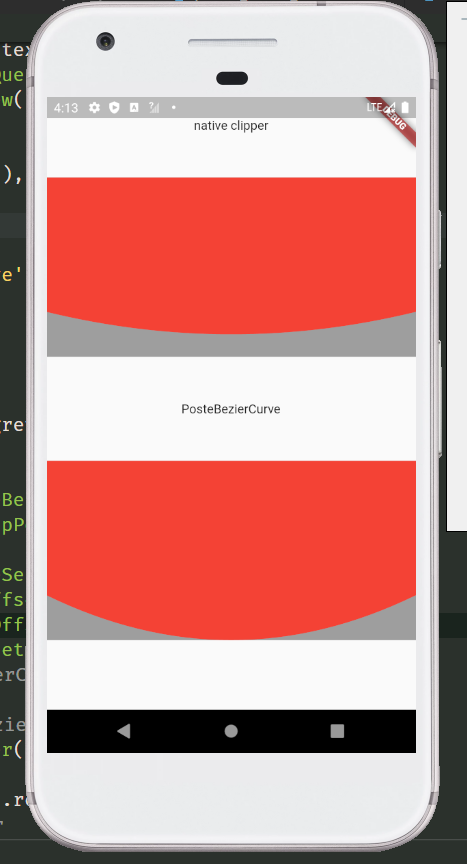
The common method of tracing points according to the position of elements will leave a gap. Only after the control points are calculated can the element information be completely filled. For example, in the following picture, the coordinates of the points used are the same, but the styles cut out are different. The function I want to provide is to restore the design style as much as possible. And after using the package, you only need to confirm the coordinates of each point, without other complex calculations, and the code is more concise.

  • draw your own
Stack(
  children: [
    Container(
      height: 200,
      color: Colors.grey,
    ),
    ClipPath(
      clipper: NativeClipper(),
      child: Container(
        height: 200,
        color: Colors.red,
      ),
    ),
  ],
)

class NativeClipper extends CustomClipper<Path> {
  @override
  Path getClip(Size size) {
    Path path = Path();

    path.lineTo(0, 0);
    path.lineTo(0, size.height - 50);
    path.quadraticBezierTo(size.width / 2, size.height, size.width, size.height - 50);
    path.lineTo(size.width, 0);
    path.lineTo(0, 0);
    return path;
  }

  @override
  bool shouldReclip(covariant CustomClipper<Path> oldClipper) => true;
}
  • use package

Stack(
  children: [
    Container(
      height: 200,
      color: Colors.grey,
    ),
    ClipPath(
      clipper: ProsteBezierCurve(
        position: ClipPosition.bottom,
        list: [
          BezierCurveSection(
            start: Offset(0, 150),
            top: Offset(screenWidth / 2, 200),
            end: Offset(screenWidth, 150),
          ),
        ],
      ),
      child: Container(
        height: 200,
        color: Colors.red,
      ),
    ),
  ],
),

Usage

Second order Bezier curve

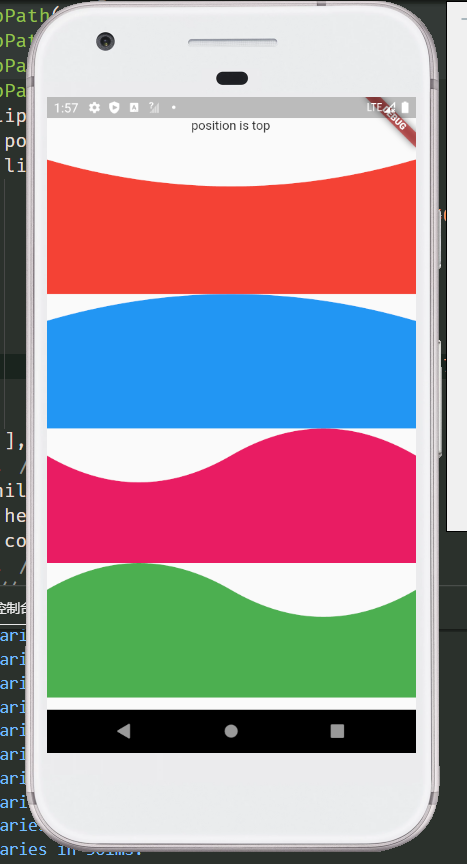
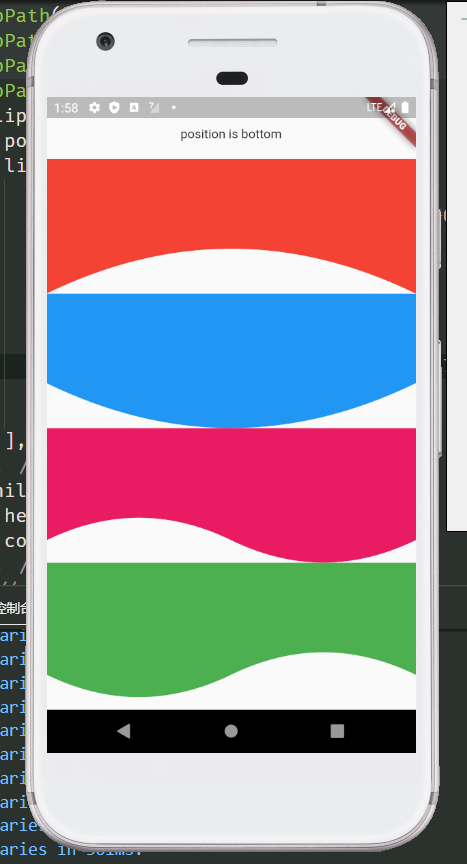
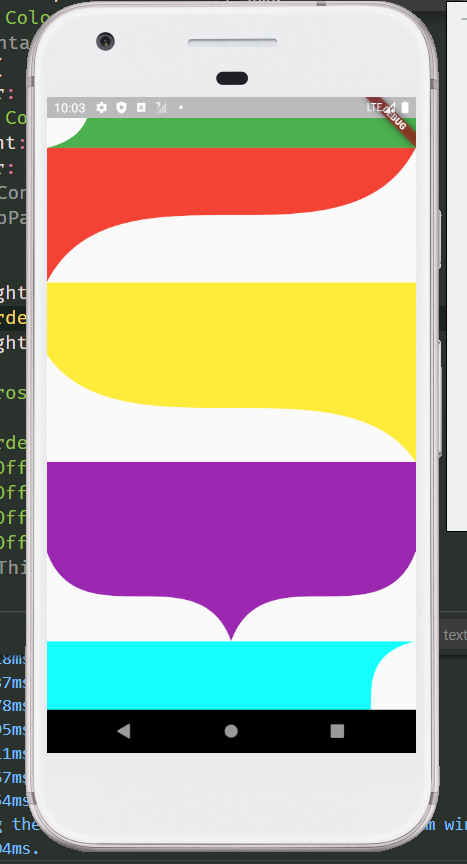
more preview

Examples
  ClipPath(
    clipper: ProsteBezierCurve(
      position: ClipPosition.top,
      list: [
        BezierCurveSection(
          start: Offset(screenWidth, 0),
          top: Offset(screenWidth / 2, 30),
          end: Offset(0, 0),
        ),
      ],
    ),
    child: Container(
      color: Colors.red,
      height: 150,
    ),
  )

  
  /// Wavy line
  ClipPath(
    clipper: ProsteBezierCurve(
      position: ClipPosition.bottom,
      list: [
        BezierCurveSection(
          start: Offset(0, 125),
          top: Offset(screenWidth / 4, 150),
          end: Offset(screenWidth / 2, 125),
        ),
        BezierCurveSection(
          start: Offset(screenWidth / 2, 125),
          top: Offset(screenWidth / 4 * 3, 100),
          end: Offset(screenWidth, 150),
        ),
      ],
    ),
    child: Container(
      height: 150,
      color: Colors.red,
    ),
  )
class
  • ProsteBezierCurve Used to draw and return the clipping path
parameter type default describe
list List<BezierCurveSection> Used to draw Bezier curve, you can pass in more than one
reclip bool true Allow redrawing elements
position ClipPosition ClipPosition.left Used to determine the drawing position of the curve
  ClipPath(
    clipper: ProsteBezierCurve(
      position: ClipPosition.top,
      reclip: false,
      list: [
        ...
      ],
    ),
    child: ...,
  ),
  • BezierCurveSection Clips for drawing curves
parameter type default describe
start Offset start point of Bezier curve
top Offset top point of Bezier curve
end Offset end point of Bezier curve
proportion double 1/2 the proportion of the top position of the Bezier curve,It doesn't need to be modified

  ClipPath(
    clipper: ProsteBezierCurve(
      position: ClipPosition.top,
      reclip: false,
      list: [
        BezierCurveSection(
          proportion: 1 / 3,
          start: Offset(..,..),
          top: Offset(..,..),
          end: Offset(..,..),
        ),
      ],
    ),
    child: ...,
  )

  • BezierCurveDots Coordinates of Bezier curve control points
parameter type default describe
x1 double The X-coordinate of the first point
y1 double The Y-coordinate of the first point
x2 double The X-coordinate of the second point
y2 double The Y-coordinate of the second point
Static function of ProsteBezierCurve
  • BezierCurveDots calcCurveDots(BezierCurveSection param) Obtain the coordinates of the control points after calculation, and draw the path after obtaining the control points, such as drawing curves with multiple edges or combining the curves with other drawing rules

ClipPath(
  clipper: CustomSelfClipper1(),
  child: Container(
    height: 150,
    color: Colors.red,
  ),
)

class CustomSelfClipper1 extends CustomClipper<Path> {
  @override
  Path getClip(Size size) {
    Path path = Path();
    BezierCurveSection section1 = BezierCurveSection(
      start: Offset(0, 30),
      top: Offset(10, 45),
      end: Offset(0, 60),
    );
    BezierCurveSection section2 = BezierCurveSection(
      start: Offset(size.width, size.height - 90),
      top: Offset(size.width - 10, size.height - 105),
      end: Offset(size.width, size.height - 120),
    );
    BezierCurveDots dot1 = ProsteBezierCurve.calcCurveDots(section1);
    BezierCurveDots dot2 = ProsteBezierCurve.calcCurveDots(section2);

    List<double> dot1List = dot1.getList(); // Return to list<double>
    Map<String, double> dot2Map = dot1.getMap(); // Return to Map<String, double>

    print(dot1List); // [20.0, 45.0, 0.0, 60.0]
    print(dot2Map); // {x1: 20.0, y1: 45.0, x2: 0.0, y2: 60.0}

    path.lineTo(0, 0);
    path.lineTo(0, 30);
    path.quadraticBezierTo(dot1.x1, dot1.y1, dot1.x2, dot1.y2);
    path.lineTo(0, size.height);
    path.lineTo(size.width, size.height);
    path.lineTo(size.width, size.height - 90);
    path.quadraticBezierTo(dot2.x1, dot2.y1, dot2.x2, dot2.y2);
    path.lineTo(size.width, 0);
    path.lineTo(0, 0);
    return path;
  }

  @override
  bool shouldReclip(covariant CustomClipper<Path> oldClipper) => true;
}

/// This method can splice the third-order Bezier curve, but is not recommended. You can use the ProsteThirdOrderBezierCurve

class CustomSelfClipper2 extends CustomClipper<Path> {
  @override
  Path getClip(Size size) {
    Path path = Path();
    BezierCurveSection section1 = BezierCurveSection(
      start: Offset(0, size.height),
      top: Offset(30, size.height - 50),
      end: Offset(80, size.height - 70),
    );
    BezierCurveSection section2 = BezierCurveSection(
      start: Offset(size.width - 100, size.height - 70),
      top: Offset(size.width - 30, size.height - 95),
      end: Offset(size.width, size.height - 160),
    );
    BezierCurveDots dot1 = ProsteBezierCurve.calcCurveDots(section1);
    BezierCurveDots dot2 = ProsteBezierCurve.calcCurveDots(section2);

    path.lineTo(0, 0);
    path.lineTo(0, size.height);
    path.quadraticBezierTo(dot1.x1, dot1.y1, dot1.x2, dot1.y2);
    path.lineTo(size.width - 100, size.height - 70);
    path.quadraticBezierTo(dot2.x1, dot2.y1, dot2.x2, dot2.y2);
    path.lineTo(size.width, 0);
    path.lineTo(0, 0);
    return path;
  }

  @override
  bool shouldReclip(covariant CustomClipper<Path> oldClipper) => true;
}

Third order Bezier curve

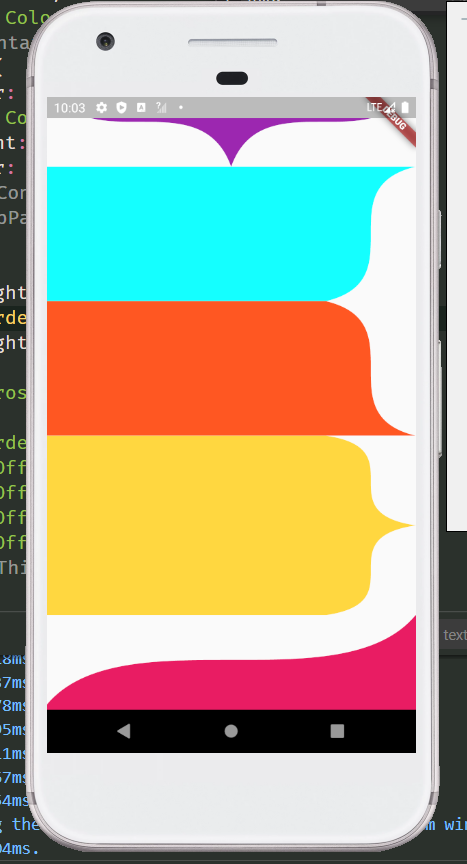
more preview

Examples

  ClipPath(
    clipper: ProsteThirdOrderBezierCurve(
      position: ClipPosition.bottom,
      list: [
        ThirdOrderBezierCurveSection(
          p1: Offset(0, 100),
          p2: Offset(0, 200),
          p3: Offset(screenWidth, 100),
          p4: Offset(screenWidth, 200),
        ),
      ],
    ),
    child: Container(
      height: 200,
      color: Colors.red,
    ),
  )

class
  • ProsteThirdOrderBezierCurve Clipping path for drawing and returning third order Bezier curves
parameter type default describe
list List<ThirdOrderBezierCurveSection> Used to draw Bezier curve, you can pass in more than one
reclip bool true Allow redrawing elements
position ClipPosition ClipPosition.left Used to determine the drawing position of the curve
ClipPath(
  clipper: ProsteThirdOrderBezierCurve(
    position: ClipPosition.bottom,
    list: [
      ...
    ],
  ),
  child: ...,
)
  • ThirdOrderBezierCurveSection Fragment for drawing third order Bezier curve
parameter type default describe
p1 Offset The coordinates of the first point
p2 Offset The coordinates of the second point
p3 Offset The coordinates of the third point
p4 Offset The coordinates of the fourth point
smooth double .5 The greater the value of smoothness 0 ~ 1, the straighter the value is, the smaller the value is, and the larger the arc is. When the drawing distance is short and saw tooth appears, try to increase this value
ClipPath(
  clipper: ProsteThirdOrderBezierCurve(
    position: ClipPosition.bottom,
    list: [
      ThirdOrderBezierCurveSection(
        smooth: .7,
        p1: Offset(0, 100),
        p2: Offset(0, 200),
        p3: Offset(screenWidth, 100),
        p4: Offset(screenWidth, 200),
      ),
    ],
  ),
  child: Container(
    height: 200,
    color: Colors.red,
  ),
)

/// Spire shape
ClipPath(
  clipper: ProsteThirdOrderBezierCurve(
    position: ClipPosition.top,
    list: [
      ThirdOrderBezierCurveSection(
        p1: Offset(screenWidth, 0),
        p2: Offset(screenWidth, 100),
        p4: Offset(screenWidth / 2, 100),
        p3: Offset(screenWidth / 2, 0),
      ),
      ThirdOrderBezierCurveSection(
        p1: Offset(screenWidth / 2, 100),
        p2: Offset(screenWidth / 2, 0),
        p3: Offset(0, 100),
        p4: Offset(0, 0),
      ),
    ],
  ),
  child: Container(
    height: 200,
    color: Colors.teal,
  ),
)

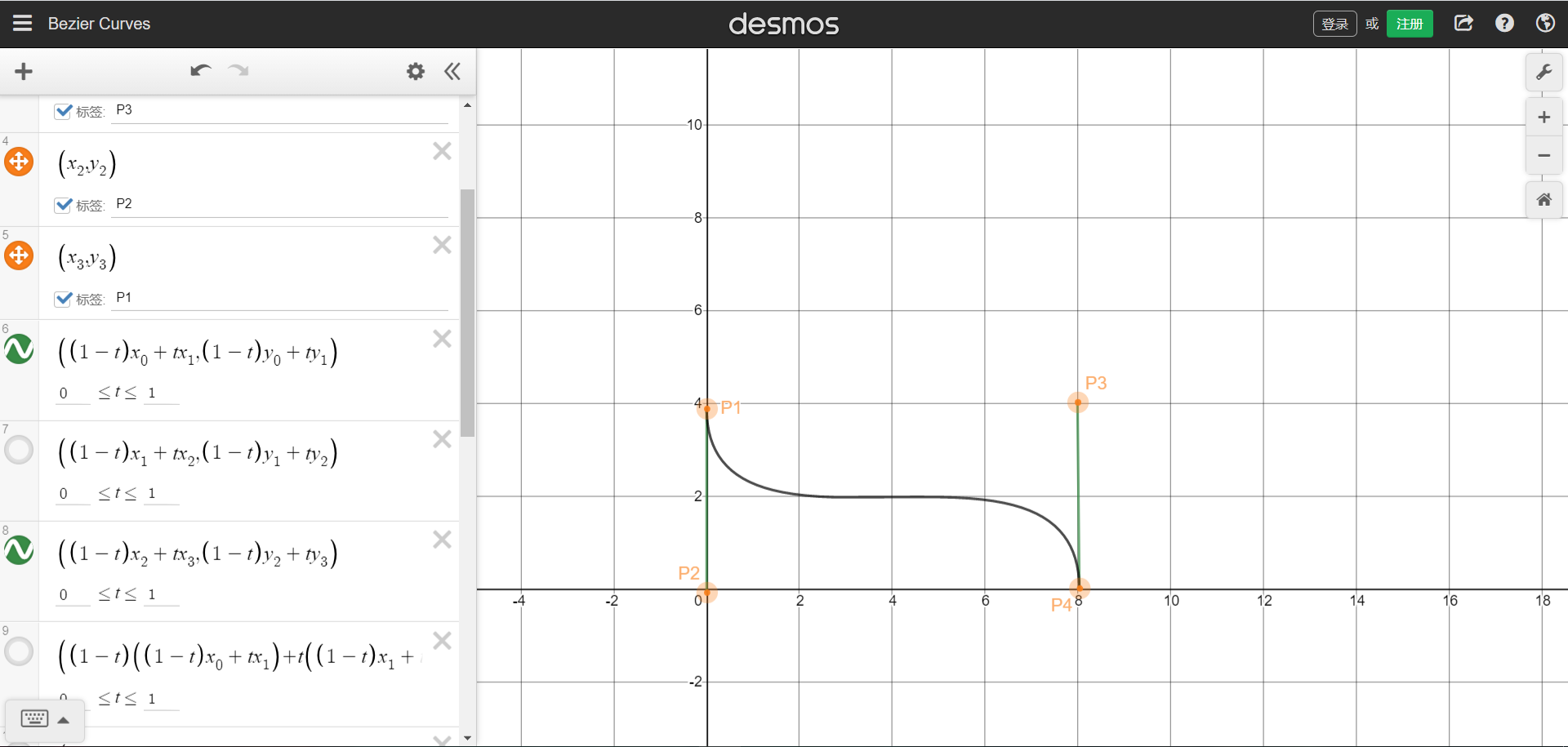
The position coordinates of the four points can refer to the figure below. The starting and ending points are P1 and P4 respectively.Picture sample URL。You can understand that four points form a rectangle, and the four coordinates are the positions of the four points. The curve will be drawn in the rectangle.

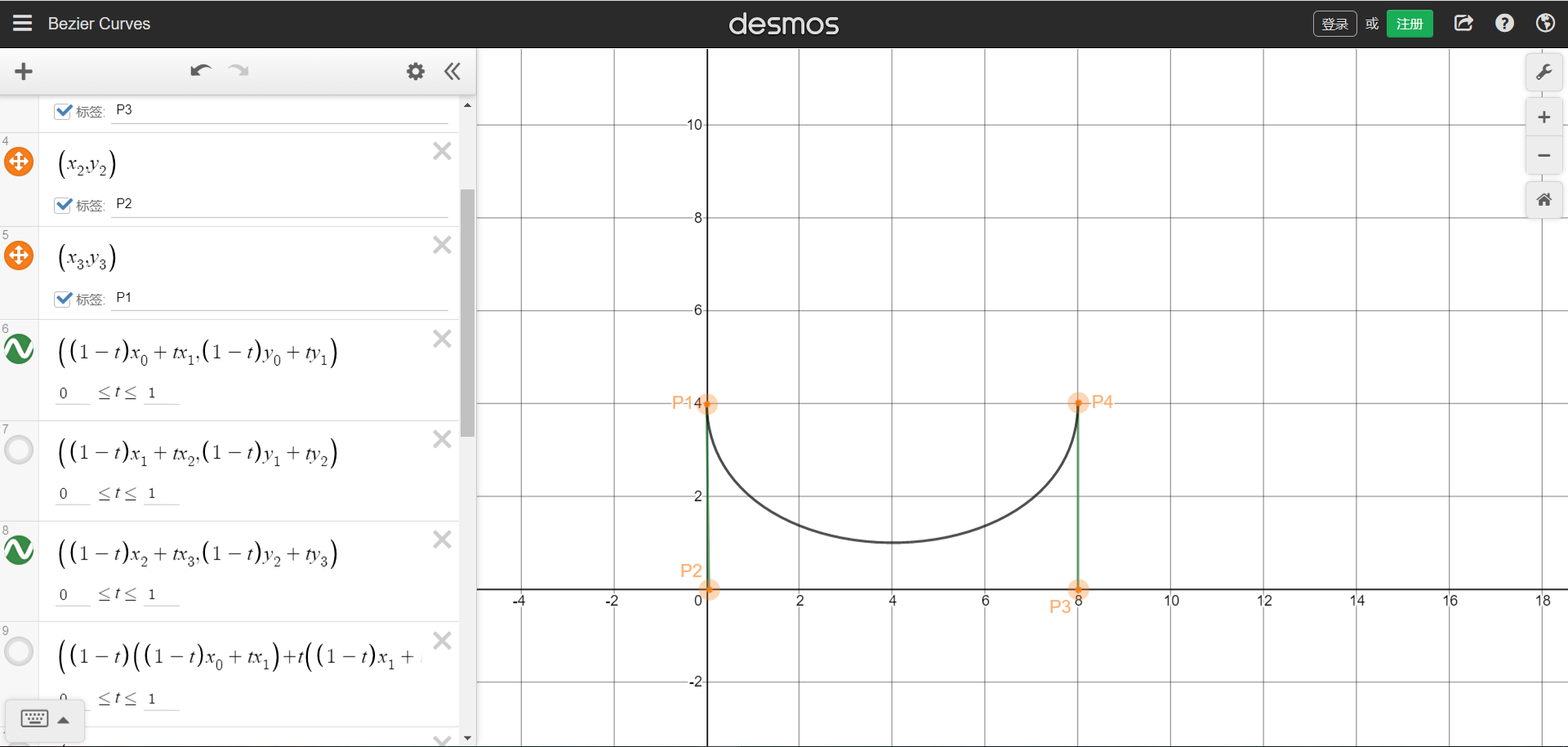
We can also draw a single arc graph through the third-order Bessel function, need P1 and P4 are on the same side,But that brings up the problem that was stated at the beginning,The arc does not cling to the bottom.

  • ThirdOrderBezierCurveDots Coordinates of third order Bezier curve control points
parameter type default describe
x1 double The X-coordinate of the first point
y1 double The Y-coordinate of the first point
x2 double The X-coordinate of the second point
y2 double The Y-coordinate of the second point
x3 double The X-coordinate of the third point
y3 double The Y-coordinate of the third point
Static function of ProsteThirdOrderBezierCurve
  • ThirdOrderBezierCurveDots calcCurveDots(ThirdOrderBezierCurveSection param) Obtain the coordinates of the control points after calculation, and draw the path after obtaining the control points, such as drawing curves with multiple edges or combining the curves with other drawing rules

ClipPath(
  clipper: CustomSelfClipper1(),
  child: Container(
    height: 200,
    color: Colors.teal,
  ),
)

class CustomSelfClipper1 extends CustomClipper<Path> {
  @override
  Path getClip(Size size) {
    Path path = Path();
    ThirdOrderBezierCurveSection param = ThirdOrderBezierCurveSection(
      smooth: 0.3,
      p1: Offset(0, size.height),
      p2: Offset(0, 0),
      p3: Offset(size.width, size.height),
      p4: Offset(size.width, 0),
    );
    ThirdOrderBezierCurveDots dots = ProsteThirdOrderBezierCurve.calcCurveDots(param);

    List<double> dotsList = dots.getList(); // Return to list<double>
    Map<String, double> dotsMap = dots.getMap(); // Return to Map<String, double>

    print(dotsList); // [71.56809408040556, 0.0, 339.8604773481659, 200.0, 411.42857142857144, 0.0]
    print(dotsMap); // {x1: 71.56809408040556, y1: 0.0, x2: 339.8604773481659, y2: 200.0, x3: 411.42857142857144, y3: 0.0}

    path.lineTo(0, 0);
    path.lineTo(0, size.height);
    path.cubicTo(dots.x1, dots.y1, dots.x2, dots.y2, dots.x3, dots.y3);
    path.lineTo(0, 0);

    return path;
  }

  @override
  bool shouldReclip(covariant CustomClipper<Path> oldClipper) => true;
}

If you have any issue, please submit them to issues, I will deal with them as soon as I see them. Thank you!

カテゴリー

ソースリポジトリ

このパッケージを使用しているプロジェクト

データはまだありません。