パッケージ、リポジトリ、アプリカテゴリを検索

パッケージ詳細v5.0.1

quran_library

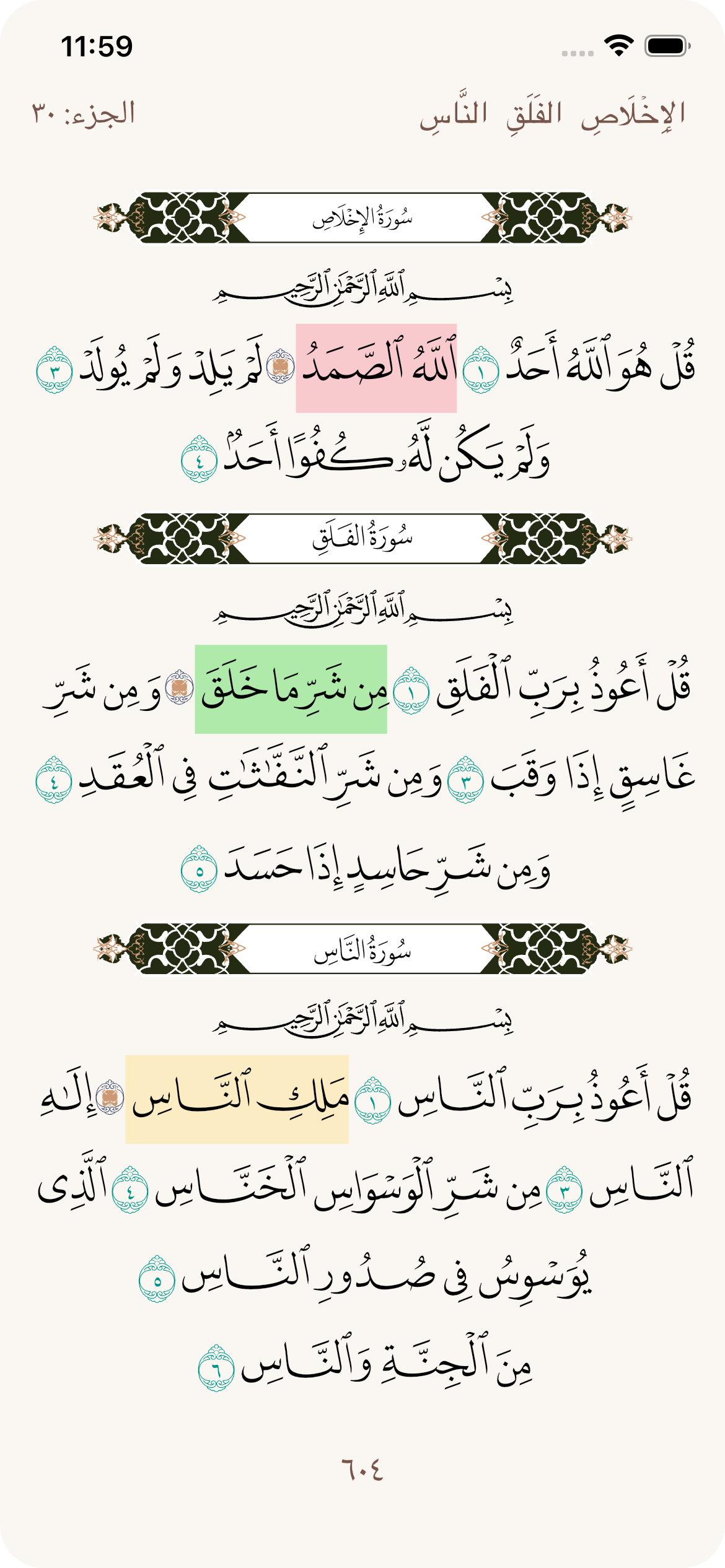
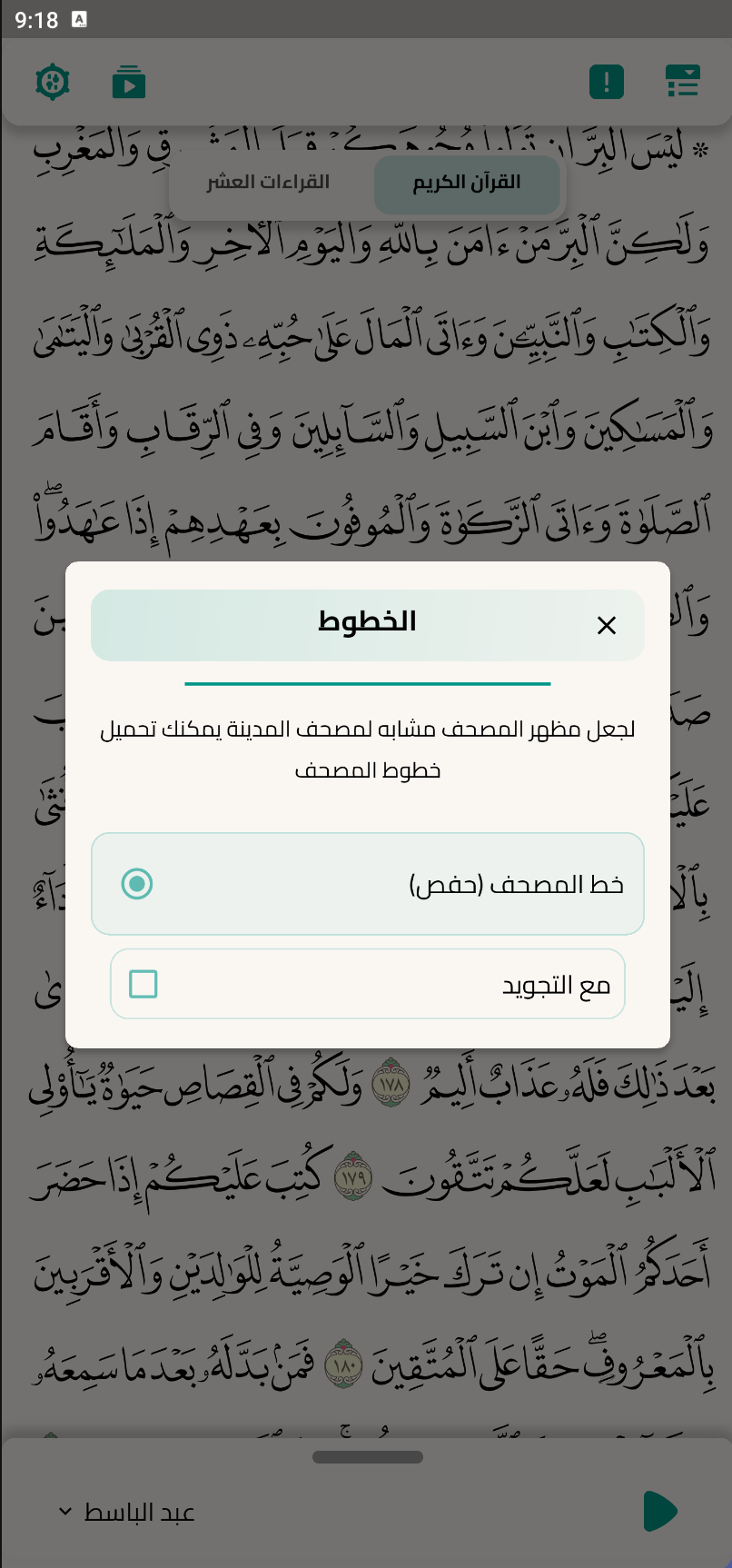
メディナのコーランと同一の聖クルアーンを表示する統合パッケージで、アシムによるハーフスの朗読が含まれます。

AndroidiOSWebmacOSWindowsLinux
30日間ダウンロード
1620
いいね数
88
Pub ポイント
150

パッケージをインストール

flutter pub add quran_library

パッケージ概要

公開情報に基づく選定ガイドです。参考としてご利用ください。

quran_library パッケージは、メディナ・ムシャフに掲載されている通りの正確で統合的な聖クルアーンの表示を提供し、アシムによるハーフスの朗読を採用しています。イスラムアプリケーションを開発する開発者向けに設計されており、テキストの正確性を保証し、複数のプラットフォームをサポートします。このパッケージには、節、章、および朗読データへの構造化アクセスが含まれており、クルアーン学習、読書、または朗読に焦点を当てたアプリへのシームレスな統合を可能にします。教育ツール、デジタルモスク、宗教学習プラットフォームに最適です。

用途

  • デジタルコーランリーダー
  • イスラム教育アプリ
  • コーラン朗読ツール
  • 宗教学習プラットフォーム
  • Mushafベースのモバイルアプリケーション

主な機能

  • メディナムシャフの正確さ
  • ハフスの朗読(アシム)
  • マルチプラットフォーム対応
  • 構造化された節/章データ
  • オフラインでのコーランのアクセス
  • Clean Dart API

適している対象

  • イスラムアプリ開発者
  • コーラン学習ツールの作成者
  • 宗教的な焦点を持つモバイルアプリビルダー
  • 教育技術チーム
  • クロスプラットフォームのFlutterプロジェクト

注意事項

  • アラビア文字のレンダリングについて理解が必要
  • 完全な機能を実現するには、追加のUIコンポーネントが必要になる場合があります
  • コーランコンテンツに焦点を当てたアプリに最適
  • 1つの朗読バリエーションに制限される
  • 正確なソースデータの整合性に依存する

元の README

関連するソースリポジトリの README 原文のスナップショットです。最新の内容はリポジトリをご覧ください。

Quran Library

pub package pub points likes Pub Downloads License: MIT

Web Windows macOS Android iOS

Choose your language for the documentation:

Arabic English bangla Bahasa Indonesia Urdu Türkçe Kurdish Bahasa Malaysia Español

Important note before starting to use: Please make:
  useMaterial3: false,
In order not to cause any formation problems

Table of Contents

Getting started

Android

The required permissions for audio playback (WAKE_LOCK, and FOREGROUND_SERVICE_MEDIA_PLAYBACK) are automatically added by the package. You don't need to manually edit your AndroidManifest.xml.

Additionally, to enable system-integrated audio controls (notification/lockscreen) using audio_service, your app's MainActivity must extend AudioServiceActivity:

Kotlin:

import com.ryanheise.audioservice.AudioServiceActivity

class MainActivity: AudioServiceActivity()

Java:

import com.ryanheise.audioservice.AudioServiceActivity;

public class MainActivity extends AudioServiceActivity {}

If you don't apply this change, the audio will still work locally, but AudioService.init() may fail and system controls won't be available.

iOS

For background audio playback, you must add the following to your app's Info.plist:

<key>UIBackgroundModes</key>
<array>
  <string>audio</string>
</array>

This allows audio playback to continue when the app is in the background.

In the pubspec.yaml of your flutter project, add the following dependency:

dependencies:
  ...
  quran_library: ^4.3.0

Import it:

import 'package:quran_library/quran_library.dart';

Initialize it:

Future<void> main() async {
  await WidgetsFlutterBinding.ensureInitialized();
  await QuranLibrary.init();
  runApp(
    const MyApp(),
  );
}

Usage Example

Basic Quran Screen
/// You can just add it to your code like this:
class MyQuranPage extends StatelessWidget {
  
  @override
  Widget build(BuildContext context) {
    return QuranLibraryScreen(
      parentContext: context, // Required 
    );
  }
}
or give it some options:
QuranLibraryScreen(
            parentContext: context,
            withPageView: true,
            useDefaultAppBar: true,
            isShowAudioSlider: true,
            showAyahBookmarkedIcon: false,
            isDark: isDark,
            appLanguageCode: Get.locale!.languageCode,
            backgroundColor: context.theme.colorScheme.surface,
            textColor: context.textDarkColor,
            ayahSelectedBackgroundColor:
                context.theme.colorScheme.primary.withValues(alpha: .2),
            ayahIconColor: context.theme.colorScheme.primary,
            surahInfoStyle:
                SurahInfoStyle.defaults(isDark: isDark, context: context)
                    .copyWith(
              ayahCount: 'aya_count'.tr,
              firstTabText: 'surahNames'.tr,
              secondTabText: 'aboutSurah'.tr,
              bottomSheetWidth: 500,
            ),
            basmalaStyle: BasmalaStyle(
              verticalPadding: 0.0,
              basmalaColor: context.textDarkColor.withValues(alpha: .8),
              basmalaFontSize: isLoadedFont ? 120.0 : 25.0,
            ),
            ayahStyle: AyahAudioStyle.defaults(isDark: isDark, context: context)
                .copyWith(
              dialogWidth: 300,
              readersTabText: 'readers'.tr,
            ),
            topBarStyle:
                QuranTopBarStyle.defaults(isDark: isDark, context: context)
                    .copyWith(
              showAudioButton: false,
              showFontsButton: false,
              tabIndexLabel: 'index'.tr,
              tabBookmarksLabel: 'bookmarks'.tr,
              tabSearchLabel: 'search'.tr,
            ),
            indexTabStyle:
                IndexTabStyle.defaults(isDark: isDark, context: context)
                    .copyWith(
              tabSurahsLabel: 'surahs'.tr,
              tabJozzLabel: 'juzz'.tr,
            ),
            searchTabStyle:
                SearchTabStyle.defaults(isDark: isDark, context: context)
                    .copyWith(
              searchHintText: 'search'.tr,
            ),
            bookmarksTabStyle:
                BookmarksTabStyle.defaults(isDark: isDark, context: context)
                    .copyWith(
              emptyStateText: 'no_bookmarks_yet'.tr,
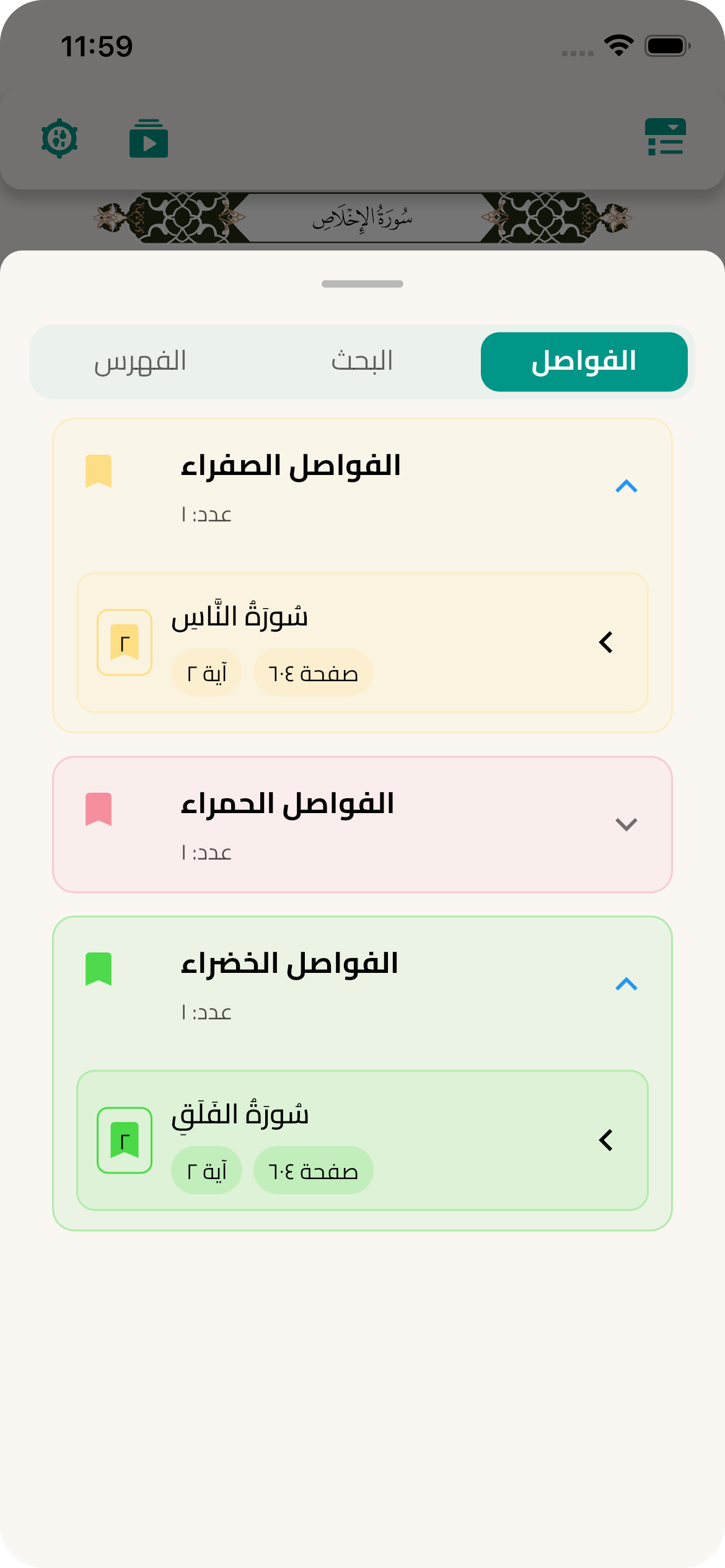
              greenGroupText: 'greenBookmarks'.tr,
              yellowGroupText: 'yellowBookmarks'.tr,
              redGroupText: 'redBookmarks'.tr,
            ),
            ayahMenuStyle:
                AyahMenuStyle.defaults(isDark: isDark, context: context)
                    .copyWith(
              copySuccessMessage: 'ayah_copied'.tr,
              showPlayAllButton: false,
            ),
            tafsirStyle:
                TafsirStyle.defaults(isDark: isDark, context: context).copyWith(
              widthOfBottomSheet: 500,
              heightOfBottomSheet: MediaQuery.sizeOf(context).height * 0.9,
              changeTafsirDialogHeight: MediaQuery.sizeOf(context).height * 0.9,
              changeTafsirDialogWidth: 400,
              tafsirNameWidget: customSvgWithCustomColor(
                'assets/svg/tafseer_white.svg',
                color: context.theme.colorScheme.primary,
                height: 24,
              ),
              tafsirName: 'tafsir'.tr,
              translateName: 'translate'.tr,
              tafsirIsEmptyNote: 'tafsirIsEmptyNote'.tr,
              footnotesName: 'footnotes'.tr,
            ),
            topBottomQuranStyle: TopBottomQuranStyle.defaults(
              isDark: isDark,
              context: context,
            ).copyWith(
              hizbName: 'hizb'.tr,
              juzName: 'juz'.tr,
              sajdaName: 'sajda'.tr,
            ),
          ),
Individual Surah Display
Expand section
/// For displaying a single surah with custom pagination
SurahDisplayScreen(
  /// [surahNumber] The surah number to display
  surahNumber: 1, // For Al-Fatihah
  /// [onPageChanged] if provided it will be called when a surah page changed
  onPageChanged: (int pageIndex) => print("Surah page changed: $pageIndex"),
  /// [isDark] enable or disable dark mode
  isDark: false,
  /// [basmalaStyle] Change the style of Basmala
  basmalaStyle: BasmalaStyle.defaults(
              isDark: isDark,
              context: context,
            ).copyWith(
    basmalaColor: Colors.black,
    basmalaWidth: 160.0,
    basmalaHeight: 30.0,
  ),
  /// [bannerStyle] Change the style of banner
  bannerStyle: BannerStyle.defaults(
              isDark: isDark,
              context: context,
            ).copyWith(
    isImage: false,
    bannerSvgHeight: 40.0,
    bannerSvgWidth: 150.0,
  ),
  /// and more options...
),
Single Ayah Display
Expand section
/// For displaying a single ayah from any surah
GetSingleAyah(
  /// [surahNumber] - must be between 1 and 114
  surahNumber: 1, // Surah number
    
  /// [ayahNumber] - ayah number within the surah
  ayahNumber: 2, // Ayah number
    
  /// [textColor] - optional text color
  textColor: Colors.black,
    
  /// [isDark] - optional, default is false
  isDark: false,
    
  /// [fontSize] - optional, default is 22
  fontSize: 24.0,
    
  /// [isBold] - optional, default is true
  isBold: true,
),
Partial Pages (single or range) + Highlighting
Expand section

You can display just one specific page or a range of pages using QuranPagesScreen.

Requirements:

  • Pass the parent widget context via parentContext.
  • Choose either a single page or a range using startPage and endPage.

Basic examples:

// Single page
QuranPagesScreen(
  parentContext: context,
  page: 6,
)

// Range of pages (inclusive)
QuranPagesScreen(
  parentContext: context,
  startPage: 6,
  endPage: 11,
)

// Optional: disable page view if you want a static view
QuranPagesScreen(
  parentContext: context,
  startPage: 6,
  endPage: 7,
  withPageView: false,
)

Programmatic highlighting (by surah/ayah numbers):

// Highlight by Surah and Ayah numbers
QuranPagesScreen(
  parentContext: context,
  page: 6,
  highlightedAyahNumbersBySurah: {
    18: [1, 5, 10], // Surah Al-Kahf: ayahs 1,5,10
    36: [3],        // Surah Ya-Sin: ayah 3
  },
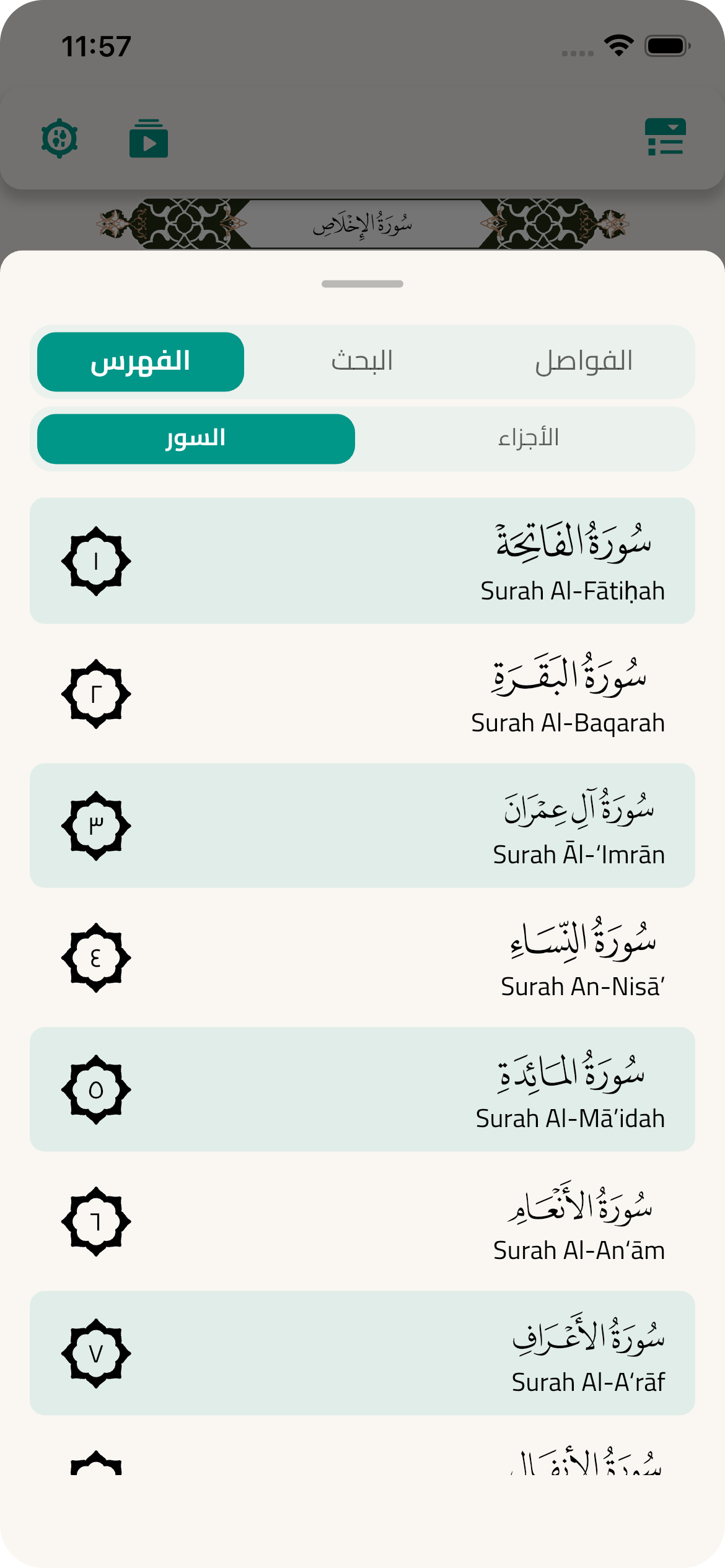
)

// Highlight by page range + ayah numbers (within those pages)
QuranPagesScreen(
  parentContext: context,
  startPage: 6,
  endPage: 11,
  highlightedAyahNumbersInPages: [
    (start: 6, end: 11, ayahs: [1, 3, 5]),
  ],
)

// If you already have unique ayah numbers (UQ), you can still pass them directly
QuranPagesScreen(
  parentContext: context,
  page: 6,
  highlightedAyahs: [1023, 1024, 1025],
)

Optional multi-select mode (keeps multiple ayahs selected on long-press):

QuranPagesScreen(
  parentContext: context,
  page: 6,
  enableMultiSelect: true,
)

Notes:

  • QuranPagesScreen is a StatelessWidget.
  • Highlighting is applied programmatically and does not replace manual selection.
  • You can combine multiple highlighting inputs; they’ll be merged internally.
Using GetSingleAyah in a list:
Expand section
class SingleAyahExample extends StatelessWidget {
  @override
  Widget build(BuildContext context) {
    return Scaffold(
      appBar: AppBar(title: Text('Display Single Ayahs')),
      body: ListView(
        padding: EdgeInsets.all(16),
        children: [
          // Ayat al-Kursi
          Card(
            child: Padding(
              padding: EdgeInsets.all(16),
              child: Column(
                children: [
                  Text('Ayat al-Kursi', style: TextStyle(fontWeight: FontWeight.bold)),
                  SizedBox(height: 10),
                  GetSingleAyah(
                    surahNumber: 2, // Al-Baqarah
                    ayahNumber: 255, // Ayat al-Kursi
                    fontSize: 20,
                    textColor: Colors.brown,
                  ),
                ],
              ),
            ),
          ),
          
          SizedBox(height: 16),
          
          // Complete Al-Fatihah
          Card(
            child: Padding(
              padding: EdgeInsets.all(16),
              child: Column(
                crossAxisAlignment: CrossAxisAlignment.stretch,
                children: [
                  Text('Surah Al-Fatihah', style: TextStyle(fontWeight: FontWeight.bold)),
                  SizedBox(height: 10),
                  // Display all ayahs of Al-Fatihah
                  ...List.generate(7, (index) => Padding(
                    padding: EdgeInsets.symmetric(vertical: 4),
                    child: GetSingleAyah(
                      surahNumber: 1,
                      ayahNumber: index + 1,
                      fontSize: 18,
                      isDark: false,
                    ),
                  )),
                ],
              ),
            ),
          ),
        ],
      ),
    );
  }
}

Utils

The package provides a lot of utils like:
  • Getting all Quran's Jozzs, Hizbs, and Surahs
final jozzs = QuranLibrary.allJoz;
final hizbs = QuranLibrary.allHizb;
final surahs = QuranLibrary.getAllSurahs();
final ayahsOnPage = QuranLibrary().getAyahsByPage();

/// [getSurahInfo] let's you get a Surah with all its data when you pass Surah number
final surah = QuranLibrary().getSurahInfo(1);
  • to jump between pages, Surahs or Hizbs you can use:
/// [jumpToAyah] let's you navigate to any ayah..
/// It's better to call this method while Quran screen is displayed
/// and if it's called and the Quran screen is not displayed, the next time you
/// open quran screen it will start from this ayah's page
QuranLibrary().jumpToAyah(AyahModel ayah);
/// or you can use:
/// jumpToPage, jumpToJoz, jumpToHizb, jumpToBookmark and jumpToSurah.
  • Adding, setting, removing, getting and navigating to bookmarks:
// In init function
QuranLibrary().init(userBookmarks: [Bookmark(id: 0, colorCode: Colors.red.value, name: "Red Bookmark")]);
final usedBookmarks = QuranLibrary().getUsedBookmarks();
QuranLibrary().setBookmark(surahName: 'Al-Fatihah', ayahNumber: 5, ayahId: 5, page: 1, bookmarkId: 0);
QuranLibrary().removeBookmark(bookmarkId: 0);
QuranLibrary().jumpToBookmark(BookmarkModel bookmark);

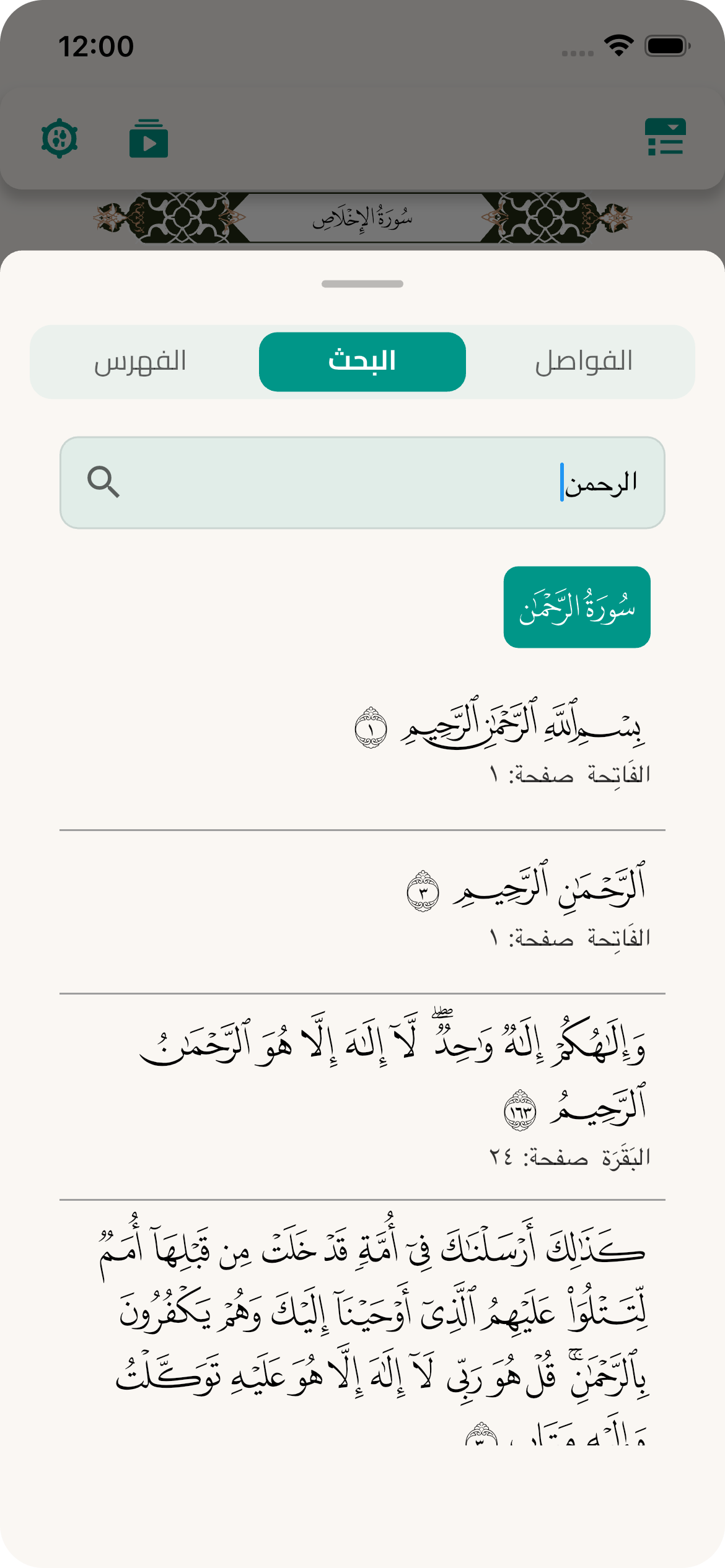
  • searching for any Ayah
TextField(
  onChanged: (txt) {
    final _ayahs = QuranLibrary().search(txt);
      setState(() {
        ayahs = [..._ayahs];
      });
  },
  decoration: InputDecoration(
    border:  OutlineInputBorder(borderSide: BorderSide(color: Colors.black),),
    hintText: 'Search',
  ),
),
  • Word Info (Recitations / Tasreef / Eerab)
/// Open Word Info bottom sheet (with on-demand download)
await QuranLibrary().showWordInfoByNumbers(
  context: context,
  surahNumber: 1,
  ayahNumber: 1,
  wordNumber: 1,
  initialKind: WordInfoKind.recitations,
  isDark: true,
);

/// (Optional) download a specific kind programmatically
if (!QuranLibrary().isWordInfoKindDownloaded(WordInfoKind.recitations)) {
  await QuranLibrary().downloadWordInfoKind(kind: WordInfoKind.recitations);
}

Word Audio (Word-by-Word)

Enable word audio playback to hear individual words or all words of an ayah sequentially.
// Initialize word audio (call once after QuranLibrary.init())
QuranLibrary.initWordAudio();
  • Play a Single Word
// Play word audio using WordRef
await QuranLibrary().playWordAudio(
  ref: const WordRef(surahNumber: 1, ayahNumber: 1, wordNumber: 1),
);

// Or using numbers directly
await QuranLibrary().playWordAudioByNumbers(
  surahNumber: 1,
  ayahNumber: 1,
  wordNumber: 1,
);
  • Play All Words of an Ayah
// Play all words of an ayah sequentially
await QuranLibrary().playAyahWordsAudioByNumbers(
  surahNumber: 1,
  ayahNumber: 1,
);
  • Stop & State
// Stop playback
await QuranLibrary().stopWordAudio();

// Check state
bool isPlaying = QuranLibrary().isWordAudioPlaying;
bool isLoading = QuranLibrary().isWordAudioLoading;
bool isAyahMode = QuranLibrary().isPlayingAyahWords;
int wordCount = QuranLibrary().getAyahWordCount(surahNumber: 1, ayahNumber: 1);

Note: Audio buttons also appear automatically inside the Word Info bottom sheet when word audio is initialized.

Fonts Download

To download Quran fonts, you have two options:

  • As for using the default dialog, you can modify the style in it.
  • Or you can create your own design using all the functions for downloading fonts.

macOS needs you to request a specific entitlement in order to access the network.

To do that: open macos/Runner/DebugProfile.entitlements and add the following key-value pair.
<key>com.apple.security.network.client</key>
<true/>
///
/// to get the fonts download dialog just call [getFontsDownloadDialog]
///
/// and pass the language code to translate the number if you want,
/// the default language code is 'ar' [languageCode]
/// and style [DownloadFontsDialogStyle] is optional.
QuranLibrary().getFontsDownloadDialog(downloadFontsDialogStyle, languageCode);

/// to get the fonts download widget just call [getFontsDownloadWidget]
Widget getFontsDownloadWidget(context, {downloadFontsDialogStyle, languageCode});

/// to get the fonts download method just call [fontsDownloadMethod]
QuranLibrary().fontsDownloadMethod;

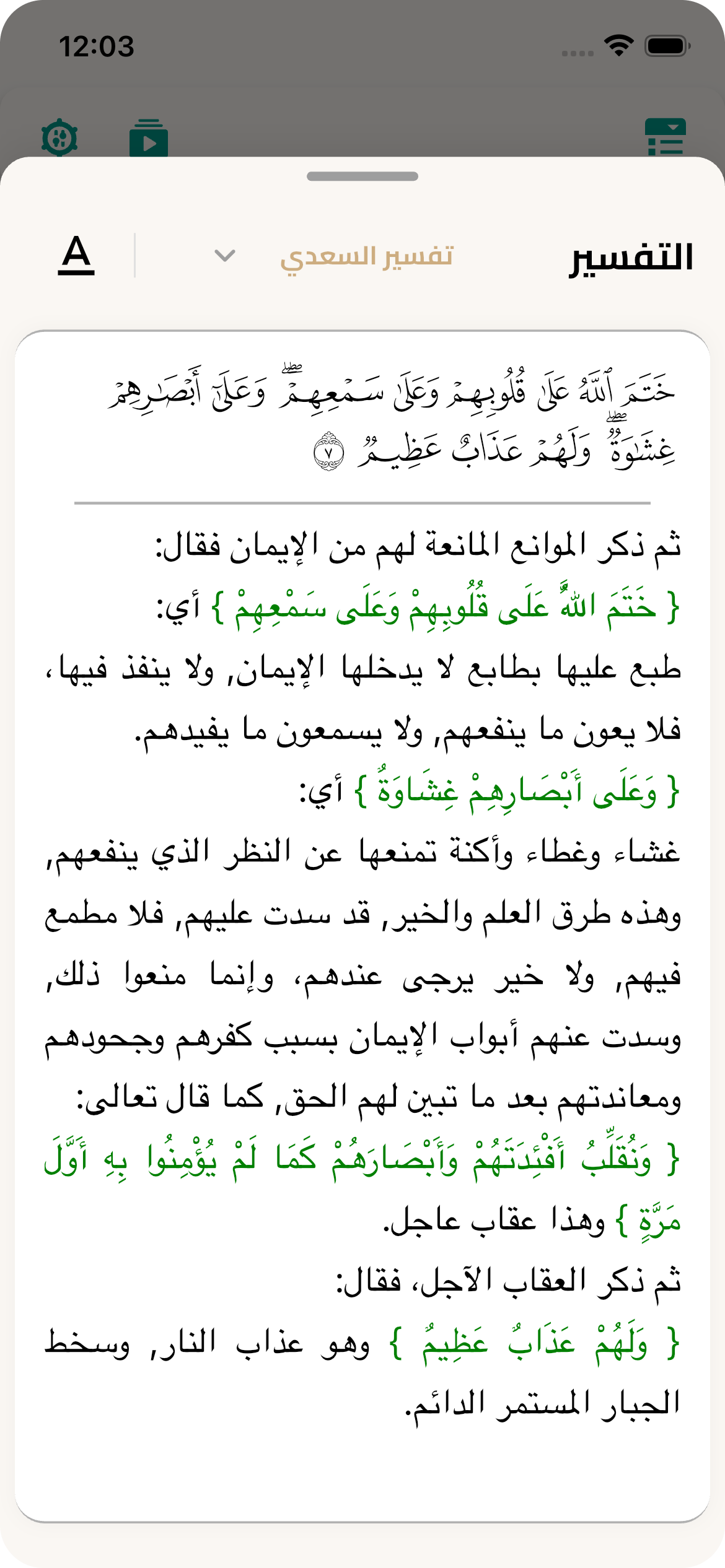
Tafsir

  • Usage Example
// get current list


final all = TafsirController.instance.items; // includes defaults + customs

// add a custom sql file (File is from file picker)

final added = await TafsirController.instance.addCustomFromFile(

  sourceFile: pickedFile,

  displayName: 'My Custom Tafsir',

  bookName: 'My Book',

  type: TafsirFileType.json,

);
/// Show a popup menu to change the tafsir style.
QuranLibrary().changeTafsirPopupMenu(TafsirStyle tafsirStyle, {int? pageNumber});

/// Fetch tafsir for a specific page by its page number.
QuranLibrary().fetchTafsir({required int pageNumber});

/// Check if the tafsir is already downloaded.
QuranLibrary().getTafsirDownloaded(int index);

/// Get the list of tafsir and translation names.
QuranLibrary().tafsirAndTraslationCollection;

/// Change the selected tafsir when the switch button is pressed.
QuranLibrary().changeTafsirSwitch(int index, {int? pageNumber});

/// Get the list of available tafsir data.
QuranLibrary().tafsirList;

/// Get the list of available translations.
QuranLibrary().translationList;

/// Fetch translations from the source.
QuranLibrary().fetchTranslation();

/// Download the tafsir by the given index.
QuranLibrary().tafsirDownload(int i);

/// (Optional) Download Tajweed (ayah-level) data used inside the Tafsir bottom sheet
if (!QuranLibrary().isTajweedAyahDownloaded) {
  await QuranLibrary().downloadTajweedAyah();
}

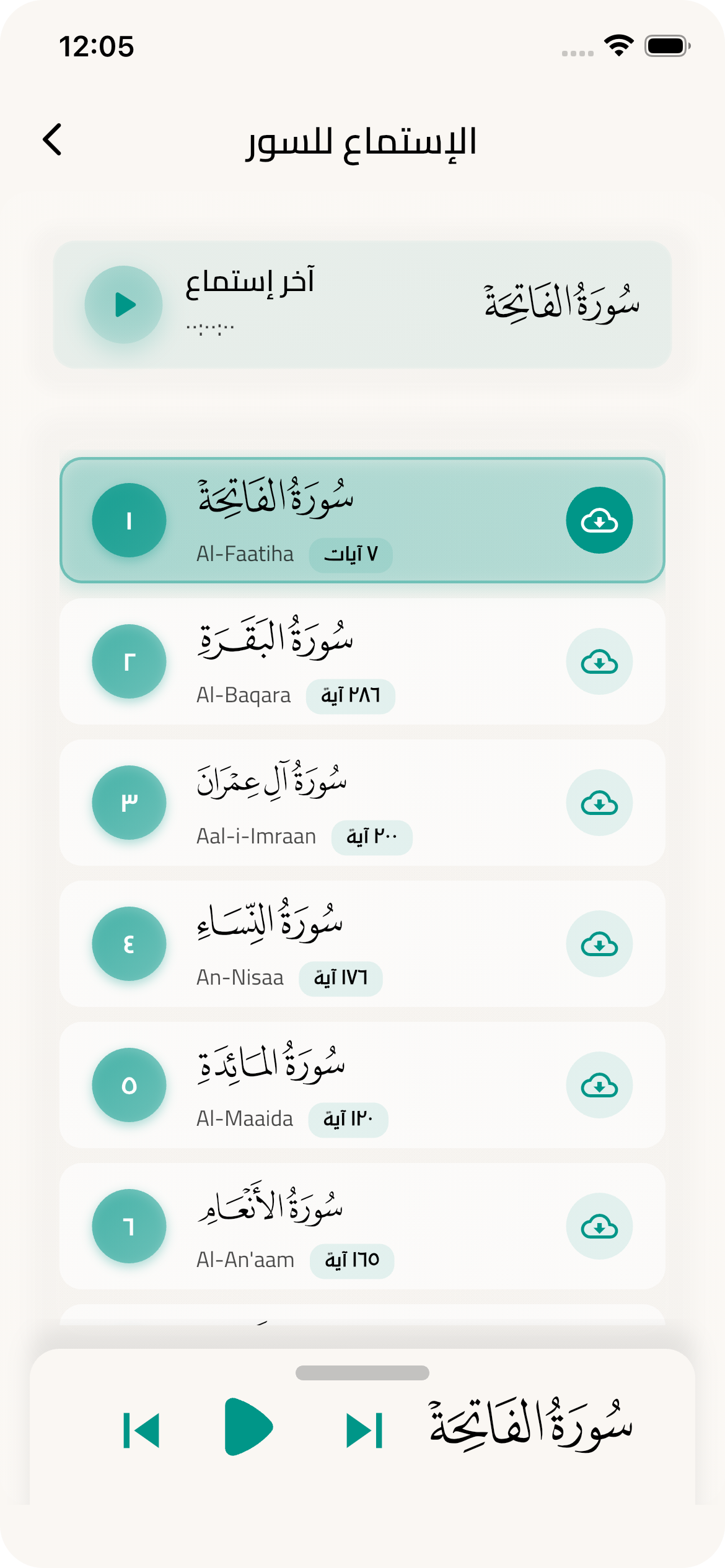
Audio Playback

This section provides comprehensive capabilities for audio playback of the Holy Quran with background playback support and advanced audio file management.
  • Verse Audio Playback
/// Play a verse or group of verses starting from a specific verse
await QuranLibrary().playAyah(
  context: context,
  currentAyahUniqueNumber: 1, // Unique ayah number
  playSingleAyah: true, // true for single ayah, false to continue
);

/// Move to next verse and play it
await QuranLibrary().seekNextAyah(
  context: context,
  currentAyahUniqueNumber: 5,
);

/// Move to previous verse and play it
await QuranLibrary().seekPreviousAyah(
  context: context,
  currentAyahUniqueNumber: 10,
);
  • Surah Audio Playback
/// Play a complete surah from beginning to end
await QuranLibrary().playSurah(surahNumber: 1); // Al-Fatihah
await QuranLibrary().playSurah(surahNumber: 2); // Al-Baqarah

/// Move to next surah and play it
await QuranLibrary().seekToNextSurah();

/// Move to previous surah and play it
await QuranLibrary().seekToPreviousSurah();
  • Download Management
/// Start downloading a surah for offline playback
await QuranLibrary().startDownloadSurah(surahNumber: 1);

/// Cancel ongoing download
QuranLibrary().cancelDownloadSurah();
  • Position Control & Resume
/// Get current/last surah number
int currentSurah = QuranLibrary().currentAndLastSurahNumber;

/// Get last position as formatted text (like "05:23")
String lastTimeText = QuranLibrary().formatLastPositionToTime;

/// Get last position as Duration object for programming operations
Duration lastDuration = QuranLibrary().formatLastPositionToDuration;

/// Play from the last position where user stopped
await QuranLibrary().playLastPosition();
  • Complete Audio Example
class AudioControlExample extends StatefulWidget {
  @override
  _AudioControlExampleState createState() => _AudioControlExampleState();
}

class _AudioControlExampleState extends State<AudioControlExample> {
  @override
  Widget build(BuildContext context) {
    return Scaffold(
      appBar: AppBar(title: Text('Quran Audio Player')),
      body: Column(
        children: [
          // Display current surah
          Text('Current Surah: ${QuranLibrary().currentAndLastSurahNumber}'),
          
          // Display last position
          Text('Last Position: ${QuranLibrary().formatLastPositionToTime}'),
          
          // Control buttons
          Row(
            mainAxisAlignment: MainAxisAlignment.spaceEvenly,
            children: [
              // Play from last position
              ElevatedButton(
                onPressed: () => QuranLibrary().playLastPosition(),
                child: Text('Resume from where you left'),
              ),
              
              // Play Al-Fatihah
              ElevatedButton(
                onPressed: () => QuranLibrary().playSurah(surahNumber: 1),
                child: Text('Surah Al-Fatihah'),
              ),
            ],
          ),
          
          Row(
            mainAxisAlignment: MainAxisAlignment.spaceEvenly,
            children: [
              // Previous surah
              IconButton(
                onPressed: () => QuranLibrary().seekToPreviousSurah(),
                icon: Icon(Icons.skip_previous),
              ),
              
              // Previous ayah
              IconButton(
                onPressed: () => QuranLibrary().seekPreviousAyah(
                  context: context,
                  currentAyahUniqueNumber: 10,
                ),
                icon: Icon(Icons.fast_rewind),
              ),
              
              // Next ayah
              IconButton(
                onPressed: () => QuranLibrary().seekNextAyah(
                  context: context,
                  currentAyahUniqueNumber: 5,
                ),
                icon: Icon(Icons.fast_forward),
              ),
              
              // Next surah
              IconButton(
                onPressed: () => QuranLibrary().seekToNextSurah(),
                icon: Icon(Icons.skip_next),
              ),
            ],
          ),
          
          // Download buttons
          Row(
            mainAxisAlignment: MainAxisAlignment.spaceEvenly,
            children: [
              ElevatedButton(
                onPressed: () => QuranLibrary().startDownloadSurah(surahNumber: 2),
                child: Text('Download Surah Al-Baqarah'),
              ),
              
              ElevatedButton(
                onPressed: () => QuranLibrary().cancelDownloadSurah(),
                child: Text('Cancel Download'),
              ),
            ],
          ),
        ],
      ),
    );
  }
}
  • You can also use the default Quran font or Naskh font
/// [hafsStyle] is the default style for Quran so all special characters will be rendered correctly
QuranLibrary().hafsStyle;

/// [naskhStyle] is the default style for other text.
QuranLibrary().naskhStyle;

Sources

  • Quran text and metadata: King Fahd Glorious Quran Printing Complex — Quran Developer Portal

    • https://qurancomplex.gov.sa/quran-dev/
  • Fonts, Tafsir, and Translations: Quranic Universal Library (QUL) by Tarteel

    • https://qul.tarteel.ai/

License

MIT for code. QCF fonts are provided via Quranic Universal Library (QUL). Ensure you comply with QUL terms (and any upstream KFGQPC terms) when distributing applications that include or bundle these assets.


Read more about the license here.

For additional terms regarding QCF fonts and QUL resources, see NOTICE.

カテゴリー

依存関係

依存関係一覧 24 件

ソースリポジトリ

このパッケージを使用しているプロジェクト

データはまだありません。