パッケージ、リポジトリ、アプリカテゴリを検索

recursive_tree_flutter のカバー
パッケージ詳細v1.0.4

recursive_tree_flutter

ツリー型データ構造に焦点を当て、UIに表示するためのツリービュー用パッケージです。

AndroidiOSWebmacOSWindowsLinux
30日間ダウンロード
5290
いいね数
42
Pub ポイント
160

パッケージをインストール

flutter pub add recursive_tree_flutter

パッケージ概要

公開情報に基づく選定ガイドです。参考としてご利用ください。

階層的なUIでツリー型データ構造を視覚化するように設計されたFlutterパッケージです。開発者がネストされたデータをインタラクティブなツリービューとしてレンダリングできるようにし、ノードの動的展開および折りたたみをサポートしています。このパッケージは、クリーンで再帰的なレンダリングロジックに重点を置き、大規模なデータセットに対して最適化されています。ファイルエクスプローラー、組織図、カテゴリ階層など、構造化されたデータ表現が必要なアプリケーションに最適です。Flutterのウィジェットシステムに基づいて構築されており、すべての主要プラットフォームにシームレスに統合されます。

用途

  • ファイルシステムディレクトリの表示
  • 組織図のレンダリング
  • カテゴリおよびサブカテゴリの階層を表示しています
  • 構成ツリーの構築
  • JSON や XML データ構造の可視化

主な機能

  • 再帰的ノードレンダリング
  • 展開および折りたたみ可能なノード
  • カスタマイズ可能なノードスタイル
  • 深いネストのサポート
  • クロスプラットフォーム互換性
  • 大規模なツリー構造の効率的なレンダリング

適している対象

  • 階層データインターフェースを構築する開発者
  • インタラクティブなツリーナビゲーションを必要とするアプリ
  • ネストされたデータモデルを含むプロジェクト
  • 視覚ツリー構造を必要とする UI
  • 複数のプラットフォーム向けのFlutterアプリ

注意事項

  • 非常に大きなツリーに対して最適化が必要になる場合があります
  • カスタムスタイルにはFlutterウィジェットの理解が必要です
  • 展開/折りたたみ以外の組み込みインタラクティビティは限定的
  • フラットなデータ構造には適していません
  • パフォーマンスはノードの複雑さに依存します

元の README

関連するソースリポジトリの README 原文のスナップショットです。最新の内容はリポジトリをご覧ください。

recursive_tree_flutter

Languages:

English Vietnamese

The recursive_tree_flutter library helps build a tree data structure and visualizes it as an inheritance tree (stack view or expandable tree view). While most tree-view libraries focus on the interface, recursive_tree_flutter prioritizes the tree data structure, allowing it to support various special UI styles - that's the strength of this library. For example, it can update the tree when a node is selected, return a list of chosen nodes/leaves, return a list of favorite nodes...

Table of contents

Code example

Reference to Explaining the working of the Expandable Tree based on ExpandableTreeMixin.

import 'package:flutter/material.dart';
import 'package:recursive_tree_flutter/recursive_tree_flutter.dart';

import '../data/custom_node_type.dart';
import '../data/example_vts_department_data.dart';

class ExTreeSingleChoice extends StatefulWidget {
  const ExTreeSingleChoice({super.key});

  @override
  State<ExTreeSingleChoice> createState() => _ExTreeSingleChoiceState();
}

class _ExTreeSingleChoiceState extends State<ExTreeSingleChoice> {
  late TreeType<CustomNodeType> _tree;
  final TextEditingController _textController = TextEditingController();

  @override
  void initState() {
    _tree = sampleTree();
    super.initState();
  }

  @override
  void dispose() {
    _textController.dispose();
    super.dispose();
  }

  @override
  Widget build(BuildContext context) {
    return GestureDetector(
      onTap: () => FocusManager.instance.primaryFocus?.unfocus(),
      child: Scaffold(
        appBar: AppBar(
          title: const Text("Example Single Choice Expandable Tree"),
        ),
        body: Column(
          children: [
            Expanded(
              flex: 4,
              child: SingleChildScrollView(
                child: _VTSNodeWidget(
                  _tree,
                  onNodeDataChanged: () => setState(() {}),
                ),
              ),
            ),
            Expanded(
              flex: 1,
              child: TextFormField(
                controller: _textController,
                decoration: const InputDecoration(
                  hintText: "PRESS ENTER TO UPDATE",
                ),
                onFieldSubmitted: (value) {
                  updateTreeWithSearchingTitle(_tree, value);
                  setState(() {});
                },
              ),
            ),
          ],
        ),
      ),
    );
  }
}

//? ____________________________________________________________________________

class _VTSNodeWidget extends StatefulWidget {
  const _VTSNodeWidget(
    this.tree, {
    required this.onNodeDataChanged,
  });

  final TreeType<CustomNodeType> tree;

  /// IMPORTANT: Because this library **DOESN'T** use any state management
  /// library, therefore I need to use call back function like this - although
  /// it is more readable if using `Provider`.
  final VoidCallback onNodeDataChanged;

  @override
  State<_VTSNodeWidget> createState() => _VTSNodeWidgetState();
}

class _VTSNodeWidgetState<T extends AbsNodeType> extends State<_VTSNodeWidget>
    with SingleTickerProviderStateMixin, ExpandableTreeMixin<CustomNodeType> {
  final Tween<double> _turnsTween = Tween<double>(begin: -0.25, end: 0.0);

  @override
  initState() {
    super.initState();
    initTree();
    initRotationController();
    if (tree.data.isExpanded) {
      rotationController.forward();
    }
  }

  @override
  void initTree() {
    tree = widget.tree;
  }

  @override
  void initRotationController() {
    rotationController = AnimationController(
      duration: const Duration(milliseconds: 300),
      vsync: this,
    );
  }

  @override
  void dispose() {
    disposeRotationController();
    super.dispose();
  }

  @override
  Widget build(BuildContext context) => buildView();

  @override
  Widget buildNode() {
    if (!widget.tree.data.isShowedInSearching) return const SizedBox.shrink();

    return InkWell(
      onTap: updateStateToggleExpansion,
      child: Row(
        children: [
          buildRotationIcon(),
          Expanded(child: buildTitle()),
          buildTrailing(),
        ],
      ),
    );
  }

  //* __________________________________________________________________________

  Widget buildRotationIcon() {
    return RotationTransition(
      turns: _turnsTween.animate(rotationController),
      child: tree.isLeaf
          ? Container()
          : IconButton(
              iconSize: 16,
              icon: const Icon(Icons.expand_more, size: 16.0),
              onPressed: updateStateToggleExpansion,
            ),
    );
  }

  Widget buildTitle() {
    return Padding(
      padding: const EdgeInsets.symmetric(horizontal: 6.0),
      child: Text(
        tree.data.title + (tree.isLeaf ? "" : " (${tree.children.length})"),
        maxLines: 1,
        overflow: TextOverflow.ellipsis,
      ),
    );
  }

  Widget buildTrailing() {
    if (tree.data.isUnavailable) {
      return const Icon(Icons.close_rounded, color: Colors.red);
    }

    if (tree.isLeaf) {
      return Checkbox(
        value: tree.data.isChosen!, // leaves always is true or false
        onChanged: (value) {
          updateTreeSingleChoice(tree, !tree.data.isChosen!);
          widget.onNodeDataChanged();
        },
      );
    }

    return const SizedBox.shrink();
  }

  //* __________________________________________________________________________

  @override
  List<Widget> generateChildrenNodesWidget(
          List<TreeType<CustomNodeType>> list) =>
      List.generate(
        list.length,
        (int index) => _VTSNodeWidget(
          list[index],
          onNodeDataChanged: widget.onNodeDataChanged,
        ),
      );

  @override
  void updateStateToggleExpansion() => setState(() => toggleExpansion());
}

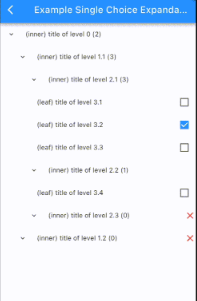
Result:

Demo 5

Features

Some features provided by this library include:

  • Building a tree data structure (Dart code).
  • Various functions for tree operations, such as finding nodes, searching with text, updating multiple choice/single choice trees, etc.
  • Allows lazy-loading to expand the tree at runtime.
  • The tree data structure can be used independently from the Flutter UI.
  • Visualizes the tree structure using Flutter.
  • Allows customization of the Flutter UI to suit specific requirements.

Contents

Tree Data Structure (Dart code)

Inspired by the structure of a directory tree on a computer, there are two types of nodes: directories and files. A directory can contain multiple files and other directories, and a file is the smallest level that cannot contain anything else.

Similarly to the directory tree structure on a computer, recursive_tree_flutter will build a tree data structure that includes inner nodes and leaf nodes.

  • AbsNodeType: An abstract class representing the data type of a node. A node can be either an inner node or a leaf node. This class has the following properties:
    • id: required, dynamic.
    • title: required, String.
    • isInner: boolean, default is true.
    • isUnavailable: boolean, default is false.
    • isChosen: nullable boolean, default is false.
    • isExpanded: boolean, default is false.
    • isFavorite: boolean, default is false.
    • isShowedInSearching: boolean, default is true. Also known as isDisplayable, được sử dụng used when the UI tree has a search function.
    • clone(): abstract method, T extends AbsNodeType. Allows cloning the object.
  • TreeType: The tree data structure.
    • T is the Implement Class of AbsNodeType.
    • data: required, T.
    • children: required, List<TreeType<T>>.
    • parent: required, TreeType<T>?. If parent == null, it means we are at the root of the entire tree.
    • isChildrenLoadedLazily: boolean, default is false. Only used if the current tree is lazy-loading, indicating whether the children have been loaded before or not.
    • isLeaf: Is current tree at a leaf node?
    • isRoot: Is current tree at the root node?
    • clone(tree, parent): static method. Allows cloning a tree.
Helper Functions (Dart code)
Flutter UI Tree

StackWidget: The UI tree is built using the stack approach. Multiple choice, data is parsed only once:

Demo 1

StackWidget: The UI tree is built using the lazy-loading stack approach. Multiple choice, data is parsed at runtime:

Demo 2

ExpandableTreeWidget: The UI tree is built using the expandable approach, and data is parsed only once:

Demo 3

VTSDepartmentTreeWidget: Another UI tree built using the expandable approach, and data is parsed only once:

Demo 4

SingleChoiceTreeWidget: Another UI tree built using the expandable approach, and data is parsed only once, single choice:

Demo 5

LazySingleChoiceTreeWidget: Another UI tree built using the expandable approach, data is parsed at runtime, single choice:

Demo 6

ExVNRegions: Vietnam's regions, tree is customized with different color for each level, data is parsed only once:

Demo 7

ExVTSDms4TreeScreen: Viettel VTS DMS.4 tree:

Demo 8
Explaining the working of the Expandable Tree based on ExpandableTreeMixin

An expandable UI tree has the following structure:

SingleChildScrollView( // tree is scrollable
  - NodeWidget (root)
    -- NodeWidget
      +++ NodeWidget
      +++ NodeWidget
      +++ NodeWidget
    -- NodeWidget
      +++ NodeWidget
    ...
)

We can see that NodeWidget is a StatefulWidget built recursively and wrapped by SingleChildScrollView to provide scrolling capability to the tree. Updating the tree (data) will change the state/UI of the NodeWidget - this can be done using setState or Provider for management. NodeWidget will inherit ExpandableTreeMixin (as shown in the example VTSDepartmentTreeWidget using setState) with some functions like:

  • initTree(): Initializes the tree (data) (called in initState()).
  • initRotationController(): Initializes the rotationController variable used to create an animation effect when expanding the UI tree (called in initState()).
  • disposeRotationController().
  • buildView(): Builds the UI of the tree (already written).
  • buildNode(): Builds the UI of a node (must be implemented). This function allows developers to freely customize the UI in unlimited ways.
  • buildChildrenNodes(): Builds the child nodes with animation for expansion (already written).
  • generateChildrenNodesWidget(): Returns List<NodeWidget>, must be implemented (an example is provided in the function documentation).
  • toggleExpansion(): Determines whether to collapse/expand the child nodes.
  • updateStateToggleExpansion(): Updates the state after performing the collapse/expand action.

BSD-3-Clause License

Copyright (c) 2023, Viettel Solutions

Redistribution and use in source and binary forms, with or without
modification, are permitted provided that the following conditions are met:

1. Redistributions of source code must retain the above copyright notice, this
   list of conditions and the following disclaimer.

2. Redistributions in binary form must reproduce the above copyright notice,
   this list of conditions and the following disclaimer in the documentation
   and/or other materials provided with the distribution.

3. Neither the name of the copyright holder nor the names of its
   contributors may be used to endorse or promote products derived from
   this software without specific prior written permission.

THIS SOFTWARE IS PROVIDED BY THE COPYRIGHT HOLDERS AND CONTRIBUTORS "AS IS"
AND ANY EXPRESS OR IMPLIED WARRANTIES, INCLUDING, BUT NOT LIMITED TO, THE
IMPLIED WARRANTIES OF MERCHANTABILITY AND FITNESS FOR A PARTICULAR PURPOSE ARE
DISCLAIMED. IN NO EVENT SHALL THE COPYRIGHT HOLDER OR CONTRIBUTORS BE LIABLE
FOR ANY DIRECT, INDIRECT, INCIDENTAL, SPECIAL, EXEMPLARY, OR CONSEQUENTIAL
DAMAGES (INCLUDING, BUT NOT LIMITED TO, PROCUREMENT OF SUBSTITUTE GOODS OR
SERVICES; LOSS OF USE, DATA, OR PROFITS; OR BUSINESS INTERRUPTION) HOWEVER
CAUSED AND ON ANY THEORY OF LIABILITY, WHETHER IN CONTRACT, STRICT LIABILITY,
OR TORT (INCLUDING NEGLIGENCE OR OTHERWISE) ARISING IN ANY WAY OUT OF THE USE
OF THIS SOFTWARE, EVEN IF ADVISED OF THE POSSIBILITY OF SUCH DAMAGE.

カテゴリー

ソースリポジトリ

このパッケージを使用しているプロジェクト

データはまだありません。

