パッケージ、リポジトリ、アプリカテゴリを検索

riff_switch のカバー
パッケージ詳細v0.0.4

riff_switch

RiffSwitchでスムーズな遷移と魅力的なインタラクションを体験しましょう。簡単なスライド効果と魅了するアニメーションを可能にするスイッチライブラリです。

AndroidiOSWebmacOSWindowsLinux
30日間ダウンロード
185
いいね数
10
Pub ポイント
140

パッケージをインストール

flutter pub add riff_switch

パッケージ概要

公開情報に基づく選定ガイドです。参考としてご利用ください。

RiffSwitch は、スムーズなスライド遷移と視覚的に魅力的なアニメーションを備えたスイッチコンポーネントのユーザーインターフェースを強化することを目的としたFlutterパッケージです。最小限のコードで魅力的でインタラクティブなスイッチを作成でき、設定や好み、ステータスインジケーターでのトグルに最適です。このライブラリはAndroid、iOS、Web、macOS、Windows、Linuxなど複数のプラットフォームをサポートしており、デバイス間で一貫した動作を保証します。カスタマイズ可能なスタイルと応答性のあるフィードバックにより、RiffSwitchはインタラクションをダイナミックかつ洗練されたものにし、UXを向上させます。

用途

  • カスタムトグルスイッチ
  • ユーザーの好み設定
  • オン/オフステータスインジケーター
  • インタラクティブなUI要素
  • モバイルおよびウェブアプリケーションインターフェース

主な機能

  • スムーズなスライドアニメーション
  • クロスプラットフォーム互換性
  • カスタマイズ可能な外観
  • レスポンシブなインタラクションフィードバック
  • 最小限のセットアップが必要

適している対象

  • 視覚的な洗練を求めるUIデザイナー
  • インタラクティブなフォームを構築する開発者
  • 直感的なトグル制御を必要とするアプリ
  • クロスプラットフォームのFlutterプロジェクト
  • ユーザー体験を重視するプロジェクト

注意事項

  • 複雑なテーマに対応するためには追加のスタイル設定が必要になる場合があります
  • 多数のスイッチリストにおけるパフォーマンスへの影響
  • スイッチ固有の機能に限定される
  • トグル以外のインタラクティブコンポーネントには適していません
  • Flutter のアニメーションフレームワークに依存しています

元の README

関連するソースリポジトリの README 原文のスナップショットです。最新の内容はリポジトリをご覧ください。

RiffSwitch

Build pub package pub points popularity likes Star on Github Awesome Flutter License: BSD

Breathe life into your Flutter UI with RiffSwitch, the switch library that empowers effortless sliding effects and captivating animations. Customize the sliding behavior for a unique user experience, while interactive dragging fosters a sense of control and responsiveness. Witness smooth state transitions as the switch flips, adding a touch of visual polish to your app. Whether you prefer simple or decorative switch types, RiffSwitch seamlessly integrates into your UI, transforming basic interactions into engaging experiences.

Experience seamless transitions and engaging interactions with RiffSwitch.

Table of Contents

Installation

To use RiffSwitch in your Flutter project, add the following to your pubspec.yaml file:

dependencies:
  riff_switch: ^0.0.4

Then, run:

flutter pub get

Usage

Import the package:

import 'package:riff_switch/riff_switch.dart';

Add the RiffSwitch widget to your UI, providing the necessary parameters:

RiffSwitch(
  value: _isEnabled,
  onChanged: (bool newValue) {
    setState(() {
      _isEnabled = newValue;
    });
  },
  // Additional customization options...
)

Features

  • Customization: Customize the appearance with various options such as colors, texts, and child widgets.
  • Sliding Effects: RiffSwitch supports sliding effects for a modern and interactive user experience.
  • Enum Types: Choose between simple and decorative switch types based on your UI requirements.
  • Animation:
    • Smooth Transitions: Enjoy smooth animations when the switch transitions between on and off states.
    • Interactive Dragging: The sliding effects are accompanied by interactive dragging animations for a responsive feel.

Examples

Here's a basic example of how to use RiffSwitch:

import 'package:flutter/material.dart';
import 'package:riff_switch/riff_switch.dart';

void main() {
  runApp(MyApp());
}

class MyApp extends StatelessWidget {
  @override
  Widget build(BuildContext context) {
    return MaterialApp(
      home: Scaffold(
        appBar: AppBar(
          title: Text('RiffSwitch Example'),
        ),
        body: Center(
          child: RiffSwitch(
            value: true,
            onChanged: (bool newValue) {
              // Handle switch state change
            },
            // Additional customization options...
          ),
        ),
      ),
    );
  }
}

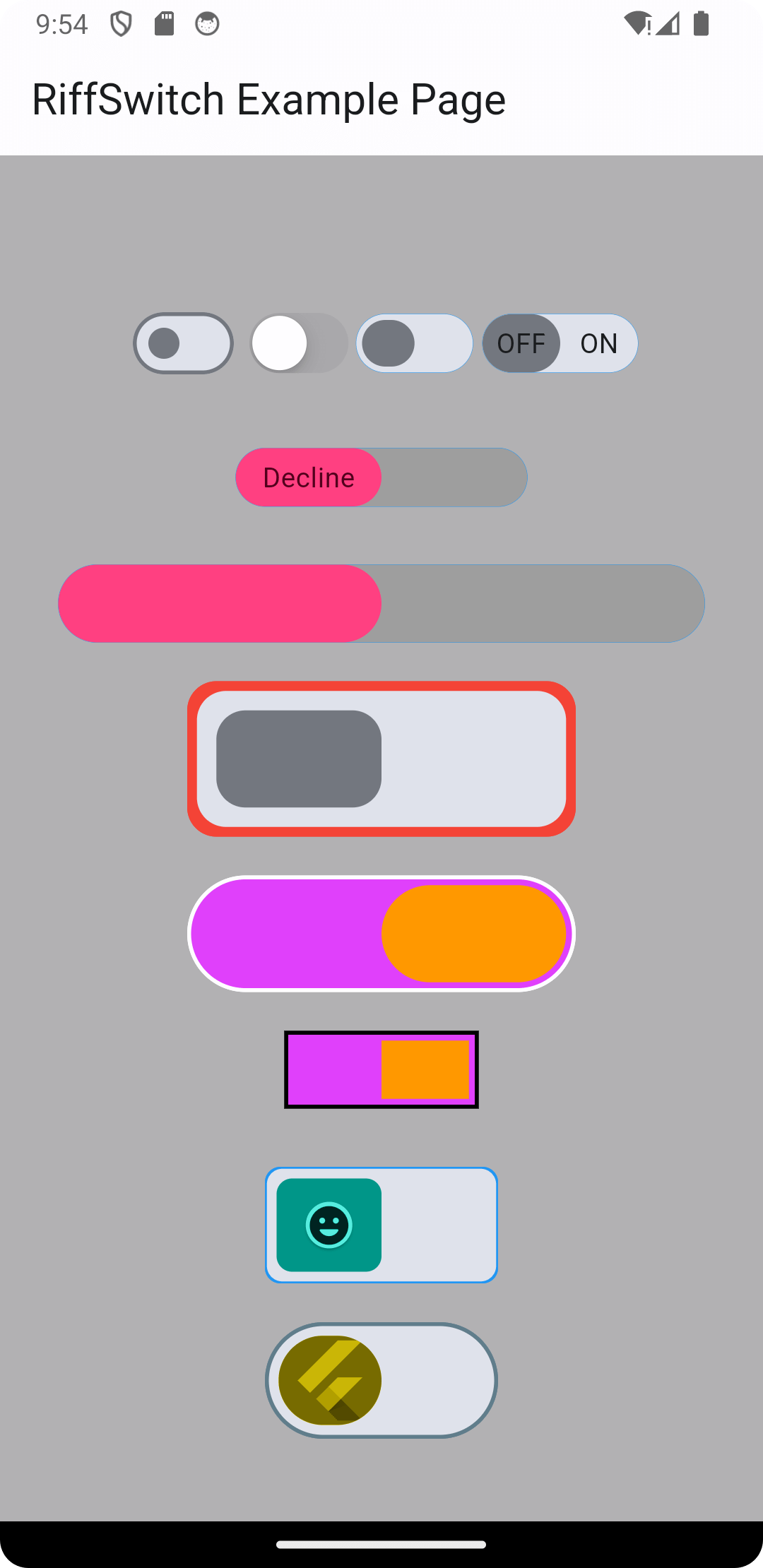
More examples from main.dart

// 1
  RiffSwitch(
    value: _switchValue,
    onChanged: (value) => setState(() {
      _switchValue = value;
    }),
    type: RiffSwitchType.simple,
  ),

  const SizedBox(height: 30),

  // 2
  RiffSwitch(
    value: _switchValue,
    onChanged: (value) => setState(() {
      _switchValue = value;
    }),
    type: RiffSwitchType.simple,
    activeText: const Text("Accept"),
    inactiveText: const Text("Decline"),
    thumbColor: MaterialStateProperty.resolveWith((Set<MaterialState> states) {
      if (states.contains(MaterialState.selected)) {
        return Colors.greenAccent;
      }
      return Colors.pinkAccent;
    }),
    trackColor: MaterialStateProperty.resolveWith((Set<MaterialState> states) {
      if (states.contains(MaterialState.selected)) {
        return Colors.grey;
      }
      return Colors.grey;
    }),
  ),

  const SizedBox(height: 30),

  // 3
  RiffSwitch(
    value: _switchValue,
    onChanged: (value) => setState(() {
      _switchValue = value;
    }),
    type: RiffSwitchType.decorative,
    activeColor: Colors.orange,
  ),

  const SizedBox(height: 30),

  // 4
  RiffSwitch(
    value: _switchValue,
    onChanged: (value) => setState(() {
      _switchValue = value;
    }),
    type: RiffSwitchType.decorative,
    activeChild: const Card(
      color: CupertinoColors.systemBlue,
      child: FlutterLogo(),
    ),
    inactiveChild: const Card(
      color: CupertinoColors.systemYellow,
      child: FlutterLogo(),
    ),
  )

NOTE: It's important to note that the thumbColor property takes precedence over any color applied directly to the active or inactive thumb, whether through a container widget or any other means. This allows for consistent and predictable customization of the thumb's color across different states of the switch, ensuring a cohesive visual appearance throughout the application.

Screenshots

Screenshot 1 Screenshot 2 Screenshot 3
Screenshot 4 Screenshot 5 Screenshot 6
Screen Record 1 Screen Record 2

Contributing

Contributions are welcome! Feel free to open issues or submit pull requests.

  • Issues: If you encounter any bugs, have feature requests, or want to suggest improvements, please open an issue on our GitHub repository. Provide as much detail as possible to help us understand the problem or idea better.

  • Pull Requests: If you'd like to contribute code changes, feel free to submit a pull request. Before doing so, make sure to fork the repository and create a new branch for your changes. Follow the existing coding style and guidelines, and write clear and concise commit messages. Your pull request will undergo review, and we'll work together to ensure the changes align with the project's goals.

  • Feature Requests: If you have ideas for new features or enhancements, please open an issue to discuss them. We value community feedback and want to ensure that new features align with the project's direction and objectives.

  • Spread the Word: Help us grow the FontResoft community by sharing the project with others. Whether through social media, blog posts, or word of mouth, spreading the word about FontResoft helps attract more users and contributors.

License

This project is licensed under the BSD 3-Clause License - see the LICENSE file for details.

カテゴリー

依存関係

依存関係一覧 1 件

ソースリポジトリ

このパッケージを使用しているプロジェクト

データはまだありません。