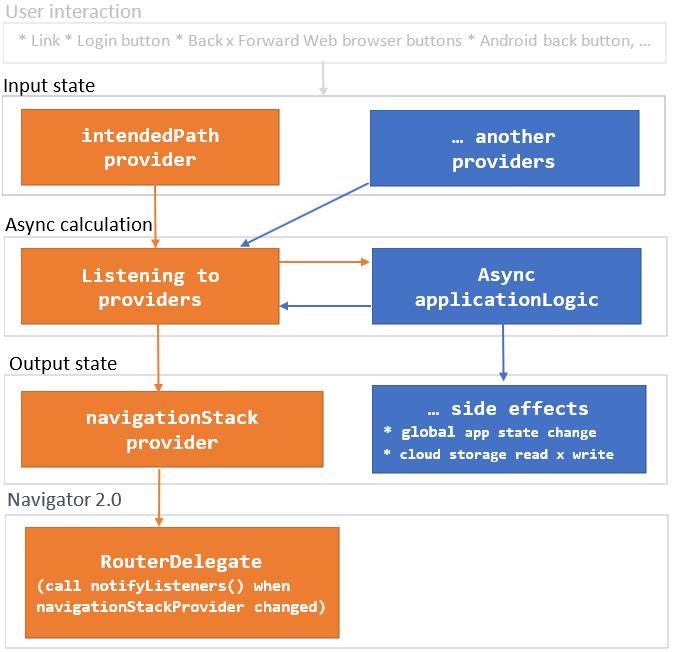
If you are interested in the motivation why the package was created and a detailed description of what problems it solves, read this MEDIUM article:
Simple Flutter navigation with Riverpod.
Simple but powerful Flutter navigation with riverpod and Navigator 2.0 that solves the following:
Strictly typed navigation:
you can use navigate([HomeSegment(),BookSegment(id: 2)]); instead of navigate('home/book;id:2'); in your code
asynchronous navigation ...
... is the case when changing the navigation state requires asynchronous actions (such as loading or saving data from the Internet)
multiple providers ...
... is the case when the navigation state depends on multiple riverpod providers
easier coding:
the navigation problem is reduced to manipulating the class collection
better separation of concerns: UI x Model (thanks to riverpod :+1:):
navigation logic can be developed and tested without typing a single flutter widget
nested navigation
just use the nested riverpod ProviderScope() and Flutter Router widget
Take a look at the following terms related to URL path home/book;id=2
string-path: e.g. home/book;id=2
string-segment: the string-path consists of two slash-delimited string-segments (home and book;id=2)
typed-segment describes coresponding string-segments (HomeSegment() for 'home' and BookSegment(id:2) for 'book;id=2') typed-segment is class TypedSegment {}'s descendant.
Flutter Navigator 2.0 navigation-stack is uniquely determined by the TypedPath (where each TypedPath's TypedSegment instance corresponds to a screen and page instance): pages = [MaterialPage (child: HomeScreen(HomeSegment())), MaterialPage (child: BookScreen(BookSegment(id:2)))]
encode and decncode helps to convert typed-segment to string-segment and back.
Step2 - configure AppNavigator...
... by extending the RNavigator class.
classAppNavigatorextendsRNavigator{
AppNavigator(Ref ref)
: super(
ref,
[
/// 'home' and 'book' strings are used in web URL, e.g. 'home/book;id=2'/// decode is used to decode URL to HomeSegment/BookSegment/// HomeScreen/BookScreen.new are screen builders for a given segmentRRoute<HomeSegment>(
'home',
HomeSegment.decode,
HomeScreen.new,
),
RRoute<BookSegment>(
'book',
BookSegment.decode,
BookScreen.new,
),
],
);
}
Step3 - use the AppNavigator in MaterialApp.router
If you are familiar with the Flutter Navigator 2.0 and the riverpod, the following code is clear:
The link Go to book: [3, 13, 103] in the running example would not make much sense in the real Books application.
But it shows the navigation to the four-screen navigation stack:
Flutter Navigator 2.0 and its MaterialApp.router constructor requires a URL parser (RouteInformationParser).
We use URL syntax, see section 3.3. of RFC 3986, note
*For example, one URI producer might use a segment such as "name;v=1.1"..."
Each TypedSegment must be converted to string-segment and back.
The format of string-segment is
<unique TypedSegment id>[;<property name>=<property value>]*, e.g. book;id=3.
encode/decode example:
Instead of directly converting to/from the string, we convert to/from typedef UrlPars = Map<String,String>
So far, we support the following types of TypedSegment property: int, double, bool, String, int?, double?, bool?, String?.
Every aspect of URL conversion can be customized, e.g.
support another property type (as a DateTime, providing getDateTime, getDateTimeNull and setDateTime in your own UrlPars's extension)
See extension UrlParsEx on UrlPars in
path_parser.dart.
rewrite the entire IPathParser and use a completely different URL syntax. Then use your parser in AppNavigator:
It is good practice to place the code for all events (specific to navigation) in AppNavigator.
These can then be used not only for writing screen widgets, but also for testing.
classAppNavigatorextendsRNavigator{
......
/// navigate to next bookFuturetoNextBook() => replaceLast<BookSegment>((last) => BookSegment(id: last.id + 1));
/// navigate to homeFuturetoHome() => navigate([HomeSegment()]);
}
As you can see, changing the Input state starts the async calculation.
The result of the calculations is Output state which can have app-specific Side effects.
Navigator 2.0 RouterDelegate is then synchronized with navigationStackProvider
Roadmap
I prepared this package for my new project. Its further development depends on whether the community will use it.
proofreading because my English is not good. Community help is warmly welcomed.