パッケージ、リポジトリ、アプリカテゴリを検索

rough_notation のカバー
パッケージ詳細v0.0.3

rough_notation

Flutter の CustomPainter を使用して、ウィジェットにアニメーション付きの手描き風の注記を作成します。Rough Notation JS ライブラリからインスパイアされています。

AndroidiOSWebmacOSWindowsLinux
30日間ダウンロード
68
いいね数
5
Pub ポイント
160

パッケージをインストール

flutter pub add rough_notation

パッケージ概要

公開情報に基づく選定ガイドです。参考としてご利用ください。

Rough Notation は、CustomPainter を使用してウィジェットにアニメーション付きの手書き風の注釈を追加できる Flutter パッケージです。Rough Notation JavaScript ライブラリからインスパイアされており、テキストや UI 要素にスケッチのような表現力のある外観をもたらします。動的でスタイル化された線や図形を使ってコンテンツの重要な部分を強調するのに最適です。Android、iOS、Web、macOS、Windows、Linux など複数のプラットフォームをサポートしており、クロスプラットフォームアプリに非常に適しています。Rich Text、Markdown、HTML エディタともスムーズに統合できます。

用途

  • 教育アプリでの重要なテキストの強調
  • インタラクティブなチュートリアルに表現的な注釈を追加する
  • 手描きスタイルのエフェクトでUIを強化する
  • ダッシュボードでデータポイントを可視化する
  • 魅力的なオンボーディング体験を作成する
  • 動的マーカーを使用したMarkdownコンテンツのスタイリング

主な機能

  • アニメーションされた手描きスタイルのライン
  • カスタマイズ可能なストロークおよびフィルプロパティ
  • 複数の注記タイプ(下線、ボックス、円)のサポート
  • CustomPainter との組み込み統合
  • クロスプラットフォーム互換性
  • pub add コマンドによる簡単なセットアップ

適している対象

  • 教育および学習アプリケーション
  • 視覚フィードバック付きのインタラクティブUI
  • 表現力のあるUI要素を探しているデザイナー
  • リッチテキストエディタを構築する開発者
  • 遊び心や芸術的な注釈を必要とするアプリ

注意事項

  • 多数の注釈があるとパフォーマンスに影響する可能性があります
  • CustomPainter の基礎を理解する必要がある
  • 2Dキャンバスレンダリングに制限
  • 高性能アニメーションには適していません
  • 静的または低頻度の更新に最適

元の README

関連するソースリポジトリの README 原文のスナップショットです。最新の内容はリポジトリをご覧ください。

RoughNotation Flutter

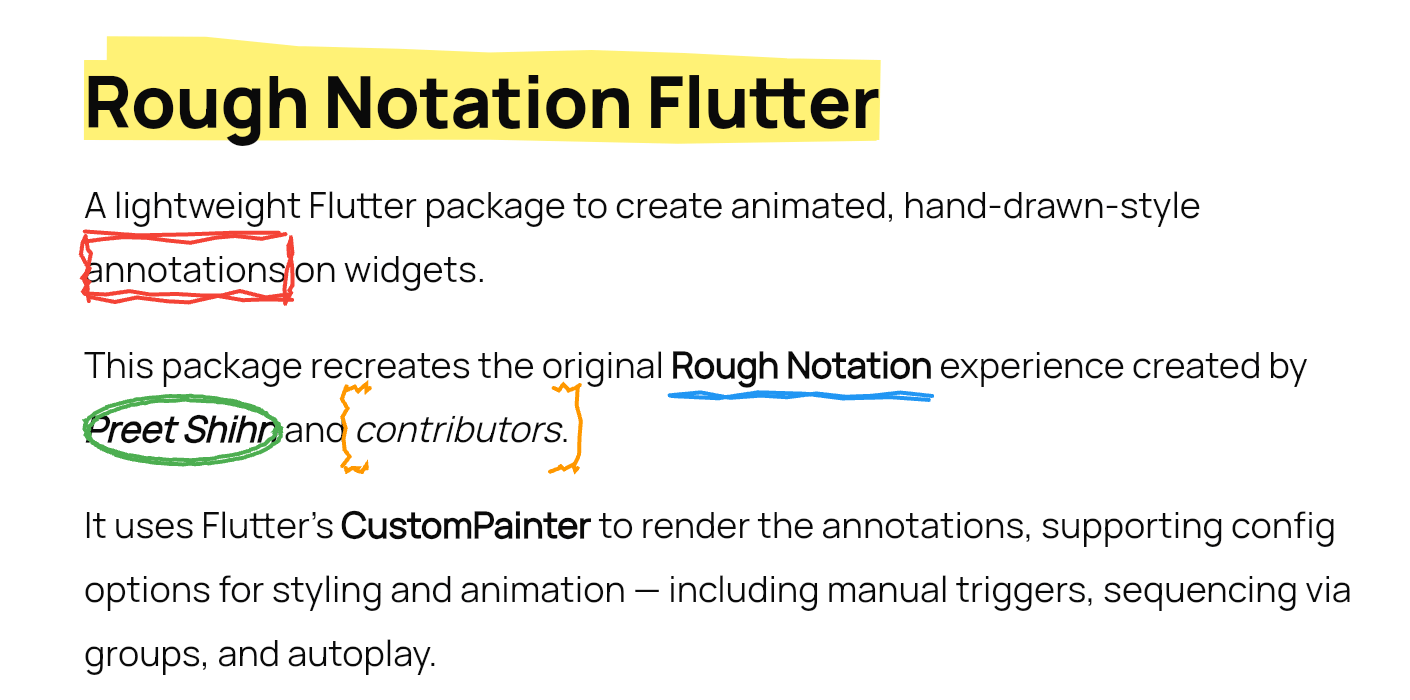
A lightweight Flutter package to create animated, hand-drawn-style annotations on widgets.

This package recreates the original Rough Notation experience created by Preet Shihn and the contributors.

It uses Flutter’s CustomPainter to render the annotations, supporting config options for styling and animation — including manual triggers, sequencing via groups, and autoplay.

demo-gif


🌐 Playground

See the landing page which has the complete showcase: 👉 roughnotation-flutter.web.app

It showcases all use cases, animation types, groupings, styling controls, and more — all built with Flutter Web.

Explore source in the playground/ folder.


✨ Features

  • Hand-drawn-style annotations
  • Built-in styles:
    • Underline
    • Box
    • Circle
    • Highlight
    • Strike-through
    • Crossed-off
    • Bracket
  • Supports:
    • Autoplay animation
    • Manual triggers
    • Group-based sequencing
    • WidgetSpan for rich text use 38: - iterations for sketchier multi-stroke effect

📦 Installation

flutter pub add rough_notation

🚀 Usage

Basic Annotation
RoughUnderlineAnnotation(
  child: Text('Flutter is fun!'),
  iterations: 3, // Optional: default is 2
)
With Controller (Manual Trigger)
final controller = RoughAnnotationController();

RoughBoxAnnotation(
  controller: controller,
  child: Text('Boxed text'),
);

// Manually trigger
controller.show();

🧹 RichText with WidgetSpan

SelectableText.rich(
  TextSpan(
    text: 'Create a ',
    children: [
      WidgetSpan(
        alignment: PlaceholderAlignment.baseline,
        baseline: TextBaseline.alphabetic,
        child: RoughUnderlineAnnotation(
          child: Text('underline'),
        ),
      ),
      TextSpan(text: ' on a span.'),
    ],
  ),
);

🔄 Grouped Annotations

Use group and sequence to define a group and control animation order.

RoughUnderlineAnnotation(
  group: 'intro',
  sequence: 1,
  child: Text('Step 1'),
);

RoughBoxAnnotation(
  group: 'intro',
  sequence: 2,
  child: Text('Step 2'),
);

// Trigger animation
RoughAnnotationRegistry.showGroup('intro');
Autoplay a Group on Widget Init
@override
void initState() {
  super.initState();
  RoughAnnotationRegistry.markGroupForAutoStart('groupName');
}
✅ Note:
  • It doesn't matter where widgets are in the widget tree — grouped annotations can live inside deeply nested widgets or even different build scopes. The registry handles sequencing regardless of position.
  • From Flutter 3.16+, deferred or conditionally built widgets (e.g., in a ListView.builder) won’t throw errors but will skip animations until built.

Optional:

RoughAnnotationRegistry.showGroup(
  'intro',
  delayBetween: Duration(milliseconds: 300),
);

⚠️ Potential Pitfalls & Edge Cases

  • Delays & Durations: Group sequencing introduces its own delays between elements. Avoid adding large delay values on individual annotations if part of a group.
  • Controllers & Autoplay: If using RoughAnnotationController(autoPlay: true), ensure the widget is built first. Internally, we use addPostFrameCallback to delay the trigger.
  • Multiple Controllers: You can reuse the same controller for multiple widgets, but only one annotation may render if others haven't mounted yet.
  • Lazy Lists / Builders: Widgets in a ListView.builder or similar builders that are not yet mounted will not animate. No crash, but no effect either.
  • Visual Misalignments: Styling mismatches may occur across platforms. Future updates will improve drawing precision and painter logic.

🧠 What's Next

We’re aiming to improve:

  • Core painter logic for smoother lines and curves (lib/src/painters)
  • Extend features and stability of annotation widgets (lib/src/annotations)
  • Also the controllers & grouped behaviour (lib/src/controllers)

The original JS library uses roughjs. Although there's a Flutter version (rough), it’s outdated and Dart 3 incompatible.

We’re considering reviving or reimplementing it in parts. All contributions are welcome!

If you're looking to contribute, ideal places to start are:

  • lib/src/painters/
  • lib/src/annotations/

🙏❤️ Acknowledgements

This Flutter package is heavily inspired by the original Rough Notation JS library.

We acknowledge the original creators and contributors of the JS library — including design, animation logic, and documentation.

We are grateful for the coder’s community and the support of open-source enthusiasts everywhere.


📄 License

MIT


🤝 Contributions

Pull requests are welcome. Let’s make annotations ✏️ in Flutter fun and beautiful.

カテゴリー

ソースリポジトリ

このパッケージを使用しているプロジェクト

データはまだありません。