パッケージ、リポジトリ、アプリカテゴリを検索

shaky_animated_listview のカバー
パッケージ詳細v0.0.5

shaky_animated_listview

画面のスクロール変更を追跡するためのアニメーションをリストアップするか、リスト項目を異なる遷移ルールでアニメーション化するための最初のアタッチメントを行います。

AndroidiOSWebmacOSWindowsLinux
30日間ダウンロード
98
いいね数
73
Pub ポイント
140

パッケージをインストール

flutter pub add shaky_animated_listview

パッケージ概要

公開情報に基づく選定ガイドです。参考としてご利用ください。

ShakyAnimatedListView は、リスト内のアイテムのスクロール変化や初期表示を視覚的に追跡するための動的リストアイテムアニメーションを提供するFlutterパッケージです。アイテムがビューポートに表示されるときやスクロール中にカスタマイズ可能な遷移効果を適用することで、ユーザー体験を向上させます。滑らかな入場および移動アニメーションを備えた魅力的で応答性の高いリストを作成するのに最適であり、Android、iOS、Web、macOS、Windows、Linuxなど複数のプラットフォームをサポートしています。このパッケージは軽量で、既存のFlutterプロジェクトにスムーズに統合できます。

用途

  • リストアイテムのエントリアニメーションの向上
  • スクロール中の視覚フィードバック
  • 動的トランジションを使用してインタラクティブなUIを作成する
  • スクロール可能なリストにおけるユーザー参加の向上
  • マルチプラットフォームアプリでのリストのアニメーション

主な機能

  • カスタマイズ可能な遷移ルール
  • リスト項目のスムーズな入力アニメーション
  • スクロール対応のアニメーショントラッキング
  • すべての主要な Flutter プラットフォームをサポートしています
  • 軽量で統合が簡単

適している対象

  • インタラクティブなリストを構築する開発者
  • 視覚的な洗練を求めるUIデザイナー
  • アニメーション付きリストエントリを必要とするアプリ
  • クロスプラットフォーム Flutter アプリケーション
  • ユーザー体験の向上に焦点を当てたプロジェクト

注意事項

  • 非常に大きなリストではパフォーマンスに影響する可能性があります
  • アニメーションパラメータの正確な調整が必要です
  • 利用可能なドキュメントが限られています
  • 中程度のリストサイズに最適
  • 静的または単純なリストには適していない

元の README

関連するソースリポジトリの README 原文のスナップショットです。最新の内容はリポジトリをご覧ください。

Shaky_animated_list

pub

Shaky_animated_list can be used for three main things:

  1. Animate List view scroll.
  2. Animate grid view first view.
  3. Animate grid view scroll.

1. Library over view

All these animations track your scroll changes on screen or your list first attachment to animated your list items with different transition rules.

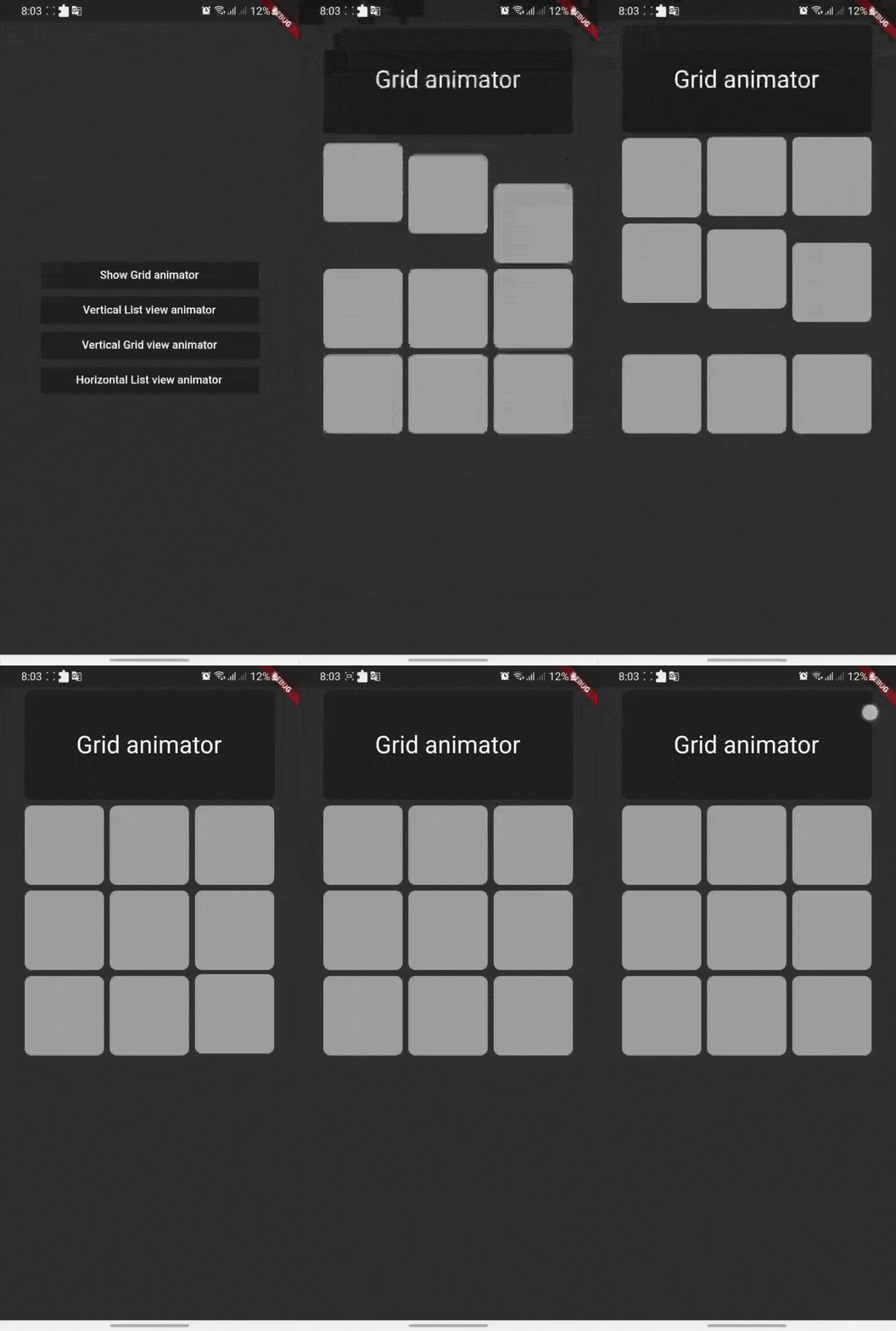
Shaking Grid Scroll list Scroll Grid
shaking_grid scroll_list scroll_grid

You can define these animation directions Axis by channing your list ScrollDirection.

Shaking Grid

Shaking grid can be simply implemented by wrapping your grid child by GridAnimatorWidget and that's it we will take it from here ^^

for example you can simply do this to show shaking grey color cards

    GridView.count(
    crossAxisCount: 3,
    // shrinkWrap: true,
    children: List.generate(9, (i) => GridAnimatorWidget(
        child: Padding(
        padding: const EdgeInsets.all(4),
            child: ClipRRect(
            borderRadius: const BorderRadius.all(Radius.circular(10)),
                child: Container(
                color: Colors.grey,
                ),
        ),
    ),
    ),).toList()
    )

shaking_grid

ListView Scroll animations

ListView Scroll animations will enable your to implement the scroll animations with full control on animations space and duration please don't add vertical margins to your elements, you can use the spaceBetween to give a space between elements and extendedSpaceBetween to control the scroll animations space. Also you can use duration to control the reverse animations duration based on your needs

for example you can simply do this to show ListView vertical Scroll animations

    AnimatedListView(
    duration: 100,
    extendedSpaceBetween: 30,
    spaceBetween:10,
    children: List.generate(
    21,
    (index) => Card(
    elevation: 50,
    margin: const EdgeInsets.symmetric(horizontal: 20),
    shadowColor: Colors.black,
    color: Colors.grey,
        child: SizedBox(
        height: 300,
            child: Padding(
            padding: const EdgeInsets.all(20.0),
            child: Column(
                children: [
                    CircleAvatar(
                    backgroundColor: Colors.blue[500],
                    radius: 60,
                    child: const CircleAvatar(
                        backgroundImage: NetworkImage(
                        "https://avatars.githubusercontent.com/u/30810111?v=4"),
                        //NetworkImage
                        radius: 50,
                        ),
                    ),
                    const SizedBox(
                    height: 10,
                    ),
                    Text(
                    'Scroll to start',
                        style: TextStyle(
                        fontSize: 30,
                        color: Colors.blue[900],
                        fontWeight: FontWeight.w500,
                        ),
                    ),
                    const SizedBox(
                    height: 10,
                    ),
                    const Text(
                    'Animated list demo',
                        style: TextStyle(
                        fontSize: 15,
                        color: Colors.white,
                        ),
                    ),
                    const SizedBox(
                    height: 10,
                    ),
                ],
            ),
            ),
        ),
    )
))

scroll_list

Grid Scroll animations

Grid Scroll animations will enable your to implement the scroll animations on a grid view, one little change here is that we will implement the delegate, this is a design issue that we run into so you will have to to specify your crossAxisCount, crossAxisSpacing, mainAxisSpacing, and duration and we will take it from here,you can use any other default supported parameters in GridView.

for example you can simply do this to show Grid vertical Scroll animations

    AnimatedGridView(
          duration: 100,
          crossAxisCount: 2,
          mainAxisExtent: 256,
          crossAxisSpacing: 8,
          mainAxisSpacing: 8,
          children: List.generate(
              21,
              (index) => Card(
                    elevation: 50,
                    shadowColor: Colors.black,
                    color: Colors.grey[700],
                    child: SizedBox(
                      width: double.infinity,
                      child: Padding(
                        padding: const EdgeInsets.all(20.0),
                        child: Column(
                          children: const [
                            CircleAvatar(
                              backgroundColor: Colors.black,
                              radius: 60,
                              child: CircleAvatar(
                                backgroundImage: NetworkImage(
                                    "https://avatars.githubusercontent.com/u/30810111?v=4"),
                                //NetworkImage
                                radius: 50,
                              ),
                            ),
                          ],
                        ),
                      ),
                    ),
                  )
             )
       ),

scroll_grid

ListView horizontal Scroll animations

if you want to add a horizontal animations, all what you have to do is to add a scroll direction to the widget and that's it for example you can simply do this to show ListView horizontal Scroll animations

  AnimatedListView(
        duration: 100,
        scrollDirection: Axis.horizontal,
        children: List.generate(
        21,
            (index) => const Card(
            elevation: 50,
            margin: EdgeInsets.symmetric(horizontal: 10),
            shadowColor: Colors.black,
            color: Colors.grey,
                child: SizedBox(
                height: 300,
                width: 200,
                ),
            ),
        ),
  ),

horz_list

Sample source code

Example for all cases

Contribute

Let's develop with collaborations. We would love to have contributions by raising issues and opening PRs. Filing an issue before PR is must.

License

Project is published under the Apache 2.0 license. Feel free to clone and modify repo as you want, but don't forget to add reference to authors :)

カテゴリー

ソースリポジトリ

このパッケージを使用しているプロジェクト

データはまだありません。