パッケージ、リポジトリ、アプリカテゴリを検索

side_menu_animation のカバー
パッケージ詳細v1.1.0

side_menu_animation

カスタマイズ可能なUIを備えたアニメーションサイドメニュー。Yalantisライブラリ(Android/iOS)にインスパイアされています。

AndroidiOSWebmacOSWindowsLinux
30日間ダウンロード
21
いいね数
97
Pub ポイント
150

パッケージをインストール

flutter pub add side_menu_animation

パッケージ概要

公開情報に基づく選定ガイドです。参考としてご利用ください。

AndroidおよびiOSのYalantisライブラリを参考にした、カスタマイズ可能なUIを持つアニメーションサイドメニューを提供するFlutterパッケージです。滑らかな遷移と視覚効果により、複数プラットフォームでのナビゲーション体験を向上させます。外観および動作の完全なカスタマイズが可能で、モダンでインタラクティブなドロワーが必要なアプリに最適です。Android、iOS、Web、macOS、Windows、Linuxに対応しており、クロスプラットフォームの一貫性を確保しています。

用途

  • モバイルアプリのナビゲーション
  • Webダッシュボードインターフェース
  • クロスプラットフォームアプリケーション
  • カスタマイズ可能な引き出しデザイン
  • インタラクティブUIコンポーネント

主な機能

  • スムーズなアニメーションの遷移
  • 非常にカスタマイズ可能なUI
  • クロスプラットフォーム対応
  • レスポンシブデザイン
  • 既存のコードとの簡単な統合
  • ダークモードのサポート

適している対象

  • モバイルまたはウェブアプリを開発する開発者
  • 現代のナビゲーションパターンを探しているデザイナー
  • アニメーション付きサイドメニューを必要とするプロジェクト
  • 複数のプラットフォームをターゲットにするアプリ
  • Flutterをフルスタック開発に使用するチーム

注意事項

  • 古いデバイスではパフォーマンスチューニングが必要になる場合があります
  • カスタマイズオプションは複雑さを増す可能性があります
  • 基本的なセットアップを超えるドキュメントは限られている
  • 他のナビゲーションパッケージとの潜在的な競合
  • 非常に大きなメニュー項目には最適化されていません
  • Flutter のアニメーションシステムの理解が必要です

元の README

関連するソースリポジトリの README 原文のスナップショットです。最新の内容はリポジトリをご覧ください。

Side Menu Animation

pub package

Animated Side Menu with customizable UI. Inspired in Yalantis library (Android/iOS). Original Design: https://dribbble.com/shots/1689922-Side-Menu-Animation

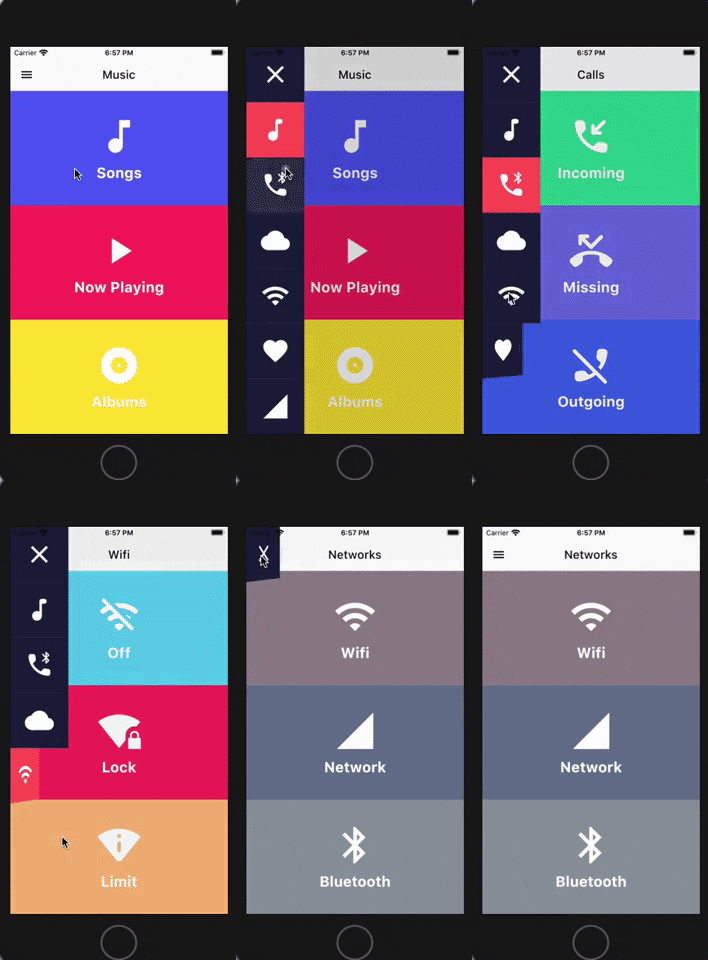
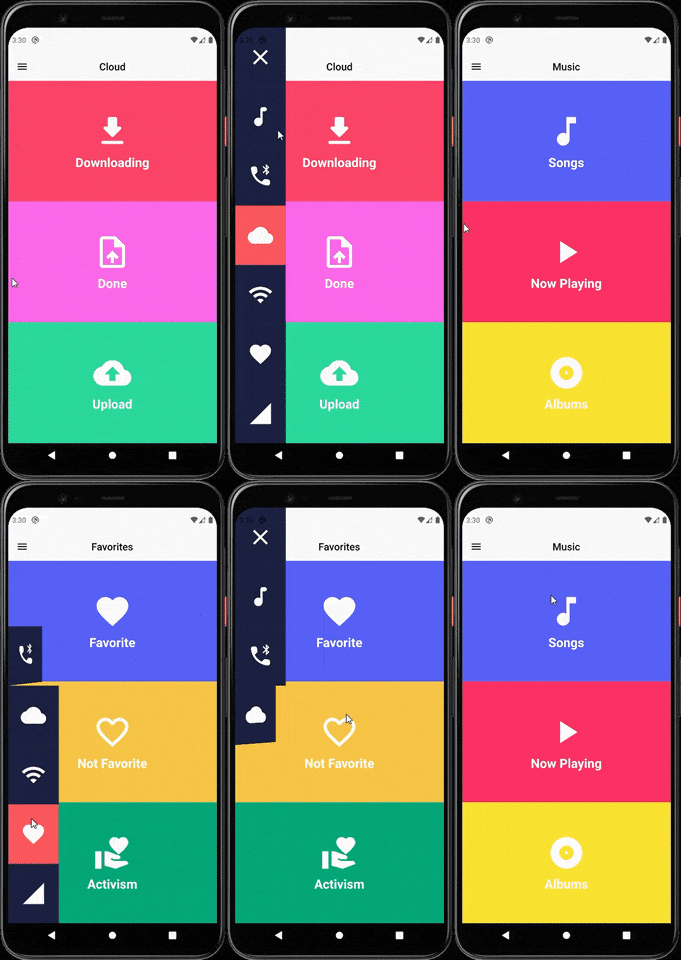
Sample

SIDE MENU ANIMATION SIDE MENU ANIMATION - DRAG GESTURE

Learn how to build this package

  • Video 1: https://www.youtube.com/watch?v=vcdETKdI15E
  • Video 2: https://www.youtube.com/watch?v=W7mxTcwX5Wg

(Don't forget to subscribe and like)

Features

  • Optional parameter to tap outside to dismiss
  • Optional parameter to change the scrimColor
  • Custom color item for the side menu selected
  • Custom color item for the side menu unselected
  • Custom width for the side menu
  • Custom duration of the animation side menu
  • Display the menu from left or right

Getting Started

You should ensure that you add the router as a dependency in your flutter project.

dependencies:
 side_menu_animation: "^0.0.1"

You should then run flutter packages upgrade or update your packages in IntelliJ.

Example Project

There is a example project in the example folder. Check it out. Otherwise, keep reading to get up and running.

Usage

Need to include the import the package to the dart file where it will be used, use the below command,

import 'package:side_menu_animation/side_menu_animation.dart';

SideMenu

class SideMenuScreen extends StatelessWidget {
  final _index = ValueNotifier<int>(1);

  @override
  Widget build(BuildContext context) {
    return Scaffold(
      body: SideMenuAnimation(
        appBarBuilder: (showMenu) => AppBar(
          leading: IconButton(icon: Icon(Icons.menu, color: Colors.black), onPressed: showMenu),
          backgroundColor: Theme.of(context).scaffoldBackgroundColor,
          elevation: 0,
          brightness: Brightness.light,
          centerTitle: true,
          title: ValueListenableBuilder<int>(
            valueListenable: _index,
            builder: (_, value, __) => Text(value.toString(), style: TextStyle(color: Colors.black)),
          ),
        ),
        views: [YourCustomViews1Here(), YourCustomViews2Here()],
        items: [MyCustomItem1Here(), MyCustomItem2Here()],
        selectedColor: Color(0xFFFF595E),
        unselectedColor: Color(0xFF1F2041),
        tapOutsideToDismiss: true,
        scrimColor: Colors.black45,
        onItemSelected: (value) {
          if (value > 0 && value != _index.value) _index.value = value;
        },
      ),
    );
  }
}

SideMenuBuilder

class SideMenuBuilderScreen extends StatelessWidget {
  final _index = ValueNotifier<int>(1);

  @override
  Widget build(BuildContext context) {
    return Scaffold(
      body: SideMenuAnimation.builder(
        builder: (showMenu) {
          return Scaffold(
            appBar: AppBar(
              leading: IconButton(icon: Icon(Icons.menu, color: Colors.black), onPressed: showMenu),
              backgroundColor: Theme.of(context).scaffoldBackgroundColor,
              elevation: 0,
              brightness: Brightness.light,
              centerTitle: true,
              title: ValueListenableBuilder<int>(
                valueListenable: _index,
                builder: (_, value, __) => Text(_value.toString(), style: TextStyle(color: Colors.black)),
              ),
            ),
            body: ValueListenableBuilder<int>(
              valueListenable: _index,
              builder: (_, value, __) => IndexedStack(
                index: value - 1,
                children: [YourCustomViews1Here(), YourCustomViews2Here()],
              ),
            ),
          );
        },
       items: [MyCustomItem1Here(), MyCustomItem2Here()],
        selectedColor: Color(0xFFFF595E),
        unselectedColor: Color(0xFF1F2041),
        onItemSelected: (value) {
          if (value > 0 && value != _index.value) _index.value = value;
        },
      ),
    );
  }
}

For more info about the ussage, check the example project.

Contact

You can follow me on twitter @diegoveloper , Youtube channel

If you want to contribute with the project, just open a Pull request :), all contributions are welcome.

Contribution

If you want to contribute with this package, follow this steps:

  • Fork this repository.
  • Do your changes! You can add your name with link into the CONTRIBUTORS.md file.
  • Before push your changes run dartfmt . -w.
  • Create a Pull request on Github from your fork/branch to my repo(main branch).

カテゴリー

ソースリポジトリ

このパッケージを使用しているプロジェクト

データはまだありません。